
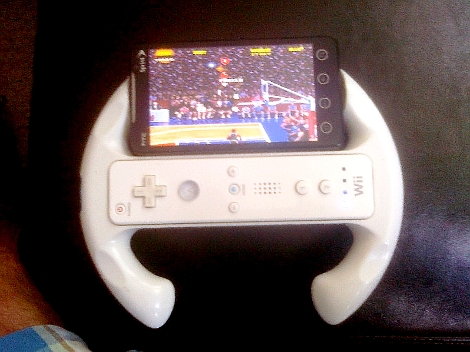
If you’ve got an iPhone or Android device that you use with a Wii remote when gaming, this quick hack will give you the third hand you need to manage all of that hardware. [Syanni85] mounted his Android phone to a Wii wheel for just a few dollars in parts. He ran across the wheel itself at the dollar store, and the phone is held in place using a universal mounting bracket. A small square pad sticks onto the back of any device and mates with a base. He cut off the unnecessary parts of the base and glued it to the back of the wheel.
If you haven’t tried using a Wii remote with your phone yet, find out how to do it with iPhone or with Android.












I have to admit this is a pretty smart idea
would go great with the nes emulator :D
I like it!
NBA JAAAAAMMMMMM!!!!
eheheh nice! KISS rulez :)
Simple, cheap, looks great and should work great to. Probably not a hack but definitely a cool mod that’s worth the effort :)
Simple, cheap, looks good and is very much a hack. The wheel was certainly never intended for this. What more is required for something to qualify as a hack?
How can you play NBA Jam without a turbo button?
This definitely qualifies as a hack. Earlier today I found out how to use a Wii remote as a controller for PSX4Droid and I was thinking about something like this.
I’m sure you can get these Wii wheels used for cheap.
The back trigger on the wiimote is set to turbo… So NBA Jam is EPIC and super easy to play!
The link in your iPhone+Wiimote story is dead. Anyone know where to find the tutorial?
Link still works for me..
But here you go:
http://forum.ppcgeeks.com/showthread.php?t=129886
Oops, i link my thread at ppcgeeks. Sorry, i can’t seem to find anything even with google
And think of how impressed your boss and co-workers will be when you pull that out of your briefcase at your next management meeting.
Sorry, I meant the links in this story were broken: http://hackaday.com/2009/08/05/wiimote-iphone/
I’ll do some searching if no one else knows. Thanks.
Wow, simple but pretty awesome. very nice.
Now if you could only get that Wiimote speaker to pipe out the sound… then you could have some pseudo-surround sound.
Course, I’ve never actually gotten the whole Wiimote+iDevice thing working, so maybe the speaker does work and I’m just out of the loop. Regardless, I love this little “hack” :) Great answer to the lack of physical buttons on the iPhone.
damn damn damn
i920 Omnia 2 winning winmo6.5
The thing would look so great running this way, but it’s the lame duck winmo dragging me back again.
Next phone-Android.
I was playing an online fps on my iPhone and the controls were difficult to use, so I was wondering if there was a way to connect my ps3 controller to my iPod. I searched around but all I could find was the wii remote, and i wanted to use sticks instead of tilt. Anyone know if this would work?