
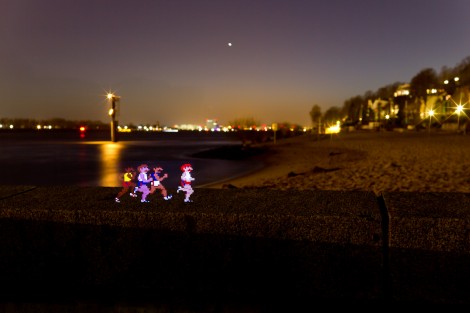
This image was not made in post production, but captured during a long camera exposure. The method uses stencils to add components to a picture. [Alex] built a jig for his camera from a cardboard box. This jig positions a large frame in front of the camera lens where a printed stencil can be inserted. He printed two identical sheets of paper with black covering the area all around the 8-bit joggers. When properly aligned and inserted in the jig, the black parts of the stencil will act to mask the areas where he wants to capture the natural surroundings of the image. Once the camera shutter is triggered, he uses a flash to illuminated the stencil, then removes the the paper image from the jig and ambient light from the dark surrounding is captured during the remainder of the 20-30 second exposure time. The real trick is getting the light levels between the flash and the ambient light to balance and produce a result like the one seen above.
Is anyone else hearing the Punch Out cut-scene music in their heads right about now?











Wow, this takes “light drawings” to a new level! You could use the screen of a mobile device to get the characters and just mask the rest of the screen with modeling clay or blu-tack, and use a box with a screen sized hole to blank the rest of the scene. Then turn off the screen or put some card in front, and remove the box while it captures the background. Quite difficult to get the timing right though.
You could put realistic objects in the scene, or photos of people to make it look like they are materializing.
Kudos for coming up with a method to do this physically, but I have to admit the end results look no different from a quickly done Photoshop.
Not Punch-Out. Track and Field:
http://www.1up.com/do/blogEntry?bId=8524747
Hard way of doing that.
simply print them out as cutouts, out in the frame, take photo.
This is not new and has been done for ages, look up fairy photos to see some of the most famous from the early days of photography.
Am I missing something here? This could be done digitally with almost any image editor. Add shadows, etc. Why the “physical” bloat?
Why not do it in GIMP, PaintShop Pro, or some other digital manipulation tool?
Point and click with a mouse is not challenging enough for some.
Attempting to re-create digital effects through physical means is pretty challenging and, when it works, very rewarding.
I was totally playing the Punch-Out!! music in my head (yes – even though it’s the Track & Field dudes). When I read the last line I nearly fell off my seat!
Well that’s one way of doing it. The way I’ve been taught is to cut out a shape in the middle of a black piece of card, attach different bits of celophane to “colour” it in, then take your photo, put an external flash behind, then fire the external. You get a similar effect, but without having to touch your camera once the exposure starts (which can cause blurring if your tripod isn’t sturdy
And to all of those people who are saying “Just photoshop it, it’s easier”. Yes it’s easier, but so is shoving a netbook into a project that only requires an Arduino, because you’re too lazy to learn how to program chips.