
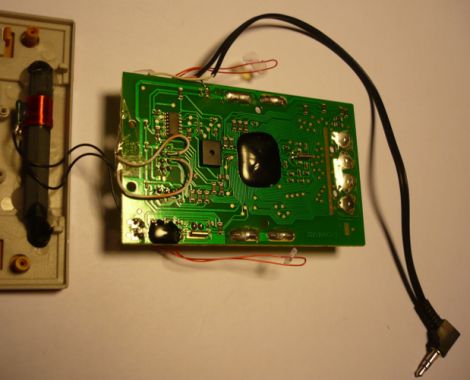
[Fred] got a La Crosse wireless weather station as a gift and thought the LCD display was great, but he was dismayed that there was no means of extracting the temperature data for use on a computer. He thought that the modular design of the system would make it great for use in his home automation project if he could only get his hands on the data.
He tore into the base station and started looking around for easy places to get at the data he was looking for. He thought about tapping into the bus that controls the LCD in hopes of finding an easy to decode signal, but the weather station used a proprietary chip with an integrated LCD controller, making it all but impossible. Instead, he started sniffing the data coming across the wireless link, and while he didn’t quite yet know what he was seeing, it was a start.
He sniffed the signals using Audacity, and eventually found that the base station received 40-bit data bursts from each sensor. He dug further, and with the help of some data he found online, he was able to decode the data packets. The last hurdle he ran into was figuring out how the system’s CRC encoding worked. It took a bit of work but he eventually got it, and can now record data packets knowing that the data has come over the air intact.
So far, it looks like his temperature monitoring system is working quite well, though he has several improvements planned for the near future. If you have a similar unit and are interested in extending its capabilities, [Fred] has posted plenty of code on his site.













Nice work reversing that CRC. It might be interesting to try the reverse hack – build/repurpose a transmitter to send arbitrary temp readings to the base station. You could use it to, say, monitor the temps of a distant server room, or temperature readings for some other part of the world (sourced from the Web, of course).
nice hack!
what do you guess?
do other stations work with the same protocol?
few weeks ago, i wanted to change the barometric sensor of a WS against a CO2 sensor.
my intention was to provide a analog signal and faking the barometric sensor, but it didnt work since it was all proprietery.
I’ve done something similar with the Davis weather stations. My blog shows how to interface a PC to the console for about $15 rather than using the $150 dongle from Davis. I’ve also sniffed the console’s wireless receiver chip configuration so that I’ll be able to (eventually) receive the data on an IM-ME.
http://madscientistlabs.blogspot.com/search/label/Davis%20VP2
I also expect that I could add data logger capabilities to my DIY interface for around $1. Haven’t gotten to this yet because, unfortunately, my time for hacking this thing in the summertime is almost non-existent.
http://www.wxforum.net/index.php?topic=11675.25
I wish he gave the baud rate- it prob. is NRZ encoded and might work with 433MHz National Geographic/Thermo protocol
Audacity: Free Audio Editor and Recorder
So he used a audio program to sniff the wireless data ?
I am confused
I have used Audacity to look a signals too. It is kind of like a storage scope with out the calibrated voltage.
r u sayin a regular sound card can detect minute 2.4 ghz fluctuations? wtf? what if u hooked a transmitter to the headphone jack? could it transmit too?
There seems to be a bit of confusion regarding the use of Audacity in this project.
As he mentions in his writeup, Fred tapped in to the data and clock lines of the wireless chip on the receiver. This gives him full access to all of the same signals the receiver is getting from the remote unit. Audacity can be used as a “poor man’s spectrum analyzer” to look more closely at the data as demonstrated in several projects we have featured in the past.
except he is using audacity as an oscilloscope not a spectrum analyser. It isn’t looking at the wireless signal, rather the data from the wireless receiver.
I’ve looked at several basic wireless protocols at 432.92 MHz (all using simple ON-OFF keying with a proprietary encoding), including a no-name wireless thermometer: http://bertrik.sikken.nl/433mhz/
Used audacity for recording the waveforms as well :)
Audacity can be used to measure the low frequency signals. However be aware that the sound card is supposed to work with low frequencies (audio) so this will of course not work with high frequency signals because the sample rate is too low.
That was an inspiring read, nice!
To whom it may concern (could not find project developer’s Email address):
Humidity/Temp sensor looks pretty much an SHT11 from Sensirion. FWIW. Alessandro
thank you for the nice comments and the suggestions. !
I used Audacity and my PC soundcard as a low cost oscilloscope.
It works for low frequency signals that are less than a few kHz.
I sniffed what the receiver sub-module outputs to the controller, that is after demodulation.
There the clock and the data seem at 19.2 kHz, which the soundcard can easily record.
I used 96kHz as a sampling rate to record the data.
Thank you also for sharing links to similar projects, they are a useful source of information !
The IT+ protocol uses FSK, see decoding with RFM12B at http://forum.jeelabs.net/comment/3658#comment-3658
Is there a way to track for a stolen temp sending unit? I live in South Florida and continue to get readings. Think a neighbor took it. It must be in someones house since the readings a consistent arournd 78 degrees , 12 below the outside temp
I have a 432 mc ham handi- talke but am not aaaable to pick up a data burst Any ideas
Thanks
Bill
You need to know what frequency you weather unit is listening to in case it’s a different frequency. You might be able to get that from the company. Another option is an RTL/SDR dongle for about $10 that can cover a huge frequency band. But really once you know the frequency you need a directional antenna to do some rf hunting and triangulate where the signal is coming from. If you can repeatedly show that it points to a particular house then you might be able to convince law enforcement to approach them about it. But is it worth it to you to go through all that? Might be quite interesting to see the neighbors face when what they stole was traceable.
Very awesome indeed.
Nicework FBB.
Just got one of these “weather stations”.
I might be really easy to take some of your work and apply it to a software defined radio app.
The USB radio dongles are dirt cheap ~ $8 US and have excellent sensitivity and performance around 430MHz.
Edit: “Nice work” and “It might be really east”
-Sorry.
Easy. This keypad is TERRIBLE..
Wish I could edit.
I’m curious about hacking a Taylor Digital Projection Thermometer (about 20 yrs old).
I want to be able to pick up the outdoor temp transmission on my computer, without interfering with the base unit
or the transmit unit.
The Specs list the “Transmission: max. 100ft. (30 m) open area, RF434 MHz.
The FCC ID is TG3SS-5000TX with an output frequency of 434 MHz.
What would I need on my computer to detect that frequency, read it, and display the outdoor temp
on my computer?
I’ve read some previous discussions re: Audacity (which I use on both Linux & Windows OS for editing mp3 files);
but I’ve never used Audacity’s spectrum analyzer, etc. for the purposes discussed.
Is there a link to this project, None of the links seem to take me to it.
Rather than hacking into the base unit, how about grabbing the signal with something like RFM69HCW?
Yup that would work. Mine is in the 800 MHz band.
The transmitters normally go bad in my experience, you can however buy replacement antennas for about £10.
I didn’t see any responses to amigadragon post on January 25, 2018 at 2:11 pm about grabbing the signal with RFM69HCW. I had also thought I could just grab the signal from my router as it tries to forward to the La Crosse View App. I was encouraged when I took apart the C82929 and found an 8266 chip in the circuit board. My spectrum analyzer shows a signal from a 915 MHz temperature sensor that is so infrequent as to defy analysis. However, my RFM69HCW picked it up and I was able to decode it as raw data which didn’t make too much sense. I would love to either pick up the 915 MHz sensor signals and decode them with an RFM69HCW or hack the station or hack the Wi-Fi router. The signal does seem to be quite robust to travel 400m and quite energy efficient to only emit every few minutes, so I’d rather do this than deploy my energy hog solution with a Wi-Fi based 8266 sensor controller. I.e., I love the idea of low energy sensor communications coalesced by a central hub with a Wi-Fi transmitter.
I just haven’t found anything useful on the internet, so far.
Thanks,
Psi
Is there a way of installing a USB port on the CA80550 weather station display? I would love to get the weewx software to work with my weatherstation.