Egg clock (it’s egg-ceptional)

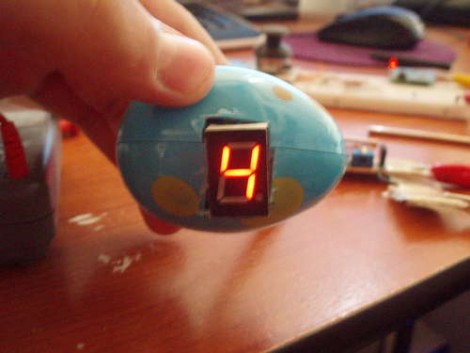
Easter is over and with some plastic eggs still on hand, [Franspaco] was looking for something to do with them. He decided to use an egg as an enclosure for a digital clock.

You can see that the finished project uses just one 7 segment LED display to show the time. A scrolling number method is used to delineate each digit of the 24-hour time readout. The display will go blank, followed by two numbers for the hours, a dash as a separator, and finally two more digits for the minutes. A PICAXE microcontroller drives the clock, but for accuracy a DS1307 does the timekeeping.

[Franspaco] etched his own circuit board that is sized to fit perfectly, housing the two chips, an LED, and a programming header. The on-board LED blinks at 1 Hz, giving some inner glow to the plastic shell. He accomplished most of his goals, but was unable to fit the batteries inside of one egg, prompting the need for a tethered power-egg. If he moves to surface mount components for the next generation of this device we think he’ll have no problem fitting a small battery (like an A23) inside.

Easter egg hacking

ateam_easter_egg

Spring is upon us and Instructables user [Mischka] decided it was a good idea to combine two flavors we never considered putting together: The Easter Bunny and the A-Team.

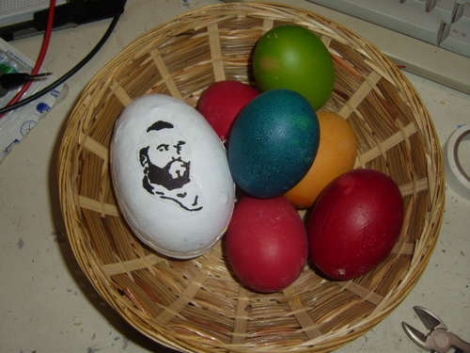
He decided to build the egg as an Easter gift for his brother, who is a huge fan of the A-Team. He found a slightly larger than normal plastic egg, and proceeded to paint the shell white, adding a printed picture of Mr. T once the paint had dried.

The guts of the egg are made up of a Picaxe 08M micro controller mounted on a Picaxe protoboard. Rather fond of buzzing, beeping audio, he decided to forgo a normal speaker and opted to use a piezo instead. To activate the music when the egg is shaken, a tilt switch was added to the board as well. He uploaded his software to the Picaxe, sealed up the egg, and called it a day.

We can imagine his brother will be pretty pleased with the creation – who wouldn’t be? We only wish that there was video of the egg in action.

PICAXE using LEDs to communicate

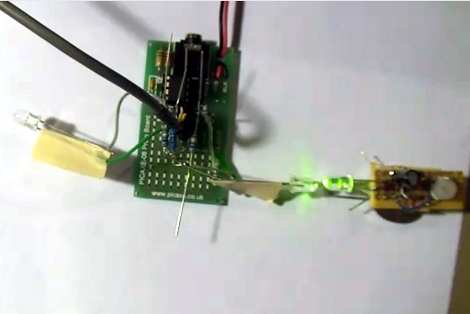
[Relwin] has being working on using LEDs as bi-directional devices. The setup above allows him to use each LED as an input, looking for a bright light source and then syncing up with the activity it receives. It is the most basic of communications using the components. The hardware at the heart of the system is a PICAXE development board on the left. The blinking light to the right causes the LED on the left of the picture to blink, but moving the blinking source over to that side will reverse the effect. The chip is programmed to play a tune on a piezo buzzer whenever a connection is lost. What is interesting to us is that these green LEDs will not detect a red LED flashing because the voltage threshold is different on the detector side of things.

He’s got some code available, but we’re really looking for the ideas of what to do with this concept. Maybe something along the lines of LED matrix video puzzles, or a variation on this laser-pointer LED game. Watch the demo video after the break and then let us know what you would use it for by leaving a comment.

[Read more...]

Blasting off with GPS

Launching model rockets is a good time, but more often than not, it’s hard to tell how high the rocket went or how fast it moved – both essential facts when bragging about your latest flight. [Chris] recently built a GPS-based altimeter for the USC Rocket Propulsion Lab, so that they could track the performance of their latest project. The circuit is based off a Picaxe 18x and uses a GPS module to obtain NMEA altitude data. Once the data is obtained, it is stored on an external EEPROM to be read back after the rocket has been recovered.

[Chris] unfortunately does not have any pictures of the board he built, but he has made his circuit diagram and source code available. He reports that the logger worked perfectly aside from a small bit of time where the GPS module temporarily lost its satellite lock.

If you are interested in reading more about flight data recording and telemetry, be sure to check this out.

Stackable macro photography rig

When taking macro photographs you lose a lot of clarity due to a reduced depth of field. One way to get sharp pictures is to take multiple shots at slightly different distances from the subject and then stack them into one image. There’s software to do this for you, but you still need a set pictures to start with. [Dsvilko] built this setup to easily capture a set of macro images.

He’s using the internals from an optical drive as a sled to carry the subject. A PICAXE drives the stepper motor that moves the carriage, which takes input from an IR remote control. This turns out to be a fantastic method as the sled can move in 0.2mm increments. After he’s got his set of images he uses Zerene to stack them together.

Bonus points to [Dsvilko] who used Linux command line tools to edit together the demonstration video embedded after the break.

[Read more...]

Flash trigger with programmable delay

Here’s a flash trigger with a programmable delay. These triggers are often used to capture quick events like a balloon popping. The technique takes place in a dark room with the shutter open. When the event is triggered the flash illuminates the scene and an image is captured. Because these require precise timing it has typically been a chore to synchronize the event, hence solutions like using a pressure plate.

This build, which centers around a PICAXE 08M, allows the photographer to use any trigger they desire, but adds a delay. The box above shows the apparatus set up for a 42 millisecond delay. So if you’re using the sound of the balloon pop as a trigger, you can hold the flash off until the event really gets going.

[Thanks Two Part Epoxy]

SD activity indicator for Wii

[DeadlyFoez] wanted to know when the SD card in his Nintendo Wii was in use. He built and indicator LED using a PICAXE 08M and added it next to the SD slot. He uses one pin of the microcontroller to monitor the voltage on one pin of the SD card slot. That pin has a specific value when the card is idle, which rises when it’s in use. He didn’t share the details of which pin he’s sampling, or what the magic number from his source code actually represents. But the concept should be enough of a start if you want to do this one yourself. Watch it go blink-ity-blink in the clip after the break.

[Read more...]