Review: Sequre SQ-D60 Temperature Controlled Soldering Iron

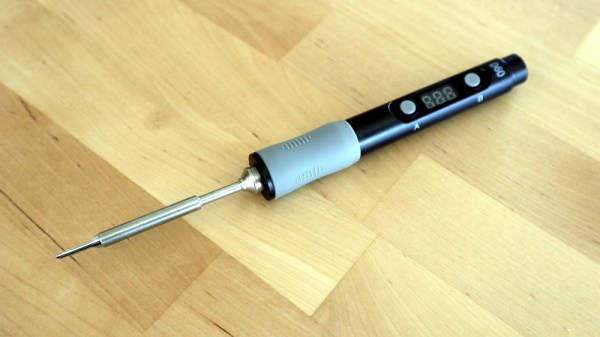
Over the past few years a new class of soldering iron has arisen: a temperature controlled iron no longer tied to a bulky mains-powered base station, but using low-voltage DC power and with all electronics concealed in a svelte handle. First came the Miniware TS100, and then  many more, with slightly different feature sets and at varying price points. We’ve reviewed a few of them over the years, and today we have the most recent contender in the Sequre SQ-D60. It follows the formula closely, but costs only £20 (about $26). This price puts it in an attractive budget category, and its USB-C power option makes it forward-looking over models with barrel jacks. Description over, it’s time to plug it in and put it through its paces.

What’s In The Box?
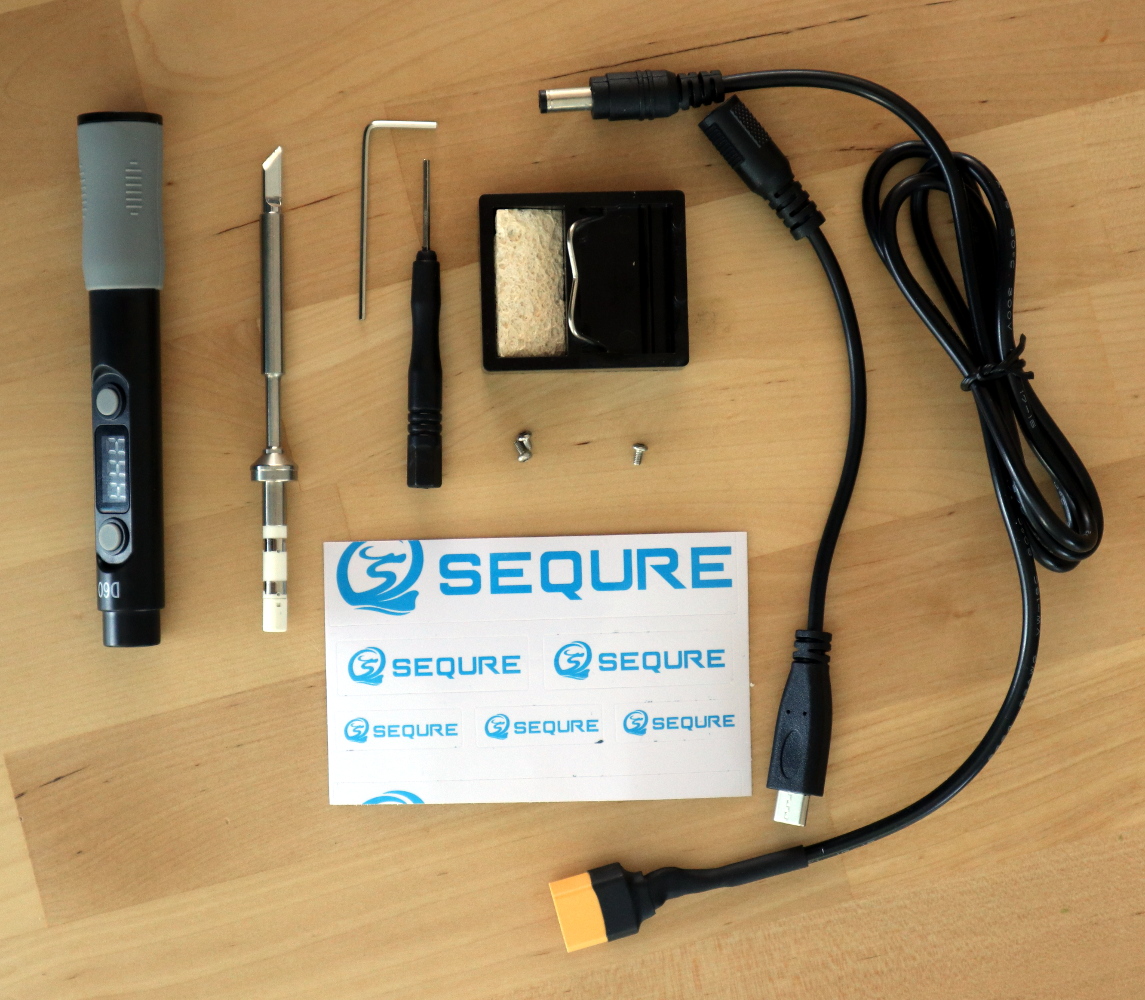
That's a lot of extra bits for a budget iron!
That’s a lot of extra bits for a budget iron!

In the box, aside from the handle containing the electronics, were a surprisingly comprehensive array of parts and accessories. The handle itself is similarly-sized to its competitors, being only slightly longer than that of Pine64’s Pinecil. The tip supplied was unexpectedly a slanted chisel, so I may have managed to order incorrectly, though since it shares the same tip design as both the TS100 and the Pinecil I have plenty of alternative tips should I need one. Otherwise there was a little bag of hex screws along with a key and a driver for them, a little stand with a sponge, a set of Sequre stickers, a USB-C to barrel jack cable, and a barrel jack-to-XT60 connector for use with LiPo battery packs. These last two cables are a particularly useful addition.

At first sight the tip doesn’t seem to have any means of being fixed into its socket, but a closer inspection reveals that there is a hex screw hiding underneath a silicone finger sleeve that holds it securely when tightened. The handle has a simple enough interface, with just two buttons and a 3-digit, 7-segment display. Powering it up from a 45 W USB-PD power supply, and it heats up to 300 °C in around ten seconds after pressing one of the buttons. My usual soldering temperature is 360 °C, and it has an interface involving long presses of one of the buttons before they become up and down buttons to select the temperature. In prolonged use the handle doesn’t become noticeably warm, and aside from a slight new-electronics-getting-hot smell there was no immediate concern that it might release magic smoke. Continue reading “Review: Sequre SQ-D60 Temperature Controlled Soldering Iron”
Indian Makers Respond To The COVID-19 Pandemic By Producing Oxygen Concentrators

We’ve all spent the last year or more under the shadow of the COVID-19 pandemic, and though some of us may have been vaccinated or come through its various waves it remains far from over. One of the hardest-hit parts of the world at the moment is in India, where health services are struggling to maintain adequate oxygen supply such is the demand for it from sick patients.

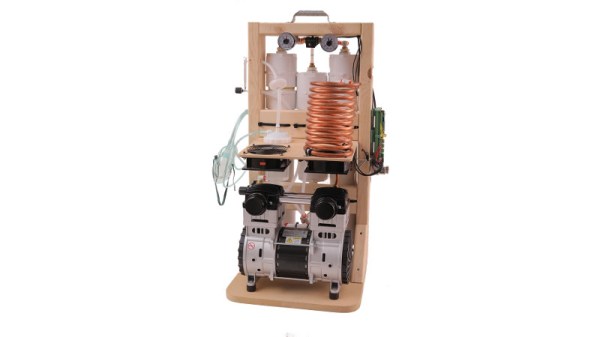
India’s hacker and maker community have risen to the challenge and done their bit to supply needed resources, and fresh from last year’s PPE manufacturing efforts a group from the Makers Asylum hackerspace in Goa have launched upon a fresh challenge. They aim to start producing the established open-source OxiKit oxygen concentrator in the Indian hackerspace community using locally manufactured parts, and they’ve launched a crowdfunding effort to cover their development, prototyping, and certification work.

The oxygen concentrator project builds on Makers Asylum’s experience last year as part of an extremely successful network of makerspaces producing PPE, which demonstrates that they have the resources, logistics, and ability to take on a project of this size. The OxiKit is no hare-brained contraption but an established and successful design that is already at work, so we believe that this project has a good chance of success. It’s close to home for Hackaday too, and one of the people involved with it is our colleague [Anool Mahidharia].

In a global pandemic only a global response can overcome the incredible challenges before us. For that reason we’d like to urge you to take a look at the Makers Asylum page wherever you are, and if you can, support it.

Continue reading “Indian Makers Respond To The COVID-19 Pandemic By Producing Oxygen Concentrators”

Keep In Touch With Grandma, With This Lo-Tech Interface

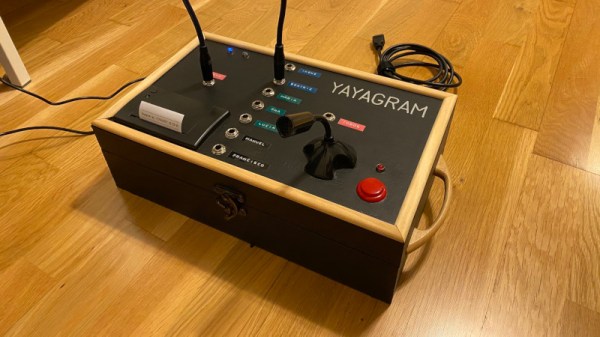
We have so many options through which to communicate with our friends and relatives during the lockdown, thanks to our smartphones and the number of apps that serve all possible needs. Impressive as they are though, a smartphone is not suitable for everyone. In particular older people can find them less easy to use, and the consequent loss of communication ability is addressed by [Manu] with the Yayagram, described in a thread of Spanish-language Tweets and later the thread was translated into English.

On the top of the box is a microphone with push-to-talk switch, a small thermal printer, and a set of 1/4″ jack sockets with associated jump lead. Each socket corresponds to a relative, and an audio message to that relative can be posted via Telegram simply by speaking into the microphone with the button pressed. Replies are then printed through the thermal printer. Meanwhile behind the scenes is a Raspberry Pi holding it all together.

We like the simplicity of the interface, and who wouldn’t want to ensure that their older relatives were able to keep in touch! But while the jump lead is a neat touch, we hope it’s not too difficult for extremely frail hands. It’s certainly not the first accessibility project for older people that we’ve seen.

Arduino MKR Makes Nespresso Monitoring Easy

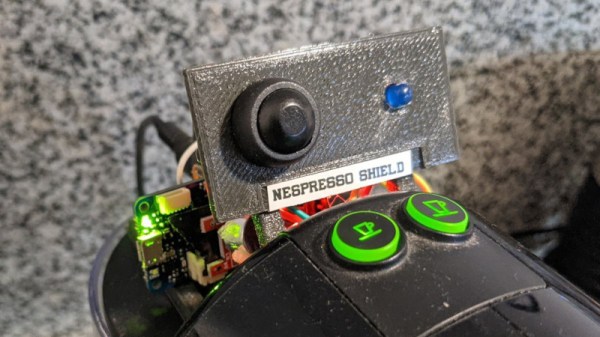
Monitoring an appliance with a microcontroller usually follows a well-worn path of diving inside and finding somewhere in the electrical circuitry that can be connected through some kind of interface to a microcontroller. For his Nespresso pod coffee machine, [Steadman] eschewed tearing into the device, and instead chose to monitor the sound it makes. A commodity sound threshold sensor board is hooked up to an Arduino MKR Zero, and this set-up logs coffee consumption. It’s important to note how this generation of Arduino is no longer one of the simple boards of old, instead it sports an RTC and SD card alongside its SAMD21 Cortex-M0+ processor so it is perfect for just such a datalogging project. The coffee data can be saved into a CSV file viewable by a spreadsheet, for which code is provided.

We like this project for its non-invasive simplicity, and we can see that there could be plenty of other similar machines that could benefit from an analagous technique for non-invasive monitoring. While the pages of Hackaday are full of coffee machine projects we see surprisingly few pod coffeemakers, perhaps because our readers are a canny bunch who balk at paying a premium for their caffeine. If you do happen to have a Nespresso machine though, perhaps you’d like some help identifying the capsules.

Was Novell’s NE2000 Really That Bad?

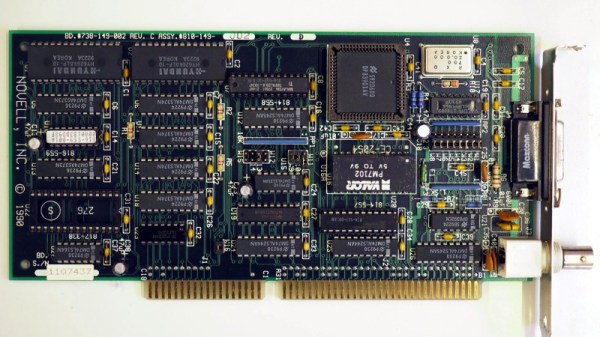
If you used almost any form of networked PC in the late 1980s or the 1990s, the chances are that you will at some point have encountered the Novell NE2000 network card. This 16-bit ISA card became a de facto standard for 16-bit network cards, such that very few “NE2000” cards were the real thing. A host of clones filled the market, some of which followed the spec of the original rather loosely. It’s something [Michal Necasek] examines as he takes the reader through the history of the NE2000 and why it gained something of a bad reputation. An interesting read for ’90s PC veterans who battled with dodgy Windows 3.1 network drivers.

The Novell line of network cards were not a primary product of the network server OS company but an attempt to spur the uptake of networked computers in an age when few machines were supplied from the factory with a network card installed. They were largely an implementation of the reference design for the National Semiconductor DP3890 Ethernet interface chipset, and for simplicity of interfacing and drivers they used an I/O mapped interface rather than DMA. The problem with the NE2000 wasn’t the card itself which would work with any NE2000 driver, but the host of “NE2000 compatible” cards that appeared over the decade as that magic phrase became a key selling point at the bottom end of the market. Sure they might contain a DP3890 or its clones, but even minor differences in behaviour would cause them not to work with all drivers, and thus they gained a bad name. The piece reveals the original card as one that might have been slow and outdated towards the end of its reign as a standard card, but maybe one not deserving of the ire directed at it.

If ancient networking kit is your thing, we’ve got some far more obscure stuff to show you.

A Modern Mac Using An Ancient Mac Display

If you own an Apple product you probably live in a world with a few proprietary interfaces, but by and large your displays and desktop peripherals will use familiar ports such as USB and DisplayPort. For the Mac owner of yore though it was a different matter, as [Dandu] is here to tell us with the tale of a vintage Apple monochrome CRT monitor and a modern Mac.

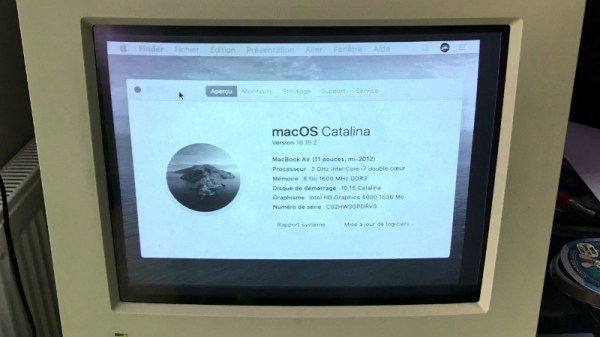
There are no handy VGA ports to be found in this screen, instead it has a 15-pin D connector following a proprietary interface. With the right adapter it’s easy enough to produce VGA from the modern machine, but while it is in theory possible to map VGA pins to Apple pins there’s a snag with this particular model. Instead of using separate sync pins, it demands a composite sync of the type you might find in an analogue TV set that contains both horizontal and vertical sync pulses. The solution came through a simple transistor circuit, and then with the requisite settings on the modern Mac to deliver the 640×480 resolution it was possible to see a MacOS Catalina desktop on something more suited to a Mac II.

We’re more used to seeing CRT Macs in the form of the venerable SE/30, a machine that’s been on our radar for a long time.

Fail Of The Week: Mistaking Units For Values

Usually when we post a Fail Of The Week, it’s a heroic tale of a project made with the best of intentions that somehow failed to hit its mark. The communicator that didn’t, or the 3D-printed linkage that pushed the boundaries of squirted plastic a little bit too far. But today we’re bringing you something from a source that should be above reproach, thanks to [Boldport] bringing us a Twitter conversation between [Stargirl] and [Ticktok] about a Texas Instruments datasheet.

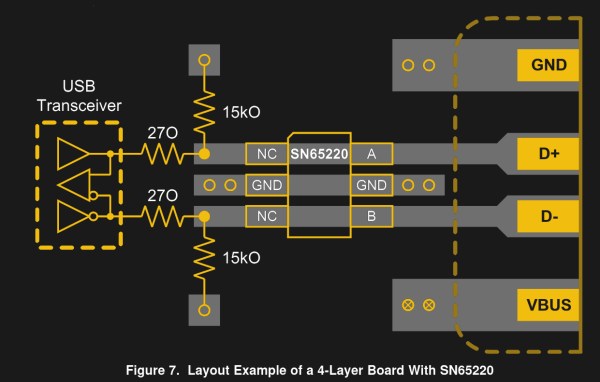
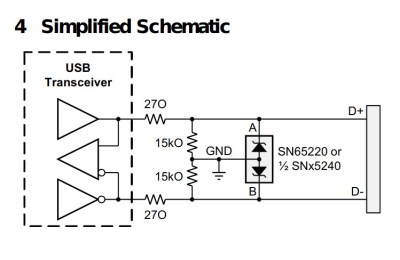
The SN65220 schematic

The SN65220 is a suppressor chip for USB ports, designed to protect whatever the USB hardware is from voltage spikes. You probably have several of them without realising it, the tiny six-pin package nestling on the PCB next to the USB connector. Its data sheet reveals that it needs a resistor network between it and the USB device it protects, and it’s this that is the source of the fail.

There are two resistors, a 15kO and a 27O, 15k ohms, and 270 ohms, right? Looking more closely though, that 27O is not 270 with a zero, but 27O with a capital “O”, so in fact 27 ohms.

The symbol for resistance has for many decades been an uppercase Greek Omega, or Ω. It’s understood that sometimes a typeface doesn’t contain Greek letters, so there is a widely used convention of using an uppercase “R” to represent it, followed by a “K” for kilo-ohms, an “M” for mega-ohms, and so on. Thus a 270 ohm resistor will often be written as 270R, and 270 kilo-ohm one as 270K. In the case of a fractional value the convention is to put the fraction after the letter, so for example 2.7kilo-ohms becomes 2K7. For some reason the editor of the TI datasheet has taken it upon themselves to use an uppercase “O” to represent “Ohms”, leading to ambiguity over values below 1 kilo-ohm.

We can’t imagine an engineer would have made that choice so we’re looking towards their publishing department on this one, and meanwhile we wonder how many USB devices have gone to manufacture with a 270R resistor in their data path. After all, putting the wrong resistor in can affect any of us.