The Tube Map, In Glorious 8-Bit!

There was a time when visitors to London would carry an A to Z map to navigate the city’s Undergound railway system, referring to the iconic London Transport map printed on its back as they did so. Now it’s likely they’ll do the same with their smartphones, with apps ranging from simple analogues of the printed version through to fully annotated route planners with up to the minute train information. Is this a new technology, something only possible in the last decade? Serial British rail YouTuber [Geoff Marshall] thinks otherwise, and has programmed a Tube map on a vintage BBC Micro.

We don’t expect anyone to heft a pile of vintage hardware onto the Central Line at rush hour even though in reality he’s running it on an emulator due to his real BBC Micro being kaput. Perhaps someone should drop him a line about capacitor replacement in that power supply. But it does provide an entertaining jaunt back into afternoons in a 1980s school computer lab, with MOVE, DRAW, and PLOT commands as he wrestles with the limited colour palette of MODE 2.  The result only covers Tube Zone 1, or the very centre of London, so to visit London Hackspace you’ll have to remember to take the Bakerloo line northbound out to Zone 4 and disembark at Wembley Central.

Happily as you can see in the video below the break he enlists the help of a friend to run it on real hardware. He posted the code as a comment to the video but it’s really hard to find. Try this direct link and scroll down, it should be the first comment but you need to click “Read more” to unfold the code. We think the Tube Map would make a great test for any retrocomputer, so we look forward to this feat being repeated.

Continue reading “The Tube Map, In Glorious 8-Bit!”

A Volume Control From A VCR Drum

The VHS VCR has now passed from widespread use, and can thus be found as a ready supply of interesting parts for the curious hardware hacker. [Clewsy] has a novel use for a VCR head scanning drum, the part that is supposed to be tasked with reading information off of magnetic tape. Instead, it’s reading information from fingers as the knob for a USB volume control. Underneath the drum is an optical encoder disk which is read by an ATmega32U4 for USB interfacing with a host computer.

The helical-scan video recorder was a mechanically complex solution to the problem of recording a high-bandwidth video signal onto a tape that could be made slow-moving enough to be practical. By recording the video in diagonal stripes across the tape from a fast-moving spinning head they avoided the need for huge reels of tape, enabling hours of video to be fitted into a roughly book-size cassette.

While over time the mechanics of a VCR mechanism were simplified and cheapened to a great extent, the heads and drum were the one area that could not be compromised. Thus the VCR head was for a time the most high-precision mechanical device owned by most consumers, and the drums usually have exceptionally nice bearings. All of this makes one a particularly good choice for a volume knob or indeed any other large rotational control, so much so that we’re surprised it hasn’t become a more frequent occurrence. So scour the electronic junk, and you might just find the ultimate in free high quality control hardware.

Of course, this isn’t the only thing a VCR head drum can do.  How about a centrifuge?

The First Hacker Camp To Show Up On Google Maps

Our summer gatherings at hacker camps are fleeting and ephemeral, anticipated for months but over far too quickly. Afterwards we have only our memories, and perhaps the occasional Hackaday write-up. We think BornHack 2020 in Denmark was the only hacker camp that wasn’t forced to go online-only by the pandemic last year, and now as far as we know it has also become the only one ever that has left its mark for the wider world by being captured for posterity by Google Earth.

Visible in the forest is the sparsely populated and socially distanced main field of what was a considerably smaller camp than normal, as well as in separate clearings the speakers tent and the loud field. Perhaps it doesn’t help as much in explaining to outsiders what a hacker camp is as might a picture of one of the larger ones, but it does at least serve as a visible reminder that we weren’t quite snuffed out last year.

It’s a moment of nostalgia to see BornHack 2020 on Google Maps for those of us who were there, but perhaps the point of all this is to take a moment to consider the likely prospects for similar events in 2021 given the pandemic. Both the British EMF Camp and American Toorcamp had to cancel their events last year and should return in 2022, there’s no word as yet about 2021 from the Serbian BalCCon or the Italian IHC,  our latest update on Luxembourg’s HaxoGreen is that it’s still slated to go ahead with its move to 2021, and currently both BornHack and the Dutch MCH are expecting to run as normal this summer.

In the grip of a savage third wave of the pandemic where this is being written, it’s by no means a foregone conclusion that 2020’s cancellations may not repeat themselves. International borders remain difficult to cross without exacting quarantine requirements. If you make it to a camp this year you may be one of the lucky few, and in the increasingly likely event that we don’t, we’ll be suitably envious. Don’t loose hope, we shall all meet again… eventually.

If you fancy a closer look at BornHack 2020, have a read of our write-up.

Can You Code Without Google?

Imagine for a moment that something has taken out your phone line, cell, and fibre connection so you have no internet. For some of you this may even be reality, but go with it and imagine yourself deciding to use your unexpectedly disconnected lockdown time pursuing that code project you always promised yourself. You pull out your laptop and fire up a code editor. Can you write code that works, without the Internet as a handy crib sheet? [Austin Z. Henley] couldn’t, when he tried writing a straightforward web app. He uses it as a hook to muse on the nature of learning, and it’s certainly a thought-provoking subject.

It has become an indispensable tool for the engineer and the coder alike, to constantly refer to online knowledge. This makes absolute sense, as it provides a reference library that will be many orders of magnitude in excess of anything an individual can possibly hold personally.

This holds true whether the resource takes the form of code snippets from StackOverflow or GitHub, or data sheets from TI or Microchip. Even our calculations have moved online, as it’s often much quicker to use an online calculator on a web page to derive for example an impedance calculation. This is not necessarily a bad thing, instead it’s an enabler; skills that used to take months to master due to slow information access can now be acquired in an afternoon. But it does pose the interesting question, in the Internet age what is the measure of an expert coder? Is it the ability to produce the code effectively with whatever help is available, or is it a guru-like mastery of the code? Maybe it’s both. If you have the Internet, give us your views in the comments.

VGA Without The Hassle, From Your PlayStation One

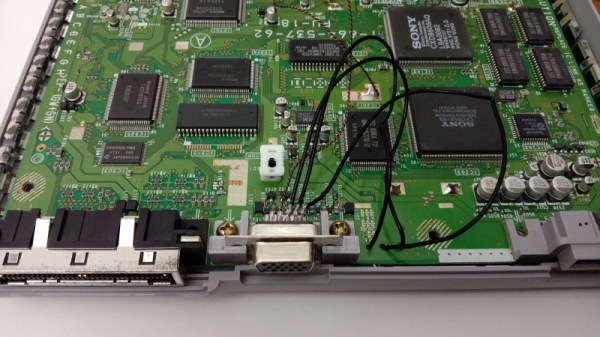
The original Sony PlayStation was a nifty console for its day; that grey box may have only had a 33 MHz MIPS processor and 4 MB of RAM, but for the early to mid 1990s its games were some of the best to be had. From the days when it would have sat under a family TV with a composite video or RF connection, you might expect that the PlayStation would require some form of converter box to drive a higher quality monitor. As [Wesk] found out though, present on the PS1 mainboard are all the required H and V sync as well as RGB video signals to drive a VGA monitor at 15 kHz.

It’s a wallow in the past for anyone who spent the 1990s using their SMD soldering skills to install modchips in PS1s, but it’s pleasing to find that those sync lines aren’t only available from tricky-to-solder IC pins, instead they appear on handy pads. Along with RGB lines from the normal video output they’re brought out via lightweight co-ax to a VGA socket that sits in a 3D printed bracket in the space where a removed system link port would have been. A small trim of the internal shield is requited to clear the new socket, leaving the VGA port on the back of the reassembled console looking for all the world as though it was installed in the Sony factory. Given how simple this mod turned out to be and the sharpness of the resulting image, it’s surprising that this wasn’t tried back in the day. Perhaps we were all too busy playing Wipeout.

While you’re idly rekindling your interest in a PS1, should you buy one then perhaps you’ll need a modchip.

Thanks [John] for the tip.

Bitbanged DVI On A Raspberry Pi RP2040 Microcontroller

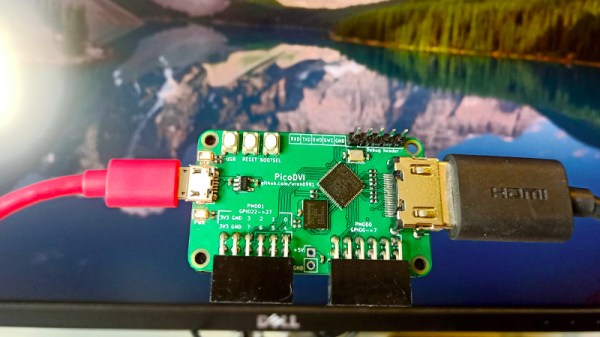
When we first saw the Raspberry Pi Pico and its RP2040 microcontroller last month it was obvious that to be more than just yet another ARM chip it needed something special, and that appeared to be present in the form of its onboard PIO peripherals. We were eagerly awaiting how the community might use them to push the RP2040 capabilities beyond their advertised limits. Now [Luke Wren] provides us with an example, as he pushes an RP2040 to produce a DVI signal suitable to drive an HDMI monitor.

It shouldn’t be a surprise that the chip can be overclocked, however it’s impressive to find that it can reach the 252 MHz necessary to generate the DVI timing. With appropriate terminations it proved possible for the GPIO lines to mimic the differential signalling required by the spec. A PCB with the RP2040 and an HDMI socket was created, also providing a couple of PMOD connectors for expansion. All code and software can be found in a GitHub repository.

The result is a usable DVI output which though it is a relatively low resolution 640×480 pixels at 60 Hz is still a major advance over the usual composite video provided by microcontroller projects. With composite support on monitors becoming a legacy item it’s a welcome sight to see an accessible path to an HDMI or DVI output without using an FPGA.

Thanks [BaldPower] for the tip.

AOI By DIY

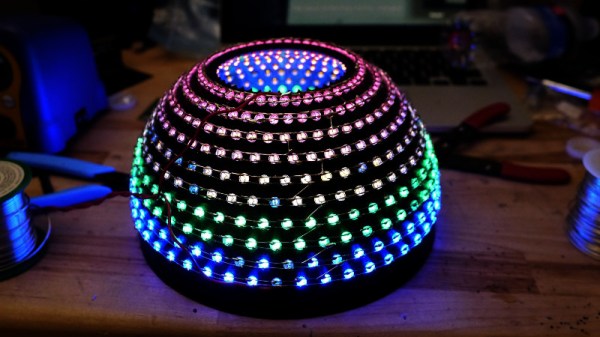
As anyone who has ever assembled a run of PCBs will tell you, quality inspection of solder joints can be a difficult process. Even under a microscope their appearances can be deceptive, and one silver blob can be perfect while its neighbour conceals a problem. The electronics industry have developed inspection tools to help, including optical inspection devices. It’s one of these that [Sina Roughani] has built, in the form of a hemispherical 3D printed dome with concentric rings of coloured LEDs mounted within it.

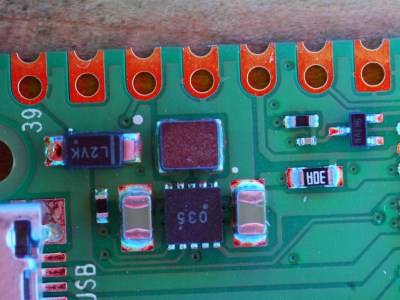
The principle behind this tool is as unexpected and simple as it is clever; by having different colours of light from different elevations of the dome it ensures that each different angle of the solder joint surface reflects a different colour. Thus a colour photograph shot from directly above the board allows visual inspection of the quality of the solder joints by the rainbow of colours that appears around their edges. This process can even be automated with OpenCV or similar, hence the process is referred to as Automated Optical Inspection, or AOI.



The technique is demonstrated with some pictures of a Raspberry Pi Pico, on which it shows really well the rainbow-edged solder joints and the red colour reflected from flat pads. What at first might seem like a novelty lighting effect becomes a very useful inspection tool.

PCB inspection is a subject we’ve covered before, though perhaps we don’t all have access to X-rays.