Nine Not-so-easy Steps To Build A Singing Tesla Coil

We love a good Tesla coil music performance, but have never really considered building our own. After reading [TheHomebrewGuru’s] guide to musical Tesla coils we’re still not considering it. Whether or not you’re going to undertake the project, his massive writeup is worth a look.

The tutorial begins at the beginning, with a bit of background on these devices, including what they are, where they came from, and the electrical theory behind them. From there it’s on to the build. This isn’t a go-out-and-buy it type of project. You’re going to need some ingenuity to hunt down parts that will work, and will work with each other.

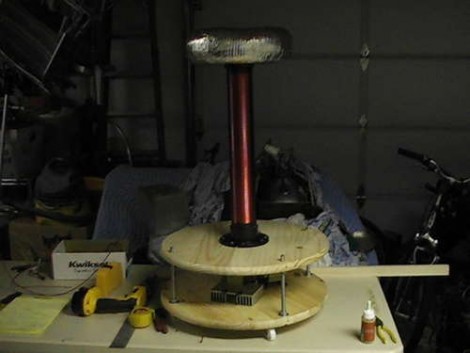
The image above shows a partially built device, using sheet metal ductwork covered in foil tape as the torroid at the top. The column is wrapped in wire, forming the secondary coil, and the wooden base is ready for the installation of the primary coil. Electronics will be housed between the two wood discs of the base, with a TI Launchpad board driving the music part of the hack.

There isn’t a good demo video of this playing music. But you can get the idea if you look back at the head-mounted tesla coil which did a great job of pumping out the tunes.
[Ian] Shops Akihabara

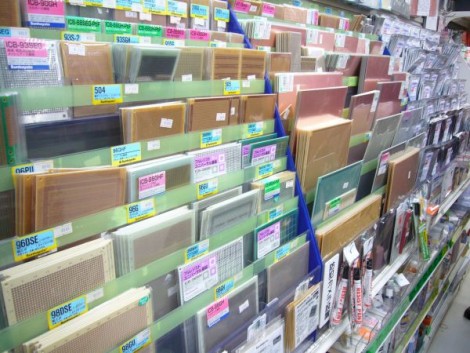
Hackaday alum and Dangerous Prototypes founder [Ian Lesnet] is in Japan and he’s been spending a lot of time at Akihabara Electric Town. For those that don’t recognize the name, this is an electronic components extravaganza with buildings packed full of small shops each specializing in different merchandise. For instance, we love this picture of a shop that carries every kind of protoboard, breakout board, and copper clad sheet imaginable. The stall next door might have nothing but LEDs, or be full of cords for every purpose.

We’ve been following [Ian’s] regular tweets about the trip. Luckily, he just posted a roundup of the Akihabara posts. Surprisingly, he restrained himself to purchasing just a few items. Part of this is a limit on the amount of stuff he can get back to the States with him. The other reason is that the prices are not necessarily less than you’d find in a catalog. He mentions that the nice thing is you can see the parts before buying them. This is useful for sizing knobs, transformers, cases, etc.

The most exciting thing in his bag is a half-dozen nixie-like VFD tubes for just $12. How much would you give to have this shopping attraction down the street from you?

If you’re interested in a video tour of Akihabara check out this one from the Tokyo Hackerspace.

[via @dangerousproto]

Simulating PenTile RGBG Displays

Here’s an interesting experiment that lets you simulate PenTile displays on a normal LCD monitor. [Barrett Blackwood] wanted to test out how some graphics look on PenTile RGBG displays with different pixel densities. These PenTile RGBG matrices are sometimes used in OLED displays. For instance, the Nexus One smart phone features a display of this type. Because red, green, and blue OLEDs emit different intensities of light, the pixels are laid out differently from LCD panels in order to balance the color mixing. Our eyes see the green light very well, and so green sub-pixels are made much smaller than their red and blue counterparts.

Because the hardware layout is different, some graphics appear to have crosshatching artifacts in them when viewed on the PenTile displays. [Barrett] made the example above to simulate how graphics look on a traditional LCD screen (image on the left), and how they appear on the PenTile scren (image on the right). The magenta hue seen above is a result of resizing the image. Since the simulation method turns off 1/3 of the green pixels in the image, resizing it ruins the careful calculation. It must be view at a 1:1 ratio to see the image correctly, at which point the magenta magically disappears.

Pyxis 3 Hits Beta; Rebranded As Gadgetos

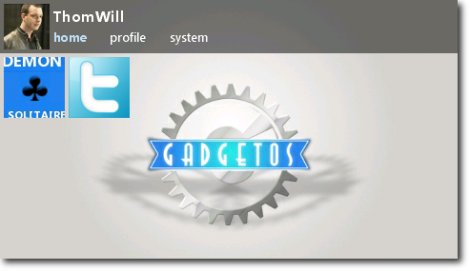
The beta version of Pyxis 3 is now available. Skewworks continues to develop the ARM operating system, and with the transition to version 3 they’ve given it a new name: Gadgetos. One big difference from Pyxis 2 is that the new kernal is closed source. But they’ve taken steps to ensure that the OS is still hardware independent. This is done by reworking the kernel to allow driver loading at run time from an SD card.

The user interface has also changed a bit. Gadgetos relies entirely on a context-based menu system. The minimum input hardware requires a touchscreen LCD and one tactile button. By holding that button, a menu pops up in the center of the screen. This menu is different based on where it is called (this is where context comes in). If you’re at the desktop screen, you get options to load programs, etc. If you pull up the menu while running an application you’ll see the options available for that app. To see more about the new navigation system check out the video after the break.

Continue reading “Pyxis 3 Hits Beta; Rebranded As Gadgetos”

Buzzer Project For Classroom Team Games

Want to host a Jeopardy tournament with your friends? Looking to add a bit more fairness to your school’s knowledge bowl? Perhaps you should build some buzz-in hardware of your own.

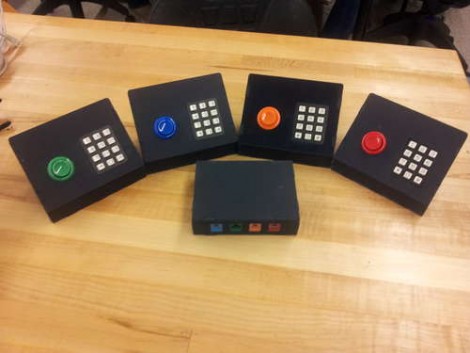
Here you can see [Matt Hanson’s] take on this idea. He used one Arduino to gather not just buzzer info, but also keypad data from four satellite controllers. Each has an RJ45 jack, allowing it to connect tot he base unit with an Ethernet patch cable. We like the color coding that [Matt] chose, which matches the color of the arcade button to the keystone jack on the base. And of course the fantastic look of the water-jet cut cases isn’t lost on us either.

You may wonder why he included a key pad on each controller? It looks like he and a few others worked together to develop a team-based math game for use in school.

Color Sensing With An RGB LED And Photoresistor

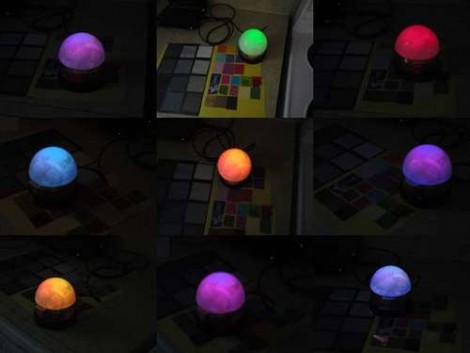
[Fjord Carver] brings together an RGB LED and CdS Photoresistor to make a color sensor. Those Cadmium Sulfide lights sensors usually have a very wide swing of resistance when exposed to varying levels of light sensitivity. That makes for great resolution when reading them using the ADC of a microcontroller. The LED comes into play by shining known wavelengths of light on the surface being measured. Three separate readings are taken with each of the LED’s different colors, then used to extrapolate the RGB value of the test material. We saw the very same method used a couple of years back. This time around it’s an Arduino doing the measuring instead of a PIC.

So why isn’t that sensor shown in this picture? It’s because we appreciate the application which [Fjord] is using for this sensor. He built a lamp that shines the same color as the surface on which it is placed.

Win Free Stuff By Uploading A Pic Of Your Fritzing Circuit

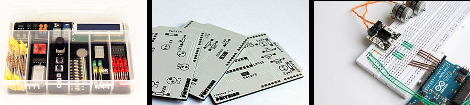
Pull out your old Fritzing designs, or churn out a new one, and you might be able to win one of these prizes. Fritzing is looking for the top three designs which will receive these prizes. On the left is a Fritzing super upgrade kit with goodies like a Character LCD, DC motor and driver IC, shift register, LEDs, and buttons. In the middle is a free PCB from your design (they’ve started their own service to us Fritzing for board layout). Third prize is a motor driver breakout module for breadboard use.

You can get an idea of what others are submitting by poking around their project pages. You’ve got a bit more than a week to get your designs in for consideration. Their deadline is on Sunday, December 18th, 2011.

If this stuff doesn’t interest you, don’t forget to try your luck with 2012 Free Day!