No Nintendo DSi Homebrew

The latest version of the Nintendo DS, the DSi, has officially launched in Japan. It features larger dual touchscreens, dual cameras, and an SD card slot. The members of GBAtemp.net have decided to tackle the most important question: will it run homebrew? Current DS systems just need a purpose built flash cartridge to load homebrew software (usually stored on MicroSD). Forum members have tested at least 10 different flash carts, and none of them worked. While not completely exhaustive it’s proof enough to us that current generation carts will not work. We hope this is something that can patched with a new firmware. Most carts load their firmware off the flash, so upgrades are easy. The blocking of homebrew maybe a side-effect of Nintendo’s announced region-locking on the DSi.

We hope this gets sorted out soon. Maybe we’ll see hackers figure out how to take advantage of the SD slot instead. If you’ve got a Nintendo DS, there’s no excuse not to be playing with homebrew. It’s as easy as copying files to a card. We’ve had success with the DSTT, which you can find on DealExtreme for just $10.

[via Gizmodo]

NES Controller Connectors For Sale

If you weren’t looking forward to trying to find a NES Four Score just to rip connectors out of it or were reluctant to cut the ends off your NES controllers and use different connectors for your NES hack, you’re in luck. Parallax has released an NES controller connector (7-pin, male) that is compatible with the Nintendo controller. They also provide the socket pinout. It’s interesting to see a product like this come out so long after the original console, a testament to the popularity.

[via Make]

Control Your Camera Remotely With A DS

Using a custom built cable connected to the lower GBA slot and a copy of Canon’s SDK, [Steve Chapman] has come up with a very clever way of taking pictures remotely with a Nintendo DS Lite.

Currently the software supports bracket shooting as well as bulb mode. [Steve] points out that he is currently testing an audio based trigger system using the mic built into the DS and the software is still a work in progress.

While the weight saving benefits of using a DS instead of a notebook are obvious, there are things you do give up going this route. Traditionally, when you tether a camera to a computer the photos are saved directly to the computer where you can view the image on a much larger monitor. With the DS, it seems all you can do is remotely trigger the camera. Given the size and resolution of the screens maybe that’s all it can do.

[via Boing Boing Gadgets]

Wii Backup ISO Loader

[youtube=http://www.youtube.com/watch?v=Xtu0kQHaIhI]

The video above shows a new Wii backup loader that’s in development. It works via the easy to use Homebrew Channel we covered previously. From the news post it seems you have to rip the original game disc and then patch it before burning the copy. No release date has been set. As Nintendo Wii Fanboy put it, there’s much more interesting things to do with homebrew than wait for this to be released.

A Console For Retro Games

Like many nerds, we have our share of retro video games and nonworking consoles lying around. Every so often we feel like dragging one out and hoping it works.. Luckily for us, the Super Genintari is available to fulfill our fantasies of beating Ghosts ‘N Goblins. The Super Genintari is an Atari 2600, NES, SNES and Sega Genesis all rolled into one; you can even put in four cartridges at once and hook it up to your television with a simple AV cable.

[via DVICE]

Wiimote Head Tracking In Processing


[Manuel] has been playing around with [Johnny Lee]’s Wiimote head tracking code. He’s posted a preliminary port outlining the code in the Processing environment. It relies on darwiinremoteOSC so you won’t see this outside of OSX, but it should help you out if you’re trying to do this is in Processing on another platform.

[via Create Digital Motion]

[photo: nicolasnova]

Wiimote Missile Launcher


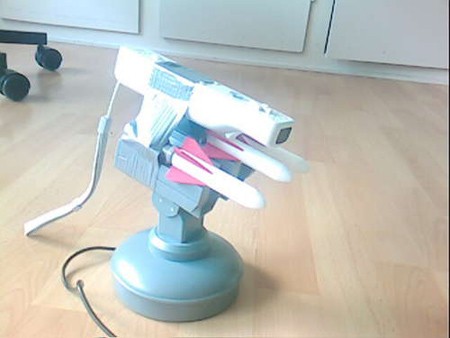
[toelle] has shown yet another use for the Wiimote by having it auto aim his USB missle launcher. The bill of materials is pretty simple: a Wiimote, a motorized USB missile launcher, some duct tape and glovepie.

Simply tape the Wiimote to the missile launcher, install glove pie and follow his instructions for some custom code and off you go. He goes in depth on how to connect the Wiimote to the PC, as well as details on how the custom code works. It only tracks IR targets right now, which is a bit of a bummer, but that would see TV remotes right?

Is there any way this could be combined with the sonar controlled missle launcher that we covered in July?

[via Hack N Mod]