Hard drive resurrection

posted Nov 17th 2005 11:00am by
filed under: laptops hacks

table
Follow along as reader [anonymous Gort] swaps the guts of two hard drives to bring one back from the land of the dead.

Someone at work had a laptop computer they never backed up. They traveled 1000 miles to give a presentation, using the laptop


229 Responses to Hard drive resurrection

  • ryan says:

    i am going to attempt a pcb switch on my WD800BB hard drive. i need the data on it, but can’t afford professional prices, period. what i would really like to know is if the firmware is going to be a problem for this drive. anyone who has a success or failure story for pcb switching in WD 80gb drives, please post it!

  • Many great suggestions in this thread, would like to add something that hasn’t been mentioned. With the hard drive apart, if you can’t or will not be recovering data, the magnets in these drivers are awesome! We’ve pulled apart a number of dead drives just for those powerfull magnets!
    Finally, anyone have thoughts on how long to keep the hard drive in the freezer?

  • Brent says:

    Anybody reading this in the Atlanta area who can provide help swapping platters?

  • Pedro says:

    I’m going to attempt this surgery on my 75 gig ibm deskstar. What kind of snpa ring tool did you need? Internal or external? I imagine you used the snap ring tool to remove the plates. Thanks for the info.

  • anonymous Gort says:

    Remember, disassembling is the last, last thing to attempt.I practiced on 2 old 160mb drives (cost 2 dollars each).Used the star/Torx drivers and snap ring tool to disassemble the drive.(size = T5 to T9 star/ Torx)
    The Torx driver to unscrew the center screw as the snap ring tool held the assembly still. I practiced 4 times insuring I could get the disk platters in and out.Try a (pcb) logic board /printed circuit board swap first.

    Practice on dead or low cost drives first.
    practice with T5 to T9 star/Torx driver and snap ring tool to disassemble the drives.

    Make the target drive FAT32 or EXT2/EXT3, not NTFS.
    Have a computer with a CD, a CDR and a FAT32, EXT2/EXT3 hard drive as big or bigger than the drive you

  • liquidpaper says:

    S.O.S. HELP! HELP! HELP! Very afraid after reading posts that I did further, possibly unrecoverable damage… chronology of events:
    Computer: Dell Latitude CPx Laptop, 20G HD.
    OS: Win2k
    1. Took out keyboard (tried to clean before replacing).
    2. Replaced keyboard. Went to boot. Windows rebooted over and over several times. Worked as usual and turned down.
    3. Powered up next day. Blue Screen of Death.
    4. Error message: Windows could not find file…SYSTEM/SECURITY. and “system hive error”.
    5. Ran Norton Emergency Boot… said virus found but unable to repair.
    6. Ran downloaded boot repair and purchased recovery software. Both wouldn’t load.
    7. Ran Windows Recovery Console… at first, recognized O.S…. but after several starts / stops with all of the above… no longer.
    8. New message: 0x0000007B 0×81867910,0xC0000102, etc. & INACCESSIBLE_BOOT_DEVICE
    9. Took to Best Buy Geek squad… at first, agreed w/ my assumption that sounded like virus. (I was thinking it was a virus in the boot sector… oh, had also created new boot record)
    10. Then told it was a bad platter after running diagnostics and nothing recoverable…
    QUESTION IS: How reliable is Best Buy diagnostics??? Can I still send to place w/ clean room??? Have found 2 reasonably priced…
    No whirring, whizzing, whining, or any noises of any sort before I removed the keyboard and used canned air… could this have done something??? Did my constant rebooting while trying to fix what I thought was a virus done too much damage??? ****My next step was going to be attach the drive as a slave to another machine… after reading posts, that should have been first step… but, again, never suspected drive nor did MS tech support area lead me to believe it was the drive??? IS ALL HOPE LOST??? Sorry for long post. Any suggestions, ideas, admonishments, public flogging appreciated.

  • anonymous Gort says:

    Question 1 , did the laptop work ok before you took it apart ?.
    Question 2 , did you

  • liquidpaper says:

    anon gort…
    Thanks for reply.
    Q.1: Everything worked just fine until removed keyboard and cleaned keyboard and other areas w/ canned air.
    Q.2: Did not attempt reformat or reload of any software… (data too precious)
    …. purchased new harddrive for laptop (just to get it up and running) that came w/ 2.5″ USB drive enclosure… was going to use that…
    Sooo… will try the other steps and let you know…

  • steve says:

    I had a hard drive in a laptop crash, but it was still under warrantee. I had to save the information without taking the hard drive out (otherwise warrantee void…) I tried a plethora of methods, including Linux Live-CDs. Linux could recognize the drive, but couldn’t mount it, and I didn’t have any recovery tools that would work under linus. Eventually I found a way to create a Windows “live-CD”: http://www.nu2.nu/pebuilder/

    I was able to recover my data, and sent the laptop in for a replacement.
    (The next two replacements had various problems too and finally got a different brand with the third……what a mess. Don’t buy an Averatec laptop!!!)

  • Nicholas Bodley says:

    If a multi-platter drive has only one read channel, then aligning platters to each other probably doesn’t matter a lot, because only one head is active at a time. A head selector connects the desired head to the read channel, apparently.

    I once revived a stuck Hardcard drive by whacking the drive housing so the platter’s inertia made it lag behind, as the housing rotated around the platter. Once unstuck, the drive ran fine. Didn’t have to hit it hard.

    I’m amazed that HDs can work after being opened in ordinary (but clean) rooms. Perhaps any ordinary dust is so big that it can’t possibly fit between head and platter!

    salvage:
    Head actuator bearings are just peachy, for building precision mechanisms. Platter spin motor also has lovely bearings, but they are hard to get at. Yes, the magnets for the head actuator ar wonderful. Wear gloves, so you won’t get pinched (as badly :) ), if you take them apart.

    Good luck, folks!

  • Walt Carnahan says:

    I was using a 30GB Toshiba 2.5″ HD in an external enclosure to store photos when It bounced off a bunk bed and wouldn’t work anymore. I’ve 9GB of pictures that I hope to recover by swapping the disks to another Toshiba HD, almost the identical model. Then I’ll copy the files to an internal HD with plenty of free space. I’ve been practicing on a couple of IBM 2.5′ 60GB HDs. A couple of questions

    Should I format the good drive where I plan to place my platters?

    DOes one use some sort of a tool to handle the platters?

    Removing the top platter is easy. Should I try it alone first?

  • s says:

    This is all very fascinating. Possibly educational? Thanks to everyone for posting here.
    I’m about to throw my Toshiba 40G (MK4026GAX) laptop hd into the freezer w/ fingers crossed, of course. The drive crashed today (scratching and clicking noises; faliure to read error upon attempt to boot, etc.), after only 5 months of use. Has any one tried gutting one of these? If so, any success? I have a relatively small amount of very important info that I would really like to recover (~1 month of law school notes). Does anybody have any other suggestions regarding this type of drive that do not involve spending several hundred dollars?

    Thanks again folks

  • Pedro says:

    Hi,i’m the 75 gig IBM deskstar guy. Thanks for setting up an AIM alias to help. I actually just got my replacement drive, same model, serial numbers etc on the new identical drive. I’ve practiced thus far on a 20 gig drive. Have a couple of question. How did you remove and then handle the platers once the screws holding them in were removed from the rotor?
    Can you touch the edges of the platers if using gloves? What kind of gloves do you recomend i use? thanks for your help.

  • anonymous Gort says:

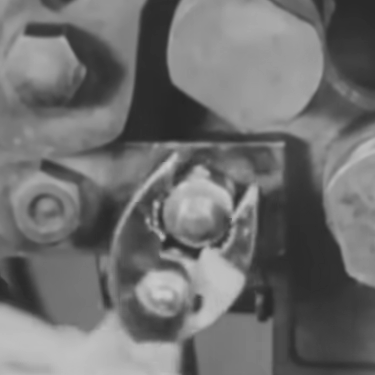
    The photo # 1 and # 3 shows a bent tweezes , I took a clean pair of tweezes and bent the edges as shown..
    First platter was easy, came right out second platter required a tilt as it came out. To install the platter I just reversed

  • Dan says:

    I recovered a Maxtor ARES C64K drive that was 20gigs. It had a single platter with a single read head. Initially, I thought the circuit board was bad, so I bought 2 identical drives to swap with. Didn’t work.

    So, I removed the platter from one of my new drives and placed the platter from my broken drive inside. It took a couple of tries to get the platter lined up correctly (there was a lot of vibration) and the disk would POST. Remarkably, I recovered 100% of the data I was looking for and the rest of the directory structure was about 80% recoverable.

    $21 on ebay for 2 broken drives with the identical firmware.

    Not bad for no clean room and no gloves. Did it in my basement :)

  • haitao says:

    The freezing method doesn’t work on my 200 GB maxtor diamond plus 9 hard drive. The cold temperature only delayed the clicking/clunk (it looks like that the voice coil actuator starts to work only when the platrers spin up to a certain velocity). Carefully listen the clicking/clunks and they are likely from the position of voice coil actuator (enlightened by the detailed inlustration of http://www.hardwaresecrets.com/printpage/177). But still don’t know what’s wrong inside the hdd. Why the arm keeps swinging back and forth without settle in its ready position? The read-write head is dead? How poor am I! Looking for an identical drive for future swapping parts like what is said above.

  • anonymous Gort says:

    Dan…
    Thank you for the feedback on the
    Maxtor 20gig ARES C64K drive.
    Am happy you got your data back.

  • basscleff says:

    hi, great resources here. I have a maxtor Diamondmax 80Gb plus 9. power surge killed the motor (or the motor control chip?) it does not spin. After buying a replacement drive, and swapping the pcb..no dice. Now it spins, and the bios sees it, but the heads crash. I was told that the firmware needs to be reloaded, and that the mfr’s always keep a redundant copy of the firmware stored in an aternate location on the drive firmware chip.

    My question: is this possible, and if so, is there a way to reloade this firmware, or reinitialize it?

    I’m at my wits end, and about ready to open the drive and start swapping the platters.

    How do you remove the platters, without damaging the surface and the platter heads?
    Do the platter heads automatically adjust the proper tolerance between the plater surface, or do we not have to worry about the space, as most platter heads seem to be mounted on flexible metal.

    thx!

  • HHH says:

    #120: your donor drive must be IDENTICAL to your crashed drive — model and firmware #s must match.

    Firmware is loaded at the factory and cannot be changed, but i could be mistaken.

    Your best bet is platter transplant, which is what I’m currently facing (fried motor or seized bearing).
    But once again, donor must be identical.

    ——–

    Now, my own questions are :
    Has anyone had any experiences with Seagate Barracuda 7200.7 120GB disk (IDE). It has 2 platters and I wonder if they must be aligned dead on.

    Worst comes to worst, I’ll buy a brand new one ($80), populate it with data, skew platter alignment and then see if data is still readable. I figure a worthwhile experiment vs $3,000 bill by data recovery Co.

  • Desperateman says:

    I just want to ask a question.
    I tried desperately to recover my data on my HDD. Intially, it was just a problem of me dropping the harddisk. Without any knowledge prior to trying to fix it, I opened my HDD and let dust went inside, and I also took out the “platters”. I touched the platters several times with my bare hands. On top of the above, I even moved the position of the “heads”. At the end, I put everything back together, I even tried to clean the dust myself using primitive tools, i.e. soft fine cloth. (It was very late at night and I was very desperate to get my HDD fixed, I couldn’t call noone for help so I decided to take a look at it myself.)

    I just want to know, after I’ve done all those stupid things, is it still POSSIBLE to have ANY of the data recover from that drive?? This drive is a multi-platters drive (250Gb Maxtor). PLEASE HELP ME, I really want to get the data back from that HDD!! I am willing to pay anything to just recover SOME of the data on it!

  • bennyb says:

    hi if anyone can help me with this i would really appreciate an email! – bpm105@hotmail.com.

    i have a laptop with a 30gig toshiba drive. I came to turn it on yesterday and, despite the drive spinning up and making healthy noises, the system hung at the XP startup screen and windows would not load. i removed the drive and transferred it to a 2.5″ backup case and attempted to read it by plugging it into another machine via usb. this works…although unfortunately not on the main partition – just on the remaining two, which work fine and can be accessed and written to without a problem. the main partition however, is apparently ‘corrupt and unreadable’ according to the box displayed every time i attempt to access it in my computer. the hdd spins as well as ever and is not making any strange noises etc. does anyone have any thoughts as to what this might be or any suggestions as to anything i can try? i’d really appreciate an email if you could help!

  • HHH says:

    #122
    even if you scratched the platters, data should still be recoverable but it won’t be cheap. Especially in the case of such big drive, you’re looking at thousands.
    Look up Action Front or Ontrack in google.

  • Binxalot says:

    This is a great article. Also, the comments, #75 especially were very good.

    A few answers to some of the questions. I picked up a entire set of 33 piece security bits kit, including torx security bits for $13 at the local ACE Hardware store.

    To sum this article up. If your HD is already gone, what have you got to lose by trying? Most of us cannot afford the $1000+ fee for professional recovery, and from what’s been posted above, they will do the same things as this article has suggested. So back up your data, and then give this a shot.

    -Binx

  • est1712 says:

    After replacing the platters and hard drive spinning, the bios and OS will not recognize the hard drive. Any ideas what I’m doing wrong?

    Thanks,

  • frank says:

    Could someone please:
    1) illustrate what a “snap ring tool” is by providing a link to a web site that sells one
    2) describe *exactly* how the “snap ring tool” is used in this process (hard drive platter swap)

  • anonymous Gort says:

    #1
    snap ring tool , look for

  • sphinx says:

    anonymous Gort, have you tried this procedure on newer high density drives? ( 100GB+ )

    I think the tolerance and measurements are much smaller.
    On the other hand, embedded servo is nice – I was playing with old drives and found platters can be put on completely out of alignment, and still, everything will work.

  • anonymous Gort says:

    to # 129 , sphinx

    did the 20gb laptop drive.
    working on a 20gb Pc IDE now.

  • Rick says:

    Hey, I droped a disk lastnight and thought I was sunk, but after reading through some of this, I took it, thumped each side hard (not real hard) on a book. It’s working, backed up, and running like nothing ever happend.

    Thanks for your help!

  • sphinx says:

    Anonymous Gort, let me know how itgoes… from whatever little tinkering i did, I see heads are extremely fragile – those little “pads” keep breaking off when i insert the platters.

    1) Do you have a tool or technique for carefully sliding the disk between the heads?

    2) how do you remove the metal plate over coil assy, without the arm dancing all over and scratching the platter? the freaking magnet is a pain!

    Thanks

  • AC says:

    I have an 80gb IBM Deathstar that died (stopped spinning, no clunk noises). So I just got another hard drive on ebay, same model number and everything, BUT there was a different Part Number. I swapped teh boards, and now the drive spins up but cannot be detected at all by the computer, either by the BIOS or Windows. Is there anything I can do with these drives, or are they totally incompatible. Like I said, visually, they are exactly the same, except for the part number. Augh, so frustrating.

  • Elisa says:

    ho guys I burnt a chip an pcb(the green piece) of my hard drive. is it replaceable with one of the same model?

  • Hoang says:

    I have a hdd what has been fallen off from the table. Database’s hdd is very important for me. I want to recovery this data but i’m living in the country poor – VietNam.
    Anyone could help me? Please get the advice to mail: Hoangcamapas@gmail.com
    Should i send the hdd to another country to recovery it?

  • Tim Hoad says:

    I have a failed hard drive with 20,000 plus mp3s on, i ama dj, the control logic board has blown, cooked threw a microchip, anyone tell me where i might obtain a replacment control board for a maxtor maxline 2 250 gig ata drive.

    im sure the data is fine just the logic boards cooked, im on uk.

    fault was caused by overheating after external drive case fan stopped.

    Tim.

  • phraze! says:

    I have a toshiba laptop hd which is 30 gigs. model MK3018GAS it was making a grinding noise / spinning down then spinning back on. I got a few blue screens. Thought it was the laptop fans and it wasnt… After listening and hearing the HD spin and then not spin.. So…. The hd spins up makes a grindy like noise like something is given out… Then it stops spinning after a few seconds it comes back on and then no more…. Not sure what I should do. It came up to win xp then it stopped spinning, is it a dead motor or something?. any suggestions?. email me master_of_a_million_styles at yahoo dot com

  • Steve says:

    I have a similar issue. I have had success with 3 of 5 attempts at freezing hdd’s. I have a different hdd now and freezing wouldn’t allow it to spin up. I am also looking at purchasing an identical hdd and attempting to replace parts trying to get data off. I am wondering as with one question earlier, is there a good way to get the arm off of the platter and back on. I am seeing that when attempting to manually spin my platter using a torx driver there is a scratching noise telling me that the arms are touching the platter to much. I am thinking if I purchase an identical drive and replace the arm onto the platter maybe this will take care of the issue thus allowing me to get the data off. I am just not sure of the best way to remove and replace the arm as the ends of the arm always move together when not having the platter seperate them. Any help would be appreciated.

  • robert says:

    I have a Seagate 160gb hard drive with a fried chip on the circuit board. Does anyone know where to get replacement circuit boards? The drive is still under warranty but I am reluctant to send it to them for fear of losing the data.
    Your help and thoughts are appreciated. Email me with any sources for logic boards.
    Robert

  • JAMAN says:

    I had a large Maxtor drive with a very important document on it (worth 25,000 usd) fail. I read the initial posts about platter replacement. I seriously considered going this route so I continued reading for fail/success/advice posts. Came across many different ways to get the drive back up. The freezer deal scares me the most. It’s a hit or miss (or should I say total destruction) with this method. How cold? How long to leave it in? Is your freezer colder than mine? Too many unknown variables in this equation for me. I can see how this will work for ‘frozen’ parts such as arms and other moving metal parts. When the metal freezes, it contracts and thus may free up a stuck part. However, if you leave it in too long, you can end up with condensation (which we all know is water) in your hard drive.

    Luckily for me, Microcenter had a sale on these drives and I purchased two at that time. I took the board off the good one and placed it on the failed unit and voila. ALL data retrieved. No need to ruin the platters with contamination or water.

    I understand that different situations call for different remedies but, ALL remedies should begin with the same simple element – a coherent thought process.

    Happy recovering.

  • jaman says:

    # 139 – See if you can do an advance swap for the drive at Seagate. That would allow you a few days to get it done on your own time. The only drawback to this method is the FW versions btwn the two drives. Hopefully they will match.

  • matt says:

    Hey does anyone know how to take the head, in the new hdd, off the patter and then put the head back on the old platter? When i am practicing with a new working hdd i am taking the head off the platter then just putting it back on the same platter. When i power the hdd up the head starts clicking. What am i doing wrong?

    Thanks everyone.

  • Invince_Z says:

    I have a Wester Digital WD400 portable hardrive.There’s lot of data inside.Unluckyly, one day the hardrive was fall, and a few days later all the data and partition inside was gone.
    Could you give me a few tips how to retrive my data back?Tq

  • pal says:

    i didn’t see anyone mention a trick that worked for me once. i took a laptop drive out, with an adapter, attached it to an open pc. at boot up, while it was trying to start, i spun it, (while keeping it level – more like a flick of the wrist) a few times and it started and mounted, which it wouldn’t do before. i recovered the important stuff just by copying files! might be worth a try, instead of hitting a drive, when it won’t spin up. i think it was a bearing issue.

  • anonymous Gort says:

    Attempted to fix a 40 Gig Maxtor Diamondmax plus.
    Tried 10 different PCBs and a few different cables.
    Took 2 nonworking 40 Gig Maxtor s apart for practice.
    Then moved the platter to a good drive.
    Made the same seek sound the rest (6) made.
    The drive has 1 head and 1 platter, when I looked under it the surface was bad.
    I think the

  • bob dilon says:

    Will this void my warranty?

  • yes it will void your warranty you er.. uneducated person.

    good article, interesting ideas, i needed to recover data from laptop drives, although i dont know where to get the damned screwdrivers, cant buy them locally, maybe online..

    yeh

  • Oleg says:

    The freezer method worked very well for me.

  • RAzOR says:

    This might be an obvious one but I have been told by a data recovery place that my drive’s firmware is messed up. Is it risky to change the board that has the firmware? I suspect not since the only board I know of on HD’s is external. Just wondering thanks. Its a Seagate 200GB 7200RPM ATA133.

  • CaptainBrowncoat says:

    Since this seems to still have been an active topic relatively recently, I’ll give this a shot. Would like to pull the data from my old Amiga SCSI drives (yes, I’ve got an Adaptec SCSI controller on a PC here), but the boot drive seems to have died in storage. It makes no sound upon startup, but the LED comes on so I think it’s just the motor. Any suggestions? How do I properly mount the drives so they can be read (I’m open to either Winbloz- or Linux-based solutions)? And how do I make a disk image from them that’ll work in UAE?

  • anonymous Gort says:

    CaptainBrowncoat

    is the “boot” drive the one with the data. ?
    can you boot the Pc with a live CD like Knoppix 3.9.
    knoppix mounts the drives “read only: at boot up.
    also put a target SCSI drive to put the data on.
    remove any drives with OS or data you want to keep.

    I set up a AIM name of “anonymous Gort” to help. Put “Amiga SCSI drives,” in the message so I know its you.

  • I had a client with a Thinkpad 20GB drive die and they didn’t have any backup.

    I ordered two drives exactly the same as the dead one on eBay.

    I swapped circuit boards and it would power-up but wasn’t recognized.

    I tested opening one drive for practice to see what to expect inside.

    I wasn’t sure how the platters were aligned, so I decided to swap the electronics instead. I removed the heads, arms and electronics from the good drive and put them into the bad drive. Very tricky trying to get 4 heads around the two disks! I didn’t have a clean room, just a clean desk.

    I didn’t get the drive-lock parts in place but hoped that they weren’t required.

    I was sure that it wouldn’t work, but when it powered up, I used a USB adapter with WinXP and copied all of the necessary files across.

    Several times the drive would time-out and/or die on me, but after repeated attempts I managed to get everything off.

    I hadn’t found this article until after I finished. Funny that he swapped platters and I swapped components.

    Alternatively, there are many companies that can recover your data (www.datarecoverycanada.com) but they are expensive.

    My client will be very happy to learn that their data has all been recovered.

    The next step is to ensure their network is properly secured and backed up.

  • I had a client with a Thinkpad 20GB drive die and they didn’t have any backup.

    I ordered two drives exactly the same as the dead one on eBay.

    I swapped circuit boards and it would power-up but wasn’t recognized.

    I tested opening one drive for practice to see what to expect inside.

    I wasn’t sure how the platters were aligned, so I decided to swap the electronics instead. I removed the heads, arms and electronics from the good drive and put them into the bad drive. Very tricky trying to get 4 heads around the two disks! I didn’t have a clean room, just a clean desk.

    I didn’t get the drive-lock parts in place but hoped that they weren’t required.

    I was sure that it wouldn’t work, but when it powered up, I used a USB adapter with WinXP and copied all of the necessary files across.

    Several times the drive would time-out and/or die on me, but after repeated attempts I managed to get everything off.

    I hadn’t found this article until after I finished. Funny that he swapped platters and I swapped components.

    Alternatively, there are many companies that can recover your data (www.datarecoverycanada.com) but they are expensive.

    My client will be very happy to learn that their data has all been recovered.

    The next step is to ensure their network is properly secured and backed up.

  • mgal says:

    I really need a clue…without going into a lot of history my Dell laptop hard drive failed to boot. I recieved and installed a new drive and am now trying to recover my data from the old drive. I have attached my old drive to my laptop with a USB 2.0 case but my new drive cannot see the external drive. What am I doing wrong? Please help if you can. You are all appreciated for sharing your knoweledge.

  • viperccp says:

    I am trying to swap platters with two 18G Seagate SCSI SCA Cheetah HDDs (ST118202LC).

    I came home one day to find my power out and server off. I got power back, but upon powering up the server, the HDD never came up. After trying the freezing, knocking the corner on the desk bit, no luck. Finally I decided to buy 5 identical drives from ebay.

    Got them in the mail, put on the new boards, and they all allowed the drive to spin up, but nothing could be read… the system could not read it at all. So now I am thinking the heads are bad and want to swap the platters to a good drive.

    I got everything apart and the cover off, however I cannot figure out how to get the platters off. There was a torx screw to release the head mechanism, but the heads wont come up without the platters.

    So my question is, how do I release the platters from the case? There is a C-Clip on the top most plater which came off, but the platter is still tightly held. I am assuming now that the heads are mounted as one unit, and they must be removed as such.

    There is a set of three holes in the exterior of the case, the center part of the heads, where the spindle is. It looks like I may need some special tri tipped type tool to remove/unscrew this “core” piece?

    Can anyone offer help with this particular model of drive? TIA!

  • viperccp says:

    I am trying to swap platters with two 18G Seagate SCSI SCA Cheetah HDDs (ST118202LC).

    I came home one day to find my power out and server off. I got power back, but upon powering up the server, the HDD never came up. After trying the freezing, knocking the corner on the desk bit, no luck. Finally I decided to buy 5 identical drives from ebay.

    Got them in the mail, put on the new boards, and they all allowed the drive to spin up, but nothing could be read… the system could not read it at all. So now I am thinking the heads are bad and want to swap the platters to a good drive.

    I got everything apart and the cover off, however I cannot figure out how to get the platters off. There was a torx screw to release the head mechanism, but the heads wont come up without the platters.

    So my question is, how do I release the platters from the case? There is a C-Clip on the top most plater which came off, but the platter is still tightly held. I am assuming now that the heads are mounted as one unit, and they must be removed as such.

    There is a set of three holes in the exterior of the case, the center part of the heads, where the spindle is. It looks like I may need some special tri tipped type tool to remove/unscrew this “core” piece?

    Can anyone offer help with this particular model of drive? TIA!

  • jiggaman says:

    As i work for a computer repair company, i often find placing a failing hard drive in the fridge for a few days allows it to boot for a short while, thus allowing you to connect it as a slave and get the data off as quick as possible. Im not saying it works everytime, but it does often!

  • Derek graddock says:

    Holding my breath for some good news here… my WD 80gb external hard drive won’t be recognized on my computer… I think what I did wrong was I plugged my 19V power cord (from my laptop) into the 12V port on the WD drive – just a stupid mistake – it lights up but no spinning noise, did I fry it by just plugging the 19V in briefly???
    Can I fix it and/or get the info transfered off it in ANY way?
    Please let me know, thanks a lot!!!

  • anonymous Gort says:

    # 158 Derek graddock

    1. try to put the WD 80gb external hard drive in a computer via a cable.(take it out of case and use IDE cable)

    2. order a drive exactly the same as the dead one.
    try to swap the circuit board into the dead drive.
    ( you may have fried the circuit board)

    # 153 Kevin roosdahl, good job.

  • Dawson says:

    #158: “did I fry it by just plugging the 19V in briefly???”

    HD’s contian delicate electronics; accidentally sending 60% more voltage through it than it is used to can easily fry components. Even for just a second, damage was probably done. But, sometimes you can get lucky. It sounds like you didn’t. I just realized a little while ago my router was using a 12V power supply when it’s only rated for a 9V one. (OCd my router ^_^)

  • Nordo says:

    It’s amazing how many crashed/frozen hd’s are wd. After reading through this post I currently have my wd600 sitting in the freezer wrapped in glad wrap and will try a recovery tomorrow. This hd has my only record of hundreds of photos of two weddings. Fool me used a hd as a backup of the camera’s memory.

    My question is why do you have to use knoppix (or similar) to read/transfer the data if the hd is up and working, if only for a short time?

    Another question (if it’s not considered OT), what’s everyone’s opinion on reliable/non-reliable hd’s?

  • dRfEL says:

    I have frozen HDs on many occasions with success. Sometimes you have to freeze it a couple of times to get all of the data off.

    AS to why it works, I dont really know. I do know that we use component cooler to isolate defective ICs on circuit boards. This is just cooling all of them.

  • Nordo says:

    I put my wd600 in the freezer overnight, and it worked !!!! Got all the data i wanted.
    i then put another old hd in the freezer, and got all the data i wanted off it as well !!!!!!

    my only problem was i had trouble accessing the personal documents and settings. using knoppix, i found i still couldn’t copy them over, but i could burn the data to a cd. perfect!!!

  • Okay I’m going to try the freezing operation on my seagate 160gb barracude. The only thing was it was making clicking nosies, now after reading everything that was on this site, I will try this first and come back with the resulest in some time. The only thing that I hope is that I won’t have to come down to send my hard-drive off to get it repaired. All in all you think that not backing up your system is bad, imagine losing about $12,000 dollars worth of programs (not saying how I got them) but still. BACK UP EVERYTHING, I just had to learn the hardway.

  • Gizz says:

    Hi
    I have a WD1200JB-75CRA0 and i think its the pcb there are tosted ….
    (it doesnt spin up, just sits there like a dead drive, saying “we ant got any power capitan”)
    but anyway… i have a drive almost like the broken one, and if i switch the pcb out, then i can hear the drive is spining, but i cant see the drive at the POST.

    Soo the big question is …. where do i get a pcb that will fit for this hard drive ?

  • Derek Graddock says:

    Thanks for the suggestions for my wd80gb external hd… no luck yet… I tried:
    1. try to put the WD 80gb external hard drive in a computer via a cable.(take it out of case and use IDE cable)

    But still no power to spin up the motor – I’m guessing my last resort is to order the identical one (i found it) and try to switch out the pcp boards…? Is that difficult – any sites I can go to for directions…

    Suggestions? Is all this talk about freezing and option for my situation? Thanks a ton

  • JIM says:

    Okay, I have a western digital. On boot I get the dreaded strike F1 to reboot F2 to enter setup. I tried a new cmos battery with no luck.
    I set the drive in another computer as a slave but the computer did not find or recognize it. I booted with a win 98 boot disk. Using fdisk I get a reply no fixed disks present. On occassion I get a clicking from the hard drive, however, most of the time it makes no sounds. Any ideas how to read it to get the data off it? Will the freezer trick work? How about throwing it off a very tall building?

  • Grey rabbit says:

    Swapping guts between harddrives can be done… I did it once with a old old pair of RRLL HDD and it worked… The second time I tride doing it with another pair of HDD I failed…

  • dave says:

    I have seen the question come up a number of times with no answer,
    How do you get the heads back on the platters.
    I have two IBM 18.2 SCSI drives that are crashed, one about 4 years ago that I shelved. The other is the same size but a older model IBM. I purchased three identical drives of the first model(3 platters 5 heads) for practice. This is all before I came across this article. I chose to replace the head unit. I destoryed two head units in practice but think i can get it right the third time. This model had a plastic piece just off the platters where the heads parked. This piece had spacers to guide the heads back on the platters. This configuration would make it easy to replace the platters since the heads do not rest on them
    I also purchased an identical drive of the older model(5 platters 10 heads) and took it apart(since it was DOA even tho the guy sold it to me as “working”) This drive though apears to park its heads on the outer edge of the platter. Sliding the heads off after removing a retaing pin is easy, though does not sound that good. My concern is getting them back on the platters(it appears I need to hold 5 delicate heads apart while I move them onto the platters.
    Anyone had any experience here, or know how this is done.

  • Steve Garrison says:

    I have WDC 320gb ide drive, (wd3200JB). I backed up customers hdd to it using True Image, then wiped their machine and reprogramed.

    You guessed it! The drive is mechanically dead now and my customers thousands of pictures lost.

    My shop drive was in warranty and a replacement is on the way. There is no click of death and the drive just won’t spin up. Seems a good possibility that the problem is on the pcboard.

    Now I’m reading that replacing the pcboard may not work even if that’s where the problem lies – different firmware or timeing issues or some such.

    My question is…..
    Should I not even try the board replacement?

    Will Western Digital catch the fact I jiggered with the drive I will be returning? There are no telltales that I can see on the circuit board – there are on the platter enclosure. (Is there a secret telltale that will flag the pcboard removal?)

    Is there any possibility that the pcboard won’t work on its home drive when I put it back? I’d hate to ruin a good drive in a possibly vain attempt to save data on a bad drive.

  • Mac Drive says:

    Help would be greatly appreciated–great post, and I’m trying something very similar; the data I am attempting to recover is several years’ worth of novel. Don’t even ask about the backups–this is one long list of bad luck!

    History: Scsi from 93 (out of a mac lcIII), ceased working after a move in the car–the drive simply no longer worked (it spins up and down, unreadable). Logic board switches with ebay-purchased boards have proved that it’s the guts that are the issue (the other drives run on the original’s electronics). Upon opening the drive, I’ve found that the heads (two, one above and one beneath) were -not- in the locked position, perhaps from the transit; however, even with it in the locked position now, it still won’t work.

    Issue: If the heads have been touching the surface of the platter, and swinging all over it, for God knows how long, then will the heads and the platter be destroyed (i.e. data is lost) or will just the heads be destroyed, or neither?

    In addition, each time I take apart one of the ebay drives and put it back together, it ceases working as well. Is this because I’ve let the heads touch the surface? If so, how does one keep them from touching the surface during a platter switch?

    Any help is greatly, greatly appreciated. I can be contacted at AlphaFeralWolf@Gmail.com

    Thanks, and again, good information, thanks!

  • Mac Drive says:

    …. For years I’ve been trying to get this to work.

    And my 360-page novel… is BACK!!!

    Guess what? Freezing your hard drive works. It really, really works. I’d had the case open and looked at the naked platter, and yet I’ve still managed to get the file saved from the scsi!

    Thanks so much to everyone who suggested this!!

  • jimbo says:

    i have a Maxtor DiamondPlus 60 40GB drive that died a while back. It was OEM equipment in a Dell Dimension 8100 system which froze and then blue screened in a lightning related incident (had several electronic devices affect as did all my neighbors). Upon reboot, system could not find a valid boot device. BIOS could not auto-detect the drive. The drive was swapped out for a new 160GB drive and the OS and programs were reloaded on the new drive to revive the system.

    Now comes the fun part…recovery of content from the old drive.

    When installed as a slave drive, the sick drive spins up but I hear this constant “click-clack” sound from the drive. It also prevents the BIOS from seeing the 160GB device as well. So it looks like the sick drive is hanging the IDE bus. Same thing happens when I try to use the drive in an external USB drive case.

    I have another working Maxtor drive (same model number) on its way and I plan on swapping the controller PCB first. I do not have any dead drives to play with so if anyone knows where I can get some, please let me know (send mail to jjh_nj on yahoo, or post here).

    My question is whether people think the PCB swap will work in this case. So far, I have not heard anyone explain the root cause for the symptom of a repetative “click-clack” noise from a drive that appears to spin up without any other grinding noises. The sound is obviously mechanical in origin, But is it due to a pure mechanical failure, or is it begin caused by electrical/firmware control problem?

  • john says:

    question if i opened a hard drive and touched disk. is it ruined? totally or can i send it out to someone now to try to recover data?

  • Mike says:

    I have 2 Maxtor 6Y120M0 HDs that won

  • anonymous Gort says:

    #172
    Glad the 360-page novel is back.
    Am adding

  • eric says:

    do you have any ideas that how to replacing a hard drive from my computer? the model is sony-z1wamp1 laptop……….

  • anonymous Gort says:

    how to replace a laptop hard drive…

    http://www.fonerbooks.com/laptop_1.htm

    transfer data from current hard drive to new hard drive

    http://www.bixnet.com/lapnothardri.html#where

  • Jonathan says:

    I am probably stating the obvious and it is probably something many people take for granted but it is probably a good idea to make sure there is actually something wrong with a hard drive before trying to attempt any of the recovery techniques here that require physically altering the hard drive. I have seen it so manny times when someone I know would have problems reading a disk and be ready to buy a new drive (hard drive, cd rom, floppy drive, etc) when the problem was simply a loose connection or some sort of device conflict or whatever. I have noticed at least one person here mention putting the hard drive in another computer which I think is a good idea because there could be a problem with another hardware device that causes a problem reading the drive. I do not know a lot about hardware since I am mainly a programmer and usually let the engineers deal with the hardware (I am interested in hardware and sometimes add or replace parts but something like putting chips on a circuit board is way too complicated for me) but in any case a root cause analysis should be followed before doing anything that could potentially harm a piece of hardware. I would not like to see someone destroy a perfectly good hard drive with all of their valuable information on it simply because it did not seem to be working. Sorry if this may be useless or is in the slightest erroneous, but I find the inner workings of hardware quite fascinating even if I do not fully understand it; this is how I came across this article.

  • ebdet2002 says:

    After a power surge, my Western Digital 250 gb hardrive can’t be recognized by the computer. Is this an issue with the logic board (controller board)? Will I have to switch out the platters and such, or can I just switch logic boards out with an identical hardrive?

  • Valence shell says:

    I’ve also had sucsess freezing the harddrive to get it back for a short while I retrieved about 3 gigs once and only a few files the next day before it died again for good. I believe the problem was the motor would not spin up to the proper rmp. the freezing might have contected the bearings enough to let it spin fast enough. but the motot sqeeled like a pig.

  • sc2171 says:

    I’m sorry. I have sympathy for somebody who may have lost some new data since their last backup. But those of you who whine about losing over a hundred gigs of data and looking for a solution to get it back. WHHAAAHH! If it was so important you should have backed it up. Yeah! I know you thought that little electronic device would never fail especially with moving parts in all:} Well guess ehat hard lesson learned consodering a cd, dvd, or even an external hard drive cost virtually nothing.

  • acidbasement says:

    Thanks to everyone for this great resource!

    Can anyone comment on post# 121 – is it really impossible to update HD firmware in all cases? I’ve got a non-spinning (due to a drop) Hitachi Travelstar 30GB (model# ic25n030atmr04). I swapped the circuit board from another drive with the same model# and part#, and this fixed one problem – the drive now spins up – but now the BIOS does not recognize it.

    I can see what I believe is the firmware number printed on a sticker on the board (different # on each board – probably why the BIOS did not recognize it), but I can’t find another board for sale with the same firmware# (most sellers do not post the firmware# in their ads).

    So, my questions are as follows:

    1. Can someone suggest an online retailer who is likely to carry the board I need, and who is also likely to post firmware numbers so that I know what I’m getting?

    2. Has anyone ever had success in changing firmware on a HD circuit board, or is this out of the question? If possible, I would love to be able to just change the firmware on the working drive so that it matches that of the non-working drive.

    Thanks again.

  • mANGAS says:

    Hello there
    The strangest thing happen to one drive that ive just bougth (second hand)Seagate ST3120026A Barracuda 120GB, when I plug it in for to the pc and sata cable the computer dindt turn on at all after several trys it turn on but next minute when I look there was a litle fire coming from the botom of the drive, ive turn the computer off and toke the drive out, then I notice a litle tiny chip or what that was looked totaly tosted, I pick it out clean the drive on the spot where the chip was then guess what? ive plug it back and it was stil working!!! I instaled the OS in it and is still working fine!!!
    Did this ever happen to anyone?

  • anonymous Gort says:

    to acidbasement;

    1. I just buy a lot of “bad” drives and take a chance on the ##
    2. only info on changing firmware in HDD
    is http://members.cox.net/steved64/mindstor/
    its for a MindStor Digital Wallet,
    may help you to see its procedure.

    did you try the HDD on another computer, with an adaptor , with a linux OS or another windows OS.some say freezing works good. re read #47 ,179 ,85 and 109.

  • acidbasement says:

    Yes, I’ve tried the non-working drive on a few other computers (doesn’t spin up when power connected), and I also tried the working drive whose pcb I harvested (worked fine). The fact that the bad drive spins up when the good pcb is installed tells me that its own pcb is dead, which is something that freezing would not fix, based on my admittedly limited knowledge of HDD repair. But, since the BIOS doesn’t detect the now-spinning drive due to incompatible firmware, there’s probably no way for Linux or any OS to detect it either, is there?

    I’ll do as you suggest and keep looking for bad drives, hoping to luck out. That firmware upgrade procedure looks a bit too intense for my faint heart. Thanks a bunch for all the suggestions.

  • Dmitry says:

    when swapping PCB on HDD (logic board, what variables have to match:
    1) board number
    2) board firmware
    3) Main IC…
    4) HDD Part Number

    do all these have to match, or not. which ones are/can be compatible?!

    please email me at: noland@email.com

  • Bob says:

    Guys, I had luck with doing platter transplant surgury. See http://www.freewebs.com/bgotchall/index.htm

  • gandrsoup says:

    I’ve got a Western Digital250 hard drive that’s not recognised and not spinning. can anybody tell me which/where are the relevant numbers printed on the Hard drive and or pcb That i need to match if i (as if!!) am gonna do a pcb swap…pleasehelp….. any other ideas? Thanks

  • raghav says:

    Hi,

    I tried to swap logic boards of two identical seagate 30gb HDD, after the swap the hdd does not get detected.

    Find below the config. of both the hdd

    Hdd with fried logic board :

    Model : ST93015A
    Pn : 9Y1412-331
    HDA PN NO : 100302056
    date:04386
    HP: 356013-002
    fw: 4.07
    cfg: nhm-04
    ct: 27B39006CQ13LJ

    Working HDD

    Model : ST93015A
    Pn : 9Y1412-331
    HDA PN NO : 100302056
    date:04353
    HP: 356013-002
    fw: 4.07
    cfg: nhm-03
    ct: 27B39006CPY4AR

    As far as i can see the cfg no and the batch date are different. Is this the reason as why my logic board swap is not working.

    please mail me at raghav_krs@yahoo.com

    Thanks in advance.

  • If you switch the diskes from the broken drive to one that spins do they have to be the same drive, because my conner drive stopped spinning and freezing it and tapping it does not work it will heat up but nothing spins and a need to transfer my music files to my new hard drive!

  • Kevin says:

    Some good comments and advice here..but be warned…This is very risky, but plausible. I tend to leave critical data to DTIDATA and DriveSavers, both companies have great affiliate programs. Do what you can without cracking the drive unless you have high degree of skill and experience. Don’t risk your customers data. If it’s your data..have at it..but it is always risky, even the pros have trouble some time.

  • zflynn says:

    I had an unbootable, clicking drive that all the “experts” said was definitely dead and unrecoverable other than by “experts” in a clean room. I read from data recovery sites and an article that claimed that the clicking sound was the head banging against the platters and that I would damage the data forever if I didn’t IMMEDIATELY stop trying to recover the data and send it to a special place that could do the data recovery. Sounded like a boatload of manure and my suspicions were confirmed when I read one data recovery place that said I wouldn’t have to pay them if they didn’t recover 100% of my data. Well for them to make that guarantee I knew it must be really rare to lose all your data. Then I read a lot of different stories like those posted here. One guy said he had routinely opened hard drives at his desk and was able to recover all the data from them, often with them running with an open face plate. Someone else mentioned that the CLICKING sound was actually the drive turning off and on. Well that seemed to make more sense than a crashed head. I tried freezing the drive three times but it didn’t work, win XP still didn’t recognize the drive. Neither did Linux. So I found the duplicate hard drive on Amazon and bought it and then switched the logic board from my “dead” drive with the new drive of identical model number and FIRMWARE number (important but often overlooked). It took less than a minute using a Torx screwdriver and removing four screws on each board. (Maybe an expert can do it in less than HALF a minute). The drive was now recognized by Win XP but still corrupted and unreadable. Used Easy recovery Pro and was able to recover 100% of my 200 gigs worth of files that I was told would be completely corrupted if I didn’t send it to the “pros”. My total cost: less than $50. The “pros” ESTIMATES (which they all said might be more once they evaluated it): $800-$2000. Nice scam going boys, but I hope others who can figure out the right end of a screwdriver do what I did and do a little research on how to do it yourself.

    What I learned: a little patience and research (a lot of research actually) you can most likely recover you data from a dead drive.

    What I also learned: never take the alarmist advice of “experts”, especially when they are in the position to profit (a HUUUUGE profit) off your fears and panic.

    Forgot to mention what killed my drive, a dying power supply that was creating havoc for a couple of days, spiking, etc. Power supplies are important, keep an eye on them!

  • Jim D says:

    Hello there,
    It seems I have at last discovered a web site with excellent people who do the oppersate of the general mill who say it cannot be done :)

    I also have run up against a hard drive problem (who hasen’t) that has caused me grief in the past, the bit where a sector goes bad in the boot and FAT table areas.
    My first question is, is there a program avaliable that can access the HD and write a new Boot and FAT information to the last sectors on a HD so the software can be recovered?

    My second solution, if the Boot & FAT sectors are not recoverable, how can I still make the original HD work again?
    I will put forward a thesis, maybe it will work, maybe not, however, if one dosent try, one will not know.

    As we all know, when the platter with the fat goes bad we heave/throw the HD away, its history, so it won’t matter about the warranty, warning stickers etc etc.
    The puritans will gasp, horror they say, they are the ones who never took a chance, got their feet dirty etc.

    Make a clean room, you will need a large, cardboard box or anything that can form a box like shape.
    You will need a light setup.
    Get a clear plastic bag and tape it inside the box. Get all your tools you will need and surgical gloves, set up a computer fan and fit it with a air filter and make a hole in the rear of the plastic bag and box. Push the fan assembly halfway through the hole you just made, and tape/seal it.

    Put everything you will need, tools, HD etc in the bag.

    Put your hands in the gloves and get someone (wife) to seal the gloves with your hands inside them.

    HEY did you go to the loo, you might be here for a couple of hours LOL.

    I will explain this recovery procedure (which I have not done), gulp,(:[] with a hard drive which uses just 1 platter for simplicity.

    Remember, the FAT and BOOT sector is on just 1 side of the platter, 0,0.
    (We will call the side facing you the Red side).

    Open the Hard drive, remove the platter assembly from the HD, Carefully, remove the platter fastening screws and then very gently, take the platter off the spindle shaft assembly.

    Now carefully turn the platter (the red side)
    so it is NOW upside down, and put it back on the spindle shaft.

    Reassemble the platter onto the spindle.
    Reassemble the assembly back inside the hard drive.

    Now, there will by now be some of you who will realise that all the information on the platter will appear under the heads in the reverse order it originally was put there when it was working.

    However, this exercise is not to recover the information that was originally on the Hard Drive, (you should have done this before, but to try and recover the HD so it will work again by moveing the bad sectors phisically.

    Original platter was setup like this
    [f.b......................][.........................]

    By flipping the platter over it presents
    the bad sectors like this.
    [.........................][f.b......................]
    This now gives a completly new area for the HD to write a new Boot & FAT table area on the platter :))

    [0.0......................][x.x......................]

    Scandisk will pickup the bad sectors and write a new bad sector table.

    The original Boot and FAT sector/s which were at the beginning of the HD will now be in the middle of the hard drive. :)
    When you turned the platter over, it presented the HD with a new area for the format software to write a new Boot and FAT table to a hopefully undamaged sector.

    Now this is all theory mind you, but, what were the chances of the platter being assembled in the factory the way you just did it now? 50%.

    Is either side of the platter any different in makeup to the other side? I believe not.

    Now will it work? I don’t know, but if you have access to the software to wipe out the old format and can do it, then what’s holding you back?

    Give it a go, just mabey you can resalvage your big HD and save yourself a few buck in the process.

    However, please don’t hold me responsible if you do this to a good hard drive that has information on it you want to keep, as it may not work and you may damage it in the process.
    And after trying this, it dosent work, well you havent lost anything, but if it does work, then let us all know.
    Hope you succeed
    the tinkerer.

  • That’s a great article. Fixing laptops is my job but I’ve never tried swapping hard drive guts for data recovery purposes. I thought you have to have a special super clean environment to do that and if a small piece of something gets inside the hard drive, it can cause a head crash.
    I think it’s time to try it.

  • Dell Bios says:

    You could turn this into a Multi-million dollar business

  • Jack Lindsay says:

    I dont know if anyone still reads this. i think im in the same situation…dead harddrive, recovery companys want a couple of grand to fix it, thought i’d give it ago myself. i just wanna know how u make your “clean rooms”.

    thanks
    jack

  • MIKE JAGER says:

    OK i pluged in the wrong plug into my externial hd. Fried the power. I would like to get the information off of it but guys in my town want $400 to do it. only pics but still want it. Is there a way to swap out the power source to the drive or what else is there I can do.. If some one can help that would be great

  • michael says:

    What I did for a test before working on the real hard disk is; remove the 2 platters from a laptop hard disk and put them back in, now the hard disk just clicks back and forth a few times and keeps on spinning but no longer tries to read the data. I did not align the platters, do you have to align the platters? if so how do you align the platters

    I would not care about this hard drive but it was the one I was going to use for parts, now I have to order another one from over seas…

  • michael says:

    re: above message;

    I think the problem was because I bent the heads on the readers. since then I have got another hard disk and pulled out the part to put in the bad one but it reads over the burnt section then goes back in to it cradle.

    How do you align platters anyway?

  • Leave a Reply

    XHTML: You can use these tags: <a href="" title="" rel=""> <abbr title=""> <acronym title=""> <b> <blockquote cite=""> <cite> <code> <pre> <del datetime=""> <em> <i> <q cite=""> <strike> <strong>

    Hack a Day serves up fresh hacks each day, every day from around the web as well as hacking related news.

    Send us your hacks


    Hacks

    Resources