
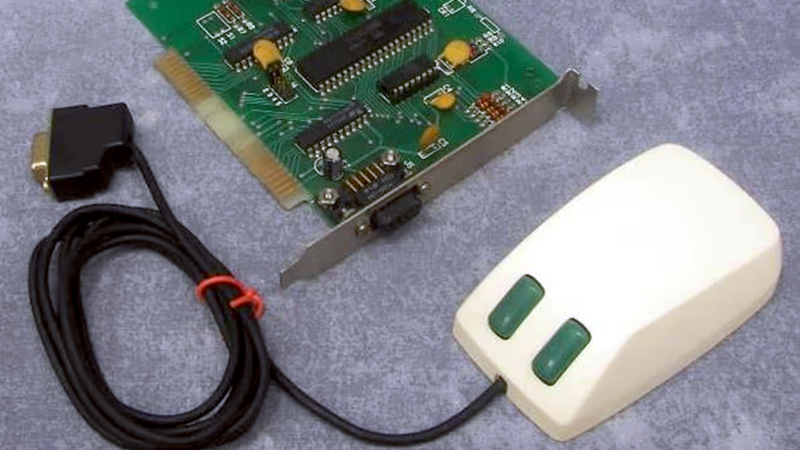
The USB port which first appeared on our computers some time in the mid-1990s has made interfacing peripherals an easy task, save for the occasional upside down connector. But in the days before USB there were a plethora of plugs and sockets for peripherals, often requiring their own expansion card. Among these were mice, and [Robert Smallshire] is here with a potted history of the many incompatible standards which confuse the retrocomputing enthusiast to this day.
The first widely available mice in the 1980s used a quadrature interface, in which the output from mechanical encoders coupled to the mouse ball is fed directly to the computer interface which contains some form of hardware or microcontroller decoder. These were gradually superseded by serial mice that used an RS-232 port, then PS/2 mice, and finally the USB variant you probably use today.
Among those quadrature mice — or bus mice, as early Microsoft marketing referred to them — were an annoying variety of interfaces. Microsoft, Commodore, and Atari mice are similar electrically and have the same 9-pin D connector, yet remain incompatible with each other. The write-up takes a dive into the interface cards, where we find the familiar 8255 I/O port at play. We’d quite like to have heard about the Sun optical mice with their special mouse pad too, but perhaps their omission illustrates the breadth of the bus mouse world.
This piece has certainly broadened our knowledge of quadrature mice, and we used a few of them back in the day. If you only have a USB mouse and your computer expects one of these rarities, don’t worry, there’s an adapter for that.












Hi! Bus mice interfaces were also part of early Super VGA cards.
The ATI VGA Wonder-16 of 1988 had one, for example.
Same goes for the enhanced EGA chip of the Schneider 286 PCs, for example.
https://en.wikipedia.org/wiki/ATI_Wonder#VGA_cards
I had one of those cards…ahhh! The glory days of video card drivers and TSRs. And the not-so-glory of QEMM…
is it a quadrature signal or an RNA sequence? we won’t know until we inject it in a rat to see!
The Sun optical mouse used an IR LED and a red LED, each coupled with their own detectors. The mousepad was aluminum, polished on the top side, with a pattern of black stripes going one way and blue stripes going the other way. Depending upon whether only one or both of the detectors saw a crossing, you could tell if the mouse was being moved horizontally or vertically. I’d guess that the black stripes triggered both detectors, while the blue ones triggered only the red LED one.
And rotating someone’s mouse pad 90 degrees when they were away could result in bizarre cursor behavior and real-world retribution.
I had the original version of this from Mouse Systems. I worked for a customs broker and they sent some samples for US Customs to tear apart and classify. They left one mouse, one mousepad and one card intact so I was able to set it up at home. Used it for awhile until I needed room in my tower for a SCSI card.
And not to be forgotten is the ADB (Apple Desktop Bus), which startet in the mid-80s and allowed a “plug & play” connection of keyboard and mouse, but only within the Apple world.
ADB was cool! 😎 It was based around a serial protocol and a microcontroller, if I understand correctly.
ADB also could handle other low-bandwidth devices, such as joysticks.
Wasn’t there a ADB-based Mac version of the famous beige Gravis Gamepad that PC/DOS users used to use ?
On PC, Commander Keen IV, Jazz JackRabbit and so on mentioned it.
I had an ADB printer: the Epson 600.
There was even an ADB modem! I think it topped out at 9.6 kilobaud though, but that left your modem port open for something else.
Well, I guess that was “good enough” for a basic data/fax modem. 🙂
Fax often ran at 4800, 9600 and 14400 Baud in the 90s, I think.
Online services such as AOL or CompuServe were low-bandwidth by nature and used compression, I think.
Minitel in France ran at 1200 Baud by default, still. Similar to BTX.
Merely then-new internet access was demanding at the time, I think.
With the exception of things such as Telnet or E-Mail, I mean.
I had that Microsoft buss mouse. I remember the constant IRQ hassles. Such a relief when USB mice arrived.
The limited IRQs and DMA channels were a limit of the 8-Bit PC/XT bus mainly.
The 16-Bit AT-bus (aka ISA) had twice of them, since things had been wired in cascade.
And no, USB was no relief, I think. 😨
USB 1.x/2.x used polling and was worse than using PS/2 mouse and keyboard interface.
Also, PS/2 devices need no USB controller to be initialized first.
They always work, even if the OS has no drivers for USB host controllers.
We had trouble thanks to USB first time in late 90s when Windows 98SE was installed on “legacy-free” PCs.:
Once the USB host controller was detected/initialized, the BIOS emulation for PS/2 mice and keyboard vanished.
So it was nolonger possible to continue with driver installation.
It was nolonger possible to click “next” and point Windows to the USB drivers!
Second issue appeared when notebooks/PCs dropped native USB 2 support in favour of USB 3-only chipsets.
That caused users to be unable to install Windows 7 at the time.
The main problem was that the intel implementation of USB 3 had no backwards compatibility built into the USB 3 host controller (no legacy-block).
Instead, the USB 3 hub did talk to USB 1.1/2.0 devices for sake of compatibility?
Unfortunately, that was no help to Windows 7, because on the software side there was no compatible USB 1.1/2.0 controller in the system!
So much for praising USB! It’s horrible! 😮💨
PS/2 mouse and keyboard are elegant and work natively at system level, no USB support required.
It’s just dumb how things have developed, especially since mice and keyboards of the 2000s supported both PS/2 and USB protocol.
All it needed was a mechanical adapter.
Even serial mice of the 90s often had supported PS/2, though they may had needed a fitting adapter (different wiring used).
The 16 bits AT platform maybe had twice interrupts, but having to juggle with DIP switches on each card to accommodate what interrupt each driver and card could support to make the whole work together was still a royal pain. Then the mix of plug-and-play and non-plug-and-play was sometimes erratic in its behavior. It was only then solved with 32-bits and PCI
Well, to me as an advanced (?) user ISA was very logical (on surface level, at least)..
Things had to work internally somehow, after all.
On ISA, everything had to be configured via jumper (or early non-PnP software configuration) and then had acted accordingly.
All it needed was to sit down for the user and think clearly for a moment.
On ISA Plug&Pray and PCI the hard- and software did what it felt like.
Resources issued by BIOS or PnP-aware OS (say Win 9x) changed every so often.
That wasn’t fun when using DOS applications and drivers that assumed resources on a clearly defined spot.
Here, plain ISA was better. VLB, MCA and EISA, too.
These other buses didn’t re-configure randomly.
Speaking of IRQ conflicts et cetera..
On DOS, it helped running Microsoft’s MSD or Checkit! at the time.
Checkit! in version 3, a commercial product by TouchStone, was very common among users, it helped trouble-shooting and brchmarking.
So that’s why many users had an, err, backup copy of it. ;)
Both programs allowed checkit memory locations, IRQ/DMA resources and display the loaded DOS device drivers.
Compared to running debuggers or hex editors on CP/M or C64 it was such a luxury.
But that’s the difference, maybe. Users of the 70s and 80s who were used to know their home computer inside-out
had less trouble fiddling with DOS and PC hardware at low-level, maybe.
These kind of users weren’t “consumers” or end users yet, but wanted to be the masters of their computers.
They wanted to understand assembly language, memory locations and i/o ports.
And write their own little programs at home. A computer was no plain appliance to them, in short.
That changed with Windows 95, when the “Maus-Schubser” type of users appeared (engl. mouse pushers).
People who had no idea about computers, couldn’t use any kryboard commands but who could click on pretty pictures (icons) using a mouse.
No wonder they had issues with ISA bus and jumpers.
That’s when the era of the DAUs had started (DAU=Dümmster anzunehmender User; dumbest assumable user).
The term was in use in my country in 90s and 2000s, I don’t mean to hurt anyone’s feelings here.
It’s the type of user who searched the “any key” on keyboard.
Such thing didn’t exist in the C64 era yet.
I mean, that being said, you’re not wrong with what you wrote.
ISA had required some technical knowledge by the user..
I wonder how ISA Plug&Play would have been if it was more like Amiga’s Auto-Config used on Zorro bus.
Because, the use of all these Plug&Play utilies on DOS or WfW wasn’t fun.
It caused more headache than just using jumpers.
I remember the Creative utilities in a rather negative way here.
The PnP and half-PnP versions of the Sound Blaster 16 required CTCM/CTCU and were no fun to use/configure on DOS.
By comparison, the original SB16 (CT17xx models, everything set by jumpers, no drivers needed) or Gravis Ultrasound or Pro AudioSpectrum 16 (software configurable) were much more user friendly.
Btw, I didn’t mean to be unfriendly. Sorry about that.
Bus mice indeed had resource issues, you’re not wrong.
The serial port (COM port) was causing less trouble, by comparison.
That’s why users opted for simpler serial mice, later on.
Ideally, in the 90s, users had replaced the serial 8250 UART by a 16550A(FN).
That new serial port chip had generated even fewer interrupts to the processor (good).
It also had a working FiFo buffer and allowed higher baudrates in multi-tasking environments (Windows, OS/2 etc).
That’s why PC magazines of the 90s had recommened using modems on a recent 16550 serial port.
Oh I’m sure we can find a “bus” mouse.
https://methodshop.com/wp-content/uploads/strange-buses-mouse-bus.jpg
“I’ve had it with these monkey fighting mice on this Monday to Friday bus!”
USB originated from a Latin term that means “it’s upside down”
Inversus ergo sum.
You think a bus Mouse is bad… I had a laser printer with a dedicated full length 16bit ISA controller board. DB37 connector, onboard processors and multiple megabytes of weird ZIP RAM chips with a .·.·.·.·.·.·.·.·.·.·.·.· pin configuration on the bottom.
Pretty sure the chassis was an HP II but most of the brains were on the card and there was type setting software that could make it do way more than what most computers could back then.
I put nail polish on the “up” side of my USB controllers, judging orientation by my laptops (which i think have all used the same orientation…i do check). I also put nail polish on the top of the laptop case just over the port so i don’t have to hold the laptop sideways to look at it (same for headphone jack).
Really kind of ridiculous that i feel like i invented the use of visual cues to orient a USB connector but there we go. I didn’t look closely enough at that part of the USB spec, i don’t know if the molded plastic boot is supposed to have an orientation for the logo but anecdotally i haven’t found any rhyme or reason to its placement in the wild ???
Also why isn’t there a masculine-coded version of high-contrast enamel in a small jar with an applicator built into the lid?
ugh “controllers” should be connectors. but i put it on the same side of both genders when i can
Car touch-up paint? Appliance touch-up paint? Solder resist repair? Otherwise just accept your high-contrast enamel is whimsically named “Red Bottom Stilettos”.
The spec says the USB Trident should be “up” on type A and B cable-end connectors, and that the socket on the host (or device) should be oriented so that the Trident is visible (up, forward, etc.) when plugging in the cable.
There are some cables whose manufacturers are too vain, and insist on putting their own logo on the “up” side, and the USB Trident on the “down” side. And then there are some that aren’t marked at all, which get the silver Sharpie treatment at a bare minimum.
There was a nice (but brief) period where mini-DIN connectors for PS2 keyboards and mice had a nice, big flat part on the connector body that you didn’t even have to look at to get it oriented correctly. And then they started color-coding them (PC97 standard), which was helpful. It’s too bad USB type A and B never had good tactile alignment cues like this.
For your paint, go to your local hobby store and get some Testors “Candy Apple Red” enamel, or whatever color you prefer. It used to be in little glass bottles with an applicator pen, just like nail polish.
Chad PS/2 keyboards of the 1990s using interrupts vs virgin USB HIDs of the 2020s using slow af polling.
No wonder modern gamers suck so much they need Pay 2 Win schemes to even play single player games 😂😂😂😂😂😂😂
I love my Commodore PC-1. It has mouse port built in. It uses Amiga mouse. And works fine with ms mouse drivers. It works great with Amiga tank mouse converted to laser.
I used a Microsoft Inport bus mouse for the longest time – I had one on a 486DX2-66. When I installed Linux for the first time (around 1994?), I had to edit the Linux source and recompile the kernel to specify the address of the Inport mouse to make it work.
And another bus mouse story – I liked the Microsoft dove bar mouse. When I had an Amiga 500 and 3000, before the 486, I used a bus mouse to Atari adapter, so I could use the dove bar mouse with the Amiga.
AMX mouse on the BBC Micro FTW!
Hey! That mouse also was a popular accessory for Amstrad PCW/Schneider Joyce! 😃
The PCW was the PC version of the Amstrad CPC, basically.
With the mouse, it was possible to do DTP and use a GUI!
Info:
https://cpcrulez.fr/applications_util-amx_mouse_and_desktop.htm
https://www.retroisle.com/amstrad/pcw/Articles/peripherals.php
https://en.wikipedia.org/wiki/Amstrad_PCW
Fascinating dive into bus mice chaos, Microsoft, Atari, Commodore incompatibilities via 8255! As a retro dev, this explains my old PC tinkering woes. Adapters save the day!