
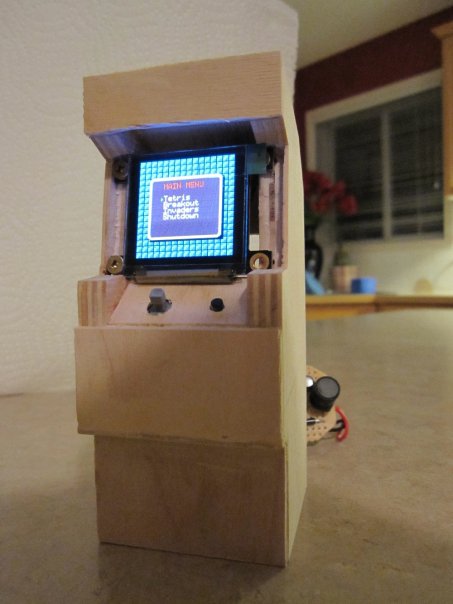
We love arcade games. Who doesn’t? We feel that the “arcade” feeling just can’t be replicated in any other form factor than an arcade cabinet. [Moslevin] must feel the same way too. He has built, what could possibly be the worlds smallest arcade cabinet. Aside from a coin mechanism, it is fully functional. It is an ATMega328p running his own custom software. The games he has available are Tetris, Invader, and Breakout, all coded by himself as well. We’ve seen small arcade cabinets before, but none this small.












Thats one small arcade cabinet XD
I read the article, it uses the atmega328p, but I cant find the schematics nor diagram, is that supposed to be an arduino?
That’s a custom ATMega328p board – not an arduino. Right now it’s just a hand-wired prototype, but I’ll eventually post schematics for it.
Is the graphics rendered and displayed using ONLY the Atmega328?
@l0gic
it’s a AVR atmega328p microcontroller
I take back what I said, I saw your using OLED display (by 4D Systems). I believe they sell OLED displays with the graphics driver onboard
somthing like the “”µOLED-96-G1(GFX)”” @ 50$ us
(which is pretty pricey for this type of project).
Would I be able to render the graphics using cheaper method (as opposed to OLED Display Module by 4dsystem )?
All of the graphics are stored on the AVR, and all of the animation/rendering is controlled entirely by the AVR.
The graphics hardware itself is a 4D Systems OLED module, which talks to the AVR over a serial command interface and handles the “pixel-level” interface.
Everything is abstracted through the RTOS device driver interface though, so there’s nothing in the code that relies on any specific feature of that module, and no difference between the graphics output on a 4D systems display, a parallel graphics LCD, or a PC Framebuffer.
wow that’s great nice job :-)
are you planning to release the code and schematics for it in the future ? I would love to build one
that would be perfect for this, web enable it! http://www.guimp.com/
You can get the OLED display from farnell (1583044) and interface it directly to the AVR. The interface is straight forward and well described in the datasheet (regular SPI bus). But you need to supply +12V to the display.
4D System basically charges you for the breakout board (which generates +12V) and the fool proof interface.
I want to laser-cut my own arcade cabinet .. anyone know of any designs online that are worth checking out before I go ahead and just wing one together myself? Ideally I’d like it to be about 50cm tall .. but I’m open to any options, if there are already designs for the cabinet out there ..
@Lupin – Thanks for the info on the OLED! I plan on doing a limited production run at some point, and being able to drive the display directly would greatly reduce the overall cost (even if it meant moving to a larger AVR part), and if it’s SPI then it should be very easy to implement a FunkOS display driver to drive it.
@JasonX – I’ll probably release the source in some form in the future, it probably needs a bit of documentation and review before it’s ready for prime time.
That’s so cool it hurts… nice work. :-)
Awesome work!! I love the mini joystick & color screen. There are doll-house reproductions of coins on ebay, so you could be ready for a coin counter – just add a slot photodetector pair.
http://www.auctionzealot.com/members/sweatshirtman/nick3(medium).jpg
needs some paint
That’s all kinds of awesome.
Superb work.
You got too much spare time on your hands… I WANNA BE YOU .. this is awesome :P
blog bookmarked for life !!!
little putty, sanding, and paint (maybe some scaled down artwork) you could pass it of as a real cabinet
only tiny
nifty
Once I finish the last few bits of mechanical fitting, I’ll definitely be painting it and adding artwork. Hopefully I’ll get around to that part sooner than later ;)
Nice, but does everything fit in the cabinet? All the pictures have a bunch of extra gut hanging out back.
Yes – everything does fit in the cabinet (although there isn’t a lot of extra space, that’s for sure). I have a back panel for it, but I’m waiting to install the power switch in it before I assemble it into the cabinet.
Top work. Really nice project. :-)
SO COOL
Well done!
Kill the girth with some balsa wood. U can cut it with a razor blade
You haven’t seen small arcade cabinets until you’ve seen the Pocket Galaga.
http://arcade.laweb.nl/PocketGalaga/
Oh and big thanks to whomever is responsible for allowing capitalization in the comments!
Gwr2014