
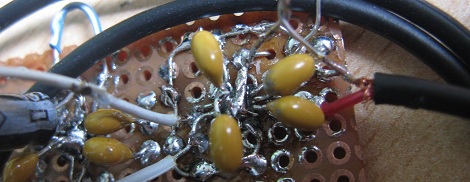
[Victor] likes to watch movies on his laptop, but the tiny speakers in his machine don’t do [John Williams] and other perfectly fine soundtracks justice. To pump up the jams a little bit, [Victor] got a pair of Trust Mila 2.0 speakers for Sinterklaas. Unfortunately, these speakers were terrible – noise everywhere, tinny output and a brighter-than-the-sun blue LED. These problems were fixed once [Victor] replaced the amplifier in both speakers.
After shopping around for a new power amp to go in each speaker, [Vic] hit upon the MAX9575 3.2 Watt amplifier. This little guy met all of [Victor]’s requirements. The only problem is that the MAX9575 is only available in a TQFN package.
After a deep breath and much sweat of the brow, both amps found a new home in their respective speakers, deadbug style. It probably would have been easier to etch a PCB, but we’ll give a tip of the hat to [Victor]’s fine motor skills anyway.
Because of the insane soldering skill demonstrated in the title pic, [Vic] now has a really nice pair of speakers. Check out the demo of the improved speakers after the break.
[vimeo=33724857]













Soldering a TQFP deadbug style? Wow, this guy’s ambitious. I’m surprised he wasn’t able to find *any* amp in a PDIP package that would have met his requirements.
Besides, he can’t drive more than 2.5W, per the USB spec, so that widens the list of suitable amps. If you search a bit on mouser, you can easily come up with a handful of candidates.
But mad props on the soldering effort. I don’t even use TQFPs on an etched PCB…
Sinterklaas is an awesome dude.
so he just ripped out a perpetuum mobile? According to trust those speakers work on 5V @0.5W, and have an power output of awesome 5W! energy crisis solved.
Maybe that’s the whole issue, even though the article says:
“How, ON EARTH can it be cheaper / better for Trust to use this crappy amplifier board with lots of components whereas the budgetary price of the Maxim IC is USD 0.75 at 1000 pieces?”
that is actually an odd statement since the circuit is based on a chip as you can see in his picture, the TDA2038 amplifier, and if that is indeed rated for higher output that the USB port can supply perhaps it sounds so bad because the chip simply isn’t getting enough power to operate as designed.
And as for the ‘Trust’ brand, that’s just a relabeler who buys in bulk from china and put their own logo on it and have no real idea what the hell they are selling themselves.
Incidentally, when I google the TDA2038 all and every link is in chinese, seems it’s only used by the chinese
http://www.alldatasheet.com/datasheet-pdf/pdf/110120/UTC/UTCTDA2030.
Sweet that you tried andres, but 2030 and 2038 are not the same number, it’s twentythirtyeight
Many years afterwards I managed to find exactly one of these speakers running on the same chip.
Power does not appear to be the issue (I disconnected the usb power rail and connected an external powersupply. I found data online (https://www.jotrin.com/product/parts/TDA2038) That says its capable of running at 6 volts. So I fed it 6 volts and listened to varying musics.
The only improvement was less noise due to a cleaner powersupply. The sound was still trash
Many years later, I managed to find one of these speakers running on the same chip.
Power is not an issue (I disconnected the USB power rail and connected an external power supply. I found data online (https://www.ntcomponents.com/Part-Detail/DF02S-T/1/1431658.html) that this Indicates that it can run at 6 so I power it with 6 volts and listen to different music. Still need to keep debugging
The only improvement is less noise due to the cleaner power supply. sound is garbage
It’s actually 5V @ 0.5A per the USB spec, which gets you 2.5W.
Wow! Victor’s got some skillz!!!
You do know you can buy QFN to DIP adapters for $6?
http://www.robotshop.com/schmartboard-48-pin-qfp-qfn-adapter.html?utm_source=google&utm_medium=base&utm_campaign=jos
That’s good to know, but you’ve still got the problem of how to solder these leadless packages yourself. It can be harder than BGAs as the pads are on an incredibly small .5 or even .4mm pitch – way too small to accurately get solder paste onto by hand.
Here’s a MAX9768 (10W, filterless) given similar treatment: http://i.imgur.com/CqZDU.jpg
That’s good to know, but you’ve still got the problem of how to solder these leadless packages yourself. It can be harder than BGAs as the pads are on an incredibly small .5 or even .4mm pitch – way too small to accurately get solder paste onto by hand.
Here’s a MAX9768 (10W, filterless) given similar treatment:
http://imgur.com/CqZDU
The one I linked to has grooves in the pcb and is pre-loaded with solder, all you have to do is seat the chip add the flux and heat with the tip of a soldering gun.
Nes: “Here’s a MAX9768 (10W, filterless) given similar treatment:
http://imgur.com/CqZDU”
Jesus-H-Christ! Looks more like a wire bonding setup, now those are some soldering skills!
Thanks for the link, but it features a 48-pin adapter, this is a 16-pin device. Probably adapters are available for QFN-16s as well, but buying two of those + shipping would be more expensive than a new speaker setup. I think one of the charms of this mod is that it cost me only -abundance- of time and some perfboard and capacitors I had lying around.
While I can’t see because the picture of the adapter is too small, QFN/QFP adapters are usually manufactured for the maximum size chip it can hold. i.e. a 16 pin TQFP package probably fits on the adapter, but you’ll end up with some useless pins. http://iteadstudio.com/store/index.php?main_page=product_info&cPath=10_22&products_id=272 here’s a better example and a cheaper price too.
I can see why you did it the “hard -way” it’s why I still make bread by hand (i took it to the extreme once when hung over and also built a wood fire oven in the back yard to bake a loaf).
For me $6 is worth the time saving and the fact that I’d most likely ruin 30+ chips in the process doing the skilled way. :-)
dont care much for this speaker project
but this TQFN “ghetto” work deserve some
street creeds.
Pretty much
Yes haha
Still terrible :) but fun to do.
I remember modding some cheap 5.1 speakers that only had a stereo input. Found the volume control chip, cut some traces, added some audio jacks and turned it into a true surround system. A crappy surround system, but fun regardless.
With amplifiers when you do dead bug style you also have the problem that they are putting out heat, and I’m not sure having them upside down is beneficial come summer?
Anyway I agree that there are tons of DIP alternatives that are quite capable.
However, when I see the picture I feel eager to give it a shot too, it’s such a challenge to solder that, and would be so pleasing if you managed to do it :)
No, these class D amps put out virtually no heat at all. They also manage to sound louder for a given power input so it’s definitely a worthwhile upgrade.
lm386 would be just fine- but wait: that’s to simple.
That picture reminds me of the ST:NG episode where the black pond blob ate the blond butch security chick. You should draw little star trek faces on the yellow caps.
Good to Sinterklaas representing
A worthwhile site for anyone interested in DIY audio it diyaudio.com These guys know their shit and are always willing to lend a hand. Quick and nasty chip amp is all that’s required for non audiophiles. Something like a gainclone will produce great results (providing you spend the dosh on decent components esp transformers and caps) for a reasonable cost. Also diy speakers rock!
Try one of these. They sound fantastic with the right speakers.
http://diyaudioprojects.com/Tubes/K-12M/K-12M.htm
I have tried out some of these tiny class D amps, they are great for USB powered sound.
It is true that the original USB spec. only allowed for 500mA, but almost all computers today can handle at least 1A on USB, some cheaper ASUS ones just have the USB 5V directly connected to the 5V rail, with the effect that a short circuited USB device turns off the whole computer…
Just a quick note about these filterless class D amplifiers, while the amplifier itself can work without a filter, a 22microhenry inductor in series with the speaker will greatly reduce current draw since any random speaker will not be optimized for use with a filterless class D.
#1) im jealous of your soldering skills!
#2) never thought of class D solving the usb-spec-not-enough-amps-for-realsound
#3) i think most clas D amps sound like (very bad word), but as someone pointed out; there could just be the a tuning issue with type of speakers or eq. or maybe the amps im thinking of are the 1st gen. classD and the newer ones sound okay?????
PS: if the music sucks, youll never know the difference between good and bad (cough: rap and pop and and and), a good amp will not make a bad signal good.
and dont anyone judge his music or amp through that camera-mic(youtube), its for voice…
but my main point is his dead-bug skills are out of this world! wow
I’ve messed around with class D amps like this. The results vary wildly, so much depends on the speaker characteristics. It is almost like you have to add a filter to get decent results. Maybe the builder got lucky in this case.
Many years later, I managed to find one of these speakers running on the same chip.
Power is not an issue (I disconnected the USB power rail and connected an external power supply. I found data online (https://www.ntcomponents.com/Part-Detail/DF02S-T/1/1431658.html) that this Indicates that it can run at 6 so I power it with 6 volts and listen to different music. Still need to keep debugging
The only improvement is less noise due to the cleaner power supply. sound is garbage