
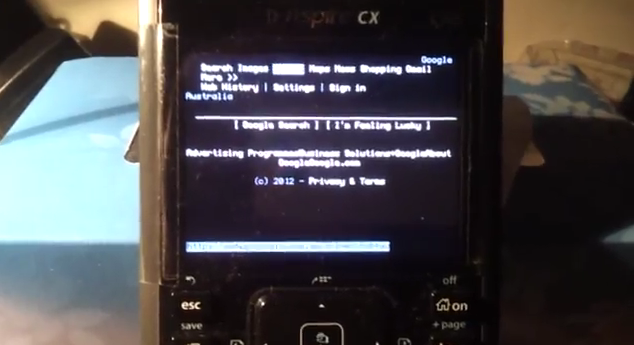
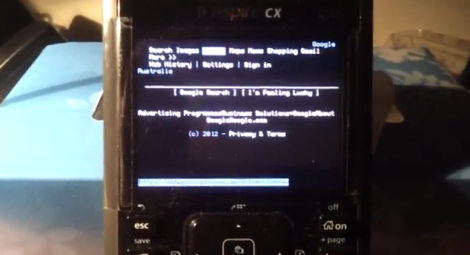
It’s great to see Linux running on a device in a way that was never intended. [tangrs] has successfully run a Linux kernel on the ARM based Nspire CAS CX graphing calculator. He’s developed an in-place bootloader that allows a kernel to be loaded from within the stock Nspire OS. It also allows for peeking and poking at memory for debugging.
[tangrs] also managed to get USB host mode working on the calculator. This allows for a USB keyboard and Wifi dongle to be connected. At this point, the calculator can connect to the internet and browse using a text-based browser: Links. The calculator runs a SSH server for remote access, and graphical browsing is in the works.
It looks like this calculator is on the way to being a handheld Linux device. All of the source for the kernel and bootloader are available on [tangrs]’s Github and updates on his blog. After the break, check out a video of text-based browsing using a full keyboard.













Really, wow…
Now, is TI going to get angry about this, or get behind it?
Let me put it this way: the only reason people still buy those is because they are locked down and lack wireless.
Exactly, they only sell because they are “unmodifiable” so can be permitted on exams.
and now runa Nspire CAS CX Calculator emulator just for fun
I would buy one, put this linux port on it, and sit in my class using it to type notes XD
You can already type notes on it by default, it even has an equation editor in notes and a file structure and my documents folder. I think there’s even an external keyboard you can get for it.
Isn’t the text browser called Lynx?
There’s links and links2, which support things like tables that lynx doesn’t.
Links2 even has svgalib and X graphical render modes.
lynx, links and links2 are all browsers!
And don’t forget ELinks and Linkx!
I have one of those TI Nspire CX CAS! Great to hear those News!
I like playing those old NES and GBC games with the GBC and NES emulators for the nSpire (with nDless).
Woukld be great if they could get all those calculating stuff back and it would be a perfect handheld PC!
it would be even better if ti accepted ndless instead of blocking it all the time. i guess they dont realize the true potential
ti knows the potential of ndless and thats why they reject it. they have contracts with schools and “guarantees” that the calculators cant be tampered with, so they are available during exams.
so, when will x be ported?
it’s done! these guys deliver without a fail!
http://www.youtube.com/watch?v=qVGnYGbH7UI&feature=player_embedded
Let’s wait until these calculators get bluetooth or wifi.
There is actually a wifi dongle plugged into the Nspire :)
first a linux powered desk phone and now calculator? i like where this is going! linux on everything!
The phone had a native linux image on it (not a good one), this did not, and to be honest you already could put Linux on everything, sometimes it just takes magic fingers(programming). Also, even though I’m a Linux advocate, Linux would not be suitable for everything.
Can you run applications on that?
If so I am going to install linux and minecraft on my calculator so I can use this graphing calculator
I want it to run Octave!
or maxima
Is it possible to get this to work on the normal (b/w) nspire?
Yes, you can use Ivoah’s guide (Google is your friend), and just switch around a few files (I don’t know which ones, however).
I have the CX (non-CAS). Can I use Linux, or do I need to buy another $150 calculator?
Yes, the CAS doesn’t matter.
OK, now grab the internal code and write an Nspire emulator, running on a TI Beaglebone via a Web interface.
can you install the cas on a regular cx?
It is possible:
Conversion of an TInspire CX to an TInspire CX CAS
Program-Sources Download …
• (1) software „nLaunch“ from
http://tiplanet.org/forum/archives_voir.php?id=12105
• (2) software „TNOC“ from
http://tiplanet.org/forum/archives_voir.php?id=1922&short=1
• (3) of TInspireCX CAS-update from
http://education.ti.com/download/…
actual version: TI-NspireCXCAS-3.2.3.1233.tcc
• (4) of TInspire Link software from
http://education.ti.com/de/deutschland/software/details/en/…/ti-nspire_computerlink
actual ver.: TI-Nspire_Computer_Link_3.2.0.123.exe
Creation of necessary update
run TNOC_en.exe
• (1) choose „Open“ and put in path to TInspireCX CAS-update
• (2) activate checkbox „Delete boot2“
• (3) execute „Process“
• (4) result: in folder of original TInspireCX CAS-update-file (e.g. TI-NspireCXCAS-3.2.3.1233.tcc) now exists a new file with „originalname“_b.tcc (e.g. TI-NspireCXCAS-3.2.3.1233_b.tcc).
• (5) this file has to be renamed to „phoenix.tns“
Connect TInspire with PC
• (1) connect handheld with PC
• (2) create folder „nLaunch“ on handheld using TI Link-software
• (3) in the lower panel (TI-Nspire file browser) right-click, New Folder, “nLaunch”
• (4) copy file „phoenix.tns“ to folder „nLaunch“ on handheld
• (5) if exist: copy files „nLaunch.tns“ and „preloader.tns“ from PC-folder „nLaunch“ to handheld-folder „nLaunch“
Reboot to delete OS
• (1) reboot handheld: press reset-button at backside of device and at same time buttons „doc“ + „enter“ + „EE“
• (2) release reset-button
• (3) release three buttons
• (4) handheld reboots and stops with selection 1-4.
• (5) choose button 2: „Delete operating system“
• (6) confirm with button 1
• (7) handheld deletes OS and stops, showing: „Press any key to restart“
• (8) execute restart („enter“), handheld stops, showing: „Operating System not found. Install OS now“
Installation of CAS
• (1) choose handheld in TInspire-Linksoftware at bottom right edge, (probably do „Aktualisieren“) and „Auswählen“:
• (2) choose „Extras“ at top, „Handheld-BS installieren“:
• (3) choose from PC-folder „nlaunch“ file „nLauch.tco“:
• (4) installation of new CAS-OS with „BS installieren“ and confirm „Ja“:
• (5) installation of new CAS-OS starts
• (6) PC shows „Fehler“: IGNORE ERROR MESSAGE !!!
• (7) The new CAS-operating system is installed correctly on TInspireCX (error message does not matter):
do setup
• do setup on handheld: choose „Language“ and „Size“ of writing
do CAS calculations
• do classical calculations, e.g.: factor, expand, integration
Hey Tinker, I hope you are fine.
I have tried your tutorial, but struggeling with the installation. I followed all your steps. I got a Error that the Connection is lost, then the calculator starts to boot, then again, and then it stays at the clock, which will end up with the screen that no OS was found.
I hope you can help me
And no, I dont want to cheat. I am allowed to use any calculator which is programmable but not one which can connect to a network. Ps: I am studying in Duisburg, DE.
I hope you can help me! :)
This is an amazing project. I plan on using low memory apps in it :)
Minecraft isn’t low memory, kids :)
Actually, yes it is. :3
Ok then… you are writing “Cas cx”, normaly it’s “Cx CAS” and linux run on Cx Cas AND Cx ;)
You are writing “Cx”, normally it’s “CX” and Linux runs on all nSpire calculators (even the black/white ones!). :P