
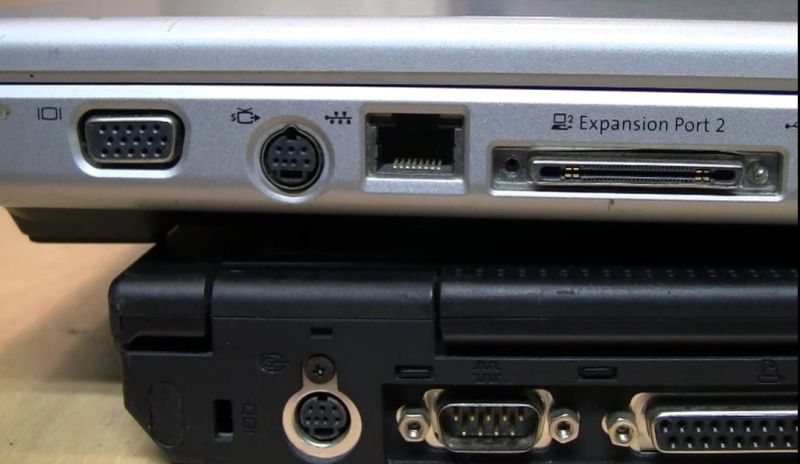
Even though laptops from around the early 2000s came with just about every conceivable port on them, they still would often feature a somewhat unusual combined video output port. While at its core this was just a 4-pin analog S-video output, the three additional pins on the mini-DIN connector provided some more features. Of course, as [VWestlife] found out during his archaeological research, not every manufacturer used the same pinout here.
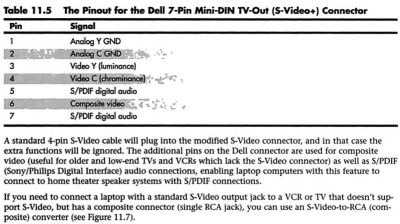
The naming for this specific port differs, with the name ‘S-video+’ appearing regularly, yet many descriptions glossing over the additional pins and only mentioning that it can be used with a 4-pin S-video connector. As it turns out, most manufacturers used roughly the same pinout, matching the shown Dell one. This adds composite output, along with two S/PDIF digital audio pins that could be routed out with an adapter into their full-sized ports.
Of course, the Apple PowerBook G4 had to be that exception again, with it omitting the audio pins and putting the composite signal on pin 5. This left the last two pins completely unused, but serving to completely confuse anyone who thought that they could get more out of the port with an adapter for those uncouth PC systems.
As to the remark at the end about how the transition to ‘just USB ports’ has made everything better, we’d challenge the average person to look at a random USB-C port and tell based on its appearance which standards it actually supports.












It’s the same as the ‘VIVO’ port on desktop GPUs of the time. Everyone had a slightly different pinout and features, so only the adapter that came with the card would work.
That said, I remember slicing up a scart cable and sticking the leads directly into the socket because the adapter was missing, so we could watch Matrix on the TV off of a video CD. The picture was worse than a VHS cassette but at least the TV was bigger than a 14″ monitor.
yeah in those ancient days there were scart adapters supporting svideo making the tv an awesome monitor, i had a 42″ plasma tv as monitor back then. must have been round the year 2007
Good times, crazy but true
Nah. Nobody was impressed. It was so bad you couldn’t tell what was going on at times. Pirate VHS dubs were better and everyone had seen the film already. It was a curiosity, one of those ‘can do’ things that sold GPUs to tech enthusiasts but had no real practical application.
I ran an S-video cable and a speaker cable from the upstairs computer room, down to the TV downstairs just to do something similar. It looked like shite for a bunch of reason, but it was amazing.
Better than VCD, maybe. But by the early 2000s plenty of people were ripping DVDs to various flavors of MPEG4, e.g xvid (the codec, not the weird DRM hardware player) and the picture quality was pretty good, if you used the right settings for the source material.
The Matrix was sort of the textbook case for optimising your transcoding settings, because it had slow parts, fast parts, bright parts and dark parts. (and of course because most nerds of the time thought it was a rad movie) Two-pass encoding could really improve the video quality while still fitting onto a CDR to share with your friends. Of course with the average student computer of the early 2000s it would take over 24h to complete the transcoding process and see if your new settings were actually better.
Back to the topic of the article, most of the improvements in picture quality were often pointless because the picture was usually passing over an S-video cable from my Toshiba laptop to a very cheap CRT TV using the janky dual-screen settings in windows 98.
“video CD. The picture was worse than a VHS cassette”
Maybe there’s an “in the US” missing, by any chance? 😉
Because the commercial VCDs sold in Europe (-not SVCD-) of early 90s weren’t worse than average VHS releases (when watched on CRT via Philips CD-i etc).
If the compression was done right, picture wasn’t blocky and there weren’t noticeable artifacts, either.
A few months ago, for example, I watched an ’94 VCD of Star Trek 4 and
was impressed how clear the image was compared to an VHS (plain VHS, not S-VHS).
There wasn’t the usual blur, noise and wear of a video cassette.
If I didn’t watch closely (freeze frame), I would have mistaken that VCD for an average DVD release of late 90s.
Oh and I watched it with a Blu Ray player on a 4k TV, btw. 🙂
If I had been using a CRT monitor, instead, then I think the image quality would have been even better (MPEG/VCD limitations less noticeable).
Of course, those Asian street-grade VCDs or NTSC VCDs might be an entirely different story, not sure.
I’m just sharing my experience with commercial PAL VCDs..
If you wanted a feature length film on a VCD you had to compress it to a blurry mess, and the encoding was MPEG-2 so it wasn’t exactly efficient to start with. If you mistook one for a DVD, there’s something wrong with your eyes.
and dont forget the 8pin version on older mac powerbooks, used as serial ports…
Some early GPU (AGP era mostly) also have multi-out port and you needed breakout cable or adapter to use a TV or record your computer to VCR
I’m not really sure how you would arrange this; but this(along with the various things that ‘serial’ has been bludgeoned into) seems like yet another case where a tiny little bit of industry coordination that wouldn’t really have been against any vendor’s interests could have done a lot of good.
When you’ve got a size-constrained situation the temptation to replace a standard S-Video connector with a mini-DIN that also provides audio or audio and composite is pretty understandable; but would it have killed people to call around and agree on a pinout?(ideally one where a normal S-Video cable would connect as expected; and any additional signals would be exposed on the same pins across vendors)?
By the time this thing came around, s-video was already on the way out. Nobody was using composite video for computer graphics because of how crude and blurry it was. If you tried to make a presentation on a data projector, all anyone could read were the headlines. It was just good enough to connect your VHS deck to your TV but once DVDs came around you strated to need component video or HDMI.
“.. in the US”? 🙂
Because here in Europe, RGB was first and S-Video was an after-thought.
(1980s Commodore CRTs such as 170x with Luma/Chroma excepted)
Originally, over here, RGB was provided on DIN socksts but then SCART (EURO AV) came along and TVs got equipped with it.
The S-Video port (Hosiden) then arrived by about late 90s as an extra port,
because SCART wasn’t prepared for S-Video signals (Chroma/Luma).
Normally, an EURO SCART connector can either have RGB (+AV) or S-Video (+AV).
Adding the Chroma signal to an RGB enabled SCART connector wasn’t really supported
(OK. a few pinouts used back then tried it, by also borrowing Luma from Composite video etc).
So the alternative to having two SCART connectors on the back of a TV often
was to have an RGB SCART and Hosiden/3x Cinch (RCA, phono) on the TV front/side.
The early LCD TVs of the 2000s had it that way, I think.
Japan had a similar development, I think.
They have their own SCART variant and their ’80s home computers had RGB on DIN connectors, too.
Though their basic video monitors probably had RGB much earlier than here in Europe.
The basic video monitors in Europe often were AV only (composite video, mono audio), with RGB being an option (depending on model).
These aforementioned Commodore monitors had Chroma/Luma on two separate Cinch connectors.
And were mostly S-Video compatibel (voltage levels sligthly different).
SCART had been around since the 1970’s, and it was designed to carry RGB as well as composite, YPbPr component video, and s-video as a standard by the end of the 80’s.
It was up to the television to support any particular signal, though there were some cable and socket shenanigans to support different combinations. The “RGB” on most televisions, VHS players and the first DVD players was not RGB, it was YPbPr component video.
I sometimes think that the appearance of the S-Video (Hosiden) and 3x phono (red/white, yellow) connectors have to do with the advent of camcorders, too.
By mid-90s and early 2000s, VHS-C and digital camcoders were a thing in family life
and having these ports straight on front of the TV allowed for easy playback.
As always. if exists on HAD, there’s an XKCD for it. In this case, https://xkcd.com/927/
Ah to be this naive and idealistic again.
You make the assumption that the manufacturers want the customer to have a good experience.
You don’t understand they make it frustrating on purpose, because they think it will make them more money to lock their customers into their ecosystem.
Apple. While we’re talking about non-standard pins and being different just to cause trouble(and catastrophic consequences) consider modular and semi-modular ATX power supplies 🔥
Back in 90s I was doing video editing and 3D Studio animation. That port was kinda useful. Laptops were not powerful and expensive. The similar output you can find in some older videocards. Was a good option to record VHS videos. There was a quiet difference in video quality between S-Video and standard RCA.
Here is the pinout for the ATI/AMD version https://pinoutguide.com/Video/svideo_7pin_pinout.shtml. I specifically bought an old XFX Radeon HD 4650 just so I could Display my screen on our old CRT TVs, The ATI card can also do component video out aswell and looks great on the 4:3 Sony Wega TV we have. I don’t have the adapter for it so its a mess of Dupont Cables and bad splices. :P
My first laptop was that exact HP model (the DV5000), brought it everywhere with me in college. I only used the video output a few times to watch movies on the common area projection tv but it seemed to work well enough (of course my video quality standards have changed a lot since then lol).