
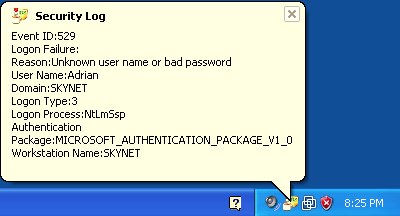
Irongeek put together a simple program for monitoring network shenanigans when you’re on an untrusted network like the coffee shop. It sits in the Windows Systray and notifies you about a variety of events. It alerts you when it sees the MAC address of the IP gateway change. It watches the security log and warns you of any attempted or successful logins. The firewall log is also monitered. Try it out and send him any bug reports/feature requests you might have.













For the Firewalllog setting in Vista, open the start menu and type Windows Firewall. Click to open “Windows Firewall with Advanced Security” (not “Windows Firewall”). In the right pane, click Properties. Then in the Logging section, click the Customize button. The Name field contains the location of the log file; copy that field and paste it into the decaffeinatid.ini setting.
Also I’m testing it now, but it looks to me like Sleep should be something considerably larger than 0. Remember it’s in milliseconds; for the not-so-tech-savvy reader, that means 1000 = 1 second.
I’m always a little wary of polling programs; they cause minute up-and-down spikes in CPU usage…
could you please stop linkbaiting with the software “hacks”?
if you want to talk about software hacks, then get into serious code-fu-phrack-type stuff, not random x program for the (oh-so-elite) windows system tray.
thx.
It’s this sort of stuff that’s got me considering removing hack-a-day from my feedreader. Would you consider creating a separate feed for the really interesting DIY hacks? This particular post is really nothing more than a software announcement.
Actually, if anyone’s interested I realized that I could address the issue of uninteresting posts with yahoo pipes.
http://pipes.yahoo.com/pipes/pipe.info?_id=bk9rlas_3rgrjqaqmlrx_q
Please for the love of god do go ahead and remove hackaday from your reader so the rest of us can peruse the comments without seeing your god-damned bitching. Seriously, folks, it’s free. How can you read “decaffeinatid: simple security log monitor” and *not* know it’s an article about a software package? If that doesn’t appeal to you, *ignore it*.
Why complain about the flavor of the free ice cream?
is anyone else getting virus scanners or anything like that telling you that the site is bad?
http://reclassify.wrs.trendmicro.com/wrsonlinequery.aspx and unfortunatly the security gateway at my work wont let me in because its classified as a “site which is known to Trend Micro to be a malicious web site. “
Funny… not open source… and not really customizable.
The source is in the zip file. Feel free to mod.
So.
It’s been about 3 years now, has a better alternative program been released?