
If you want books, but don’t want to pay for them, there is a better way than walking into your local book store and pocketing them. Try grabbing them online, from Google!
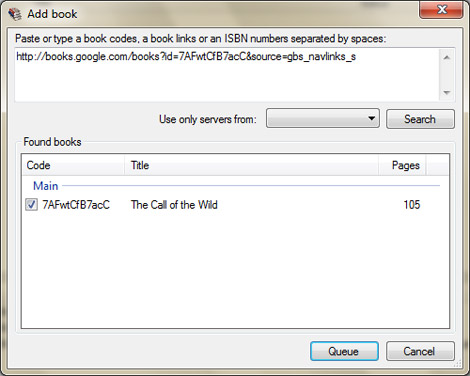
Everyone must be aware of the Google Books Library project by now. If you’re not, it’s basically a way for Google to ensure all of the world’s book content is accessible and searchable. Through the Book Project, Google works with libraries to scan and archive their older and out of print materials. Up until recently, viewers of books in the Google Library Project web space were limited to viewing books within the browser. Not any more. Google Book Downloader is a utility that rips books from Google and saves them as PDFs so you can view them with any device or desktop that can view this file format. Using Microsoft’s .NET framework, the Google Book Downloader application allows users to enter a book’s ISBN number or Google link to pull up the desired book and begin a download, fishing off with exporting the file to a PDF. Full setup instructions and download are available on Codeplex.













Great post man! I’ve been looking for a way to do this for years! I’m gonna try it tonight! But I do want to ask about something: “fishing off with exporting the title to a pdf.” Did you mean “finishing”? Keep up the great posts!
Well, this won’t last long.
lol. famous last words
Now all we need is an osx version.
Good work on the program but the problem is not many books have full view on google books
This is really bad news. I already have my bash script that only uses wget for downloading Google books.
With this program being released to everybody, Google will certainly change the way how Books are retrieved and maybe start using obscure third party plugins. Which will make harder (if not impossible) to continue downloading them.
For those willing to write their own robot, look at python and urlgrabber/urllib/htmlparser/twisted. Python makes it easy, IMHO.
@anon
I bet.
@LukeS
TIP: Viewable pages are randomized for each visitor.
thank you thank you thank you!!!!
You idiots! Now that this is public google will close it, and it will further help those who plan to stop google indexing books! Who the h*ll decided to release that?
Thank that person for singlehandedly making sure google does not have a book index and you never will be able to search through thousands of books easily!
Idiots!
what a selfishness!! you have been aware of it. But, you want to use it as your own, you idiot!!!
@naysayers
Since many of the books are in public domain they can be downloaded anyway, this just makes it much easier to do.
Programs like this are against Google’s terms of service. I got banned from google a while ago for using bots to download books.
actually it might be a different method for pulling the data off the internet but their ToS is very specific regarded automated use of their services.
This is a stupid idea.
Great. Someone who just had to show the world how clever they are will have ruined a good thing.
Books aren’t expensive folks, and there are real libraries one can patronize. Google have managed to operate library in good faith, but with public tools like this it’ll surely degrade the experience for everyone.
books are often equal or more than the cost of your tuition.
Kindly see the cost….
https://books.google.co.in/books?id=r0AlDwAAQBAJ&printsec=frontcover&source=gbs_ge_summary_r&cad=0#v=onepage&q&f=false
I tried it, but it was taking too long so I nixed it. Also, Google books then told me I had a virus (which I don’t) and refused me access, heh. There are better alternatives…
Chris Gilmer, you should be ashamed of yourself.
This is the kind of thing that give hackers a bad name. drawing attention to it is as bad as writing the app and publishing it.
Why not show us, step by step, how to hijack millions of computers and send out spam?
There are far more than enough legal, or at least moral things to hack. Why resort to the weak ploy of promoting theft??
I am truly disappointed with hack a day.
At least last time hackaday covered this sort of thing, it wasn’t directly advocating piracy.
hackaday–
@James
Not just the author of the post. The app developer should be ashamed of himself and most probably will receive a direct takedown notice from Google. He is using the trademarked word Google directly in his program plus the obvious purpose and objective (which violates de Google’s ToS) of the program.
Even worse is Codeplex actually being hosting the program. For those who don’t know CodePlex is sponsored by Microsoft.
Does anybody know Codeplex reviews new project submissions or does it just accept all crap people throw into them?
Maybe I just don’t get it, but has anyone really found Google Books to be that useful? Don’t get me wrong, I think archiving and indexing all books is a fantastic idea, but every time I’ve tried to use the service the only relevant results are limited previews. I mean, 10 out of 10 getting those Amazon.com referrals, but it rarely does me much good.
Why are people getting all pissed off? Part of being on this site is sharing information, hacker or geek/computer related. So this guy wrote a program to automate a process. If they change their method, the guy will just update the program or find someone else who knows how to do it.
@darksim905
I personally find it very useful, specially for previewing University course related books. Books are also indexed by content which means you really find relevant text by content and not only by title and abstract which used to happen on traditional libraries. But I guess you don’t read much do you? (game reviews or walkthroughs doesn’t count)
IMHO Google books works very well as it is. It is very lightweight and doesn’t require third party plugins (like most of Google services).
“So this guy wrote a program to automate a process. If they change their method, the guy will just update the program or find someone else who knows how to do it.”
If they start using some proprietary browser plugin to obfuscate the code then, TBH, I don’t really believe a guy who writes code in .NET has the skills and ability to interpret the plugin’s code.
– And that is why I’m pissed off! I don’t want more fscking plugins!
How is this hack any worse than console emulators, iphone jailbreaking, hackintosh, and any other repurposing that the original manufacturer/software provider doesnt condone, yet hackaday covers?
waaawaaawaaaah. hack a day comments have more retards than than youtube ones.
great idea, but depends on .NET making it effectively useless.
Why couldn’t a person just use Project Gutenberg? Sure, not everything comes as a fancy PDF, but it certainly seems more straight-forward.
@lubingupyourlittlesister: You are right. Everyone, I would like to set [lubingupyourlittlesister]’s comment as a prime example of what a mature comment consists of. You should all be ashamed of yourselves…
“great idea, but depends on .NET making it effectively useless”
…to about 10% of people, why just write an app that is useful to just a measly 90% of folk?
i was using this last week and i woke up to a google books banhammer.. only pulled down 103 pages before they noticed. Was a 48 hour ban.. not sure how long it would be if I tried again.
the problem is that most books are crippled, Google usually cut out large parts of them
So I guess this is compatible with an arduino based e-book reader?
@ToddM, none of what you mention (console emulators, iphone jailbreaking, hackintosh, and any other repurposing that the original manufacturer/software provider doesnt condone) is not piracy. Don’t steal shit.
The problem is this doesn’t actually work. I didn’t grab a single page and no google did not ban me.
actually, Google already presents you with a downloadable PDF for some books (for example, Babbage’s autobiography. So I guess it’s for orphaned works and those with expired copyright only).
it will be quite easy for google to block this thing, so I think a browser plug-in to a google-books-pages exclusive P2P-network would be better. It recieves orders to access a certain page, if it succeeds (since not everybody does), it adds the page to its big cache to share. (somebody implement that?)
.net sucks
mac version? :D
@You guys clamouring for a mac version: When you purchased your mac, were you in any way mislead into believing it wasn’t a minority operating system?
haters – pls stop drinking your hatorade. Someone showed up who is nicer than you. Live with it.
When I wrote a greasemonkey script that allowed people to download “this american life” instead of streaming it, I got just this kind of response. “They’ll change everything and now my script won’t work!”
Of course, it just helped them open up. Now you can subscribe to a podcast of “this american life” episodes. Stuff like this just makes it easier for executives to justify opening up the data.
Be kind.
I think its funny that people are getting mad about this. I’m sure google anticipated some degree (I don’t even know if you could call it) piracy. After all, the text is there on your screen, whats to stop you from hitting print-screen and pasting a bunch of times. This just makes it easier. =D
@sawkrawk “console emulators… is not piracy.”
Your saying the act of illegally downloading games for free as opposed to buying them isn’t piracy?
Piracy is the extortionate price charged for genuine copies you muppet
Ever stop to think that perhaps google deliberately isn’t too strict with securing this?
They have to do stuff for copyright law but they don’t have to go beyond what’s required surely.
.NET ruins it.
A few months ago Google used to say, “pages xx-yy are absent”. Recently I noticed a change: “pages xx-yy are absent or you viewed too much pages”. Surely it’s because of downloaders like this one :)
Well fuck, now google books has banned my ip.
I get this:
“We’re sorry…
… but your query looks similar to automated requests from a computer virus or spyware application. To protect our users, we can’t process your request right now.”
And that happens if I go to google books via a google search. GJ. Oh well, back to the library.
too lazy to read comments but i found this when trying to download popular science (which the HAD team STILL has not posted)
http://books.google.com/books?id=wCYDAAAAMBAJ&source=gbs_navlinks_s#all_issues_anchor for anyone interested, nearly every issue of popular science dating back to 1870
google ip bans people fast, get a copy of the onion router(ToR, wow, caps on MY hackaday? more likely than u’d think) if you plan to use this
Another great source for digitized books is the Internet Archive. They’ve got over 1.5 million digitized books and are adding about 1000 a day! Every file format related to any book they’ve got is available, for free. And best of all, the Archive doesn’t keep track of who reads what, unlike Google.
Useless hack.
The books this bot app fully pulls out are already available in full view mode (PDF or even, for many of them, EPUB). To download them outside the US, just use a proxy.
If you want the links to the images of limited preview books use the Google Books Downloader JS script (with Greasemonkey) and batch download them from within the browser. Or write your own Perl (or Python or whatever) script to automate the process the way you want (my choice).
This chip app will only get your IP banned.
Where is the hack ????
This soft only allows you to domwnload books in full view taht Googlebooks itself let you download. I won’t say it’s a hack but rather a widget, a sort of download manager for GBooks.
DONT WORKKKKKKKKKKKKKKKKKKKKKKKKKKKKKKKK
Great news.
Change your user view to user, and use flash get. Only snags the previews, but I only care about those anyway. As I usually found something from a Google query and the info is on that preview page.
here’s the latest version (as i know)
http://ulozto.net/2939866/GBDownloader-0.6.11.36366.msi?full=y&s=7
It downloads even the protected ones not only those in full view
Nice tool so far.
Will Google adjust the code to block this tool ?
The link is dead please someone give a working link.
http://tiny.cc/mk5rz