
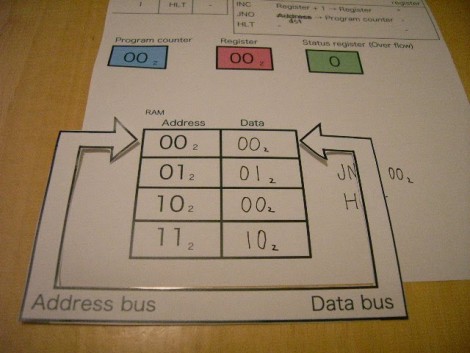
Take a few minutes out of your day, grab your scissors, and learn how a simple processor works. [Saito Yutaka] put together an exercise to teach processor operations with paper. After downloading the PDF you can cut out the Address and Data pointer as well as two-bit data tokens for each. The processor has three instruction sets; Increment register by one, Jump if not over flow, and Halt wait for reset.
Once you’ve got your cutouts you can follow along as the program is executed. The INC operation is run, with the JNO used to loop the program. Once the register has reached an overflow the overflow counter halts the program.
One word of warning, we think there’s a typo in one of the captions. Once the program starts running and gets to address 01(2) the caption still reads 00(2) for both address and data. As long as you compare the values in the picture along the way you should have no problem getting through execution. which has now been fixed.













This reminds of the the Bell Labs CARDIAC, a similar concept but base 10. I had one when I was 9 or 10. Later I found a stash of them and bought a few but I believe they may all be gone now; at least, the web site on AOL is gone. But here’s a mirror:
http://www.porticus.org/bell/belllabs_kits.html
Another similar project is the “Little Man Computer”, which even has Java emulations.
http://en.wikipedia.org/wiki/Little_man_computer
It does not have three instruction sets: it has an instruction set consisting of three instructions.
this is cool and all but why does the example program work in the pictures but his instructions are always 00(2)
>>Fetch the instruction . Read data on address 00(2) .
Data is 00(2). This means increment register by one
>>Fetch the instruction . Read data on address 00(2) .
Data is 00(2). This means jump if not over flow .
lol wat
Agreed EFH
Thank you Hackaday. I’m a TA in an Assembly class and I’ve been needing a visual aid to teach to high school students.
I may have to do some expanding to cover all that I need to though.
This looks to be a good educational tool, Might print one out for fun once I get back home
Good job
Thanks for your comment.
Sorry I couldn’t find a typo before wrote page.
I fix the typo a minute ago.
Thanks.
There are a few errors in the writeup and this page’s description, but overall a very neat way to demonstrate how a processor works at the lowest level.
Well, I suppose you could get into how the transistors and cache store the data on the silicon, but that’s not so much computing at that point.
This is cool, I will have to teach this to Mike Jr. at some point! =)
nice one
explain this:
Fetch the instruction . Read data on address 01(2) .
Data is 01(2). This means jump if not over flow . Status register is 0 . So CPU should jump to somewhere .
But CPU doesn’t know which address to jump .
then
Increment program counter .
then
Read data on address 10(2) . The data value is 00(2) .
CPU know a address to jump .
how does it now know to jump? BUT why does it(jump) when the instruction(00) is to increment the register by one ???
maybe edit to say “01 = jump if not status else jump to next read data address” or something in programmer speak
Well, you probably took it from the bad end. The 01b is a 2-word (where word means a group of 2 bits for now) instruction. In case the condition is met, the processor jumps to the address specified in the operand in second word of the 01xxb instruction. In case the condition is NOT met, then it jumps to the next instruction. Therefore it jumps 2 words further, effectively jumping to the address 11b. Here it reads the 10b instruction, thereby halting the system.
So when can we expect the Linux port :)
The captions are a little confusing but if you just look at the picture realizing that some are doubles it makes perfect sense.
There’s so much Engrish in this, I just can’t force myself to read it.
At least use Google Translate from a language you know well.
There is a CARDIAC community over on G+ where you can get all the files to make your own CARDIAC as well as the manual. The last place I was able to purchase an original CARDIAC was from Edmunds but even they seem to have run out. Making your own is not hard and it also gives you the chance to skin it to fit your own personality.
https://plus.google.com/u/0/communities/105401067945055411018