
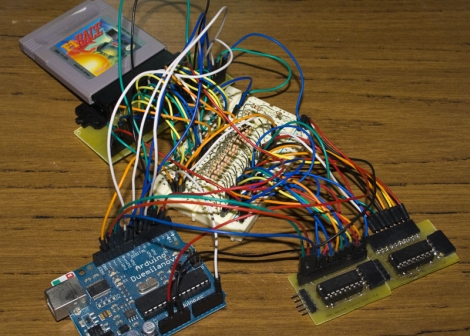
[Alex] collects retro gaming consoles. One day while playing a SNES title, his save games got wiped when he powered off the system. It turned out that the battery inside the game cartridge got disconnected somehow, and it got him thinking. He decided he wanted to find a way to back up his save games from the cartridges for safe keeping.
While cart readers exist, he says that they are hard to find nowadays, so he decided to construct his own using an Arduino. SNES cartridges are relatively complex, so he opted to focus on Gameboy cartridges for the time being. Before attempting to back up save games, he first chose to learn how to communicate with the cartridges in general, by reading the ROM.
He breaks the cartridges down in detail, discussing how they are constructed as well as how they can be addressed and read using the Arduino. He was ultimately successful, and offers up code as well as schematics on his site for any of you interested in doing the same. We imagine that save game reading (and perhaps editing) will likely happen in the near future.
Check out the video below to see his cart reader in action.
[youtube=http://www.youtube.com/watch?v=7u8_dlGbvoA&w=470]













Two comments.
First of all – this is an awesome hack.
Secondly – ROM emulators work much better and support far more features, are less prone to hardware failures (such as a dead or disconnected battery) and allow you to carry around tens of thousand of titles on the space of a microSD chip.
So I love the idea but I just don’t get the practicality now that ROMs are so widely available.
@CutThroughStuffGuy
While I, being too young to actually own many of the retro consoles such as a SNES, I can see why he’d rather play the games on the original console.
It really is a different experience to play it on the console then on the computer. It just feels more authentic.
@CutThroughStuffGuy; nothing beats playing a game on actual hardware.
I don’t disagree that you get the most authentic experience with original hardware but you get 99.9999% of the experience with plenty of advantages (save states, rewind, TAS, movies, huge libraries, less bulky, cheaper, various display sizes, open source friendly, ability to hook up authentic controllers, the list just goes on and on) and really almost none of the disadvantages (bulky hardware, batteries, hard to read screens, gigantic games, increased loading times, less portable, etc). Every so often you get emulation artifacts but those are rare already and once we decompile entire chips at the literal physics based gate level and program emulators that can handle literally every single PHYSICS based emulation state then you pretty much have a perfect virtualization at that point – which is almost where we are now with some of the early gaming consoles.
Work is underway to do that for the NES’s (and other consoles) MOS 6502 chip (and graphics/sound as well) already. It has been done in Java, now we just need to speed it up by a few orders of magnitude to make it truly useful as a 1:1 virtualization tool.
http://en.wikipedia.org/wiki/MOS_6502
http://www.visual6502.org/
@CutThroughStuffGuy I think the main point was to back up savegames, not get emulator roms.
Simple, strictly speaking you can only legally have a ROM of a game (Well at least in the US) if:
1. You own a physical copy of the game in question
2. You dump the ROM YOURSELF from your own cart
While strictly speakinng I doubt only the most anal retentive judges would care about reason 2 due to the fact that dumping kits are REALLY expensive and the fact that it IS a backup of your game but strictly speaking this is the only legal way of getting ROMs.
Besides, if you had a really rare game game you could back it up and have it around forever and if you don’t really give a shit about the specifics of dumping put it on the internet… tthough IIRC I think that the GoodGBC set has all known gameboy games dumped already.
It was but in order to do that, he had to back up the ROMs first (to read saves, you have to read the cart).
I suppose this would be useful then for backing up saves from physical games to convert them to emulated games as well as ROM dumping. Don’t misunderstand – this is a great hack. I just don[t personally think using older hardware has any advantages over emulated hardware. Your mileage may vary.
I did the same thing last year but only used one ATMEGA16 and a FTDI cable. Just goes to show you, using a Arduino is not always the simplest thing. Glad to see he got it working though.
http://www.rival-corp.com/2011/03/20/gameboy-rom-dumper/
I threw up pictures of mine once I read this.
I prefer to use the physical game system as opposed to an emulator, but that’s just my preference.
@Anonymous
Cycle-exact emulators beat playing “on the real thing” because they are a ton easier to just play and accurate enough that you wouldn’t notice the difference.
@CutThroughStuffGuy
You don’t have to dump the ROM to dump the save IIRC.. you can look at the ROM to work out what save type it is though.. the main issue is writing code to handle all the different save types.
@Thread
>>While cart readers exist,
>>he says that they are hard to find nowadays,
He hasn’t looked hard enough.. I bought readers and flash carts for the gb after about two minutes of google. There are USB carts floating around at the moment.
>>We imagine that save game reading (and
>>perhaps editing) will likely happen in
>> the near future.
Yeah, only you’re a decade or so too late.
Very cool project :D
there’s another at:
http://www.reinerziegler.de/readplus.htm#GB_Flasher
“You don’t have to dump the ROM to dump the save IIRC.. you can look at the ROM to work out what save type it is though.. the main issue is writing code to handle all the different save types.”
You still have to know WHERE to look to dump (the address the save is stored at). Easier to dump it all first then later dumps can dump saves only because you then know where to look.
F1 RACE FTW , loved that game.
@cantido, from a technical standpoint; yes, but it’s hard–if not impossible–to recreate the nostalgic feel.
“but it’s hard–if not impossible–to recreate the nostalgic feel.”
Meh. I politely disagree. It quacks like a duck and walks like a duck and improves on said duck. It’s just as good.
This isn’t like preferring a real woman over a real doll. It is more like preferring a replicant from Blade Runner over a real woman (or man). When the substitute is just as good or better, the original nostalgia is all that is left.
A bit odd that I find this just after I finish building the reader portion of my own Arduino-based Gameboy flash cart reader/writer. It looks as if have been beaten to the punch.
I can think of BIG application for this – musicians using LSDJ and other game boy based music sequencing software would love a DIY solution for flashing the ROMs to their carts. Current solutions are finicky and often require parallel ports in order to write ROMs – implementing ROM writing with this arduino setup would surely be a godsend for many of us who’ve struggled to get the poorly designed transferrers and poorly written code that comes with them to function properly.
Always like the retro gaming hacks on HAD.
Yes, F1 Race FTW. It was a great original Game Boy game.
I also collected old handhelds until the growing clutter annoyed me too much.
Now all my favorites and many more live on in spirit in the form of emulation.
If you had a really good game going it would be outstanding to be able to transfer it from the original system over to an emulated one for archiving or just continuation.
I think emulation may be one of the reasons that carts and readers ARE still available on the market.
Heck, as long as the hardware works, it’s trade-able, so we’ll see stuff like this for a good long time to come, even if it sinks deeper and deeper into obscurity.
You don’t need to dump the ROM to get the save, but you need access to the same data bus anyway.
I’d love to something similar.
I love this.
My first hack was soldering a ZIF socket to some stripboard, and then soldering a bunch of wires to a GB cart with the cart removed,and then using eproms (with UV erasers and prom blowers to copy the roms).
This was really easy for the smaller games, which was most of them.
@phate: I had a half completed one for about 6 months and just recently decided to rebuild it. I find it a little strange that 3 other people (including yourself and the guy of this article) have suddenly decided to get into gb programming within march 15 thru 21. :S
So, to see my awesome version of a mostly complete gb/nes/snes cart/rom reader, click on my name to look at my blog.
[seems that hackaday loves the arduino… The parallax propeller beats it hands-down, at 80MHz to boot]
I’d love to be an Arduino inefficiency tard on this one, I kept thinking OMG this will be so slow.
Then I realised that it might actually make the hack work by being slow enough to meet the timing requirements on the bus!
first of all i’ve been playin the emulators cause i can easily go to http://www.dopeROMS.com and get games that way.