At Last, A Gameboy Advance With Decent Audio

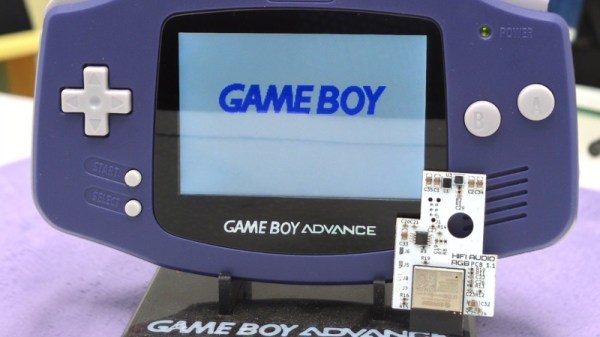
Many pieces of consumer electronics are build down to a price, and the corners cut show up in their performance. The Gameboy Advance from Nintendo is no exception: its audio is a PWM stream that sounds awful through the included amplifier. [Cajun Panda] has a fix though, in the form of a replacement audio chain.

It takes the form of a PCB that hooks into the pads of the removed GBA audio chip, and provides a much cleaner audio path with filtering and EQ and a class D audio amplifier. In addition there’s an audio codec and an ESP32 for Bluetooth connectivity, enabled by a long press of a GBA button and configured via a web interface on the ESP. Best of all there is no case modification, this is designed to remain as stock as possible.

Everything can be found in a GitHub repository should you wish to make your own, so if you want to bring your GBA audio up to scratch you know where to go. If you want to make it even better don’t forget, you can always upgrade the screen.

Turning A Toy Game Boy Into A Real Game Boy

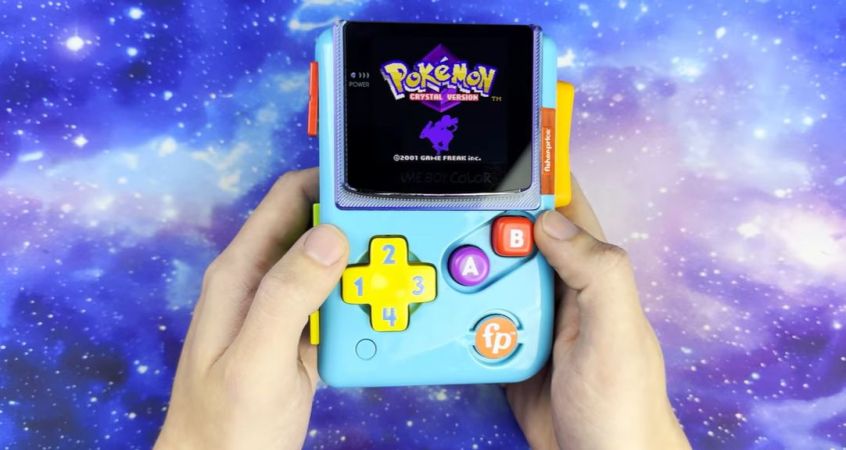
In the world of children’s toys there are many offerings which are meant to look like devices used by older kids or even adults, with the Fisher Price Laugh & Learn Lil’ Gamer toy bearing quite the resemblance to Nintendo’s iconic Game Boy. Although this factoid could be filed away as amusing trivia before passing said toy to a child for its requisite physical abuse by said child, a purported adult can still have a lot of fun with this toy by modding it into a real Game Boy, as [KOUZEX] recently did.

Part of the challenge here is to not just treat it as an unconventional replacement shell for a genuine Game Boy, but to retain as much of the child toy’s look and feel as possible. This includes things like buttons and even the weird sliding blocks on the side.

For the functional components a Game Boy Color with a busted screen was chosen as a donor, with the GBC mainboard fitting almost perfectly inside its new shell. Wires were then soldered to bridge Nintendo’s PCB with the toy’s PCB to make the original buttons and speaker work. After blowing a fuse on the GBC mainboard due to likely some power back feeding, the toy’s PCB had its non-essential parts stripped, but fortunately without further damage to the grafted in electronics.

Most of this mod is quite straightforward, just with some creativity required to add a Select and Start button as these were notably absent from the original. The new, rather large replacement OLED screen is a nice upgrade too and actually fits pretty well with the chunky look of the child’s toy. Even as mostly a joke mod, it seems surprisingly functional.

Continue reading “Turning A Toy Game Boy Into A Real Game Boy”

Watch YouTube On A Game Boy Color With A Special Cartridge

There’s no questioning [Throaty Mumbo]’s uncanny skill at answering questions that nobody ever asked, such as whether it’s possible to watch YouTube videos on a Nintendo Game Boy Color handheld gaming system.


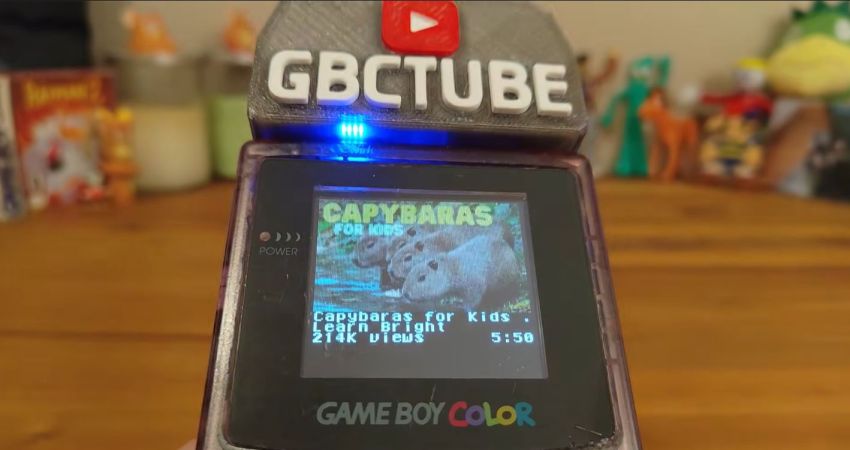
Of course the answer here is a resounding ‘sorta’, loosely defined by what you mean with ‘watch’ and ‘video’ exactly. For the impatient there’s the GitHub project page with the project summary, along with a detailed video containing hijinks and a playback demo on real Game Boy Color hardware with the cobbled-together GBCTube cartridge.

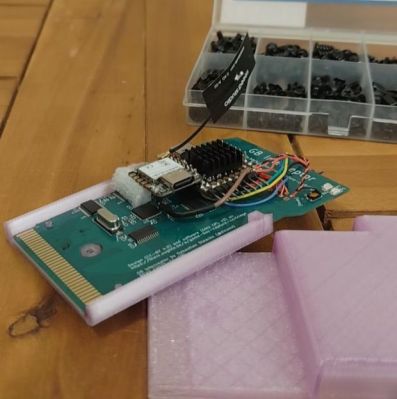
The nice thing about these cartridge-based gaming systems is that you get direct access to the system’s hardware via the cartridge bus, with for systems like the GBC a basic cartridge PCB readily available if you’re feeling that prototyping itch.

Such a cartridge breakout board for the GBC was thus used as the core of this project, with an ESP32-C6 acting solely as Wi-Fi bridge for the RP2350B MCU which handles basic player firmware and bridging duty between the GBC and the streamed video data from the host PC. It’s the latter does the heavy lifting of wrangling the YouTube experience into something that sort of works on the GBC’s amazing, very vibrant, backlight-free 160×144 resolution color LCD.

With the cartridge inserted you can search for a video title on the GBC, select a video which is then downloaded with yt-dlp on the host PC and prepared for streaming. Audio is handled by the RP2350B to free up CPU cycles on the GBC, for which a separate speaker is slapped into the cartridge for high-fidelity mostly-synced audio.

Perhaps the most fascinating question that one is left with is whether a more powerful Espressif MCU like e.g. the ESP32-S31 could combine all these tasks into a single package. Not because there’s a particular reason to do so, but more out of sheer morbid curiosity, perhaps.

Continue reading “Watch YouTube On A Game Boy Color With A Special Cartridge”

Fixing A Nintendo Game Boy Clone That Runs Too Fast

There’s no shortage of cloned Nintendo hardware out there, and most of it is pretty poor. A few are actually pretty interesting though, such as the GB Boy by Gangfeng, which takes real cartridges and thus in many ways should provide the original Game Boy Pocket experience with modern hardware. But as you might imagine, even the best of the clones comes with various technical issues at no additional charge — with this particular unit having a habit of running the game too fast. It’s an issue that [Sharopolis] addresses in a recent video with a partial fix.

As can be seen in the demonstration, it runs games just too fast to make it very usable or fun, hence why it sat in a drawer for a few years after purchasing off AliExpress. This raises the question of what’s wrong with these units, as others report similar issues with this and other ‘GB Boy’ variants.

Fortunately the unit is easy to open, revealing the PCB with a couple of chips on it, one marked KF2001 being the brains of the operation alongside two memory chips. The crystal resonator marked X1 for the main IC is rated for 5 MHz, whereas a quick look inside the Game Boy Pocket shows that its crystal resonator runs at 4.1943 MHz, which is a bit of a difference.

Because of how buying components and pricing works, [Sharopolis] ended up with a reel of 100 of replacement resonators with the right parameters for a drop-in replacement. After swapping the resonator, the GB Boy now does indeed run games at the right speed, but a new issue has now cropped up in the form of flicker on the display.

In the comments it’s suggested that replacing the cheap capacitors on the GB Boy’s board can help here, but it highlights just how these clone systems keep managing to snatch defeat from the jaws of victory by pairing what looks to be a pretty good IC with either the wrong or sub-par components.

Continue reading “Fixing A Nintendo Game Boy Clone That Runs Too Fast”

Time Frog Color Is A Game Boy Color On Your Wrist

Handheld consoles are great for gaming on the go, but who wants to hold onto things all the time? Would it not be easier to strap the game to your wrist? Well, not in its current form factor, but [LeggoMyFroggo], aka [
Chris Hackmann] has you covered, because he turned the Gameboy Color into a (relatively smart) watch.

Why “relatively” smart? Well, we say that because he’s using the original Game Boy Color CPU, a Sharp SOC based on the Z80 that is far less powerful than modern smartwatch platforms. That SOC is helped out by an RP2040 that translates the chip’s parallel RGB output into something a modern watch-sized display can comprehend via its PIOs. [Chris] refers to it as a “poor man’s FPGA” which isn’t a bad way of thinking about it in this context. Yes, he could have just stuck an emulator on that chip, but what’s the fun in that?

The controls are squeezed into the sides of the watch — the four face buttons on one side, and a tiny D-pad on the other — but that’s easy enough because this thing is 15 mm thick. Since [LeggoMyFroggo] is a purist, he insists on loading the games via cartridge, which does not help thin it out. Game Boy carts are not not watch-friendly, so the cartridges are custom PCBs that plug into an M.2 slot, but with the original (or at least compatible) ROM.

If it wasn’t for the cartridge slot, maybe a battery would have fit. But it doesn’t, which leads to our favorite part of the hack: the battery is in the watch strap. This is both kind of crazy, but also brilliant. The band is cast in silicone, so he’s able to embed a flexi-PCB inside. As for the watch body, that’s CNC’d out of 6061 aluminum before being anodized to a very Nintendo-esque purple.

[Chris] evidently has a soft spot for the Game Boy Color — we featured his FrogBoy re-imagining of the handheld a few years back. The project is just up on YouTube as of this writing, but the watch will join the FrogBoy on [Chris]’s GitHub so we can all get in on the fun once he’s finished the documentation.

Continue reading “Time Frog Color Is A Game Boy Color On Your Wrist”

Real-time Shader, Running On A Game Boy Color

[Danny Spencer] has a brilliant graphical demo that, like all great demos, flexes a deep understanding of the underlying system: a real-time 3D shader on the Game Boy Color.

If you’re not familiar with shaders, they were originally mathematical lighting models (hence the name) and are an integral part of the modern 3D graphics pipeline. One no longer draws pixels directly to a screen to represent objects. Instead, 3D object data is sent to the Graphics Processing Unit (GPU) which handles the drawing. Shaders are what control things like an object’s lighting, textures, and more.

Implementing even a basic real-time shader in software on a Game Boy Color is pretty wild. Not only is it a pixels-and-sprites (and not 3D graphics) kind of system, but the Game Boy’s SM83 CPU doesn’t even have a multiply instruction, nor does it support floats. As [Danny] puts it: given that the entire mathematical foundation of his shader rests on multiplying non-integer numbers, he had to get creative. That makes his demo a very round peg in an extremely square hole.

In the case of [Danny]’s demo, the user can manipulate the position of, and lighting around, a classic Utah teapot in real time. He explains the workflow and shows how the process can be applied to other objects. The ROM is available on GitHub and there’s a video, embedded below.

[Danny] is no stranger to performing feats of technical prowess that are as creative as they are playful, like implementing a working adding machine in a DOOM level.

Continue reading “Real-time Shader, Running On A Game Boy Color”

A New Screen Upgrade For The GBA

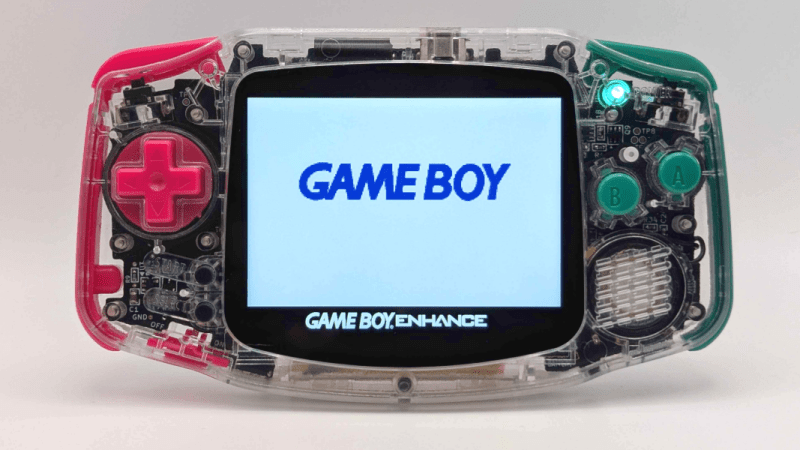
The Game Boy Advance (GBA) was released in 2001 to breathe some new life into the handheld market, and it did it with remarkable success. Unfortunately, the original models had a glaring problem: their unlit LCD screens could be very difficult to see. For that reason, console modders who work on these systems tend to improve the screen first like this project which brings a few other upgrades as well.

The fully open-source modification is called the Open AGB Display and brings an IPS display to the classic console. The new screen has 480×480 resolution which is slightly larger than the original resolution but handles upscaling with no noticeable artifacts and even supports adding some back in like scanlines and pixelation to keep the early 00s aesthetic. The build does require permanently modifying the case though, but for the original GBA we don’t see much downside. [Tobi] also goes through a ton of detail on how the mod works as well, for those who want to take a deep dive into the background theory.

There has been a lot of activity in the Game Boy Advance communities lately though as the hardware and software become more understood. If you don’t want to modify original hardware, want an upgraded experience, but still want to use the original game cartridges we might recommend something like the Game Bub instead.