
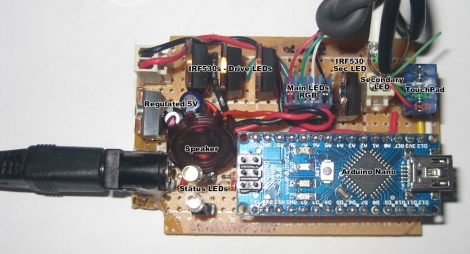
[Dave] needed some extra light above his desk/workbench area and decided to wire up some RGB LED light strips to brighten the place up a bit. He wasn’t content with using a standard switch to toggle them on and off, and after some brainstorming, he decided to build a capacitive touch circuit using a pair of copper tubes mounted in a project box. Just as he was putting the finishing touches on his switch, he saw a project online where a Synaptics touchpad was used in conjunction with an Arduino for lighting control. The copper tube switch was pitched, and he got busy working with his Arduino.
When connected to an Arduino, the touchpads can be used in two modes – relative and absolute. Relative mode is familiar to most people because it is used to guide the mouse cursor around on a laptop’s screen. Absolute mode however, relays coordinate information back to the Arduino, allowing the user to map specific areas of the pad to specific functions. [Dave] enabled his touchpad to use absolute mode, and mapped a handful of different functions on the Arduino. He can now fade his lights on and off or light the room on a timer, as well as use a sliding function to tweak the LEDs’ brightness.
It’s a neat, yet simple hack and a great way to repurpose old laptop touchpads.
Continue reading for a quick demo video he put together, and swing by his site if you want to take a look at the source code he used to get this working.
[youtube=http://www.youtube.com/watch?v=ViBDuM0C-KM&w=470]












Does anyone else think this project would be great with a touchpad overlaid with a colour selector wheel – something like you see in photoshop or paint. Touch the colour you want, and the arduino reads the touch point, converts that into an RGB value and outputs it to the LEDs. A simple sticker shouldn’t interrupt the touchpad operation too much, and would look absolutely awesome!
Leo,
At one point, I did have similar functionality. I’m going to update the blog with this but in summary – I have separate control over each RGB of the Main LED, and was using the right side (at first) to play with the blue. With RGB if you go full brightness (255) on all 3 colours, its still very cool blue looking. So, I used the slider to vary the blue value, but then figured I would rather just get a warm white colour I like and hard code a reduced blue value for all ranges Im using. The only issue is I’m not sure I would want to do all sorts of colours – unless I build a disco in the basement!
I think I’d like Leo’s idea better as an input to a graphics program. Off the top of my head I bet Paint.NET would support a plugin for that sort of thing, but I don’t use any of those programs for more than crop/resize anyway.
Good example why the Arduino bandwaggon can be BAD.
He was going to “hack” something together (and therefore learn something) but then went with the “someone else’s code” route.
Sad.
Yes, because everyone knows you can interface to synaptics touchpads with only three 555 timers and a NAND gate.