Architectural LED Install Shows How To Do It With Style

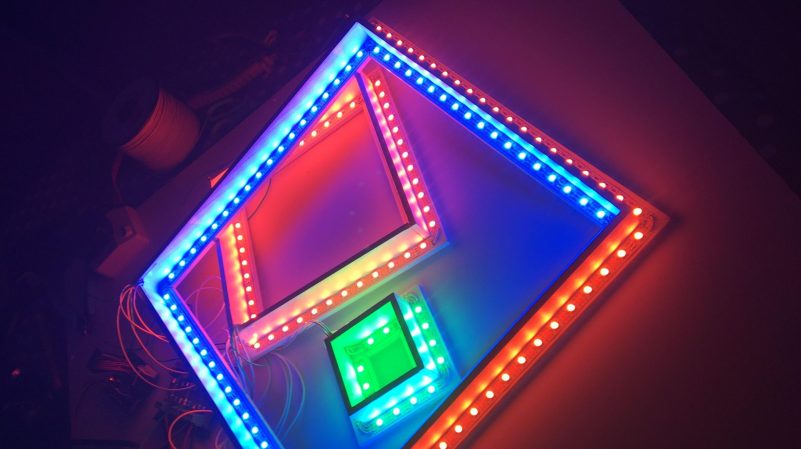
Anyone can string up some LED string lights in a space with mixed results. However, if you want to create a lighting environment that’s classy and stylish, it takes a little more finesse. [ipad.bendavid] has a great example of this, with a rather tidy architectural LED installation.

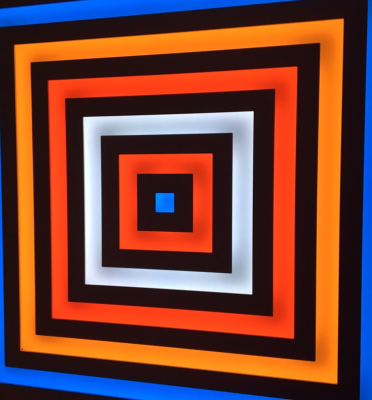
The final look is quite clean and evenly lit, without requiring the use of any diffuser material.

The electronic side of things is relatively straightforward. There’s an ESP32 running the show, commanding the colors for 928 individually-addressable WS2812 RGB LEDs. It uses the WebSocket API for real time control, integrates with Home Assistant, and even offers audio reactive lighting modes with the aid of an INMP441 I2S audio input module. A hefty 5 V, 60 A power supply ensures the LEDs are never short of juice. There was also careful attention paid to power distribution to avoid any dim spots or other issues.

Where it gets really cool, though, is the attention paid to the construction of the installation. The LED strips are installed in concentric square frames, which block light in specific areas to create a nice square pattern, with the LEDs facing the wall they’re installed on rather than projecting out to the viewer. This hides the strips themselves and eliminated the need for diffusers which can be a pain to get right.

Overall, the build is a pleasing one that plays with light and darkness and looks rather stylish in a way so many LED installs don’t. If you’re cooking up your own neat glowable projects, you know we’d love to see them on the tipsline.

A Complex Way To Push A Button

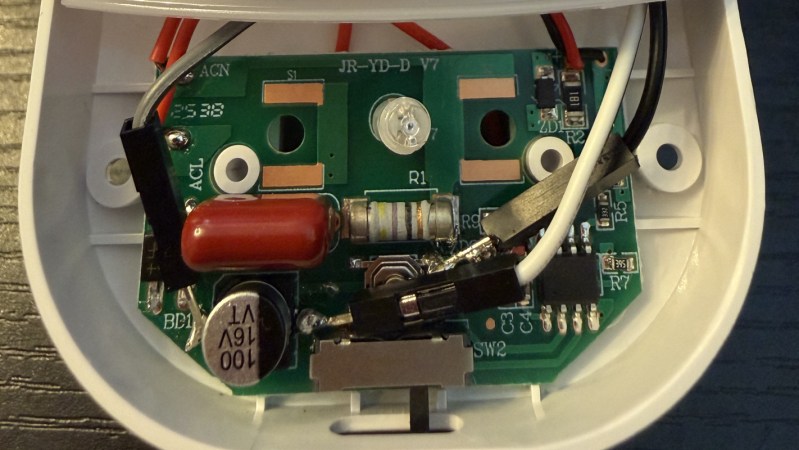
We’ve likely all looked at a simple problem in our lives and thought that it would be an easy fix, only to realize that the project is enormously more complicated than we first realized. Whether that’s starting a home improvement project, doing a quick repair to a bicycle or car, or trying to install an obscure piece of software on a Linux machine, the amount of time we budget for these tasks often ends up woefully underestimated. []’s night light needs to have its brightness set every night, and it seems easy enough to get a microcontroller to automate that, right?

Well, upon opening the small device, the first issue is that there is no labeling on any of the parts, so simply adding a jumper on to existing microcontroller pins without damaging anything wouldn’t easily be possible. Adding a secondary microcontroller is the next logical step, but the power supply in the night light is extremely underpowered so using even the smallest Raspberry Pi or off-the-shelf Arduino was out of the question too. [Oscar] instead chose an ATtiny85, which solves the power requirement issue, but these are a bit more of a challenge to program without a USB device. From there, it needs a transistor wired in to the circuit to actually push the button for him, plus a few support resistors, so [Oscar] actually had a PCB custom-built to hold all of these components.

Even after all of that, the space within the night light enclosure made installing the PCB a challenge, but in the end he has a device which, when his home automation system powers on the plug for the nightlight, automatically boots up and pushes the switch the required number of times and then puts itself to sleep. We’d call that a success even after the colossal effort getting this inexpensive, small light working the way he wanted. There are some other low-powered solutions for problems like these too, as long as being battery-powered isn’t a dealbreaker.

A Light-Up Map Of Monaco

If you want to get around Monaco, a map — digital or otherwise — is probably the best way to navigate. But if you just want to appreciate the city’s form in a more artistic way, you might enjoy [Terence Grover’s] latest project—a backlit topographic map of the unique principality.

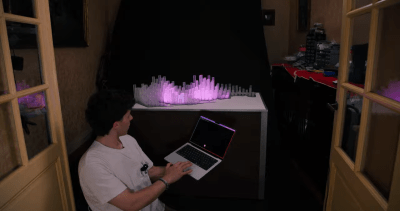
The touch mode allows one to draw patterns across the map.

The project started with a QGIS mesh of Monaco, with the data fed through the Open-Meteo elevation API, which takes into account building heights. This was used as the basis for the heights of 179 pieces of 20 mm x 20 mm acrylic. These were assembled into a laser cut steel base, and were sanded on all sides but the base in order to allow them to diffuse light more effectively.

Strips of CS8812 LEDs are used to light the plastic towers, driven by a pair of Adafruit Feather RP2040 Scorpio boards. They’re fed pixel data from a Raspberry Pi 5, which runs a Flask panel accessed over an iPad. This allows control over the LED map display, showing things like civic data, highlighted events, and weather. There’s even a touch-sensitive mode that lets one paint fun patterns across the representation of the city.

We love a good artistic map, particularly when they’re full of LEDs and represent useful information.

Continue reading “A Light-Up Map Of Monaco”

An RGB Keyboard For Your Hackaday Communicator Badge

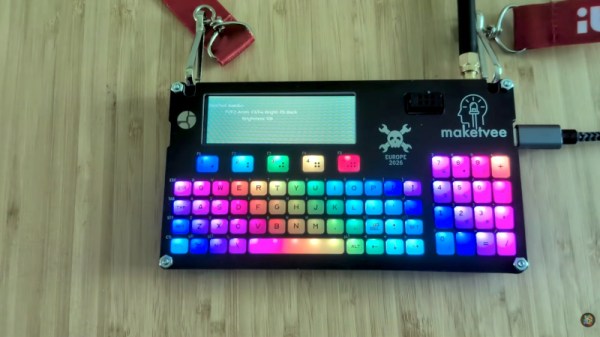
The most recent Hackaday event badge has been the Communicator, a handheld wireless terminal with a rather nice QWERTY keyboard. It’s good enough as delivered, but [makeTVee] has gone one better and made his Communicator keyboard into a fully RGB light-up experience.

The feat is achieved with the help of a new front panel holding some very thin side-emitting addressable LEDs. The keys are custom-printed, and there’s a TPU mat to hold them all together. The LEDs are driven from one of the device’s GPIOs.

We saw this badge in real life at the recent Hackaday Europe conference in Lecco, Italy. It really is as good as it looks in the video below, the care and attention which has gone into the build is extremely impressive.The original badge used a silicone cast set of keys, and we’d say if you are making a device with a keyboard then these might make a very good option.

If you’re not familiar with the Communicator, it’s worth having a look at the launch announcement.

Continue reading “An RGB Keyboard For Your Hackaday Communicator Badge”

Transforming Lamp Built With LED Filaments

[Nick Electronics] had an idea to build a stylish lamp that could transform its shape while lit. This goal was achieved beautifully with the aid of many, many filament LEDs.

If you’re unfamiliar with filament LEDs, they’re basically thin plastic filaments stuffed with lots of individual LEDs that are very close together. This effectively creates a continuous, flexible, glowing string that can be used for all sorts of creative purposes.

[Nick] packed the lights into an interlocking stack of PCBs that make up the lamp’s structure. Each PCB layer hosts four filaments mounted around the outer edge, and has a pin that locks into a groove in the next layer to allow them to tug each other around as they turn. The PCBs rotate around a central shaft, with power passed from one to the other via interlinking wires. Drive is via a stepper motor on top of the lamp, controlled by an A4988 driver. There’s also an ATmega48 microcontroller onboard, which is the brains of the operation. A DC-DC converter onboard steps up the 5 V input voltage from USB-C to 10 volts for the stepper motor.

It’s neat to watch the lamp in action, glowing and slowly shifting in patterns as the layers catch and rotate in and out of alignment. We’ve seen interesting builds in this vein before, like this fantastic origami lamp from a few years ago.

Continue reading “Transforming Lamp Built With LED Filaments”

Building Festival Badges That Sync Themselves Up

Lots of music events these days hand out various glowing tchotchkes that flash and sync up with the performance. [Tony Goacher] has whipped up his own badges that can do just that, all without needing any sort of pairing or infrastructure to speak of.

The CrowdClock badges each feature a ring of 16 addressable RGB LEDs. Running the LEDs is an ESP32 microcontroller, which has lots of neat wireless capability baked in from the factory. [Tony] decided to leverage the ESP-NOW wireless communication protocol to enable each badge to broadcast its current local clock tick. Each device also listens out for clock ticks from other badges in the area, and updates its current clock tick value if it receives a higher one from another badge. This behaviour allows a bunch of badges within radio range to all sync up automatically in short order, and then run their LED sequences in sync. There’s no need for a master designation or anything, the devices just all sync to whichever badge has the highest clock value and go from there.

It’s a really neat way to create propagating self-syncing behaviour in distributed wireless nodes. Files are on Github for those curious to learn more. Meanwhile, if you’ve ever wondered how those concert wristbands work, we’ve looked at that too. Video after the break.

Continue reading “Building Festival Badges That Sync Themselves Up”

Let Twitch Chat Control Your LED Strings

Once upon a time, someone set up a livestream wherein the messages from Twitch chat could control a game of Pokemon. Since then, we’ve seen Twitch control all sorts of things. If you’d like to have them play with some LEDs in your house, you might like this project from [pfeiffer3000].

The concept is simple enough. The heart of the build is an ESP32 microcontroller, which is easy to integrate with web services thanks to its onboard WiFi capability. It’s hooked upt o a string of WS2812B addressable RGB LEDs. The LEDs themselves are installed within table tennis balls to act as nice, spherical diffusers, and installed in a square frame made of PVC pipes. As for code, the rig uses the WLED library to drive the LED strings, and code from TwitchIO to interface with Twitch chat itself. It’s as simple as rigging up a bit of Python. With everything assembled, [pfeiffer3000] had an attractive LED grid that could be controlled directly by anyone watching their Twitch stream.

We’ve explored how to control things via Twitch before, too. It’s a fun way to add some interactivity to your livestream that really gets viewers involved. If you’ve been building your own audience-controlled projects, we’d love to hear about them on the tipsline!