
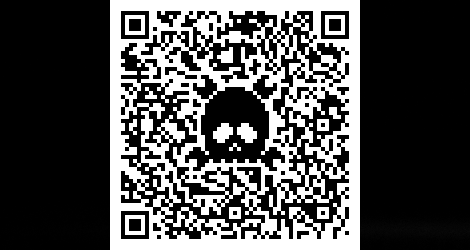
After writing this post on somone hacking QR codes, Hack A Day commenters came out in full force posting some really cool links about modifying QR codes to include a logo. I’ll fully admit I geeked out a little, but in the process I figured out some of the theory behind embedding logos in QR codes.
After getting my hands on the ISO 18004 specification for QR codes, I decided to try embedding the Hack A Day skull & wrenches inside a QR code. The tools I used were Photoshop, this QR code generator, and Microsoft Paint (I’ve never seen a program to edit individual pixels that has a better UI, so don’t laugh).
For this ‘how-to,’ I’m going to walk through the process of modifying a Version 6 QR code. The Version 6 QR code is 41 pixels square, and is a very good balance between the amount of data that can be presented and the physical size of the code itself. The graphic below shows what is absolutely required of a Version 6 QR code standard. In practice, what is actually necessary is a little different, but I’ll just go with the specs for now.

Black in this graphic will always be black, white pixels in this graphic will always be white, red is a “keep out zone,” and gray is “don’t care.” The alternating black and white band on the top and left side of the QR code is the ‘timing pattern.’ This is the little bit that divides everything on the QR code into columns and rows. The gray part of this graphic is separated into 172 8-pixel zones, as shown below:
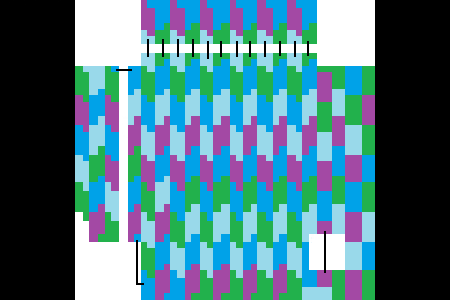
If anyone wants to 4-color map theorem this, I’ll gladly update it.
Some of these zones are non-contiguous, so I drew black lines connecting the corresponding parts. Each of these 8-pixel parts translate into one byte of data in an alphanumeric QR code. Now, the million dollar question: why is knowing how the bytes are arranged in a QR code important? The answer is with a high level of error correction, about 30% of these bytes can be complete gibberish, and your phone will still be able to read the QR code. with 172 areas, that means about 51 of them can be altered in any way, shape or form.
So, how do we implement this? First, we start out with a crappily-drawn Hack A Day logo:

It’s important to include both positive and negative space when designing this logo. If there wasn’t a white border going around the logo, the random black and white pixels would be placed right against the logo. Of course, I’m sure someone will come up with a great design that ignores this technique, but I’ll just do it this way for now. After overlaying the Hack A Day logo on top of the color map of the QR code, we get this:

Then we physically count the number of 8 pixel cells that are obscured by the logo. Since we’re doing a Version 6 QR code, about 51 of these cells can be covered up. It looks like this graphic is okay, so we move onto the next step: putting a real QR code in this thing.
I used this site to generate all my QR codes for this post. It allows you to select the QR version number and the error correction level. After typing in “http://www.hackaday.com” as the code I want embedded, I ended up with this:
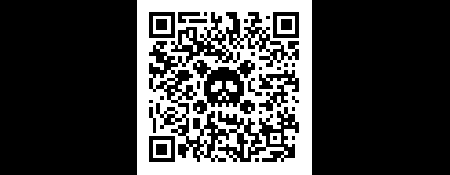
This little guy is going on our business cards.
That’s all well and good, but what if you want to put a logo in a QR code that a little bit larger than what would ‘normally’ be permitted? What if, for example, you wanted to tread into the timing area on the top and left side of a QR code? This is where design comes in. If a logo already has alternating black and white pixels, like the AT&T ‘Death Star’ for example, it’s fairly easy to have that logo overlap the timing pattern.
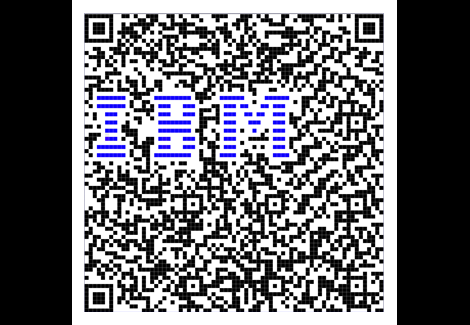
Yes, I used a Version 14 QR code for this, meaning it’s 73 pixels on a side. I did come up with smaller one, but it really doesn’t look as good.
Notice the blue bars. QR code interpreters don’t care if a pixel is white, black, red, orange, or maroon – only contrast matters. Since the blue in Big Blue is fairly dark, it registers as a dark pixel. This can be exploited by adding both visual contrast and getting rid of the 1-pixel border that is required of a 1-bit graphic.
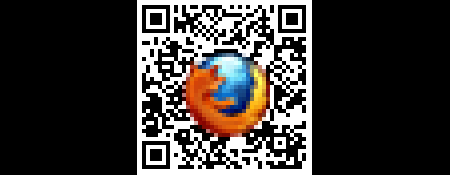
If the Firefox logo had a white border, the logo would cover more than 30% of the QR code. Putting in a full color graphic – especially one that defines itself from a background with a dark edge like an icon – gets around the need for a white border all the way around a logo. I’m sure there are more clever ways of toying with the palette of a logo, but I’ll let that go for another time.
But wait, there’s more. I’m not limited to the resolution of the QR code – I can overlay stuff at a higher resolution than the QR. This observation led me to this:
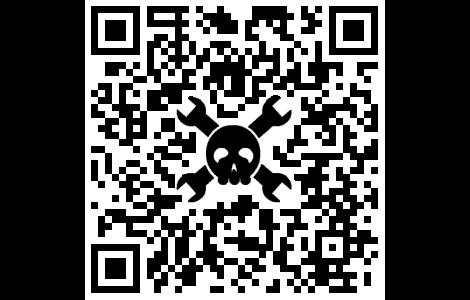
Yes, it works.
I’m hoping this how-to was at least a little helpful in demonstrating how logos can be put into QR codes. If you’ve got a neat example of this, leave a note in the comments or send it in on the tip line.












When I did mine, I just whited out an area in the middle and started filling black back in.
That’s neat, Our local newspaper has been putting a QR code in it with a pig in the middle, and was wondering how that still worked.
hopefully this idea catches on and more people/sites/whatever start using it, cause its freakin sweet.
Here’s an example of it being used on an Android developers website: http://apps.akosta.dk/busy-status-app/ :)
Forward error correction at its finest.
I hear you on most paint packages lacking decent per-pixel tools!
For pixel-pushing, my favorite tool has been Paint.NET: http://www.getpaint.net/screenshots.html
It also supports C# custom extensions, which has mostly been useful for whipping up custom grid-filters to help align icons. :)
Thank you for the how-to!
Paint.net downloads/uses too much crap put out by microsoft, I used to use it but it just became too insane.
Now I myself use the good old GIMP (also available in a portable version as well as being available on other OS’s than windows)
But to each his own of course, paint.net does have a lot of functionality.
The familiar MS paint in w7 is also much extended over their old paint btw.
Oh dear, Windows morons.
Gimp with the grid turned on and set to one px by one px and the snap to grid enabled is great for editing with a one by one px pencil tool :)
I use photoshop for per pixel but I zoom way in. My all time fav for per pixel was deluxe paint on the amiga. Great article!
Sadly the youth of today seem to think Photoshop is the cure-all to all things graphic design. This is why you have lots of online sites that have sub-par graphics. You may have great talent, but its wasted if you’re not using the right tool for the job. Try Fireworks, it’s way better at handling pixel based art. But like Brian said, paint so far has the best UI that I’ve ever run across.
I have it but really dont like working in it. Haven’t given it enough time perhaps. I’ve gotten pretty good with ps for per pixel. Then again, I’ve used it since v2.5 so I’ve had a lot of time to get used to it.
All of it’s come a long way since hand anti-aliasing graphics in dpaint.
Professional pixel artists typically use Graphics Gale or similar specialized software (good news: it’s only $20 last I checked). MS Paint is crap comparatively, and Photoshop and Fireworks aren’t even in the right ballpark. There’s a couple of Linux FOSS pixel art suites but Gale is far superior to all of them.
I’m certainly not a ‘youth’ but I would always take Photoshop over GIMP, Paint.NET, or any other graphic drawing tool.
Having used it for nearly 8 years, I can solidly say I can do more in Photoshop than other programs, including pixel editing.
There is a fully color-selectable pencil tool. If CTRL-+ to zoom in is so difficult, perhaps Paint is the right way to go…
Or, they don’t see any reason to buy and learn another tool when Photoshop works fine for their one-time experiment.
Right… blame the tool not the designer.
Well, if you loved Deluxe Paint, you’ll love grafx2!
http://code.google.com/p/grafx2/
Who cares about the image editor? For this application you can even use a text editor to edit a PGM or a 2bit BMP.
lol, that’s thinking outside the box I guess :)
Am I missing something? I just created a 60×60 px image in MS Paint for W7 and saved it as a 542b monochrome bitmap. Opening it in GVim and Notepad2 it just looks like a load of control characters, Icelandic letter thorns, ys with umlauts etc. How exactly does one go about editing a bitmap with a text editor?
If one can use a text editor to edit these image files, this conjures up ideas of using Perl or some other language to write a logo-insert script. Perhaps even add in support to use a symbols font and select which symbol to insert. This would certainly be easier and faster than programming a pixel-based modification script or doing it by hand.
DuMu,
Editing binary files in Vim:
http://tech.zhenhua.info/2008/03/edit-binary-file-in-vim.html
DuMu, the idea is to use an ASCII format such as PGM in your text editor, then if you want convert it with ImageMagick or so.
http://en.wikipedia.org/wiki/Portable_graymap#PGM_example
you’ve covered all the bases there. excellent job
Icon editors work pretty good, they snap to each pixel allowing easy black/white out of each space. Perhaps this will become a new phase for QR codes, re-write the software so the middle is simply ignored and allow for a logo space.
Long live paint! :D
jeicrash: I think the point is that the software doesn’t need rewritten for these to work.
Mm.. This is really neat but won’t it make the QR code less resilient to errors (i.e. waste of data redundancy)?
Unless I’m wrong, this is the kind of stuff that usually comes out from a designer’s head – more eye candyness, less functionality.
yeah, thats what i was thinking
if you trash half the error recovery data, it will be less likely to recover from errors
so it will be harder to read the code, meaning you need a better (or more) pictures until it works
most people leave out the error correction anyway, as many applications don’t require it (labeling things indoors, business cards, or laminated signs), so if you weren’t going to use EC anyway, might as well use it for your logo.
“But it is faster without error correction”
It is always helpful when peeople impeach their own credibility.
nothing wrong with M$paint (till they fucked it up in vista and even more in win7).
It loads fast and very basic for simple editing.
M$? just am observation, but I think Apple have overtaken them. Do you not keep up with the stock market? ;-)
Just an incorrect observation. Apple have nowhere near the market share of Microsoft, nor the overall profit and operating capital.
Just an incorrect observation. Apple have nowhere near the market share of Microsoft, nor the overall profit and operating capital.
Apple may have grown their profits by twenty-some percent, but Microsoft was already several hundred percent ahead.
And we care about this thread here because . . . ?
For pixel editing try out GraphicsGale. Works great for all types of pixel editing/sprite animation etc.
I tried using that, but they charge you for it. MSPaint works great (at least, the WinXP version does). It loads instantly (try doing that, PhotoShop!), saves quickly without hassles, and can do really great color erasing (right-clicking with the eraser–still haven’t figured out how to do that with PS). I like PS for its cloning/copying/aliasing capabilities, as well as a lot of plugins, but Paint is great for Pixel art. Sometimes (like when I make OS GUIs) I start with the shapes and color palettes in MSPaint and then work them up in PS. :)
Paint is barely adequate. Gale is excellent and it’s only $20. There are a variety of other pixel art editors which are much better than paint, most of them FOSS.
@Justen Robertson
Paint is completely adequate. It has a grid, a single pixel tool, and zoom. That is all you need to make pixel art.
Where was this article when I was playing around with this last night? One other cool thing you can do with the codes is round the edges a bit. I used photoshop’s Filter>Noise>Median at 1px on the graphic I put together and it still scans just fine even with a logo in the middle.
I put it up on my DA:
http://goo.gl/73llb
Hehe, that looks like playing old games on ScummVM with one of those nasty filters applied…
Here is a QR Code that I made.
http://misfitsman805.comxa.com/QR_CODE/Doom.png
Next time post inline as Data URI
SWEET, and, yes, Photoshop is terribly overrated. i actually get fair pixel by pixel results in Photophiltre but paint is probably the best I’ve used for such a project.
@Brian Benchoff
“and Microsoft Paint (I’ve never seen a program to edit individual pixels that has a better UI, so don’t laugh).”
MS Paint for per pixel editing FTW!! I wouldn’t laugh, I don’t and can’t photoshop so that’s really all the editing I can do xD
It’s also great for planning Minecraft builds…
So I’ve heard…
+1
Honestly, I’ve used Fireworks and Paint, and others, and I don’t see how anyone can say those alternates are an improvement on Photoshop for pixel work.
Yes, working with the correct tool is important, but so is knowing how to use a tool correctly. It is very simple to use PS for a pixel editor, you just have to know what you’re doing. For some tasks, though, I prefer Paint Shop Pro 7, but I don’t use it much any more.
I have to agree with your sentiment. Photoshop is a great tool for many different things including per-pixel editing.
The only valid argument is that paint loads faster and is simpler to learn. While that is important, I don’t think it’s fair to crap on Photoshop in general.
On QR Codes:
This is really cool, I have wondered how they work before. Great information to have. Thanks!
Don’t you miss one difference between paint, gimp and photoshop? Is not photoshop a little bit more expensive than the others (I don’t use, I’m not sure)? :) And of course for Linux user the gimp will be the best choice from that trio, that is another difference :)
Saying photoshop is not ideal for pixel editing and loads slow is hardly crapping on the software lol.
Thats like trashing a Ferrari for not having a roof rack and brush guard.
photoshop is much faster after ripping out the validation wrapper PRIOR to installation
and like all windows software MORE RAM is more better… with a new minimum of 24 gigs
These cookies are for sale in the Netherlands, and are branded with the slogan ‘Spread the love, man’. Their QR code reflects this: http://bit.ly/qLAzqK
Has been on the shelves for a year or so, and are REALLY tasty!
Just made one for my site, it worked out pretty well: http://i.imgur.com/YwjKC.png
Okay, that’s actually pretty impressive.
Nice job keeping the timing pattern. I’m guessing the exclamation mark was coincidental?
Actually I ended up with a gap at the end, so I figured I should put something there. The exclamation mark was all I could think of.
Python script for ImageMagick output options for qr, Aztec Code, svg, 32bit PNG
did this a while ago, and it also works without the left alternating pixel line
http://www.vogelmuell.de/temp/qr-gn-kiwisaft_250x250.png
Yeah. I also noticed that this pixel line seems not to harm the functionality. Does anybody know if this is intended (in fact this part of the QR code can also be damaged) or an error of the programmers which makes our work easier?
Far more impressive would be a python script wielding ImageMagick working in 24bit PNG. Lossy formats are rarely prudent. Allow the agent to destroy integrity themselves; provide only quality yourself.
Better yet prefer employing Aztec Code, an ISO standard in far wider use, as it is more tolerant to disruptions.
I created an Android app that let’s you create customized QR codes like this on your phone. Check out https://market.android.com/details?id=com.rabidgremlin.android.mecodelite
Please upgrade to allow output in Aztec Code, an ISO standard in wider use
that’s a good start but it limits user to one of a small set of graphicons
some credit for sending in the hackaday logo in color in a qr code would have been nice
https://picasaweb.google.com/lh/photo/QL78HKxVXDAlU5MaZsW10g?feat=directlink
but the explanation on why it works is nice
Nice stuff. Now it can be used much like Microsoft Tags. http://tag.microsoft.com/
Or
DiscT@2
or
LabelFlash
Lol you guys are doing this the hard way… I been adding logos to qr codes for a while and the way I do it is I cut a logo in photoshop then add a 3 pixel stroke to the outside of the logo in white.. Then layer it over the qr code then keep adjusting the size of the logo til the qr code works well..test the code while adjusting the logo size then save it when it works. Simple as that no need to make it hard talking about counting pixels.. My method takes 2 mins after u get the hang of it.
thats what i did but instead of the pixel stroke i used a edge glow
I suppose you disable the Reed Solomon, too?
(that’s bad)
Sweet Post! What about making a QR code your Logo??
The article is only somewhat accurate when it says that you can trash 51 of the byte codewords. After reading the spec: Version 6 codes are broken into 4 main blocks. Each block has 15 data codewords and 28 error correction codewords. Error correction is handled on a per-block basis, and each block can tolerate 14 bad bytes. This allows us to kill up to 52 codewords, but as soon as we kill 15 in any given block the code will be unreadable.
The good news is that the way the blocks are interleaved, wiping out any contiguous section of the code is likely to destroy all blocks reasonably equally.
Which is why we should prefer Aztec Code
If you are looking for designer qr codes for you business check out Kalvin Kleen you can find them at http://facebook.com/KKQRcodes or http://twitter.com/KalvinKleen
An entity with such limited business sense deserves to fail
Been studying bar codes a lot lately, including QR codes. For those who do PHP work, here’s a slick barcode generator (includes EAN, ISBN, QRCode and many more.) http://www.barcodephp.com/
You’d still have to manually embed your logo – Photoshop is cake (pencil tool – 1px in size; use “[” key to drop the pencil size to 1 px.)
NeoReader on the iPhone seems to be unable to read colour QR codes. Annoying. Cool hack, thanks.
For editing single pixels in images, I can definitely suggest Pixen:
https://github.com/philippec/pixen
Here is one I made for the Step Daughter…
http://dl.dropbox.com/u/29361323/PROF%20QR%20Code.jpg
perfidiously recalcitrant
Whipped up a quick script that lets you embed a square image onto your QR code…check it out
http://voltiercreative.com/qr_code/
next time use github or similar
your page has become existentially challenged
Great article! My Laptop now bears a nice QR code with an embedded Logo
Nice tutorial, thanks :)
I did a pixel art version of my logo for my QR Code:
http://tenchi.me/site/.img/qr.png
You obviously need to use my dpaint-style paint program for pixel-wrangling: Evilpixie. It’s Free Software (GPL), and as it’s creator, I’m well placed to offer a perfectly neutral, unbiased opinion: it’s fantastic, and laboratory tests have shown that using it will automatically make you at least 37% hipper and 85.14% more attractive.
But my logo IS a is a QR code!
Inception.
Wikipedia has an interesting variation where the logo goes beyond the borders:
http://en.wikipedia.org/wiki/File:Extreme_QR_code_to_Wikipedia_mobile_page.png
Much nicer in this way:
http://p.twimg.com/AWu4ES1CEAAdDLu.png
1/ Stop trying to make QR codes look pretty
http://blog.collins.net.pr/2011/04/stop-trying-to-make-qr-codes-look.html
2/ If you must do QR code “enhancement” please use Overlay and not embedding. Overlay positions the QR code “within” a logo and builds a surrounding design.
Want to see some examples of what that means – check out http://www.Cognation.net/QR particularly the IronMan2 example from Warbasse design.
1. Yes embedding QR codes is often better.
2. Especially easy logos are _really nice_ inside a QR Code, like HackADay pixeled or the IBM example.
there is a reason for both, also fuck error correction, if you don’t need it because your QR is digital, than use it for something else.
And even nicer!
http://p.twimg.com/AWvL_W-CEAAdAvS.png
I have an example up on harleyhacking of an LCD, and it is easy to do jpegs. I wrote a very compact and fast generator (for the arduino, among other things):
https://github.com/tz1/qrduino
I did a Javascript port that shows it in html5
http://code.google.com/p/jsqrencode/updates/list
One other problem – you really don’t want to change the locators (those square target like areas) too much. If you can directly download an image where the pixels are perfect there won’t be a problem but if you photographs, they need the finders and alignment patterns to figure out where the square boundaries are.
You can also do things with colors. as long as in monochrome light and dark are distinguishable.
Photoshop is fine for per pixel editing if you know what you’re doing. and also, this conversation is stupid.
here’s a QR I edited yesterday, it has jesus’s face in it.
http://i.imgur.com/b2jcy.png
hmm. I can’t tell if you’re an atheist or if you just thought it’d be ironic.
I think it is pretty awesome thing to be able to do and I don’t understand why some people think it is stupid. In areas where error correction are unnecessary its pretty cool!
I’m going to college so I put my face in the middle and added “Call me!” to the top. Geekiest way to give a girl your number, guaranteed.*
*Not actually guaranteed.
that’s totally cool. I wonder if JC really existed?
I loved this. After I read it I went right out and crafted a logo for my company. We don’t really have a use for it but it’s fun!
http://blog.jacopotarantino.com/2011/08/13/qr-code-hacking/
Fuck yeah Paint Shop Pro! I still use v5 all the time (7 has some more features, though seems to crash for me more often so I don’t use it much). I grabbed a copy of 9 once since it’s the latest version that still runs on win98, but they ballsed up the interface on it so much, I hate it. But oh well, 5 still gets the job done.
VERY interesting theory. I embedded some logos inside QR-Codes too: http://www.coding.com.br/unifei/unifei-and-cacomp-qr-codes/
I think that you can give a better design to visiting cards using this approach.
I’ve made a .NET library (implemented in C#, .NET 4.0) that can generate these things automatically.
You just put in the text to encode in the QRCode and a picture you want to embed, and the rest is done by the library.
Here’s a link to the source code:
https://sourceforge.net/projects/qrcodelogomaker/files/?
and here’s a couple of examples:
http://imageshack.us/photo/my-images/38/resultsuccess2.png/
http://imageshack.us/photo/my-images/542/result.png/
Ah, almost forgot, this uses code from the Messaging Toolkit project. check it out: http://twit88.com/platform/
The only trouble is the more you modify the less parity you have in your QR code, meaning it’s more prone to errors. It has really high parity because phone cameras and lighting situations can combine to a really shitty photo; if you wipe out parity with a graphical overlay, people have to take *perfect* snaps of QR codes or it’ll end up corrupted. Not to discourage anyone from having a good time hacking them, just a thing to be aware of that you didn’t really bring up in the article.
l337