
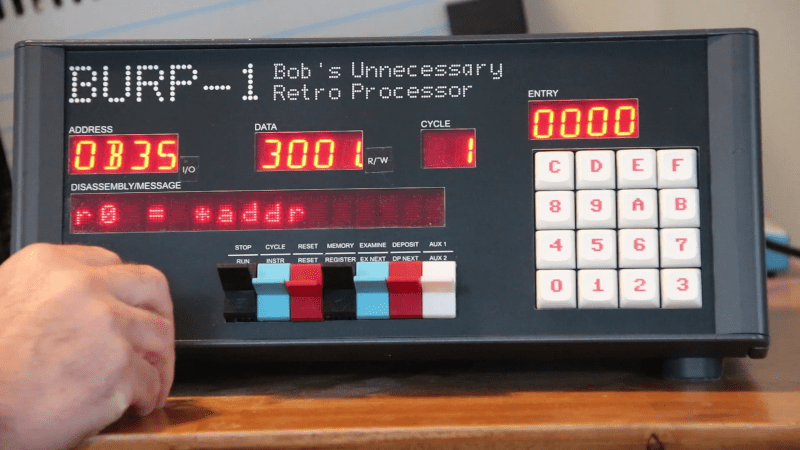
[Bob] calls his custom 16-bit computer “Bob’s Unnecessary Retro Processor” or BURP for short. While we suppose it is technically unnecessary, we love the look of it, and we hope he just used it to get the quirky acronym.
When we build custom CPUs they look suspiciously like FPGA development boards, but not BURP. We immediately thought of the IMSAI and the H8 when we saw it, but [Bob] points out it also borrows from the PDP-11.
On the other hand, none of those computers had gorgeous dot matrix LED disassemblers on the front panel. The computer uses its own language, CHASM, which is a bit like assembly language and a bit like C.
The case is a tank. At first, [Bob] didn’t use all TTL chips but didn’t want to go as far as FPGAs, so he settled for CPLDs, which were smaller forerunners to modern FPGAs. However, his microcode ROM is a… well… umm… 32-bit microcontroller. But he swears to us it is used only as a ROM that he can program without hassle. This wasn’t entirely successful, so he finally bit the bullet and switched to an FPGA. There are still some CPU-emulated ROMs in the new system. There are also CPUs dealing with the front panel (especially the disassembler) and managing USB and mass storage.
Unlike some homebrew computers, BURP can address 64K of memory, has 16 registers, and clocks at a respectable 2.1 million instructions per second. There are 99 instructions in 27 broad categories.
While we know it was unnecessary, we liked it. There aren’t plans for the build that hwe could find, but there were a lot of ideas we’d like to borrow next time we’re building a toy CPU. We’ve seen builds that were a Z-80 (or other CPU) with a microcontroller for all the other parts. Or, just emulate everything. We don’t judge. Building your own CPU is a feat if you use relays, tubes, transistors, ICs, or even software.












Now he just needs an addon for reading and writing files. Maybe a second box like a seperate hard drive.
Could call it the File Access Remote Terminal or something.
Different orifice.
Clearly it works on the back end.
One is for input/output. The other is output only.
can we talk about that number keypad layout?
looks logical to me. higher numbers/characters go higher, and it appears Bob has four non-thumb fingers per hand. I start counting at 1, though, so I think it is fair to say his layout’s a bit opinionated.
I’d prefer not to, I’m trying to forget I ever saw it.
Nice project though my brain is now trying to make as many different acronyms as possible for BURP, FART, BELCH etc.
It looks silly and probably is annoying for modern people, but it was a fairly common layout for keyboards with hexadecimal support.
Another weird thing: On most numerical keyboards (PC’s, calculator) the “one” is in the lower left corner, but in other keyboards, (phones) it’s in the upper left corner.
https://xkcd.com/927/
That was an intentional decision by The Bell System. Touch typing on a mechanical calculator/adding machine 10 key pad was common. They wanted to make people slow down pay attention to what they were dialing.
What about it? The Heathkit H8’s keyboard was arranged like that. So was the KIM-1’s. So are calculator keyboards. So are PC numeric keypads.
The Heatkit was modified to run MS-DOS!
https://www.youtube.com/watch?v=F06omp2qy2I
A useful application, at least! 🙂👍
For the Heathkit H8, I mean. Because it used Z80 by default.
And because the older i8080 and the i80x86 can use same support chips, anyway.
So this makese sense. I didn’t meant to say that running DOS is any requirement or favorable or something along these lines.
H8 definitely used 8080. It was the combined CPU/terminal H89 that had 2 Z80’s.
It was common at one time.
I think the KIM-1 used that layout, and it was just borrowing from existing designs even back then.
What unique feature does BURP have on its front panel that older computers did not?
The text display
Yes exactly, and that stands out as quite obvious to those who have used vintage systems with a front panel, so I don’t fault Al Williams for not writing it. BTW poor Al may want to start stylizing his name so it doesn’t look like AI! asking for a different font from Hackaday I know is well beyond their abilities to do in anything resembling a reasonable timeline./s
please tell me geek bench result