
Whenever you buy used computers there is a risk that they come with unpleasant surprises that are not of the insect variant. From Apple hardware that is iCloud-locked with the original owner MIA to PCs that have BIOS passwords, some of these are more severe than others. In the case of BIOS passwords, these tend to be more of an annoyance that’s easily fixed by clearing the CMOS memory, but this isn’t always the case as [Casey Bralla] found with a former student-issued HP ProBook laptop purchased off Facebook Marketplace.
Maybe it’s because HP figured that locking down access to the BIOS is essential on systems that find their way into the hands of bored and enterprising students, but these laptops write the encrypted password and associated settings to a separate Flash memory. Although a master key purportedly exists, HP’s policy here is to replace the system board. Further, while there are some recovery options that do not involve reflashing this Flash memory, they require answers to recovery questions.
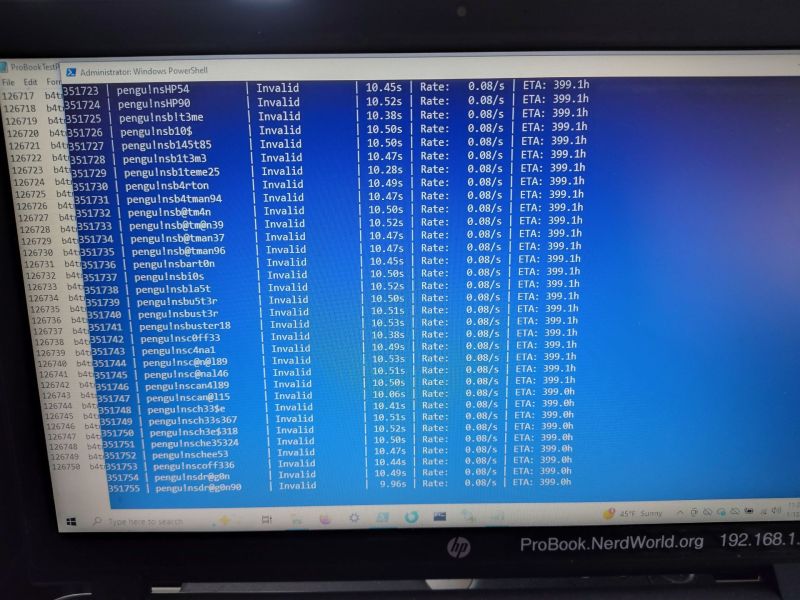
This led [Casey] to try brute-force cracking, starting with a Rust-based project on GitHub that promised much but failed to even build. Undeterred, he tasked the Claude AI to write a Python script to do the brute-forcing via the Windows-based HP BIOS utility. The chatbot was also asked to generate multiple lists of unique passwords to try that might be candidates based on some human guesses.
Six months later of near-continuous attempts at nine seconds per try, this method failed to produce a hit, but at least the laptop can still be used, just without BIOS access. This may require [Casey] to work up the courage to do some hardware hacking and erase that pesky UEFI BIOS administrator password, proving at least that apparently it’s fairly good BIOS security.












Sounds quite complicated compared to say the 90’s, e.g. AMIBIOS, when all you needed was a friend with a similar release, a few reboots to figure out which positions the password was stored in, followed by zeroing of those bytes in the targets bios backup and a quick reboot…all with nothing more than a little patience and some turbo pascal.
I just used the CMOS clear jumper.
But that’s not what the “customer” requested. :-)
Besides, even if the system had a reset pin, there was nothing to be gained from that other than more work having to reconfigure a bunch of settings the customer didn’t know. It’s beside the point whether or not those values could have been figured out via other means. The difference in time spent was minor and worth the gaining of a skill, at the time at least.
My comment was aimed at the difference in software based approache given the passage of time vs technology. I was not implying it was the simplest solution to the problem.
Humml, those who don’t know, or didn’t do it says “yes, flip the pswd jumper.. ” or disconnect the bios battery, aka cr2032″…
maybe, it work on desktop, NOT on laptop, especially the HP Elite (or Pro?) book.
I tried hard on an HP Elitebook 845, the only way was to remove BOTH 16 and 32MB serial BIOS chips with heat gun, read the binaries, patch them with a program (thanks to the developer!), rewrite the patched binaries, then do the soldering…
That need a complete disassembling of the laptop to access the second serial eeprom!
I’ve used 11th Alliance !BIOS tool. There are also other tools like Christphe Grenier’s CmosPwd.
I remember looking up how to remove the password on my thinkpad, just to see if it was even possible. It was, but it required me to open it up and dump the bios, send the dump along with $60 to some dude in eastern europe so he can insert an uefi driver that somehow bypasses boot guard, then flash that modified image back so the driver can actually erase the password.
Meanwhile the average desktop requires just shorting a couple pins.
That’s because them Thinkpads ‘r smarter than us…
Typically they have two bios chips that have to be faulted at the same time, after dr
aining local capacitors.
How does one achieve this?
about 10 years ago i purchased a lenovo T410s (while already owning the non -s version) from ebay with a notice that it had a bios password. after looking up info about it, i learned that the bios password was stored on a different writable rom chip and to bypass the password, this chip would need to be held to reset while the bios was trying to read it, thus making the bios think the password was blank.
i was able to “blank” password like this and get into bios and then set a new password, save, reboot, back into bios with this new password, then able to successfully clear the bios password altogether.
And for the next 5 years that dude in Europe had backdoor access to your computer.
For many laptops, https://bios-pw.org/ will work and is really easy. For the Thinkpads, many of them password can be bypassed by shorting some pins at just the right time. Check Russian forums and/or Yandex search to find how for your model.
This is a generic way to bypass any password when BIOS are stored on external chips. You just short the input pin of the chip with ground for a moment while the computer want to acess it and release it after entering in the BIOS (which is empty because the read wasn’t successful). Then you proceed to change the apssword to a known one then you reboot your computer with these changes made.
this is how i did to a lenovo t410s many years ago, you just worded it more neatly than i was able to in another comment. :)
This is not true at all.
You can only bypass the XX10 to XX30 series of thinkpads that way.
For the XX40 to XX80 series you have to erase the EC with a manipulated bios you can make with a cursed piece of software stitched together by the badcaps forum. Then put your original bios back on the chip.
For XX90 and further no luck. There seem to be hardware to write to the EC but its very expensive and cost probably more than you laptop.
I’ve read somewhere once (“tell me you have a bad memory without telling me you have a bad memory”) that the aim was to crack a password and the “craker” realized that when the tried password had some correct characters, the reply of being a bad password would take longer than when it didn’t have any good character, maybe that could help or maybe I’m talking rubbish…
Well, at least that theory has now been disproven. Cracking a password is apparently not a game of Mastermind.
It’s the case on non hardened/non-constant time algorithms when you can use side channel analysis (timing attack) to infer if a password (or hash of it) is good or not. It’s kind of rare in the field
That’s been a known attack for a long time. I first read about that problem being discovered and fixed in Unix decades ago. Anything remotely recent and decently done now take pains to equalize decision branches to prevent leaking the password via a “side channel”. I have no doubt it’s still a viable attack for a lot of less fastidiously created stuff out there.
Considering that password checking is simply: “hash entered password” -> “compare result with stored hash” there is very little that can influence timing of that check. Length of the password maybe, but there would be no way of telling what password length is correct. Only way this could work is if the password was stored in plain text, and afaik tha hasn’t been practiced since mid 80’s
If the first character is incorrect, the comparison will fail quicker than if every character is correct except for the last. Only very slightly quicker, mind you.
One way of mitigating the attack is to check every character even if the first character is incorrect. Or add a random delay at the end of the check to muddy the waters.
I would try empty flash/eeprom chips, forcing recovery, no?
If the password is good AI cannot do anything for you. https://xkcd.com/936/
Most consumer devices have a back door for service with BIOS passwords. Just google the serial number of the device. It is very likely that you find advice.
I reference that comic all the time, usually when I get “the look” after someone asks for my Wi-Fi password 🤣
Former favorites:
rubberbabybuggybumpers
tallgiraffeseatleaves
humpbackwhalesarescaredofheights
lotofheliumtothrowahippo
Sadly, the best passwords are often unusable, thanks to password length restrictions.
I had “knockknockpenny” for a while.
Not, “knockknockknockpenny”?!
I also use “correct horse battery staple” as a password. It’s a very good password and I can highly recommend it.
My hovercraft is full of eels.
and yet most business including at enterprise level, banks, etc all seem to want us to continue to use combinations of upper, lower, “special character” and number.
then tell us not to write it down.
Why on earth is this?
Combination of things. Part of it is regulations (PCI, FBA), and the fact that financial institutions are notoriously late and slow to change and adopt new standards (like for NIST).
The other part is legacy software or systems that have limits on character length, but more capability re: supporting different character sets. How do you gain security with a max of 12 char? Combinations of upper, lower, number and non-alphanumeric. It’s also (usually) easier to overlay some soft of MFA, and don’t worry as much about shorter, weaker passwords (and work to eliminate SFA.)
Could have just done the smart, obvious thing and used a TSOP clip and a CH341A to flash out the password instead of wasting nearly 2 months on AI bullshit to no good result.
Please, point out the instructions to do that on this specific laptop, instead of just “hey you can connect some wires and use some magic code that I assume exists but I’m too lazy to look for”.
The smart, obvious thing is not to make comments this pointless.
Erm. Yeah. Sorry, but we have. You expect us to do your job for you, too?
+1 nice to see some competent advice on hackaday. Been awhile 😂
i sure got excited about the confidence with which you used the phrase ‘TSOP clip’. i could see the product in my mind’s eye and i would just love to imagine that it’s cheap and common these days. but google shopping didn’t turn up a hit in the first page of results so :(
https://a.co/d/5r1IsDX
other commenter Chris replied with a set of pin grabbers, woah thats neat and tiny but did you mean one that grabs several pins at the same time like this? https://www.amazon.com/Pomona-Electronics-5250-Plated-Spacing/dp/B00JJ4G13I
Did they try Bios-pw.org?
Yes, I tried this. Unfortunately it didn’t work for me because the laptop would never give me a code, even after multiple manual attempts to unlock the BIOS.
This isn’t really using AI to crack the BIOS password as much as it is vibe coding a python script to do a standard brute force attack.
You are exactly correct. AI just helped speed up the python coding.
Sad that everybody has to claim “AI” for every new product these days. I’m waiting for “All Natural” AI :)
So, HP Probooks do have a backdoor for this, but it’s not a “master key” as each laptop requires a unique key file that qualified technicians and partners can request from an engineering team within HP. The process is basically “Put the file on a flash drive, plug it in, turn the laptop on, go into setup and change password.”
Consumer models (Compaq models, Pavilions, etc.) have a different method that is (mostly) universal but requires nonpublic software.
Source: Have used both methods at work.
Up until alarmingly recently, bios passwords from Dell and HP were stored, in a dedicated EEPROM, in raw ASCII, on the board.
I had a wonderful Toshiba laptop many moons ago that I had to replace the motherboard in.
The replacement had a locked bios (ugh), but also had a windows control panel that provided access to most of the bios settings. The control panel was also password locked, but the bios API itself wasn’t protected, so patching the binary to bypass the check was all that was needed! I still couldn’t change boot order, but I never ended up needing to.
Can’t you just desolder the flash chip the password is supposedly stored in, dump it for backup, then erase it completely and solder it back in to see if it solves the problem?
I’m working on a similar problem. I have a.. kiosk thing, from a printer, that I got from a thrift store.
I unplugged the SSD and can get it to boot Linux off a USB key, but I can’t get into the BIOS, because it prompts for a password, which I don’t know..
I have dumped the flash area containing the CMOS settings, and dd blanked it, but the BIOS ROM has some hard coded password in it, and instead of that blanking the password, it just reflashes the CMOS settings flash area with the same values..
It something XORed I think, based on what I dump out of it, but I can’t decode it.
My attempt to crack it has been to find the PS2 header pins, and attach an Android to generate the key codes for me, so it can just brute force it, but while a real PS2 keyboard will work on those pins, I cannot for the life of me get an Android to work to emulate a keyboard, which really shouldn’t be this difficult, especially when there are code examples of how to do it..
Uh everyone here is about 10 years behind. You can’t just pull the bios or reflash it. The password is no longer set/stored in the bios chip on any modern HP computer, laptop or desktop.
Please do a Google search on ‘trusted enclave’ and read up a little on the tpm module. In short, your bios password is stored in the secure/trusted enclave. On most modern systems your bios password is stored there along with a complete copy of the bios. On startup, the computer system veries the bios and is completely capable of fully restoring it from the enclave to ensure a ‘secure’ boot. And no, this is not a separate backup bios chip on the motherboard (although HP sometimes has two ‘bios’ chips) This is most times embedded in the chipset/CPU. (Hence why HP recommends a complete board replacement…not too many people can replace a bga or get access to the chip) You can literally completely wipe the bios chip, reinstall it and have the computer restore it, without outside help, to its previous state (I have, in desperation, proved this fact 4 years ago – do not ever let former employees set a bios password on their computer – set it for them before allowing access to the computer!)
A while a ago, my boss at my old job used an even more ‘brute-force’ method on a laptop that one of our users had set a BIOS password on, and subsequently forgotten.
Because the laptop was still in warranty, he grabbed a 9V battery, shorted it’s terminals all over the motherboard, and then got me to get a warranty replacement for the now destroyed mobo.
He did always have a ‘direct’ approach to solving problems.
So I had a similar issue a number of years back where I set the supervisor password without saving it to my password vault. Years later I actually wanted to do something in the bios and found myself locked out. In my case it was possible to short a couple of pins on the primary SPI bios chip on boot to bypass the password allowing me to set it to blank and remedy the situation. Not sure if would be similarly possible here
I went off and had a look again. https://cybercx.co.uk/blog/bypassing-bios-password/ here’s the kind of thing that I followed though the article I followed was further in the past but it’s the same information for bypassing bios passwords and seems to be up to date for TPMs etc, in that whilst you’d not be able read the disk you would likely be able to overwrite and load an os of choice as well as changing bios settings.
hi i have dell e7480 laptop its i5 7th i want to change in to i5 8th you help me