
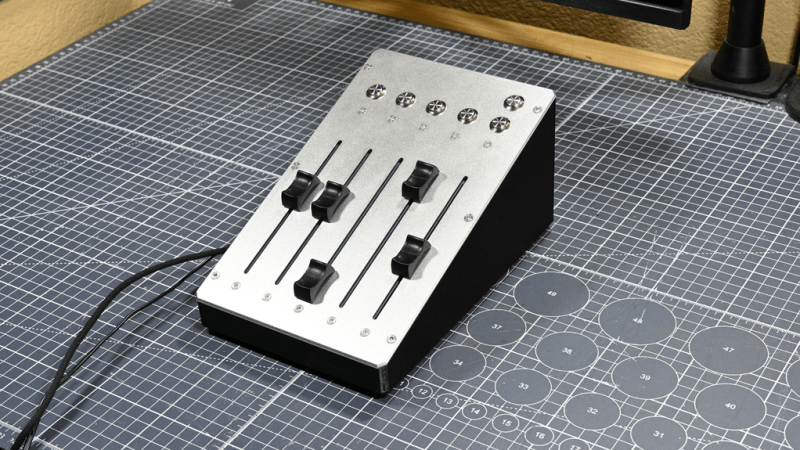
These days, Windows has a moderately robust method for managing the volume across several applications. The only problem is that the controls for this are usually buried away. [CHWTT] found a way to make life easier by creating a physical mixer to handle volume levels instead.
The build relies on a piece of software called MIDI Mixer. It’s designed to control the volume levels of any application or audio device on a Windows system, and responds to MIDI commands. To suit this setup, [CHWTT] built a physical device to send the requisite MIDI commands to vary volume levels as desired. The build runs on an Arduino Micro. It’s set up to work with five motorized faders which are sold as replacements for the Behringer X32 mixer, which makes them very cheap to source. The motorized faders are driven by L293D motor controllers. There are also six additional push-buttons hooked up as well. The Micro reads the faders and sends the requisite MIDI commands to the attached PC over USB, and also moves the faders to different presets when commanded by the buttons.
If you’re a streamer, or just someone that often has multiple audio sources open at once, you might find a build like this remarkably useful. The use of motorized faders is a nice touch, too, easily allowing various presets to be recalled for different use cases.
We love seeing a build that goes to the effort to include motorized faders, there’s just something elegant and responsive about them.











I guess the next step is to have it watch the processes that are outputting audio and automatically switch presets.
I think it’s for controlling individual application/device volume as opposed to being an EQ.
Both volume and EQ have merit to automatic profile switching (if you want to) – for instance opening a voice chat application you probably want to mute/reduce all the other programs volumes so the chat is prominent and the overall sound level remains the same. And if you can have say 8 games on the same “game” volume slider with automatic detection (as I’d guess you won’t play more than 1 at once) you might want automatic volume adjustment settings per game as not every title is good at remembering the right volume output to be in the right ballpark as all the others from its in game settings.
If you get a little fancier even possible to automatically take the surround sound of the game and downmix for your stereo set up, or split out rear/front/centre channels to do EQ, maybe crank up the surrounds volume etc. Though I’d suggest if you are really trying to do that you really really don’t want to be on Windoze – last time I used it the audio stack was pretty darn awful for user control and reliable, repeatable behaviour.
Windows has a moderately robust method for managing the volume…
Sarcasm? Or does Poe’s law apply?
I mean, seriously. There are so many layers in that stack it’s like a house of cards. You pretty much have to reboot daily or after any device change if you want reasonable certainty of it working.
Windows 7 seemed to have it figured out. The additional layers and abstractions in Windows 10 and even more in Windows 11 make the whole sound system very brittle.
I can’t imagine adding additional devices and another layer of device abstraction will improve matters at all.
I use an external analog mixer to reduce the number of Windows devices to the absolute minimum, and that helps. But the HDMI speakers will still disappear sometimes, or the webcam microphone won’t unmute, or audio won’t get routed properly when I plug headphones in. It’s nuts.
I’m confused. What windows are you using and how are you configuring it? My primary dev PC is an almost 10 year old Win10 install on 2015 mid to high end PC and it is absolutely stable.
Win10 and maybe Win7 have been more stable than my Ubuntu machines. I don’t doubt there are problematic installs but that’s true for any OS.
Even my Win 11 having PC is absolutely rock solid.
My Win10 too.
I guess he writes that because he thinks it will get him some Linux points?
These are all Lenovo machines. A 2015 i7 desktop, a x220, and x390. The older ones started out on Win7, all are now Win10. All have similar issues where it will work fine for days or weeks, then a device will spontaneously go silent, requiring poking around at the several different kinds and ages of layered controls, or ultimately a reboot. A couple of newer Win11 MiniPCs here are more stable but much more brittle when device configuration changes — even as simple as plugging an audio dongle into a different USB port.
I admit it’s better for device compatibility and driver hell than it was in the bad old days, but it’s frustrating to have to test every time before use, because sometimes it spontaneously doesn’t work. The stability isn’t there, and the underlying mechanisms are generally inscrutable.
(Don’t get me started on Linux sound. There are CentOS, Mint, Ubuntu and Debian machines scattered around here. All have their issues. )
Sound on Linux has gotten much better. At least we haven’t had to deal with OSS in a long time and PulseAudio is getting replaced with PipeWire in a lot of distros.
I recently switched to PipeWire and it seems to be working pretty well. Bluetooth audio works great now and the virtual patch panel makes it very easy to connect the audio output of one program to the input of another.
Moderately robust, then there is VoiceMeeter-(various fruits) which I take is like Jack on linux but for Windows.
If there was a digital head mixer for 5 stereo lines I go for this as a hands on to the rest of the digital interface mixer.
No OSC?
~$40 minimum per fader is not cheap. Even when bought in bulk and the price goes to roughly $30 per.
Regardless, we’ve split plenty a hair on similar topic, in some situations physical/tactile controls are needed, sliders/faders, knobs, dials, switches, pushbuttons.
It is $40 for a set of five sliders. $8 each is not bad for what you are getting.
It’s $40 for 5 faders. Makes it pretty interesting.