
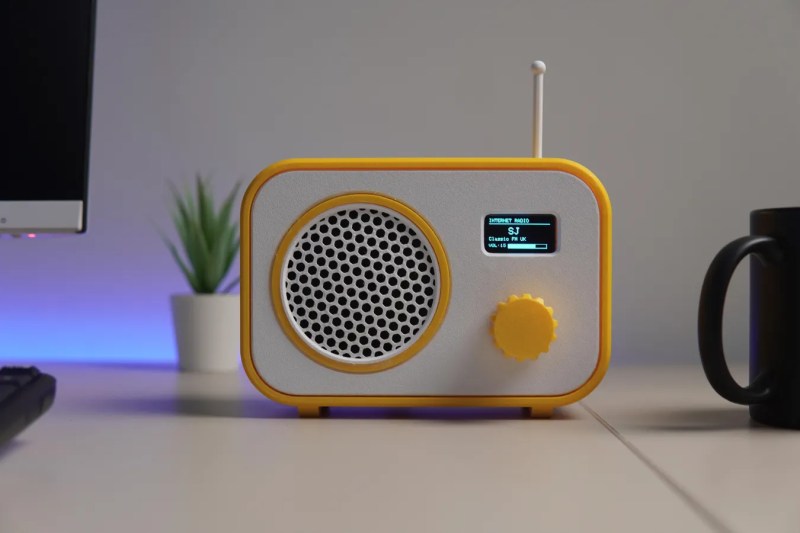
Broadcast radio isn’t as popular as it once was, its popularity suffering in turn due to technologies like MP3 players and music streaming services. If you don’t fancy either of those, you might like to listen to some internet radio stations, using a rig like the one [CodersCafeTech] built.
It’s a simple desktop radio set, but instead of tuning in to AM or FM broadcast bands, it has an antenna for 2.4 GHz instead. That’s because inside this radio is an ESP32-S3 development board, which is equipped with onboard WiFi hardware that lets it connect to the internet. It’s hooked up to a 1.3-inch OLED display over I2C, which acts as a user interface in concert with a rotary encoder. Sound is handled with a MAX98357 I2S audio amplifier, hooked up to a small 3 W speaker. Once programmed appropriately, all the unit needs is a WiFi SSID and password, and the URL for the internet radio station you’d like to listen to.
We’ve featured a few internet radio builds over the years, as well as a rather fun build that saw a Macintosh SE/30 hooked up to Spotify. If you’re tinkering with something along those lines, don’t hesitate to let us know on the tipsline!











I remember some decades ago I went to trim my hair at my favorite barbershop and while I was waiting my turn I was reading a magazine (I think it was popular mechanics) and there was a large article about a novelty product: an universal internet radio receiver with more than 1000 radio stations! those where the times my friend.
From a browser: http://www.internet-radio.com/
cool ! I use Receiver for Linux ,usually I tune a Japanese station called chifuru playing some kind of anime rock ,I dunno it is like an instant burst of energy.
Or live365
http://www.live365.com/listen
Browse genres, then bookmark your favourite stations.
You can often find the actual stream URL with a bit of detective work. Use the browser “Developer tools”, then look for a “Network” tab, then “Media”. Click the “Play” button on the actual website and watch for the stream URL – players seem to “fetch” the stream a few secconds at a time. Copy that URL and paste it into a new browser tab and it should be the radio content stream. Or you can paste it into the “Open network stream” prompt in VLC.
There’s also a trick for live365.com where you get the station number, e.g. a12345, then use a URL:
https://api.live365.com/station/a12345
and it will show you the stream URLs for that station. Some have different bit rates or higher/lower quality encoding.
Why do even commercial products always use the tiniest possible display? With a plethora of displays to choose from, please think about useability.
What’s not useable with that screen? It’s a radio. You listen to radio. Listening isn’t done with eyes last time I checked.
Check back with us when you’e older…. age > 45, but especially > 55 or 60.
You’ll find your question has answered itself.
Yes but a bigger screen would be beneficial or even a way to enlarge the font. My eyesight is perfect but I struggle sometimes to read the info on the usually smallish screen. Listening is where it’s at bit that does involve reading some text.
Hi everybody. I can understand most of the points.
One reason to use small displays is price, the next are space reqirement and availability.
BUT if you want a bigger screen, either integrate a magnifying glass in front of the small one, or, as this seems to be a kit, use a bigger screen on the version your build. I have some impressively big character-lcds with one line and 10 characters, you could fit 10 of the tiny graphic displays in its space – instead of arguing, search for a compatible option.
Just complaining does not tend to help;-).
Why does it need a display? Most radios I grew up with didn’t have one, unless you call static ink around a knob a “display”.
In the good ole days this worked so well. Nowadays you have to go to their web page and look for a camouflaged play arrow and click on it, but first turn the volume up to full level as many stations set it at half level and can’t be turned up after play. Volume controls should not be on media pages! NPR, I’m looking at you. Thanks bots, it’s why we can’t have nice things.
Originally the stream plays through your player like VLC, then they put a web page player on the site. There are 2 modes at work here. Single click (a bookmark) to a page with a useless play ribbon and the stream plays, I can handle this and I assume this project would connect to such a stream even without a screen with the play line and the now useless volume control. The second mode which borks convenience is where the page has the play button that needs to be clicked on to listen to the stream. Not robot friendly or usable with a pushbutton internet radio.
I had an older friend with no computer that listened to WWOZ New Orleans his home station on a little box internet radio and used the wifi with permission to just listen to a great radio station. He passed away and I wonder if he lost that station and more when they switched to a page driven stream. That was about 2 years ago. This is an accessibility issue for blind users of such internet radios.
Nice build although I think a larger, more useful display would have been a nice touch. Also, the plastic white “antenna” is for looks only, not even 2.4 GHz, and is not even mentioned in the text of the article.
I meant to say “text of the instructable.”
What do you need a screen for on a radio?
Tuning the station
Now for someone to come up with a program to make whatever disk jockey on the air sound like
Adrienne Barbeau’s “Stevie Wayne” (from KAB) in THE FOG.
What a missed opportunity….that voice…
Oh yeah. Love the idea.
So feed it to an AI and let it DJ your music…
Hi, Please point out where is the STL file for the enclosure? Thanks.. 😵💫🤔
Seems he wants a “buy me a coffee” for $20 bucks before you can have the STL files.
One problem with the ESP netradio solutions I had so far was that they don’t really like https streams. Now that everything is forced to https how well does this one work?
I think I have most parts for this kicking around somewhere (though a simple op-amp audio amp is not too difficult (needs not too much power for small speakers).
Esp32 can do https. Here’s an example
https://github.com/earlephilhower/BackgroundAudio/blob/master/examples/WebradioMP3PlusWebUI/WebradioMP3PlusWebUI.ino
Thanks, appreciate those links! I’ll give that project a shot :)
YoRadio and yoradio fusion
KaRadio and KaRadio32
powerfull AstraCube esp32-s3 (¿source?)
Display st7789+encoder
module pcm5100+Pa
I was considering using a rotary encoder to tune stations with an analog meter to show the tuning. Using PWM to control the meter, and multiple points marked off the station type. (Pop, rock, country, news…)
I live in a region that is often severely affected by weather events. Forget a mains powered radio. Forget an internet radio. The only thing guaranteed to work is a wind-up radio.
there’s a little devboard with everything on boar besides the display: YB-ESP32-S3-AMP
https://radiofinder.eu/en – Here you can find almost all radio stations from around the world online. Search by genre, country, and mood.
Slim Devices made a product back in the 2000s called a “Squeezebox”. The company was purchased by Logitech who marketed it for years, had a (not successful) go at converting it to a Sonus type product and then finally open sourced the lot (….to their eternal credit). Squeezebox radios are a tabletop radio unit that features a number of controls and small color LCD display. Most of the unit – a rather dense plastic box — is loudspeaker enclosure which contributes to its great sound.
The Squeezebox is an Internet radio and will process streams from around the world. It also works with music server software which, thanks to open-source, now runs on any file server. The result is a comprehensive, open source, ecosystem known as the Lyrion music server which literally does everything. For devices like this there’s a music player that will run on anything from a PiZero up and this is what I’d put in a device like this project.
I collect Squeezeboxes (have three at the moment) and also use a Pi3 to host the server and provide high quality analog audio output for a vintage HiFi system (the Pi has a “HiFiBerry” audio output shield). (Logictech also marketed a traditional rack mount style player which I’d like to get my hands on but they’re as rare as hen’s teeth.)
even better when you can make your own with squeezelite-esp32. I have updated a couple old radios to be internet radios with those boards.
The rotary encoder this project specifies isn’t like any I’ve seen: it has two pins, labeled clk (clock presumably) and DT, and then a switch pin, +5V, and GND. The description in the link says it’s an incremental encoder but analog, so, maybe it’s an infinite turns potentiometer? I am used to incremental rotary encoders having a common pin, two channels of encoder quadrature output, and maybe two contacts for an NO switch.
Okay now I found a datasheet (of sorts) for it, and it’s a typical quad encoder after all but with weird labeling. The CLK pin is quadrature output for channel A, the DT pin is quadrature output for channel B, GND is the common pin, and the +5V (which don’t actually use 5V, this is an esp32, use 3.3V) is the bias voltage for the two channels. Presumably switch reads 3.3V until pressed, when it goes to ground. So you can use any old quad encoder with it.
Neat build: an ESP32-S3, a 1.3″ OLED, a rotary encoder and a MAX98357 driving a 3 W speaker covers everything you need. The line that it needs a Wi-Fi SSID, a password and the URL for the station is the bit people underestimate; deciding which stations deserve a slot often takes longer than the soldering. Disclosure: we built and run Roam Radio, a free browser directory of about 68,000 live stations in 250 countries and territories, sorted by country, city, genre and language, with no signup. Useful for auditioning stations first: https://roamradios.com