

Writing a computer game has always been hard. It is only the nature of the difficulty that changes. A modern game is as much about graphics, sound, and storytelling as it is about programming. But in the early days of computers, writing a game was a challenge because of limited graphics, slow CPUs, and tiny memory capacity. If you wanted to write a game for an early microcomputer, you generally wrote it in assembly language. BASIC was available on many machines, but it was usually too slow for anything requiring fast animation. Assembly language was fast, but it was also difficult to write, debug, and port to another machine.
RCA — in particular [Joseph Weisbecker], the architect of the 1802 — introduced the COSMAC VIP into the primordial 1977 home video game market. In addition to using ready-made games, the idea was that you could create your own. But writing games in 1802 assembly language would be beyond most of RCA’s customers. [Weisbecker] devised CHIP-8, a tiny virtual machine. It wasn’t quite a programming language. Instead, it was a simple instruction set implemented by an interpreter running on a real computer. You wrote programs for the imaginary CHIP-8 processor, and the interpreter made them run on the actual hardware. CHIP-8 is perfect for the kind of games you’d see in those days and still has a following among those who love retro games.
A Different Time: Tiny Interpreters
Today, when we think of interpreters, we often imagine something like Python, where the interpreter reads source code and figures out what to do. However, there’s another approach that was particularly attractive when memory and processor cycles were precious: threaded code.
In a threaded-code interpreter, a program consists of references (like indices into a command table) to routines that perform operations. Instead of decoding complicated instructions, the interpreter follows these references, executing the corresponding routines. There are several variations, including direct threading, indirect threading, and token threading. Forth is probably the best-known example of a language that commonly uses threaded code. In a typical Forth implementation, a program is compiled into a sequence of references to words, and a compact inner interpreter executes them.
Why bother? Because the implementation can be remarkably small. Instead of generating native machine code, a compiler can produce a compact representation that is relatively easy to execute. CHIP-8 belongs to the same general family of ideas, although it is more accurately described as a bytecode interpreter than a conventional threaded-code system. Its instructions are two bytes long, and the interpreter decodes each instruction and executes the corresponding operation. The original implementation was written in RCA 1802 machine code.
History Of CHIP-8
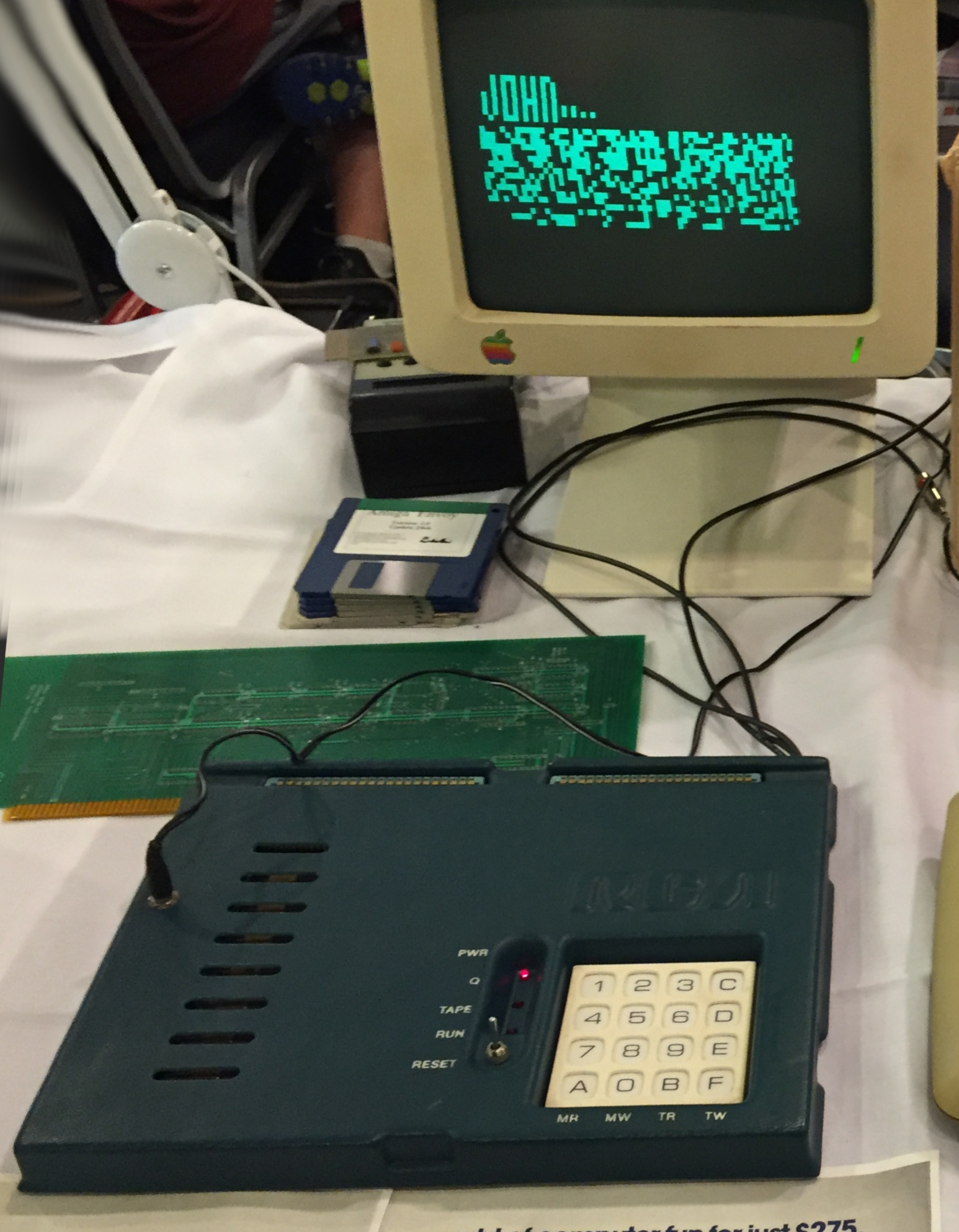
CHIP-8 made programming the VIP considerably easier, especially for games. Rather than dealing with the peculiarities of the 1802 and the VIP’s display hardware, programmers could use a small, consistent instruction set designed around graphics and keypad input.
The CHIP-8 virtual machine provides sixteen 8-bit registers, conventionally named V0 through VF. It also has a 16-bit index register, a program counter, a stack for subroutine calls, and two timers.
The display is 64 pixels wide and 32 pixels high. Pixels are either on or off. There’s no color, no hardware sprites, and no sophisticated graphics processor. There are, however, instructions specifically intended to make games easier to write. You can draw a sprite with a single instruction, test whether a key is pressed, generate a random number, and use timers to control animation.
A sprite is simply a sequence of bytes, with each bit representing a pixel. A typical sprite can be up to eight pixels wide and fifteen pixels high. The instruction set is tiny, with only a few dozen basic operations. Yet it is sufficient to implement games such as Pong, Breakout, and Space Invaders-like shooters.
CHIP-8 subsequently appeared on other systems, and later variants extended its capabilities. The best-known extension is Super-CHIP, which added features including higher-resolution graphics. Today, CHIP-8 survives largely because it is an excellent target for emulator projects. Writing a CHIP-8 interpreter is a manageable exercise, and there are thousands of small programs available to test one. But you don’t need to write an interpreter to experiment with CHIP-8.
Modern Octo
Octo is a modern CHIP-8 development environment created by [John Earnest]. It runs in a web browser and includes an assembler, an emulator, a debugger, and tools for working with CHIP-8 programs. You can write code, assemble it, and run it without installing anything. Octo also supports extensions to the original instruction set, although we’ll stick with ordinary CHIP-8 for this project. Using a higher-level assembly syntax than the hexadecimal opcodes used by early CHIP-8 programmers is handy enough.
You still have to think like an assembly language programmer. There are registers, jumps, subroutines, and a very small instruction set. However, you don’t have to remember that 6A05 means load register VA with the value 5. Instead, you can write va := 5.
That’s much easier to read. Octo also provides labels, constants, expressions, and other conveniences that make it practical to write programs of reasonable complexity.
A Little CHIP-8 Assembly
CHIP-8 has sixteen general-purpose registers, V0 through VF. Most instructions operate on these registers.
For example:
v0 := 10
v1 := 20
v0 += v1
This loads 10 into V0, 20 into V1, and adds V1 to V0. Afterward, V0 contains 30. However, Octo also allows :alias and :const keywords to make things easier:
:const RETRY 10
:alias trycount v0
trycount := RETRY
There are also bitwise operations:
v0 &= v1
v0 |= v1
v0 ^= v1
You can compare registers and values using conditional instructions. One thing that takes some getting used to is that CHIP-8 doesn’t really have conventional conditional branches. Instead, conditional instructions skip the following instruction when the condition is satisfied. Luckily, Octo hides some of that awkwardness with syntax such as:
if v0 == 10 then jump somewhere
Underneath, this is still a conditional skip followed by a jump.
Subroutines are straightforward:
: main
v0 := 10
do_something
jump main

: do_something
v0 += 1
return
Drawing is particularly interesting. To draw a sprite, you first load the index register, i, with the address of the sprite data. Then you use the sprite instruction.
For example:
i := ball_sprite ; load address
sprite v0 v1 1

; address of sprint for ball
: ball_sprite
0x80
Each sprite is one byte high and eight bits wide. Since only the most significant bit is set, it draws a single pixel. The V0 and V1 registers specify the X and Y coordinates.
Let’s Play Pong

A simple Pong game is a good demonstration of CHIP-8 programming because it requires very little graphics capability but exercises most of the interesting parts of the virtual machine. This version has two paddles, one on each side of the screen, and a single-pixel ball. The left paddle uses keys 1 and 4 to move up and down. The right paddle uses C and D. If you use Octo, this maps to the 1 and Q keys along with the 4 and R keys.
The ball moves across the screen, bouncing off the top and bottom walls. When it strikes a paddle, it reverses direction. If a player misses, the ball returns to the center. The ball doesn’t always bounce straight back. Its vertical direction depends on where it strikes the paddle. A hit in the center produces a horizontal trajectory. Hits above or below the center produce progressively steeper angles.
Since CHIP-8 doesn’t have floating-point arithmetic, we approximate the angles using integer counters. For example, a five-degree trajectory moves vertically approximately one pixel for every eleven pixels of horizontal movement. For a ten-degree trajectory, we move vertically about once every six horizontal pixels. This isn’t a sophisticated physics simulation, but it works well enough for Pong. You can play it directly using Octo in your browser.
The game loop is conceptually simple:
: main
erase_objects
move_paddles
move_ball
draw_objects
wait_for_frame
jump main
The actual program is a little more complicated because we have to handle input, collisions, and boundary conditions. Still, the basic structure is familiar to anyone who has written a simple video game.
You can find the complete Octo source on GitHub. The program uses ordinary CHIP-8 instructions and should run in Octo or another compatible interpreter.
Detecting Collisions
CHIP-8 has a clever feature that makes sprite collisions particularly easy to detect. Whenever you execute a sprite instruction, the interpreter sets register VF to indicate whether any pixels were erased by the XOR drawing operation. If no pixels were erased, VF is zero. If one or more pixels were erased, VF is one. Suppose the display contains a pixel that is already on. If you draw another sprite over that pixel, the pixel turns off. If you draw over it again, it turns back on. This makes it possible to erase sprites simply by drawing them again.
It also provides a simple collision detection mechanism. If you draw a ball over a paddle, some of the ball’s pixels will overlap the paddle’s pixels. The XOR operation erases those pixels, and VF becomes one. In our Pong game, we can use this to determine whether the ball has struck a paddle.
Conceptually, the code looks like this:
i := ball_sprite
sprite v0 v1 1
if vf == 1 then jump collision
There’s a subtlety here. VF doesn’t tell us what the ball collided with, only that the drawing operation erased at least one pixel. For Pong, we can use the ball’s position and direction to determine which paddle is involved. We can then calculate the ball’s position relative to the paddle to determine its new trajectory.
For example, suppose the paddle occupies five vertical pixels. If the ball strikes the middle pixel, it travels horizontally. If it strikes one pixel above the middle, it moves upward at approximately five degrees. Two pixels above produces ten degrees. The same idea applies below the center, except the ball moves downward. This is a simple way to add a little variety to the game without requiring complicated mathematics.
XOR drawing also gives us a way to avoid flicker when drawing. Instead of clearing the entire screen, we can erase the old objects by drawing them again. Then we update their coordinates and draw them at their new positions. This approach avoids repeatedly blanking the entire display and generally produces smoother animation.
However, there is a catch. Remember that drawing a sprite sets VF when pixels are erased? When we intentionally erase the old sprites, VF may also become one. That won’t indicate a collision. It simply means the XOR operation did exactly what we wanted. Consequently, we ignore VF during the erase pass. We only examine it when performing the drawing operation intended to detect a collision. Another important detail is that VF is updated by each sprite instruction. If you draw the ball and then draw a paddle, the second drawing operation overwrites VF. Therefore, you need to test or save VF immediately after the relevant instruction.
How Fast Is CHIP-8?
The original CHIP-8 interpreter ran on a 1970s microprocessor, so nobody was expecting spectacular performance. Modern computers can execute CHIP-8 instructions almost instantaneously. However, running the interpreter as fast as possible would make many old games unplayable.
CHIP-8 has two timers, a delay timer and a sound timer, that decrement at 60 Hz when they are nonzero. Programs can use the delay timer to control animation independently of the interpreter’s instruction execution rate. For example:
v0 := 2
delay := v0

: wait
v0 := delay
if v0 != 0 then jump wait
This waits until the delay timer reaches zero. With a 60 Hz timer, two ticks correspond to approximately 33 milliseconds, or 30 frames per second.
Octo also lets you adjust the interpreter’s execution speed. This is important because CHIP-8 never had a single universally standardized instruction execution rate. Different historical implementations ran at different speeds, and programs sometimes depended on those differences. If you run the interpreter too slowly, the game may become sluggish. If you run it too quickly, the game may run much faster than intended.
For our Pong game, the delay timer provides the primary frame pacing, so the exact instruction execution rate is less critical. However, the interpreter still needs to execute enough instructions between timer ticks to complete each frame. There is also an interesting interaction between interpreter speed and display behavior. Some CHIP-8 implementations synchronize drawing operations with the display refresh, while others don’t. These differences can affect animation smoothness and the apparent speed of a program.
If you’re experimenting with Octo, it’s worth adjusting the speed settings to see how they affect the game.
Everything Old…
CHIP-8 is almost fifty years old, but the underlying idea remains familiar. Consider the Java Virtual Machine. Java source code is compiled into bytecode, which executes on a virtual machine rather than directly on the host processor. CHIP-8 does essentially the same thing at a much smaller scale. Of course, the JVM is vastly more sophisticated. It supports a large instruction set, complex data types, object-oriented programming, garbage collection, security mechanisms, and often just-in-time compilation. Before that, the UCSD P-code system offered a bigger abstraction for early computers.
CHIP-8 has only sixteen 8-bit registers, a few dozen instructions, and a 64-by-32 monochrome display. But all of these systems attempt to separate the programmer’s view of the machine from the actual hardware. CHIP-8 also demonstrates how much can be accomplished with very little. Its instruction set is small enough to learn in an afternoon, and writing an interpreter for it is a reasonable weekend project.
If you want to understand virtual machines, emulators, or even the design of instruction sets, CHIP-8 is a particularly approachable place to start. And if nothing else, it’s a reminder that you don’t need millions of lines of code, gigabytes of memory, or a graphics processor to write a video game. It has even inspired some newer systems.
Featured image: “Iconic COSMAC Elf spaceship scene” by [William Donnelly]











Please be kind and respectful to help make the comments section excellent. (Comment Policy)