

Sometimes we like to take a few minutes away from Hackaday to spend time with our families. But just when you take your eyes off of the incoming comments, Trolls are bound to strike. Well, [Caleb] and I found a solution to the problem in the form of a troll sniffing rat. This beady-eyed vermin sits on my desk and waits. When a trolling comment is detected its eyes glow red and an alarm is sounded. Join us after the break for more about this silly project.
Software
To pull this off I need a few things to happen. First, a way to parse our incoming comments. That’s easy, we use WordPress as our content management system and that means there’s already an RSS feed for global comments. I just need to grab that data and traverse the comment authors for known trolls (who haven’t been banned). That’s not hard to do with a Python script, especially if you take advantage of the Beautiful Soup module which sanitizes and navigates HTML and XML. My script checks the feed every two minutes, stores the number that identifies each comment so as not to have duplicate alarms, and makes decisions based on the author of that comment. A simple list of usernames is used to search for trolls, but it could be used just to notify whenever one of your favorite readers leaves a comment. The script then records a message on the standard output, and sends a coded command via a serial connection.
Here’s what the terminal output looks like:
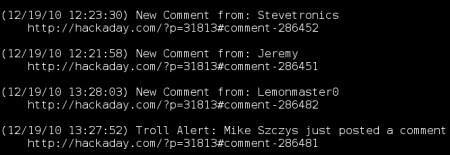
And here’s the Python script:
#!/usr/bin/python

trolls = [ 'Mike Szczys' , 'Caleb Kraft' ]
signalAllComments = True
signalAllAudibly = False

import urllib2, time, serial
from BeautifulSoup import BeautifulSoup

#start a list of comments to prevent duplicate alerts
dupe = []

#setup Arduino communications
ser = serial.Serial('/dev/ttyUSB0', 9600)

time.sleep(5)

#get list of comment identifiers
while True:

  #Reset Arduino from the last trigger
  ser.write('z');

  #Get the comments
  html = urllib2.urlopen("http://hackaday.com/comments/feed").read()
  soup = BeautifulSoup(html)

  #Check each one
  for item in soup('item'):
      thisID = item('guid')[0].string.split('comment-')[1]

      if thisID not in dupe:
              #Add to the duplicate list for next time
              dupe.append(thisID)

              #Convert post time to local time
              postT = item('pubdate')[0].string
              parsedT = time.strptime(postT, "%a, %d %b %Y %H:%M:%S +0000")
              offsetT = time.mktime(parsedT) - time.timezone
              localPostTime = time.strftime("%m/%d/%y %H:%M:%S", time.localtime(offsetT))

              #Check if this is a post we're watching
              author = item('dc:creator')[0].string
              if author in trolls:
                  print "(" + localPostTime + ") Troll Alert: " + author + " just posted a comment"
                  print "    " + item('guid')[0].string
                  print
                  ser.write('a')
                  time.sleep(1)
              elif signalAllComments:
                  print "(" + localPostTime + ") New Comment from: " + author
                  print "    " + item('guid')[0].string
                  print
                  #audible signal?
                  if (signalAllAudibly):
                    ser.write('b')
                  time.sleep(1)

  time.sleep(120)
Hardware
Next, I needed a way to sound the alarm when the parsing script identifies a troll. In my mind the easiest/quickest way to develop hardware connected to a computer is to use an Arduino connected via USB. I have an Arduino that I’ve never actually used for a project so I thought this would be a great start. I dug up a piezo buzzer and some LEDs and started looking around to see what code examples I could repurpose.
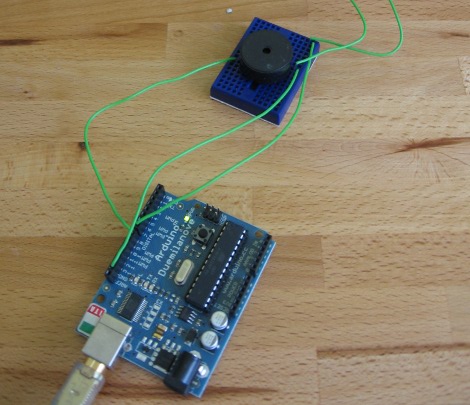
I found a post on making music using a piezo buzzer, so I altered that code to make the sounds I desired. I also looked at the serial communication examples that come with the Arduino IDE to get communications up and running. Like I mentioned above, I’m sending an ASCII char via serial connection from my Python script. The sketch below just looks for those chars and acts accordingly. I can make the hardware light the LEDs and play a bad sound when ‘A’ is received. It plays a good sound and does nothing with the LEDs when ‘B’ comes through. Any other letter turns the LEDs off, which is what the Python script uses to reset the LEDs two minutes after the last troll alert.
//Piezo code from:
//http://www.arduino.cc/cgi-bin/yabb2/YaBB.pl?num=1241248988

void setup() {
  pinMode(7, OUTPUT);
  pinMode(8, OUTPUT);
  Serial.begin(9600);
}

#define PIEZO_PIN 8
// defines for the frequency of the notes (.5 x freq of mid C)
#define AN    220     // 440 Hz
#define AS    233     // 466 Hz
#define BN    247     // 493 Hz
#define CN    261     // 523 Hz
#define CS    277     // 554 Hz
#define DN    294     // 588 Hz
#define DS    311     // 622 Hz
#define EN    330     // 658 Hz
#define FN    349     // 698 Hz
#define FS    370     // 740 Hz
#define GN    392     // 784 Hz
#define GS    415     // 830 Hz
// defines for the duration of the notes (in ms)
#define wh    1024
#define h      512
#define dq     448
#define q      256
#define qt     170
#define de     192
#define e      128
#define et      85
#define oo7      1    // 007 jingle

/////////////////////////////////////////////////////////////

void play_tune(int tune){               // play a tune . . .
  switch (tune) {                       // a case for each tune
  case 1:
    for (unsigned char i=0; i<4; i++)
    {
      ToneOut(FS*4,et);
      ToneOut(CN*4,et);
    }
    break;
  case 2:
    ToneOut(CN*8,e);
    delay(16);
    ToneOut(CN*8,e);
  }
}

void ToneOut(int pitch, int duration){  // pitch in Hz, duration in ms
  int delayPeriod;
  long cycles, i;

  //pinMode(PIEZO_PIN, OUTPUT);           // turn on output pin
  delayPeriod = (500000 / pitch) - 7;   // calc 1/2 period in us -7 for overhead
  cycles = ((long)pitch * (long)duration) / 1000; // calc. number of cycles for loop

  for (i=0; i<= cycles; i++){           // play note for duration ms
    digitalWrite(PIEZO_PIN, HIGH);
    delayMicroseconds(delayPeriod);
    digitalWrite(PIEZO_PIN, LOW);
    delayMicroseconds(delayPeriod - 1); // - 1 to make up for digitaWrite overhead
  }
  //pinMode(PIEZO_PIN, INPUT);            // shut off pin to avoid noise from other operations
}

void loop() {

  if (Serial.available() > 0) {
    int inByte = Serial.read();
    // do something different depending on the character received.
    // The switch statement expects single number values for each case;
    // in this exmaple, though, you're using single quotes to tell
    // the controller to get the ASCII value for the character.  For
    // example 'a' = 97, 'b' = 98, and so forth:

    switch (inByte) {
    case 'a':
      digitalWrite(7, HIGH);
      play_tune(1);
      break;
    case 'b':
      play_tune(2);
      break;
    default:
      digitalWrite(7, LOW);
    }
  }
}
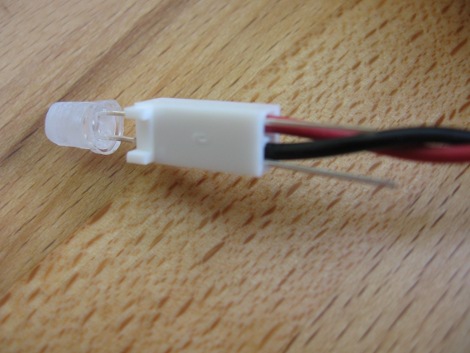
The final piece of the puzzle was to put two red LEDs inside of a plush rat that we had lying around the house. The eyes were embroidered so I clipped the LED leads at an angle to make then sharp enough to pierce through to the inside. I used a Dremel sanding drum to make the clear LED package cloudy and to shave off most of the extra plastic. I then used a couple of KK connector patch wires I had around to attach to the leads on the inside of the rat head. After removing the stuffing from the body I pushed the connector all the way on and then bent the leads over the connectors. There’s picture of this below, but without the leads bent.
I restuffed the rat and stapled up the seam that I cut open to do the work. I love the outcome. It’s clearly audible throughout the house, and I had fun along the way.
It turns out that an $8 webcam and an Ubuntu box don’t make up a great video setup. But if you must see a demonstration, here it is:
[youtube=http://www.youtube.com/watch?v=eUNlzNo9tr8&w=470]













awesome! :D
hahah thats awesome
But…what about sophisticated trolls like…:
“Pardon me, but thine projects are reminiscent of five days old faeces?”.
Now, i’m not a troll, but i couldn’t help myself ;)
Nice project – and hey, it might become more useful than you think :) it reminds me of the “stupid filter” project.
I. WIN!
Obvious coolness is obvious.
Nice!
aren’t you really just tempting people to try to burn it out? albeit impossible, but still?
Oh no it has an Arduino!
(Rat blinking red and sounding like crazy!)
No just kidding, I love those damn things ! … and this project is very cool done, but maybe use an Ethernet shield / or use something like advanced filters / regex in combination with that list to search for unknown trolls, acting like trolls…
Awsome! lol…
Ow, crap… another arduino. And why do arduino-fans always wonder why I don’t have a C++ compiler-enabled toolchain for avrs….
P.S. Awesome project, but it would do a lot simpler and cheaper with just an attiny2313+vusb stack for connectivity via usb. The code will pretty much fit into 2kb of flash.
@Necromant: You’re wrong on both accounts. It wouldn’t have been simpler nor would it have been cheaper.
You see, I didn’t really have to do much hardware wise since you just plug in the Arduino and your microcontroller is ready to program and already hooked up for serial communications. This is simpler than building the circuit for a USB connection with a tiny2313, hooking the chip up to a programmer, and loading up the V-USB packaged.
It also wouldn’t be cheaper. I already had all of the hardware for this on hand and not being used. In effect this was free.
But nice attempt at trolling… I guess you succeeded because you got me to respond ;-)
Lol, When I read the article, I was going to come here and say that anyone who moans about the Arduino gets an auto-add to the trolling list. But I was too late.
Aha! I loved this post, all hail the Troll of all Trolls!
Trolling aside, the rat looks great and this project is for sure a great introduction to the arduino and python.
Thanks! Keep it comming :P
You make writing up projects look easy mike. kudos. (its not easy)
Nice work mike. This is definitely something useful with a bit more work. What if you add a LCD with a log and a push button to clear it?
why didnt you just use the tone() function? would have saved you a half page of script =)
@Adam Outler: Now you know why I never around to chat… sorry!
Back on topic: Should be pretty easy to add an LCD, but you’d have to get the Python script to send the display data to the Arduino. You also need somewhere to store that data unless you pull it from the computer as you scroll through the menus.
Maybe version 2?
Great!
k, just sayin…
If you have the capability to do this, wouldn’t it make more sense to just have it attach a tag to the name of the individual(s) in question to warn others to take comments with a grain of salt?
Hmmmm, lets put this to the test. ;)
THIS THING IS GARBAGE!!! What a joke. F*&# this crap. I hate it. Absolutely freaking worthless piece of trash. WTF were you thinking in trying this
[/trolling]
J/K. I like the idea. Pretty neat little project for you guys to do and post up everything about it. Good job.
Now with my rant above, this rat should delete this comment, but I guess we’ll see how well it really works. :D
If only I could hook this up to real life :)
@Mike Szczys
i agree fully
using a arduinos in my projects cut time in half and buying arduino pro minis in bulk made it actually much cheaper
Cool project but you said “I restuffed the rat and stapled up the seam…”!? WTF, you can build a troll rat but you can’t sew the friggin’ thing up? Besides that its great. (Neat, I’m lighting up a rat!)
Can someone make a rat-sniffing troll?
The Arduino is for blog cred, clearly ;)
@those who are putting trolling comments here seeing if it will detect you,
It doesn’t work that way. It is reading the username. Sometimes we have to keep an eye on someone who gets angry and starts ranting but usually is perfectly fine.
This is actually more useful for notifying you when that person posts who you really enjoy. Tracking trolls is a bit difficult because if you troll too much, you just get banned.
Nice Ikea beach countertops and Ikea rat.
not a hack… can we maybe get a live stream of the troll rat now? “troll rat cam!!!” very cool idea.
An automatic troll detector would be more interesting, though nontrivial. You’d probably need something like a modern adaptive spam filter for it, though you can catch the really obvious stuff by checking for ALL CAPS or all lowercase or no punctuation (or! excessive! punctuation!!!); add to that swear counts, trivial misspelling counts, and percentage of 4chan meme material / pasta to content and you’ve got something reasonable. R9k’s ruleset could be repurposed as well. A lot of potential for false positives, but again, that’s why you have the rat notify you rather than auto-banning or auto-deleting the comments.
I like the idea of a LCD display. I think it should be dressed up to look like a miniature rat-sized iPad that the rat is holding in one paw.
Hilarious project BTW.
you guys realize that the alarm goes off every time someone posts the words “arduino” and “no”…
Obligatory test for any decent Troll detector:
“You can’t piss on hospitality. I won’t allow it!”
“Sometimes we have to keep an eye on someone who gets angry and starts ranting but usually is perfectly fine.”
I’m honored
The Python code you posted is fine, but it will constantly increase in memory usage and slow down due to the dupe checking. You can speed it up to O(log(n)) with the bisect module, though the memory issue still remains. If you don’t use bisect, that means all IDs have been added sequentially so you can do “if len(dupe)>30: dupe = dupe[:len(dupe)/2]” and keep the list at 15-30 entries max. I chose 30 since the feed keeps 15 entries at a time, so you only need 15 entries in dupe to make sure the comment isn’t repeated.
Though, really, you only need to keep the list of entries from the last go, so if you kept two lists, last_ids and new_ids, the code changes a little more but memory and speed don’t get used much.
Oh come on- why doesn’t he have a vibrate motor in there?
Mike Szczys, so does the troll alarm work? make a live stream of it :D
or better yet you can have your family and do internet.
mouse and keyboard in 1 hand your other hand petting your babies and dogs
I love this project, it makes me wish I had a website to build this. But it has started to make me think, who is on the naughty list, and who is on the nice list?
How so cool this is.
HAD’s making a list, and checking it twice. They’re gonna find out who’s naughty or nice. The Trolling Rat is coming, to town.
I guess i should have read the code… oh well… I still think a live troll rat cam would be cool.
In an effort to save entropy I suggest the following changes to the python:
Grab your first data set before the while True: loop
request = urllib2.Request(‘http://hackaday.com/comments/feed’)
opener = urllib2.build_opener()
html = opener.open(request)
lastMod = html.headers.get(‘last-modified’)
Then inside the loop get repeated data:
request.add_header(‘If-Modified-Since’,lastMod)
try:
html = opener.open(request)
lastMod = html.headers.get(‘last-modified’)
except urllib2.HTTPError as ourError:
if ourError.code == 304:
pass #page has not changed, chill
#perhaps set a flag or break loop
else:
raise
I admit this adds the complexity of try…except and urllib2 requests and openers, but I thought it’d be a good PSA for the ‘If-Modified-Since’ http header.
Note: the variable names: request, html, lastMod, opener, and ourError are arbitrary.
@bill lol continue with that song it’d be funny!
Anyways nice project yadiyadiyada a live video stream would be cool now for the troll test!
This is a stupid project wats the point? It’s a simple piece of shit!
Actually I really like the project and I hope it catches this comment
dude, python looks awful when you strip the leading spaces….
@Will
it finds usernames not words in the comments
now we all have to try our best to stay off the list XD
(This comment is awaiting moderation)
@fahhem: Thank you… I appreciate a truly constructive comment!
It crossed my mind that the list would become large and I dismissed addressing the issue since I don’t plan to leave this running for more than a day or so at a time (no mid-night wake-ups for me so troll then for maximum effect).
But I agree with you, and I plan to incorporate the use of a new and old list. Thanks!
this is a test of the emergency anti troll alert system. this is only a test. had this been an actual emergency…
could you add a hit counter to show off the effectiveness of eatas?
“eatas has squashed xxx trolls to date”
where should were send grammar corrections?
This is gangster. You should make a list for grammar/spelling nazis too. Oh, and one for women, because there are only like 4 on the internet and it’s important when they post things.
I think some people failed to read the write up properly. It says it detects authors who are on some kind of “(unbanned) troll list”, it does not scan the message for “troll like comments or sentances”.
Which begs the question, why not just ban the troll IP’s. Are you hoping they may “come good” at some point?!
@Smoker_dave,
“Are you hoping they may “come good” at some point?!”
It actually happens.
However, this was meant as a fun little zero cost couple hour project to amuse our readers. What it actually does well is alert us to someone we like(since the name usually stays the same).
Maybe they use some software to hide their IP’s?
Does my reply also activate the troll alert?
I think some Bayesian scanning would work better.
(Copy’d the username from the post)
@Mike Szczys:
Well, I just couldn’t miss the opportunity to test the rat =).
If you have an arduino liying around that is indeed simpler. But if you have a bunch of attiny2313 you got for free from a friend, several ready-to-use breakout boards for them with vusb usage kept in mind), a usbasp clone and a ready to use vusb template, that you just have to fill in and type make… why not =)
By the way. I think there’s a better way to detect trolls. When one comment gets loads of responses this is 50% the troll feeding, or 50% someone just started a discussion about something interesting. In any way it is usually worth reading.
An example:
We have a dumb discussion with a troll and several guys feeding it like a one below:
someguy: had sucks
had_reader1: @someguy you suck
had_reader2: @someguy you suck, idiot
had_reader3: @someguy you suck, noob
..and the flame goes on…
“@someguy” is referred a lot in the comments, so we have a troll probability and fire the alert.
Then the algo is simple. We count hom much each name is referenced in the comments, >3 references by different people might be the troll.
Haha I bet they have an alert set up for me :) Get this shit up on a live stream!