
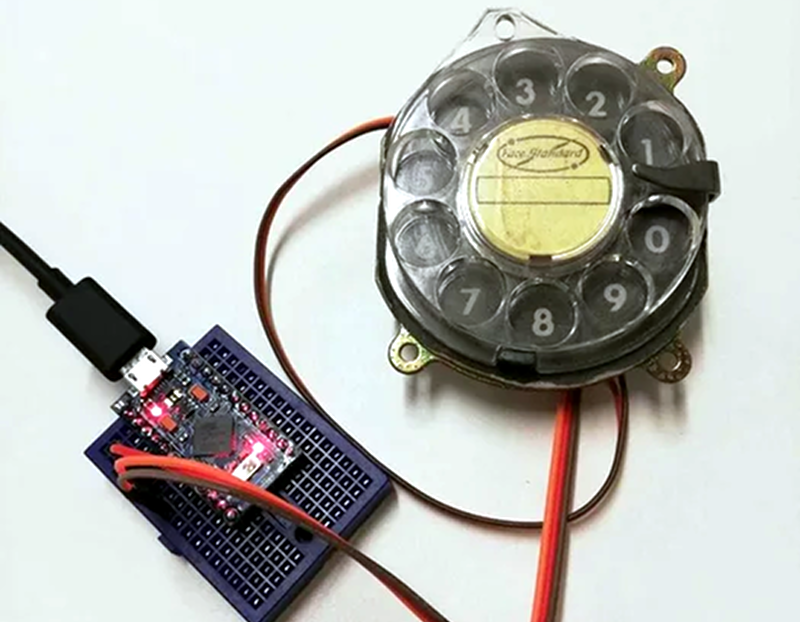
[Max] had a rotary dial from an old telephone and — unsurprisingly — had nothing in particular to do with it. The simple answer? Use an Arduino Leonardo to turn it into a USB keyboard device.
Of course, the Leonardo can easily impersonate a USB keyboard, so that’s the easy part of the project. Interfacing to the dial requires an understanding of how the phone system works.
While today, TouchTone phones are most common, they were quite uncommon for many years. Early phones required you to have an operator connect your circuit to another person’s circuit. Unfortunately for the operators, the system was inherently unscalable and also cost prohibitive.
There were a variety of schemes tried and — supposedly — an undertaker who was angry that the operator was connecting his customers to her husband’s competing mortuary invented the dial telephone.
The details are pretty simple. A typical dial has two contacts. There’s a normally open contact that closes when you spin the dial to any position. It says closed until the spring returns the dial to the home position.
The other contact is normally closed and makes or breaks the phone line. Each time the dial rewinds past a position, the contact opens briefly. Of course, this is a mechanical system, so the software has to debounce the inputs, but that’s easy enough.
If you don’t have access to a dial, you could always print one. Sort of.












Yes, Almon Brown Strowger, the inventor of the automatic telephone exchange was an undertaker; he entered that business in the late 1880s. Little is known about his life before that, except that he was a tinkerer at heart, and it is said that as a kid he and his brothers would built machinery to perform tasks given to them by their parents.
Don’t know if this is still true but it used to be that you could “dial” a rotary phone by bouncing the hangup buttons in the correct sequence at a reasonable rate of speed.
Yup, on exchanges that still recognize rotary phones. If you have fibre rather than copper, it is unlikely that rotary will work, in my experience, and some (most? Been 15 years since I had copper, and no rotary at that time) modern exchanges (copper connected) are not rotary compatible.
Usually you can still pay extra to get pulse dialing support on your line, but I just want to use a cool old phone not actually pay for a landline.
Heh. I remember when it was t’other way ’round – TouchTone(tm) was extra ($2/mo, IIRC).
Now you can buy these nifty rotary-to-DTMF converter gadgets to allow use of your dial phones on VOIP boxen.
If you shop carefully, you can find ATA’s which support pulse dialing. They’re unusual, but not unheard of (I have a couple in the shed somewhere).
My Vonage box (a dozen years old and still running) understands rotary pulses.
You could do this on dial tone phones also. I used this technique to build a working phone out of LEGO bricks a few decades ago. :-)
Yep, it’s true, I’ve done it myself lots, only problem is sometimes you “dial” the wrong number but 99% of the time it works.
My Verizon FiOS Optical Network Terminal (ONT) lets me use rotary phones at home.
OOOH, been thinking about how to access games on my mame console. Perhaps this would be the wacky gadget that I’ll use. 3 or 4 digit code to call up a game. Would need to work on the mame loader though.
maybe the codes avoid using zero and zero is used as the enter function?
BTW i’ve recently written arduino library for decoding pulses from rotary dials: https://github.com/Harvie/RotaryDial
This got me to thinking: input to your computer using Morse code. Only one button required!
This is great! But lol that huge else loop with an entry for each number is kind of ludicrous. Could be done a bit more simply, but hey if it works