
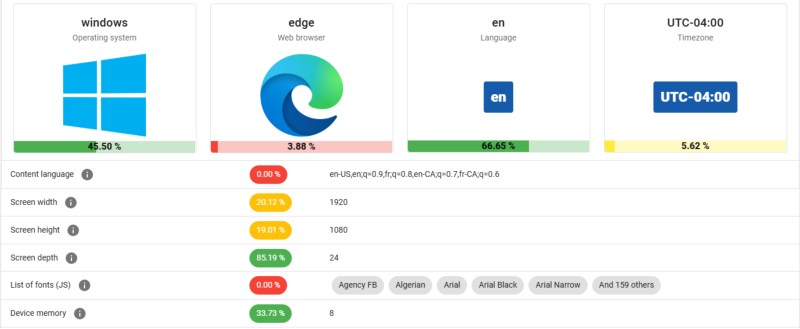
Amidst the glossy marketing for VPN services, it can be tempting to believe that the moment you flick on the VPN connection you can browse the internet with full privacy. Unfortunately this is quite far from the truth, as interacting with internet services like websites leaves a significant fingerprint. In a study by [RTINGS.com] this browser fingerprinting was investigated in detail, showing just how easy it is to uniquely identify a visitor across the 83 laptops used in the study.
As summarized in the related video (also embedded below), the start of the study involved the Am I Unique? website which provides you with an overview of your browser fingerprint. With over 4.5 million fingerprints in their database as of writing, even using Edge on Windows 10 marks you as unique, which is telling.
In the study multiple VPN services were used, each of which resulted in exactly the same fingerprint hash. This is based on properties retrieved from the browser, via JavaScript and other capabilities exposed by the browser, including WebGL and HTML5 Canvas.
Next in the experiment the set of properties used was restricted to those that are more deterministic, removing items such as state of battery charge, and creating a set of 28 properties. This still left all 83 work laptops at the [RTINGS.com] office with a unique fingerprint, which is somewhat amazing for a single Canadian office environment since they should all use roughly the same OS and browser configuration.
As for ways to reduce your uniqueness, browsers like Brave try to mix up some of these parameters used for fingerprinting, but with Brave being fairly rare the use of this browser by itself makes for a pretty unique identifier. Ultimately being truly anonymous on the internet is pretty hard, and thus VPNs are mostly helpful for getting around region blocks for streaming services, not for obtaining more privacy.











I don’t worry about nsa or cia or esa, xyz seeing my traffic…. When a request leaves the computer it is ‘public’ information. Like it or not…. Only protection is encryption which can be defeated if someone is determined enough. I am more concerned about what gets into my box to exploit it/use it for nefarious things.
Don’t worry about encryption either.
They own the CA hierarchy, so they can play man-in-the-middle snooping games to their heart’s content.
Secure encryption cannot simply be defeated if someone is determined enough. It that were true bitcoin and all other crypto currency would now be worthless.
Rubber hose attacks, poor password management, recovery from flash keys etc are by far the weakest links.
Right and those methods are necessary if you want to compromise secure crypto currency like BTC because the underlying encryption is not breakable with current computing technology. The idea that it is is just a myth.
They are worthless.
That doesn’t stop people from paying money for them, though.
They are no more “worthless” than paper currency is.
Being fingerprinted is not the same as being identified.
Exactly. Even if they could identify the computer, they can only go “look, it’s that computer again”. They have no clue where that computer is, who it belongs to, and so on.
haha tell yourself what you need to hear in order to sleep at night
but privacy is obsolete. come on in, the water’s warm
Agreed. If you use aggressive measures like VMs and keystroke timing obfuscation and don’t ever tie it to anything related to your identity, I think you can avoid being identified, unless your VPN sells you out and/or they’re really interested in you specifically. Almost no one does that though.
I’m not providing evidence because i’m not trying to prove anything. I’m stating the plain truth, in case it might be useful to you. I said in as many words: tell yourself what you need to hear. But the truth is, privacy is over.
“It depends on sloppy practices” — you’re arguing with a rando in a blog comments section. You’re doing sloppy practices. You’re doing sloppy practices. We all are.
Who do you think owns most VPN companies?
In both senses of the word ‘own’.
‘If you want privacy, you’ve got to be behind 12 boxies.’
Funny how you say this without backing up your claim.
I can cite the billion dollar industry that connects individual people to products, but hey, you go on beleiving that somewhere there isn’t a database where 5 identical browser fingerprints aren’t correlated with PII into a profile for a target user.
Saying that digital piracy is obsolete is like saying maritime piracy is obsolete. And yet, there have been 116 instances of maritime piracy during the first 9 months of 2025, with a 91% success rate.
As long as there continues to be a perceived need for it, it will continue to exist. Piracy, whether maritime or digital, is a never ending game of cat and mouse. Yet there will never be an absolute winner.
privacy -> piracy
Imagine writing two whole paragraphs and not being sure you understood what you were responding to…
Thats where exploiting human error in the use of the technology comes in. To make the finger prints useful for actual identification you need to match them to finger prints collected by other sites where the individual has left the same browser finger print and provided actual identifying information.
Unless you ever use your computer for something useful like online shopping, work, etc
The problem arises when companies like Palantir and Fog aggregate all that info and join it with traffic to your socials or bank.
My phone isn’t me, but it’s pretty easy to link it to me.
Exactly.
Sure. They are fingerpriting for kicks. This whole effort, and the teams and budgets involved, do it for the sake of it, not because they can correlate the fingerprint with the user at several key points around the web — such as when you log into any platform. Sure.
If you use the same configuration when browsing both anonymized and non anonymized they can correlate your anonymized activities to your actual identity if the organizations you intentionally identify yourself to share the browser finger print information with other entities that aggregate it or if they themselves aggregate it and the sites you don’t identify yourself too share the browser finger prints with them. Google for example has its fingers in most of the pies out there. Ideally you should use a completely different machine for anonymous and non anonymous connection sessions.
It’s not a black-and-white thing. For the vast majority of people, yes, fingerprinting will easily identify them. There are measures, though, that one can take to make it less feasible or at least for them to work much harder for it, to the point that they’d have to take a direct interest in you as an individual.
Privacy shouldn’t be something reserved for the hackers amongst us. It’s a fundamental right. This really isn’t rocket science, and deflecting from the seriousness it represents by stating it can be circumvented, or somehow putting the burden on the end-users’ practices, is not at all helpful.
You have no right to privacy in public.
Quit pulling ‘rights’ from dark smelly places.
I’m not in public. I’m in my private house. My computer is yakking to private companies. No “public” or commons is involved.
You are on the public net, with an unobscured IP address, leaving digital trails everywhere you go.
You have to make your own privacy.
What is the alternative?
‘Poison the well’ is about the only alt I can come up with.
Do that too.
Hide actual info.
BS as status obsessed richer, get freebees, sell on E-bay.
Use “Dolphin Anti”. It’s specifically designed to hide browser fingerprint and PC specs from a website. It allows you to log into the same website multiple times at the same time using different profiles.
Its a paid app, but you can create 5 fingerprint profiles for free, works perfectly!
There are still methods bypass to anti fingerprint reader
Being able to identify a computer or browser profile on a computer and distinguish it from other computers or briwser profiles which visit the same website doesn’t identify the actual user or the computers ip address. To do that you would have to match the browser finger print of the anonymized user to the browser finger print from a website where the user has provided identifying information or their true ip address. If the user uses a different local account and browser profile or better yet a different machine or virtual machine for their anonymous and non anonymous browsing that won’t work even with access to the fingerprints from a website where the user identified themselves or their true ip.
Now the actually interesting bit is that apparently blocking Java script and cookies and as much stuff as possible makes you “unique”. Now that is something I find weird and really worrying. Not for me being identifiable, but rather for folks just not caring about their own security (and bandwidth, telling the browser to avoid java script as much as possible makes sites load faster and more reactive).
That had me shook too — my tinfoil-hattedness was what made me unique. Its a plot point in Doctorow’s Little Brothers, but it never really hit home.
The bottom line is still that you should ideally use separate machines entirely for anonymized and intentionally deanonymized activities like, for most people anyway, online banking, your personal social media, ebay, Amazon, or whatever you choose to give identifying information to. Browser finger printing is far from the only reason to do that.
You have no evidence to back up thst claim whatsoever.
You have no evidence to backup this claim which would also require the ability to defeat secure encryption on billions of simultaneous intercepts to be of much use. The traffic volume alone would preclude it. Your theory could also be very easily tested with very little imagination required via a bait communication of such a severe threat nature that it could not be ignored. Trivial surveillance of a high profile “target” identified in said communication would then quickly tell you if the communication was intercepted. It won’t be unless you personally are already a specific surveillance target because governments simply cannot effevtively monitor random encrypted internet traffic at will. Christ the US government can’t even act to stop mass shooters who loudly and proudly advertise their intentions in plain text on public forums. When compromising communications are successfully intercepted its because the person or persons were already indentified as suspect and they were specifically targeted and their devices compromised.
We found the sweet summer child I see.
I accept your unconditional surrender on all points.
When the British broke the Enigma encryption in WW2, they had a problem: if they used the information, the Germans would notice that their system was broken and stop using it. So while the war command monitored any German communications they could intercept, they actually did very little with the information.
You’d have to organize a pretty big threat for them to bother reacting, which would require you to communicate with other people to set it up in the first place. That means they would see both the setup and the play, and conclude that you’re trolling them. And, if you tried to troll the world’s largest mass surveillance system with a fake threat to expose it, what makes you think you’d even live long enough to release said information to the public?
Total evidence offered in support of your claims – The usual zero. This is the typical pattern of those claiming essentially unlimited surveillance capabilities that simply don’t exist. One baseless claim rationalized by yet another baseless claim and so on. In answer to your final question, because I’m rational and don’t suffer from raving paranoia about all powerful all knowing intelligence apparatus that can decrypt every secure communication and trace every device that connects to public wifi. The significant limits of US and international intelligence to even collect analyze and act on plain text in the public domain that hundreds if not thousands of people have seen in order to mitigate clear threats is demonstrated again and again by events both domestic and international . Yeah I know I know its just all part of their ruse. Yeah sure it is. They wouldn’t want anybody to think they can read.
If we could, there would be less need of the NSA Utah Data Center.
https://en.wikipedia.org/wiki/Utah_Data_Center
Recording data, even encrypted data, isn’t hard. It just requires space to store.
Then, if a person or persons of interest stand-out, that data can then be mined and used by the organization that recorded it.
Even older encrypted data can easily be decrypted because the methods used in the past don’t always stand the test of time. So, what you think is encrypted today, may not be secure tomorrow.
Because information on people is valuable, companies like google collect it. But, for some reason, you think governments are unable to see the value of it? Interesting.
Oh, sorry one more thing, can you please clarify, are they going to kill me or just ignore me, because you claim both. I’m trying to plan the rest of my week here. :)
Nobody is going to do an exciting Jason Bourne style attempt on your life. No sexy foreign agents are going to pump you for information. Your will just pay more for insurance, and see videos that reinforce your beliefs, sprinkled with ads for products you are likely to buy, at a price you can barely afford.
For a previous employer (this was in 2008), I once scraped some airline booking sites (for a consumer organisation who wanted to file a claim against them for unfair pricing). I did this on my work laptop, but working from home. We were quickly blocked, tried a few obfuscation and VPN methods, but kept being blocked again and again.
For over a year, it was practically impossible for me to book a flight, even with a different computer on a different network. This showed me the (scary) power of browser fingerprinting.
Why would the different computer be running the same browser? After all, it’s the browser that is identified.
Browser finger printing alone did not block an entirely different machine. You gave something else away.
Probably they can block my browser fingerprint and my IP, then also block other browsers or devices that make use of that IP by their fingerprint.
Being scraped is extremely unprofitable for flight sites: when you click on a certain flight, a reservation is held for you for usually 30 minutes, and that reservation costs the booking site money. More than recouped for by the normal sales fee, but if one makes thousands of reservations and no bookings multiple times per week, this starts to add up.
I once scraped Golden Tee’s player database for one of their competitors.
Robots.txt shmobots.txt.
GT were clueless.
Could have seen that from the complete lack of security, enter player#, get data.
They paid me for a second pass as my KISS scraper had missed a bunch of players due to some sort of locking issue, likely the ones playing at the time I was scraping.
These guys paid me good untaxed cash money.
Not because they couldn’t have done it, but for deniability.
Don’t think they got much, data was dirty AF, no real names.
Usual 90% of income from 10% of players data, but they already knew that.
what a horrible person. what this person does for money should be a crime and they should have their computers seized. It’s a genuinely worrying state of affairs when a creep like this is just happily spying away and scraping data for corporations or whatever with absolutely zero shame or accountability. what a horrible time to be alive. And again; what a horrible person.
I do way worse thing then that for money.
I’ve worked for the Government (a little, I do have some standards) and NGOs (decades)!
It’s a worrying state of affairs when a business puts all this PII online in the first place.
I’m not a fan of ads. What I allow on my computer should be put through.
I try my best to block them, as I really have no interest in anything advertised.
Besides, if I want something, I’m sure I can figure out how to get it myself.
I like to watch live trains. I’ve found reloading the page rapidly 4 or 5 times tends to stop the ads.
Or just use uBlock Origins. I see no ads on Youtube – at all. Never. None. Nada. Keine.
It is so rare for me to see an ad that it usually surprises me when one gets by.
Youtube messes with adblockers in some regions by delaying the video loading, not starting playback until you press pause and then play, or loading it up with no sound. They basically find new ways of breaking the player every few months, then the adblockers get around that, rinse and repeat.
They’ve also kept turning the maximum volume down on videos, so they can play the ads louder as the users have to crank their volume up to hear.
Used to be illegal to mess with volume for ads. When did that go away?
That was only for broadcast TV.
I call rage bait :-)
But just in case this poor soul is woefully misinformed let’s not forget the lovely folks at these paradigm organisations such as: FSU, GRU, PSIA, RGB, NIS, MSS, DGSE, BND, BfV, MAD, AISI, AISE, CII, FIS, CNI, DI, SIRP etc. all of which have a deep burning desire to know all that there is to know about you. Also, there’s Microsoft, Apple, Amazon, Facebook, WhatsApp, Instagram, Youtube, Samsung, Ford, BMW, Audi, Nissan, Toyota, Oura, Philips etc. who also share a common interest in order to provide you with the very best customer experience. ;-)
Oh yeah… I forgot Google and probably lot’s of other wonderful businesses and agencies that are there to simply look after us and have nothing but the best intentions for everyone. :-)
SYSTEM PROTECTION FAULT
ILLEGAL INSTRUCTION at CS:IP 0x847fb73ca SARCASM OUT OF BOUNDS.
HALT.
Identifying a specific machine or its approximate location using fingerprinting is scary enough. But it gets even scarier.
Let’s way your machine is “fingerprint proof” to some extend. It tries to hide it’s uniqueness. And not in such a way that it’s unique in the way it hides it uniqueness. You can even mask some user behavior such as mouse movement, click timing and key stroke timing, by adding some randomness.
But even if you have a machine that is “fingerprint proof” to some extend there are also ways to identify the user itself.
Examples of identifying users:
-Pattern-of-life analysis. Uses timestamps of events to identify a user. (detectives use this, like “L” in “Death Note”, but also IRL by authorities)
-Stylometric analysis. Identifies writing style. Combined with machine learning you can narrow down the list of potential authors. Articles: https://arxiv.org/abs/2211.07467 and https://academic.oup.com/dsh/article/35/4/812/5606771
While it may seem counterintuitive, uniqueness is not always a liability to privacy. That is part of what VPNs and browsers like tor are aiming for. I accessed amiunique.org at least 4 times from the same device, location, and ISP in less than an hour. Each time it identified me as uniquie and each time it showed that visit to be my first and only visit to the site.
Yep, I got ” Yes! You are unique among the 4552552 fingerprints in our entire dataset. ”
The ones that really narrowed it down were – (in order of most narrowing)
– fonts
– navigator properties
– canvas
– firefox,
– permissions
– screen size
I suspect I might have just been unique on those alone (it reckoned 0.00% have the same fonts installed as me, for a start).. I would have thought more than 1.18% were running a big hi res screen (my 6th smallest number), but obviously not the people who use the web site..
It is certainly a relevant thing to be concerned about – as all you have to do is log into one web site somewhere, and they know who you are and your ‘fingerprint’ . They can then sell that to others, who can tell if you vist their site even via vpn or with no cookies….
Indeed HaD should be filling in the box below with my username and email…
But now, if you used a reliable VPN, public wifi, or, whatever to mask your ip, to identify you or your actual isp connection that fingerprint has to be matched to one from a site where you somehow identified yourself or your connection. Whether or not that can be done probably depends on your browsing habits
Uniqueness itself isn’t the problem. Staying the same kind of unique across sites and time is.
As many of the finger printing variables are inconsequential for surfing the web, changing them for every new browser session could be one way to defeat tracking.
It’s more secure than using a US-based VPN, since by law they have to keep track of who you are and turn all your info over to law enforcement on request. It’s practically worthless. Canada-based is fine, though.
VPNs aren’t about hiding from nation states. They are about protecting your first hop. You are slightly more trusting someone who is incentivized to maintain your privacy over an ISP who is probably your only option and who would love to make money selling your personal information. They have the information to link your computer to a person, that is the real danger. A VPN can add one extra hop there. As far as fingerprinting goes, I have had really good luck with Brave and an extension to spoof the latest chrome user-agent.
93.38% flash not detected.
On the one hand, reassuring that flash is dead. On the other hand, what’s wrong with the remaining 6.62% of browsers that they’re still installing flash??
Browser attestation is why VPNs will not keep you anonymous.
https://en.wikipedia.org/wiki/Web_Environment_Integrity
Considering the current climate, I’d expect this to be resurrected in some digital-ID form.
Curious why no mention of Mullvad Browser?
https://coveryourtracks.eff.org/
Was it tried with TOR
Find someone that works at a FAANG and buy them a few beers. Ask about how browser finger printing is just one piece of the puzzle, and how quickly they can fingerprint and link any device you are on to every other. Ask about internal AI and what it can infer from all the signal you leak online. Not just identity but a thousand other little details about you. What did your mouse pointer do? What did you briefly linger on as you scrolled?
You won’t get proof posted online, but get someone 1:1 and you might learn some things you would rather not have known.
Every app or site with a Facebook or Google button tracks your visit. Even if you don’t have an account, they will identify you with these buttons being in the page
What if you auto delete all cookies on your browser every time you run it and never run it maximized ever and change the location and area each time it is run.
Would that help in any way ?
No. Fingerprints are saved by the server and cookies being cleared off browser won’t mitigate it properly. You need anti fingerprint plugins or a secure browser like Brave
no. each site can only see it’s own cookies, not those of other sites so the only difference would be 6-7 missing cookies.
location and area would help but this discussion is about browser fingerprinting and both of those can only be changed with a vpn.
I think it requires new approaches. for instance if many parties ssh into a server and used their lynx browser, then that would appear as one party, apart from the websites visited which are usually different.
NoScript extension in Firefox, running on a Linux PC… the combination is probably fairly rare, but I would think everyone in the world who has NoScript, FF and Linux are all indistinguishable from each other even if any one of them is very different from the most globally common extensions+browser+OS combination.
I just used brave browser on docker behind a gluetun using nordVPN. There is no tracking there.
Use Brave, problem gone
I also use someone else’s device. Never my own when browsing
TOR behind a VPN.
Browsers have been adding anti user capabilities for far too long. I don’t want weird scroll behavior. I don’t want text selection blocked. I don’t want my operating system reported. WTF are they thinking?
They know exactly what they are doing. Most browsers use Chrome/chromium as their base. Chrome is maintained b Google. Google is an advertising company. Chrome supports Google’s goals.
Mullvad browser does a pretty good job of reducing fingerprintable information.
What if you disable js and forge your user agent (and preferred language)?
from what i can tell is if you disable js you are painting a bullseye on your back. maybe if you spoof your user agent to say google bot instead?
So is there a video of someone going into the depths as to why goddamn HTML and javascript and browsers have so much fingerprints available and are eager to hand it over?
Or is there only fluff to be had for some magical reason.
Meanwhile everybody is claiming they are ‘protecting you and your privacy’ while implementing yet more fingerprints for the advertisers and governments.
I bet MS now allows the TMP ID to be polled by browsers to hand them over to freaking cloudflare and the like.
Use a python script or CMD line utility or java whatever don’t use a common browser and supply dummy finger prints randomly
That works for the already it savy ones, but the whole thing affects way more than just the ones who know how to protect themselves. That not even a minimal level of anonymity seems to be promised (digital or outside) is an issue that no amount of preparedness will overcome.
Like I hate conveniece culture even more than the next guy but somewhere needs to be a middle ground of convenience and tech companies being able to piece together almost everything about your online life.
I wonder why people think that a VPN or anything like that will protect them online.
Unless the VPN provider is logging your activity (which many claim not to), and you obtain those logs via subpoena- fingerprinting/characterizing user activity is pretty much meaningless aside from internal analytics purposes. You MUST have the VPN service provider’s records in order to tie traffic back to a specific individual/IP address.
How do we feel about the combination of a privacy oriented browser (Brave in my case) and VPN? I’m not trying to stop the NSA, but would like to avoid the average corporate snoop.
Use a VPN along_with a read-only ‘Live’* Linux distro or WindowsPE. Then at best they can fingerprint which OS image you are using. Be sure to pick a popular image to further obfuscate it.
*(read-only + “live” is an oxymoron)