Coding On Windows? Redmond May Already Know.

File this one under “shocked, but not that shocked”– hacker [Xusheng Li] did some digging on a recent Windows 11 build and found that it seems to be phoning home with details about not only what AI agents you might be using on your system, but what dev tools are in use too. The full writeup is worth reading before rushing to judgement on this, but no doubt Microsoft has your best interests at heart– they always do, right?

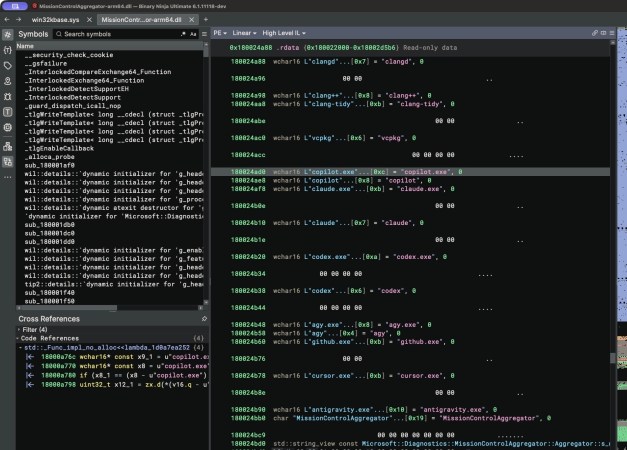
The saga starts with a library called MissionControlAggregator.dll, which contains a list of executable files to look for– things like codex.exe on the agent front, but also dev tools as common as python.exe or gcc.exe–which would be innocent enough, and perhaps even helpful if the OS was watching for these files to do something locally. It might be doing something locally, but [Xusheng] was able to trace the diagnostic that triggers when you launch one of the apps it is listening for, and yes, at least on a default Windows 11 install, it phones home about it. Alas, WSL won’t save you this time, as the same event is apparently generated when you launch the linux version in said subsystem.

Of course the default Windows 11 install does have “optional diagnostics” enabled by default, so you could argue that this is something that the system administrator consented to– provided they knew about it, which they likely don’t. We certainly had no idea that this was part of those “optional diagnostics” and are thankful to [Xusheng] for the tip.

Our own [Jenny List] took Windows 11 for a drive back in June, and emerged rather unimpressed. Your mileage may vary, but if you are, like the majority of the world’s desktop users, on Windows, you might want to double-check those privacy settings.

Won’t Somebody Please Think Of Banning The British Children!

The British government is in a headlong rush to ban under-16s from social media, and restrict the access of under-18s. And in typical form, the EFF is here with a warning about the dangers and futility of such legislation.

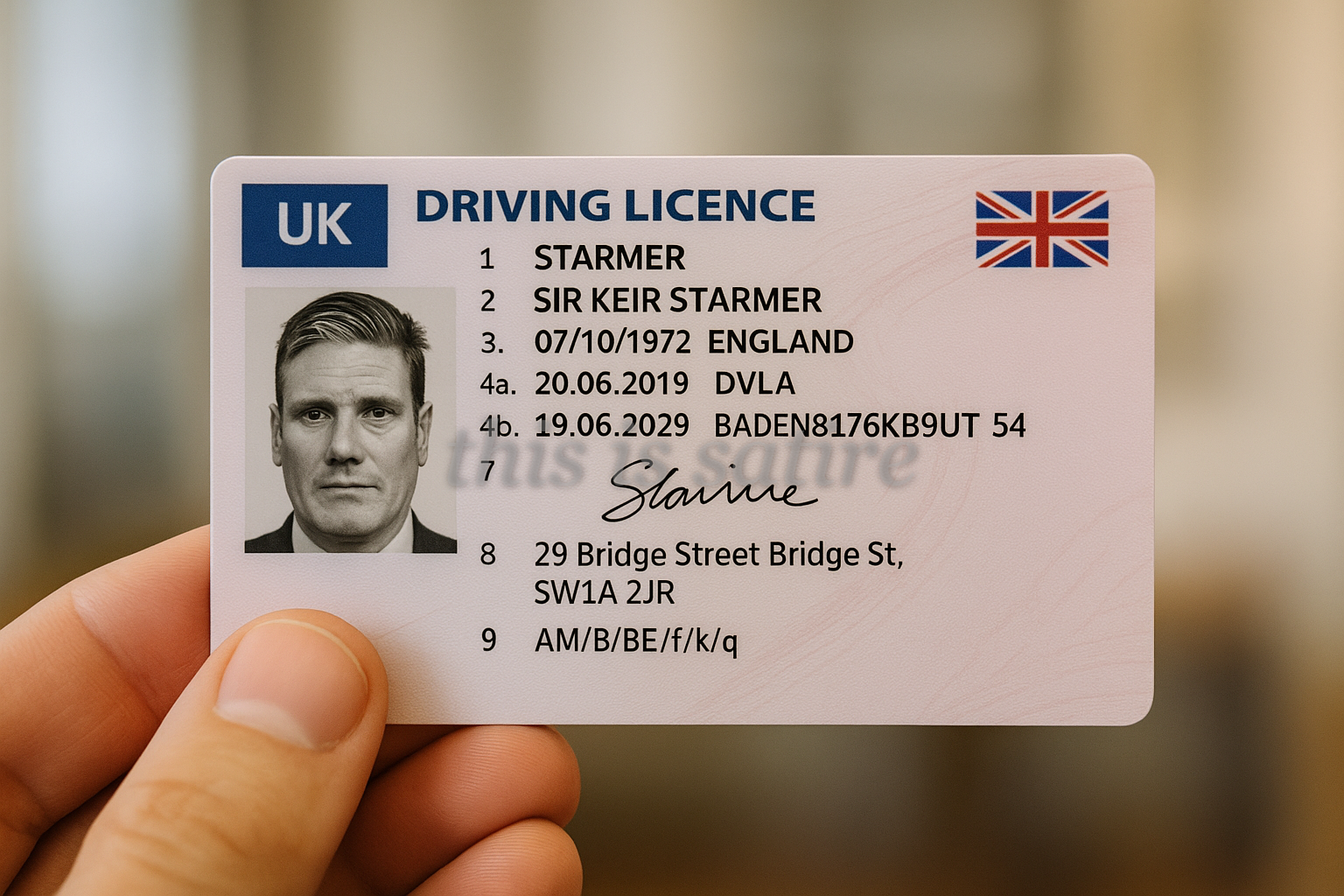
A satirical mock-up of what UK Prime Minister Keir Starmer's driving licence might look like, courtesy of https://use-their-id.com/
Kids aren’t stupid. They’ll use a fake ID like this one from the satirical https://use-their-id.com/ . Or they’ll become VPN experts.

The proposed new law will involve an age restriction policed through online ID verification, something which will not be limited to the young, as every British adult will also have to show ID to access large parts of the Internet.

There is little in the way of information about how this unprecedented invasion of privacy will be implemented, however we expect that it will be left to the lax security measures of a range of lowest-bidder third party identity verification services. The resulting database will become a very rich target indeed.

The EFF pull no punches in warning of the harms these measures will bring upon those it seeks to protect. Far from “Giving under-16s their childhood back” as it is being promoted, they warn that it will deprive them of access to community, friends, and distant family, as well as educational content that could be vital for them.

If it works at all. Certainly he more technically minded youth will put their efforts into the world of computer networking. A VPN ban is reportedly in the works, so a whole generation of future software developers and IT specialists will get their start running software to get round this on their Raspberry Pi.

We’ve reported on the EFF’s concerns over UK ID laws before.


Header image: Diliff, CC BY-SA 2.5.

What The FDA’s 2026 Wellness Device Update Means For Wearables

With more and more sensors being crammed into the consumer devices that many of us wear every day, the question of where medical devices begin and end, and how they should be regulated become ever more pertinent. When a ‘watch’ no longer just shows the time, but can keep track of a dozen vital measurements, and the line between ‘earbud’ and ‘hearing aid’ is a rather fuzzy one, this necessitates that institutions like the US FDA update their medical device rules, as was done recently in its 2026 update.

This determines how exactly these devices are regulated, and in how far their data can be used for medical purposes. An important clarification made in the 2026 update is the distinction between ‘medical information’ and ‘signals/patterns’. Meaning that while a non-calibrated fitness tracker or smart watch does not provide medically valid information, it can be used to detect patterns and events that warrant a closer look, such as indications of arrhythmia or low blood oxygen saturation.

As detailed in the IEEE Spectrum article, these consumer devices are thus  ‘general wellness’ devices, and should be marketed as such, without embellished claims. Least of all should they be sold as devices that can provide medical information.

Continue reading “What The FDA’s 2026 Wellness Device Update Means For Wearables” →

Robots Talking To Robots

Although there are a few robots on the market that can make life a bit easier, plenty of them have closed-source software or smartphone apps required for control that may phone home and send any amount of data from the user’s LAN back to some unknown server. Many people will block off Internet access for these types of devices, if they buy them at all, but that can restrict the abilities of the robots in some situations. [Max]’s robot vacuum has this problem, but he was able to keep it offline while retaining its functionality by using an interesting approach.

Home Assistant, a popular open source home automation system, has a few options for voice commands, and can also be set up to transmit voice commands as well. This robotic vacuum can accept voice commands in lieu of commands from its proprietary smartphone app, so to bypass this [Max] set up a system of automations in Home Assistant that would command the robot over voice. His software is called jacadi and is built in Go, which uses text-to-speech to command the vacuum using a USB speaker, keeping it usable while still offline.

Integrating a voice-controlled appliance like this robotic vacuum cleaner allows things like scheduled cleanings and other commands to be sent to the vacuum even when [Max] isn’t home. There are still a few limitations though, largely that communication is only one way to the vacuum and the Home Assistant server can’t know when it’s finished or exactly when to send new commands to the device. But it’s still an excellent way to keep something like this offline without having to  rewrite its control software entirely.

The EFF Nails It: What’s Wrong With UK Digital ID

It sometimes seems as though we are in a constant tussle over privacy between governments and the governed, with each year bringing fresh attempts to extend surveillance, and consequent battles. For Brits the big news at the moment comes in a new digital ID scheme, something that will be required for anyone wishing to work in the country, as well as for certain government services. It’s something that has attracted a lot of opposition, and now the EFF have produced an analysis  of why they think it won’t work.

From the perspective of a British writer it would be easy to write screeds about the flaws in the scheme, the way it over-reaches, and about the historical distrust of Brits for their government’s bureaucracy. With the parliamentary petition opposing it approaching three million signatures, there’s no shortage of people who don’t support it. Perhaps the most obvious thing for most of us is how unnecessary it is for its stated aim of preventing illegal immigrants from seeking employment, it neglects that we already have to show proof of right to work before being hired, and that if crooked employers ignore that they will surely also ignore the digital ID.

If you’re reading this elsewhere in the world from where this is being written then it’s still of relevance, because governments like to point to other countries to justify these measures. Follow the EFF on this matter, and take note.


Art: British Passport SVG by Swapnil1101, Public Domain

So Long, Firefox, Part One

It’s likely that Hackaday readers have among them a greater than average number of people who can name one special thing they did on September 23rd, 2002. On that day a new web browser was released, Phoenix version 0.1, and it was a lightweight browser-only derivative of the hugely bloated Mozilla suite. Renamed a few times to become Firefox, it rose to challenge the once-mighty Microsoft Internet Explorer, only to in turn be overtaken by Google’s Chrome.

Now in 2025 it’s a minority browser with an estimated market share just over 2%, and it’s safe to say that Mozilla’s take on AI and the use of advertising data has put them at odds with many of us who’ve kept the faith since that September day 23 years ago. Over the last few months I’ve been actively chasing alternatives, and it’s with sadness that in November 2025, I can finally say I’m Firefox-free.

Continue reading “So Long, Firefox, Part One” →

Browser Fingerprinting And Why VPNs Won’t Make You Anonymous

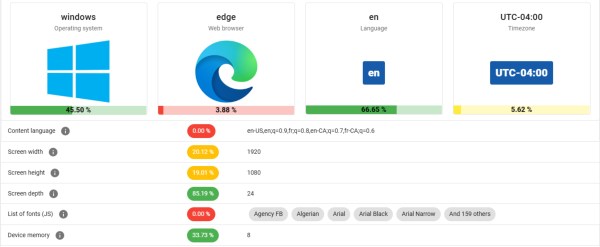
Amidst the glossy marketing for VPN services, it can be tempting to believe that the moment you flick on the VPN connection you can browse the internet with full privacy. Unfortunately this is quite far from the truth, as interacting with internet services like websites leaves a significant fingerprint. In a study by [RTINGS.com] this  browser fingerprinting was investigated in detail, showing just how easy it is to uniquely identify a visitor across the 83 laptops used in the study.

As summarized in the related video (also embedded below), the start of the study involved the Am I Unique? website which provides you with an overview of your browser fingerprint. With over 4.5 million fingerprints in their database as of writing, even using Edge on Windows 10 marks you as unique, which is telling.

In the study multiple VPN services were used, each of which resulted in exactly the same fingerprint hash. This is based on properties retrieved from the browser, via JavaScript and other capabilities exposed by the browser, including WebGL and HTML5 Canvas.

Continue reading “Browser Fingerprinting And Why VPNs Won’t Make You Anonymous” →