

When I was a kid, I was interested in a number of professions that are now either outdated, or have changed completely. One of those dreams involved checking out books and things to patrons, and it was focused primarily on pulling out the little card and adding a date-due stamp.
Of course, if you’ve been to a library in the last 20 years, you know that most of them don’t work that way anymore. Either the librarian scans special barcodes, or you check materials out yourself simply by placing them just so, one at a time. Either way, you end up with a printed receipt with all the materials listed, or an email. I ask you, what’s the fun in that? At least with the old way, you’d usually get a bookmark for each book by way of the due date card.
As I got older and spent the better part of two decades in a job that I didn’t exactly vibe with, I seriously considered becoming a programmer. I took Java, Android, and UNIX classes at the local junior college, met my now-husband, and eventually decided I didn’t have the guts to actually solve problems with computers. And, unlike my husband, I have very little imagination when it comes to making them do things.
Fast forward to last weekend, the one before Thanksgiving here in the US. I had tossed around the idea of making a personal library system just for funsies a day or so before, and I brought it up again. My husband was like, do you want to make it tonight using ChatGPT? And I was like, sure — not knowing what I was getting into except for the driver’s seat, excited for the destination.
Vibing On a Saturday Night
I want to make a book storage system. Can you please write a Python script that uses SQL Alchemy to make a book model that stores these fields: title, author, year of publication, genre, and barcode number?
So basically, I envisioned scanning a book’s barcode, pulling it up in the system, and then clicking a button to check it out or check it back in. I knew going in that some of my books don’t have barcodes at all, and some are obliterated or covered up with college bookstore stickers and what have you. More on that later.
First, I was told to pip install sqlalchemy, which I did not have. I was given a python script called books_db.py to get started. Then I asked for code that looks up all the books and prints them, which I was told to add to the script.
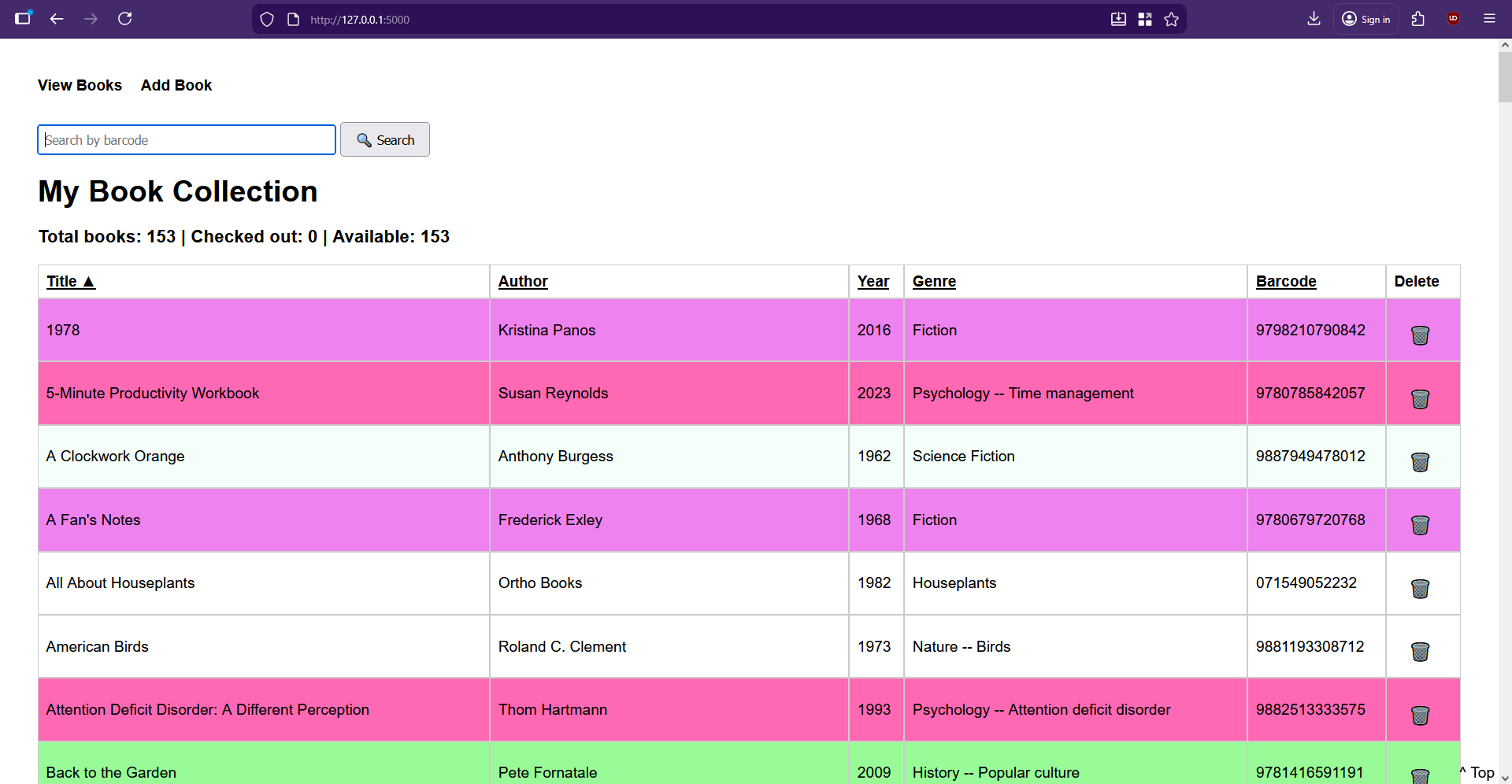
Then things were getting serious. I asked it to write a Flask server and a basic HTML front end for managing the books in the system. I was given the Flask server as app.py, and then some templates: base.html to be used by all pages, and index.html to view all the books, and add_book.html to, you know, add a new book. At that point, I got to see what it had created for the first time, and I thought it was lovely for a black and white table. But it needed color.
Check It Out
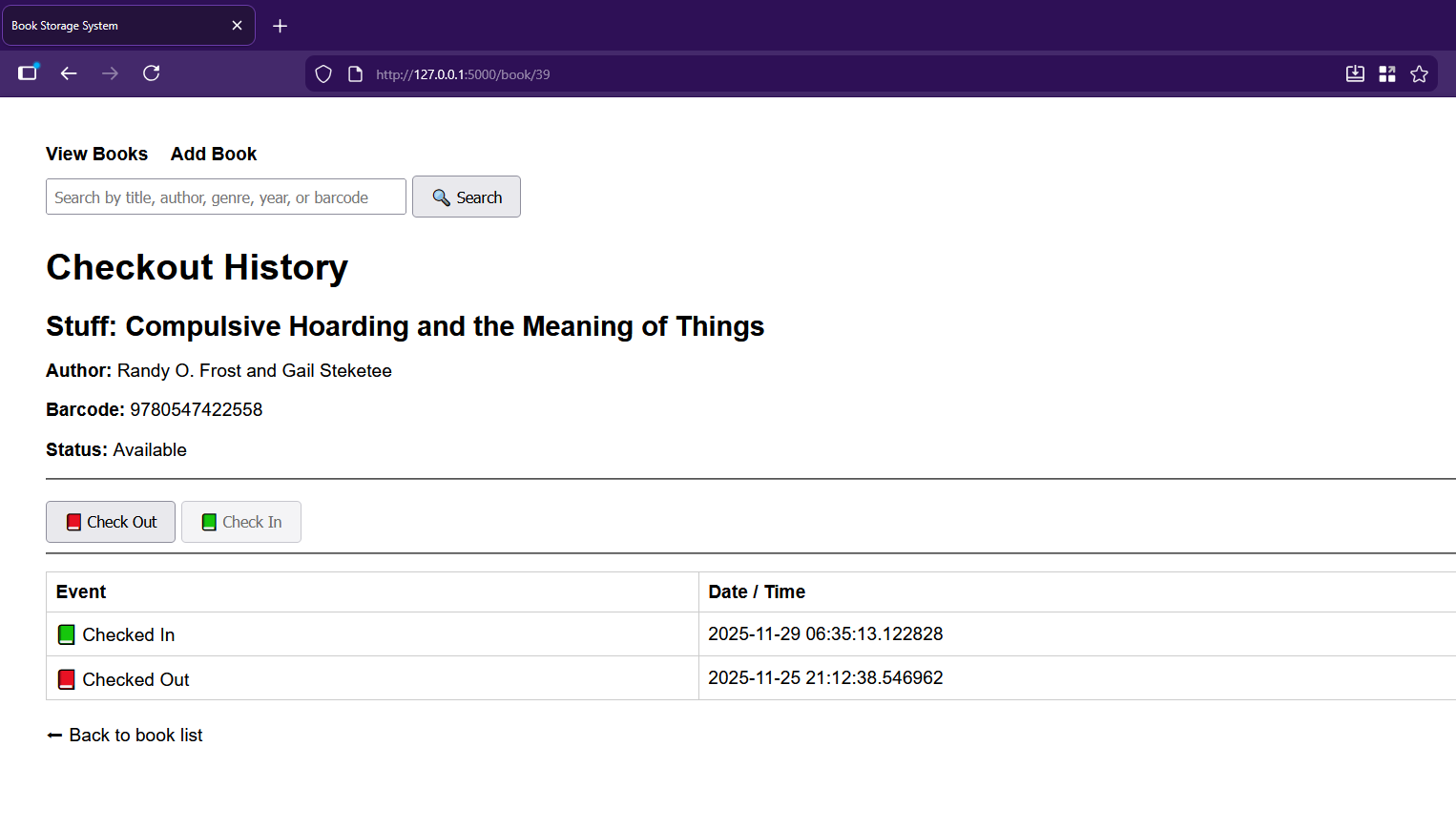
I asked the chat-thing for features and implemented them piecemeal, as you do if you’re not a masochist. First up was a cute little trash-can delete-button for every entry. Then it was time to set up the CheckoutEvent. Each of these events records which book it belongs to, whether it’s a check-out or check-in event, and the timestamp of said event. Of course, then it was time to get the checkout history wired to the front-end and accessible by clicking a book’s title.
All I really had to do was add a history route to app.py, update index.html to make the titles clickable, and create the book_history.html it spat out. Then I had it add the buttons for checking in and out on the new checkout history page, which involved adding routes to app.py as well as a helper to compute the current status.
Then it had me modify the history route and update book_history.html with the actual buttons. And they’re super cute, too — there’s a little red book on the checkout button, and a green book on the check-in.
Barcode Blues
On the index.html page, can you add a barcode number-based search box? And when the user searches, redirect them to the book page for that barcode?
Now it was time to get the barcode scanning situation up and running. I was sure at some point that ChatGPT would time me out for the night since I use the free model, but it just kept helping me do whatever I wanted, and even suggesting new features.
I wanted the barcode handling to be twofold: one, it should definitely pull the checkout page if the book exists in the system, and it should also definitely go to the book-entering page if not.
Yes — that’s a great workflow feature.We’ll add a barcode search box to your index page, and when someone submits a barcode, the app will:
-
Look up the book by barcode -
Redirect straight to that book’s checkout history page -
Show a nice error if the barcode doesn’t exist
I did what it told me, adding a barcode search route in app.py and updating the index() route to use it. I then added its barcode search form to index.html. It was at this point that I had to figure out a way to generate barcodes so I could make little stickers for the books that lack them entirely, or have otherwise obliterated ones.
I have a pretty basic 1D barcode scanning gun, and it won’t scan everything. As I soon found out, it prefers fake EAN barcodes to UPCs altogether. I finally found an online barcode generator and got to work, starting with a list of randomly-generated numbers I made with Excel. I decided I wanted all the fake barcodes to start with 988, which is close enough to the ISBN 978 lead-in, and happens to use my favorite number twice.
We took a brief detour as I asked the chat-thing to make the table to have ascending/descending sorting by clicking the headers. The approach it chose was to keep things server-side, and use little arrows to indicate direction. I added sorting logic to app.py and updated index.html to produce the clickable headers, and also decided that the entries should be color-coded based on genre, and implemented that part without help from GPT. Then I got tired and went to bed.
The Long, Dark Night of the Solo Programmer
I’m of a certain age and now sleep in two parts pretty much every night. In fact, I’m writing this part now at 1:22 AM, blasting Rush (2112) and generally having a good time. But I can tell you that I was not having a good time when I got out of bed to continue working on this library system a couple of hours later.
There I was, entering books (BEEP!), when I decided I’d had enough of that and needed to try adding more features. I cracked my knuckles and asked the chat-thing if it could make it so the search works across all fields — title, author, year, genre, or barcode. It said, cool, we can do that with a simple SQLAlchemy or_ query. I was like, whatever, boss; let’s get crazy.
Can you make it so the search works across all fields?
It had me import or_ and update the search route in app.py to replace the existing barcode search route with a generalized search using POST. Then I was to update index.html to rename the input to a general query. Cool.
But no. I messed it up some how and got an error about a missing {% endblock %}. In my GPT history it says, I’m confused about step 2. Where do I add it? And maybe I was just tired. I swear I just threw the code up there at the top like it told me to. But it said:
Ah! I see exactly why it’s confusing — your current index.html starts with the <h1> and then goes straight into the table. The search form should go right under the <h1> and before the table.
Then I was really confused. Didn’t I already have a search box that only handled barcodes? I sure did, over in base.html. So the new search code ended up there. Maybe that’s wrong. I don’t remember the details, but I searched the broader internet about my two-layer error and got the thing back to a working state many agonizing minutes later. Boy, was I proud, and relieved that I didn’t have to ask my husband to fix my mistake(s) in the morning. I threw my arms in the air and looked around for the cats to tell them the good news, but of course, I was the only one awake.
Moar Features!
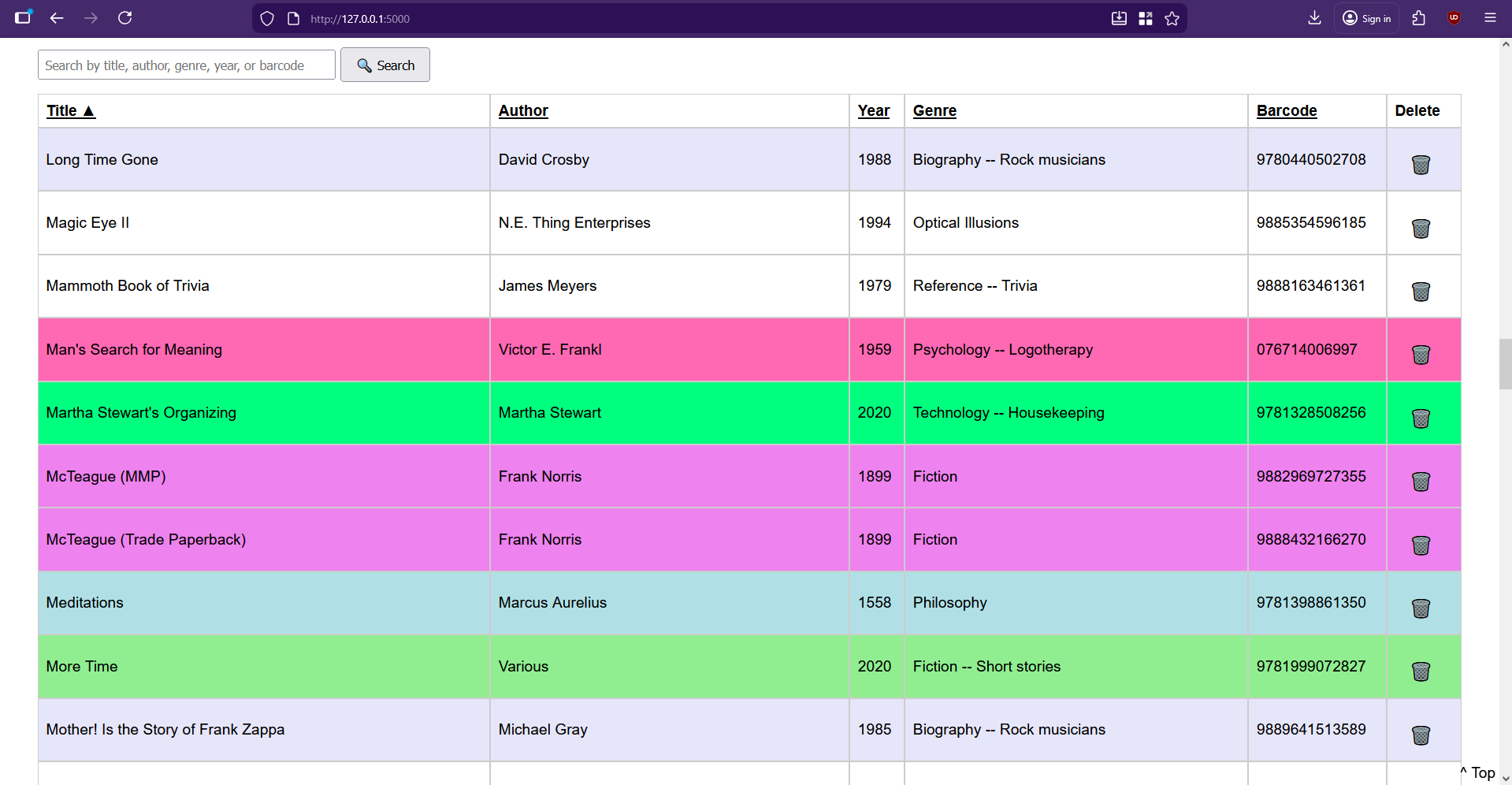
I wasn’t satisfied. I wanted more. I asked it to add a current count of books in the database and display it toward the top. After that, it offered to add a count of currently-checked-out vs. available books, to which I said yes please. Then I wanted an author page that accepts an author’s name and shows all books by that author. I asked for a new page that shows all the books that are checked out. Most recently, I made it so the search box and the column headers persist on scroll.
I’m still trying to think of features, but for now I’m busy entering books, typing up check-out cards on my IBM Wheelwriter 5, and applying library pockets to the inside back covers of all my books. If you want to make your own personal library system, I put everything on GitHub.
On the Shoulders of Giants (and Robots)
I couldn’t have done any of this without my husband’s prompts and guidance, his ability to call shenanigans on GPT’s code whenever warranted, and ChatGPT itself. Although I have programmed in the past, it’s been a good long time since I even printed “Hello, World” in any language, though I did find myself recalling a good deal about this and that syntax.
If you want to make a similar type of niche system for your eyes only, I’d say this could be one way to do it. Wait, that’s pretty non-committal. I’d say just go for it. You have yourself and the broader Internet to check mistakes along the way, and you just might like some of the choices it makes on your behalf.












I usually enjoy reading your articles just for your writing style, but this one just raised the bar. Great start to my morning!
She had me at ……. 2112!
Absolutely agree,
the writing style is great!
Did the same thing but for: cd,dvd,bluray,book management + ereader + jellyfin integration, isbn lookup, lable generator, currency, i18n, reading stats wishlist the whole 9 yards. works great!
The problem with these tools is though, you are easilly the only one using it + maintaining it. so do not create too many AI side projects!
I would never want to use a tool that literally has zero people who understand how it works. From a maintenance standpoint it’s code that is born dead.
This is basically the new version of creating a system in excel with some horrible mess of formulas and macros.
I’m not sure which code is worse… excel has fewer opportunities to create a genuine security issue, but at least with this the data is hopefully stored in a sensible and normalised database format.
An interesting answer to this problem would be to have the involved Chatbot produce documentation for the code it generated – data schemas, some description of the code architecture, query descriptions, a short users manual… I haven’t myself tried any of this yet, just curious.
And… can a chatbot debug something it created? How are they at refactoring?
I vibe coded a real simple Flask app with python last week. I knew in general how it should work, but have never used Flask before. It’s a one page file server that lets me upload emulator saves and download them from a central location so I can manage saves across multiple devices. Maybe I can browse it when I have down time and actually learn flask. But it was neat to get something personal done so fast.
A vibe coded server facing the net? Oof.
Where exactly did it say it was facing the net?
It’s not, it’s local only. Right now it’s only launched from a termux shortcut on my phone. Eventually I may set up a pi-zero to run it on my local network.,
Let’s hope it’s behind a VPN and not raw dogging it.
Why should “Let’s” care? It don’t befront me!
It’s local only. Those ports aren’t configured to forward on my router. The idea is just to host it locally as a more convenient file sharing than opening each device, opening a file browser app, sharing each save file, and getting the second device to accept the transfers.
Depending on the devices this seems like something that could be handled by Syncthing or a WebDAV server more easily.
Interesting. I hadn’t heard of either. WebDAV may be better, as Syncthing seems like overkill. But Android still seems pretty locked down and seems like I would need to spend a lot of time configuring on those ends so the files go to a place where the apps can access them. I also don’t want this stuff to be accessed on the wide web. My original idea was to run a small server on something like a pi-zero, so when I get home, all my game saves go from my phone to the server, where they can be downloaded on my PC so I can keep playing there, and vice versa before I leave the house.
Syncthing on Android works fine
As does WebDAV
Ya know what? If this is what Hackaday is about now, I’m done. I started reading this site when it was about creativity, and slop machines ain’t that.
But this is appropriate, as this is a hack in the sense that adequate use of technology helped her gain a huge amount of time on achieving her project. Of course this is subjective, because some may enjoy spending the time to do everything by themselves, but still a hack, because she did it faster than most people could. There are use cases where AI is not wrong.
Being that it’s an unethically created tool, I disagree with your last point.
Interesting take. I enjoyed the article, and have found myself in a similar situation (where vibe coding helped me hit an impossible deadline at the cost of tight code, but that met the requirements here).
If every HAD article was about this, yeah eventually I’d stop coming, but I appreciate the varied assortment of articles, provided none of the actual articles are written by AI.
Why?
Do you even understand what ai slop originally referred to, or do you blindly apply it to every single usecase?
Do you feel the same way about other automated tools?
Was the industrial revolution full of ‘slop machines’ as well?
Clara, I’ve seen your name enough to recognize it, and your projects on hackaday.io, and think you’re making a mistake. Our plucky author “programmed” a personal project while sleep deprived and it still worked. She even mentions that she couldn’t cut is as a professional programmer. But she did it. I think this article is about ambition more than cutting corners.
Yeah I have to join the others and gently challenge this position.
A few decades ago, a certain curmudgeon of a similar viewpoint would have said “ I can believe this was done on a turnkey consumer packaged all in one personal computer and not on a real mainframe and terminal with real mechanical relays. Pfft”
Just because they’re using new tools to achieve and outcome, learn something it doesn’t invalidate the journey they took.
Should we all go back to scribbling on cave walls with charcoal, because anything more is using the tools of those upon whose shoulders we stand?
AI, Reeeeeeee!!!
Ditto.
Using a “tool” created by large corporate interests and “trained” on the stolen work of actual FOSS programmers is a hard no from me.
I vibe coded a flask app to display co2 level and temperature from mqtt and allowing voting on thermal comfort back to mqtt and to a influxdb via node-red
All of the books in my personal library (1000+) have had Dewey Decimal codes on them since i was a kid decades ago. I use a program called Tellico to inventory both my book as well as my massive multimedia (vinyl LPs, DVDs, BluRays, VHS, Beta, LaserDisc, SelectaVision, etc). Most everything has a barcode you can scan, but if not, it’s simple to enter the title by hand and do a search. Makes finding a single item MUCH easier in a large collection.
Standing on the shoulders of $20 month to regurgitate stack overflow code
She never coded.
Now she did this.
Now she will learn about ‘life cycle’ and effort ratios.
In the end, she will finally learn to code, fixing this Rube Goldberg Lego mess.
To preserve the sunk effort of scanning all her books.
Either that or her husband will get stuck with ‘maintenance’ (read find decent library manager and import data).
What I’m saying is ‘vibe coding’ is a trap unless you immediately throw the thing away.
Like typing in games from computer magazines when I was a kid.
Also: ‘Library Science’ is a thing.
Predates CS by centuries.
You (well not YOU, you’re an idiot) could get a PhD in Library Science.
I never knew Library Science was a thing until I met my wife who has a master’s degree in it. It’s pretty cool stuff.
“She never coded.
Now she did this.”
Whatever else you want to say, AI and vibe coding is democratizing the interest in and creation of software tools by people who might not have gotten on the right on-ramp early enough. This is good (unless gatekeeping).
There are a ton of possible futures for this person (and project), none of which could likely ever have existed 3 years ago.
Not sure this is any more coding than paying someone on fivr to do it for you.
That said, I’m sure Maya is the type who will read through the code and try to learn from it, but most people aren’t.
My bigger fear is if people learn to code from AI generated code, we’re teaching humans to code like AI…
Actually she mentions that it was a free account ;) I use API access (mostly through openrouter) myself, keeps me way below that $20/month. And since we use these tools, i can see that AI generated code from the top models surpasses stack overflow in 99% of the cases. The quality has improved immensely for the last 12 months. Probably because frontier labs see coding as a number one business case.
Article fun and v non cynical – loved it
Not vibe-coded, but… For barcode scanning on a mobile device on an intranet site, I built a browser client function to take a pic to upload, with viewfinder to preview and position w/ vid overlay, then Zebra Xing to decode server side and return to client to validate. Not what I’d call the greatest, but free lib and did work.
I have no objection to this, why should I? To me the question is, and this seems to be a regular thing in these parts, why specifically ask for Python? I understand that it’s the current hotness. Years ago I built a PHP/MySQL database that I have used over and over, extending and altering as needed. It’s how I learned (some) PHP and (some) mySQL. But let a thousand different strokes bloom. On the plus side, now that I know the writer lives in the U.S. I feel free to criticise writing and spelling! Bonus!
I’m a fan of PHP but the PHP job market is rapidly declining. Fad JS servers are the rage now. Python remains popular for beginners and in its niches like data science or CUDA-wrapper. That popularity really helps the LLM write correct code.
I was by no means giving or intending to give advice. Anyway I worked in PHP 5 so I’d have some learning to do to get up to speed with whatever’s current (8? 9? I dunno) because it’s not backwards compatible. Paraphrasing something I heard in another context, “The good thing about Python is anyone can use it. The bad thing about Python is that anyone can use it.” Can’t figure out how to put “Established track record of learning no Python” on a resume.
“Python remains popular for beginners” and professionals. Not just for beginners…
Python is the most popular language, by many metrics. And probably has the most open-source code to train the machines on. I’d bet that the quality of Python LLM-code is better than other languages, even PHP.
Thanks for weighing in. I’m retired now but Python was the last language i picked up before my working life was done… and for the very little general coding I do now… Python. It’s got libraries and capabilities in just about any area I’m interested in.
Related to the topic – last week I needed some web pages to host some playable MP3 files. On a whim, I threw that at a chatbot. Now, I’m capable of writing this from scratch, but the bot generated a useable page with just a couple of prompts. 5 minutes.
Programming languages are very finite, well-documented, rule-based universes; it’s entirely reasonable that coding would be one of the first areas that AI would succeed at. I hope it’s a tool being used by skilled professionals to improve their efficiency and reduce errors. If it’s going to be used by penny-pinching MBAs to replace their programming staff… problem.
This is a great article and library is a great project. I also (Nov 2025) put together a library application. I used phone camera to get the titles into the software, and AI lookup to create a card catalog entry with a description and everything. I used the Library of Congress API to lookup the LOC call number rather than using Dewey decimal. Soon, I hope to add a checkout-by-photo feature which uses AI to scan a phone camera photo to fill in all the fields for checking out a book. That bypasses any barcode requirement. I also used book pockets and book cards to go into the pockets. I added acid free stickers onto the pockets to show the title, author, and call number.
I’m thinking about adding into the catalog: the first line (sentence) of the book
LLM coding is so legit when you follow the other coding best practices. Mentally, I go from programmer to supervisor. If you’re reading the results and committing to git you’re doing better than most vibe coders. You’re breaking the problem into small enough chunks for the LLM, so you understand the big picture. That’s so much better than “my LLM deleted the production database” lmfao.
Definitely use an IDE. VS Code + Github Copilot works for me. That will let the LLM read the existing code and avoid so many contextual issues.
Same. I use Claude and opencode with a plethora of models (openrouter can be great for that as well), from the terminal in my editor (Zed). OpenSpec can help preparing the chunks and document your project so agents can stay within sane bounds. You just check the bigger picture, coding practices and style, and the rest is done. Sometimes a problem is too complex, of course, but even then, most of the time feeding some pseudocode and smaller chunks fixed that too.
That certainly helps because LLMs thrive on information, and even better if it’s quality.
Wow. Another rabbit-hole, worth reading. Someone else who had some time. i’m finally retired and for fun try to keep working my PCLinuxOS laptops and desktop compu. So, recently have used ChatGPT to solve this and that computer problem instead on posting on the forum and … waiting for someone to comment. Besides, it’s kinda fun. So, we’ve been working up from short questions to longer ones to finally – we have a collection of 200 Bahá´í Writings in Spanish and wanted a way to use Chat or some other LLM to ask it questions but having everything locally housed on the desktop. Thus began the journey… we switched to Claude after a while – it’s just better in some inexplicable way. We have a little script that we can use on the collection and hope to be able to make it internet-facing in kind of limited way eventually. But it’s been a pain. First we didn’t have near enough RAM, much less and GPU – lol. Our son gave us his old Fatboy and we found some more RAM in the proverbial drawer and … this particular XFX Fatboy 590 is not recognized – not even by the OS. So, it’s been a trip. Trying to make things that might be of use to others is just rewarding – if conducive to hair-pulling behavior at times, but it’s worth it to me. Whenever Chat 5 would conk out, we’d just go do something else ’till it decided we could use it again – so no biggie there. Thanks for the chance to share. Have a beautiful evening and be happy :)
“Vibe coding” is just “I can’t be bothered doing this, but I want credit for having done it regardless.”
Who was asking for credit?
What about “I would like to have, but will never have time to develop, an app to help me do X. But I might make it happen with ChatGPT if I relax my expectations”.
I’ve nver tried vibe coding, but certainly wouldn’t criticise anyone for doing so. There are many reasons why someone might try it. That also includes “Just for fun” by the way.
You are literally reading an article giving her credit. I never got a post on a popular website when I was teaching myself how to code.
Why is this was this posted to Hackaday if it wasn’t to give her credit?
Why shouldn’t hack a day reader’s criticize people who are too lazy to learn how to code?
I wouldn’t consider Vibe Coders to be hackers.
I’ve never known a good hacker to NOT use a tool. Well, ok, the hairshirt console types who hate GUIs.
My Dad helped me build my first wood cabinet. Does that make me lazy for not first learning all the woodworking fundamentals?
Vibe Coding is a pretty good way to get interested in learning more about coding. A large part of pre-AI coding was grabbing canonical examples from the libraries you’re interested and modifying them. Or… Experts Exchange. Were these cheating too?
I’ve been wanting to dip my toes into LLM assisted coding, but I can’t stand the thought of giving sam altman my money or attention. Is there a slightly less unethical solution out there? Have folks had any luck with self hosted models?
Yes, people do use self-hosted LLMs for vibe coding. You do need a decent computer (preferrably with a GPU), though. Just try Googling something like “localllm coding” .
Self-hosted models are not necessarily always ethical…but at least those corporates won’t be able to collect your data.
I’ve used MSTY for local hosting along with Visual Studio Code. My GPU is not up to much by current standards so it’s a bit of a slow old process. Regularly clearing the conversation history helps a lot.
Local LLMs need a ton of RAM or VRAM. I think the small parameter models suck (what fits in an 8GB consumer GPU). There’s a build guide on Level1Techs that can load a 500B model. It’s 128GB of DDR5 and a 24GB VRAM GPU. The forum post is “Full DeepSeek Q1 with the “IK” version of llama.cpp on AM5”
Another option is buying a new AI-focused chip, like the Apple M5 or AMD AI Max. Both of those are like APUs with a lot of memory bandwidth.
Jesus, this is where this is at now? How long until we straight up Star Trek this stuff?
Now let us know how much energy (in Watts is fine) was used in creating this application, and how much energy is used when you use the app. :)
@Tanner Bass: Most of Star Trek’s inventions are already possible. Just that us contemporary humans are not able to generate the amount of energy that the Star Trek humans are able to generate.
Taking things apart may be easy. It’s the putting back together that thwarts us.
Someone mentioned Excel. Not only can you build cool stuff in it, in my personal experience it created employment opportunties. The Discovery Channel once hired “a friend of mine” to do pivot tables in Excel. Did “my friend” know pivot tables? Yeah, pivot tables, that’s the ticket! “He” spent three days doing nothing (except a bit of learning pivot tables) except when “he” was sent to Discovery HQ to get “his” official company ID. Then the project whatever it was was cancelled. So three days at $40 an hour to do nothing. Best job he ever had.
The point is, even for something like this project, Excel would be a great tool for data entry and export and data entry is the real consumer of time in a project such as this.
the gatekeepers are all coming out of the woodwork here… this is a neat little project and a fine example of how vibe coding can be used effectively (and responsibly). LLMs are not oracles, but for simple apps & personal projects, they can still be a great help.
🙄 it’s amazing that, asking for minimal standards is considered gate-keeping.
Giving out Vibe Coding participation trophies isn’t worthy of Hackaday.
Praising someone who is too lazy to spend a few weekends learning how to code is objectively a bad thing.
If HackaDay is just gonna be recircitated LLM content. Why should we bother reading it?
I can go to forbes for this shit.
You know people, please grow up, this is a one off personal project not some enterprise software, one person is using it and they are happy with it. The vibe coded part really doesn’t matter. I would get the complaint if it was some professional doing it for a paycheck. This is just someone wanting to make something and really enjoyed it. It doesn’t matter if they vibe coded it. You gonna make it? If your answer isn’t yes you can kindly piss off. These are individuals just happy to make something that you are chastising, not Google vibe coding a new browser they plan to sell to you. Literally nothing monetary is being gained by the maker…
Bravo. I’ve been writing code professionally for 21 years now, and I love this. Don’t let the perma-scoffers get you down, some people just get off on being disagreeable.
Now, to the moralizers. Some of my code is in the public domain, a lot is in private repositories that have been used for training. I’m glad it’s being useful instead of succumbing to bit rot.
Ones worried about slop. Please learn what AI refers to. This isn’t it.
Ones worried about “now her husband is stuck maintaining it” – the 1990s called and they want their sexism back.