A Free Cloud AI

If you would like an AI “personal agent” but don’t want your data on some opaque cloud computer, there’s a new option that appears to be somewhat nicer: [rociiu] has talorys, an AI agent that runs in your Cloudflare account. True, it is still on a cloud computer, but it is your account on a cloud computer. It is designed so you can use it on Cloudflare’s free account with reasonable limits, and the code running is all on GitHub, so you can — if you are so inclined — look to see what it is doing. The data, too, is all in your cloud instance.

This seems like a reasonable compromise. Cloudflare provides the hosting, and the software in your virtual computer does all the work. At least, that’s how it is promoted. Honestly, we haven’t combed over the code, but the assertion is “Free-tier friendly… no telemetry.”

We are fairly sure they are using Cloudflare’s AI engines, too, so it would be interesting to see how much of your data they could, in theory, harvest in transit. Of course, your data is still in the cloud, so if you are really worried about privacy, this might not be for you. But since everything is in your account and open, you can at least have more control over what’s there. For example, you can easily download or delete your data. You can even see exactly what prompts it uses.

Continue reading “A Free Cloud AI” →

A New Type Of LLM On The Block: Decision-Making Models

Large language models (LLMs) output language, but they are commonly tasked with making a decision or classification of some kind instead of writing an essay or chat reply. An LLM will be provided with input, and asked to classify that content in some way: with a rating, yes/no answer, a best-fit categorization, and so forth. A recent new type of model by the name of Jev was released only weeks ago and it is extremely fast, ultra-cheap, and laser-focused on that decision-making role. It can’t write even a single sentence, but it can classify and categorize very, very quickly.

Jev works like this: it still accepts text input, but it outputs only floating-point numbers. Those numbers are the “answers” to user-specified yes/no type questions, lists of choices, and scoring-type requests. [Simon Willison] provides a concise summary of what Jev does, and what makes this new category of model so interesting.

To say that the idea has caught on would be a wild understatement. Folks are making their own decision-type models and experiments in a flurry. Kev and Nimble are two examples (Nimble was added as a supported model in Ollama just recently, and is small enough to run locally with relative ease.)

If this type of local AI model was the missing link you needed to get an idea working, don’t keep it to yourself! Tell us all about it on the tips line.

AI On Your Gaming PC

If you want to experiment with LLMs, you typically have a choice of sending your requests to someone else’s computer or fielding a very large GPU and CPU setup to run models locally. However, a recent crop of projects aims to bring bigger models to much more modest hardware.

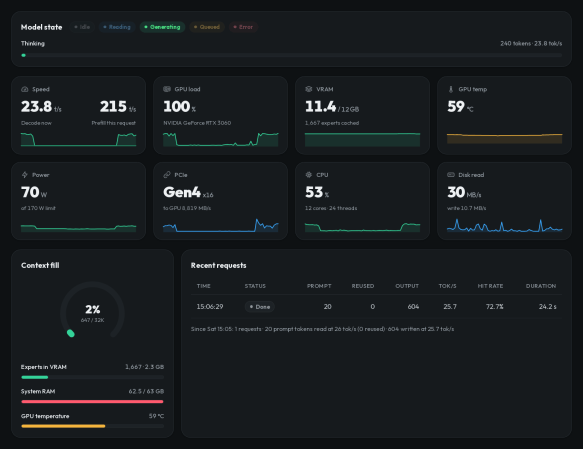
One example is Strata, a project from [Niko1221], which lets you run a 125-billion-parameter LLM on hardware you might already have for gaming. It won’t run on your old Pentium laptop, but it doesn’t require a supercomputer-like farm of graphics cards, either.

Strata can use several Qwen3.8 model variants, including different quantizations of the original model as well as coding and other specialized versions. Qwen3.8-Flash-Next is a mixture-of-experts model containing 24,576 small experts, of which only ten are needed for each token. The clever part is that Strata effectively treats VRAM as a cache for the much larger model. Frequently used experts stay on the GPU, while the complete collection normally remains in system RAM. The model also includes a roughly 29 GB lookup table that stays on the SSD and is accessed as needed.

The software also uses the model’s multi-token prediction machinery for speculative decoding, allowing several candidate tokens to be checked in a single pass. According to the project, an RTX 5070 with 12 GB of VRAM can produce roughly 50 to 90 tokens per second, depending on quantization. Tokens, of course, aren’t usually entire words, but it is still a respectable clip, once everything gets set up.

We did have some trouble setting everything up due to some incompatibility with the NVIDIA C compiler, our gcc version, and some headers, but your problems will surely be different. The setup.sh file asks you a few questions on the first run. After that, it just handles your selected startup options, which can take a few minutes while everything loads.

Once running, Strata lets you interact through a web browser. It also exposes OpenAI- and Anthropic-compatible APIs on localhost, so existing chat front ends, coding assistants, and other tools can use the local model without much special handling. Of course, you can’t expect its answers to compete with the big models out there for every task. When asking about Hackaday, for example, it got a lot of it right but also got confused about who founded the site and our authors (unless we forgot that [Tom Nardelli] once wrote some posts). Turning up the “thinking level” and turning down the temperature didn’t help much, although it did move its confusion to different facts. It did better when asked to identify some problem code or outline how to port a particular C compiler to a new target.

You’ll still want at least 32 GB of system RAM, 12 GB of VRAM, and around 80 GB of storage, so “modest” is relative. Still, it’s a neat demonstration of how mixture-of-experts models and some clever memory management can stretch ordinary PC hardware surprisingly far.

These economical LLMs can even run on older hardware, just slower.

World War I Coded Message Appears Cracked, Finally

When you think of wartime cryptography, you probably think of World War II and Enigma, although there were other famous codes used during that war. But in fact, there have been codes used through wars and in peacetime for much longer. Even the Romans used codes. Of course, World War I, or The Great War, as it would have been known, had its share of codes and, as you might expect, most of these have been broken long ago. Most of them. But apparently an AI model, GPT-6 Astra, recently cracked one that was previously undeciphered.

If you aren’t up on century-old cryptography, the ADFGVX cipher appeared in 1918. It began as ADFGX, but after a few months grew an extra letter — and a larger grid. The letters were chosen because their Morse-code patterns were relatively easy to distinguish: A, D, F, G, V, and X.

The original ADFGX version used a 5×5 grid containing the alphabet, usually merging I and J. The later ADFGVX version expanded this to 6×6, making room for all the letters and the digits as well.

Continue reading “World War I Coded Message Appears Cracked, Finally” →

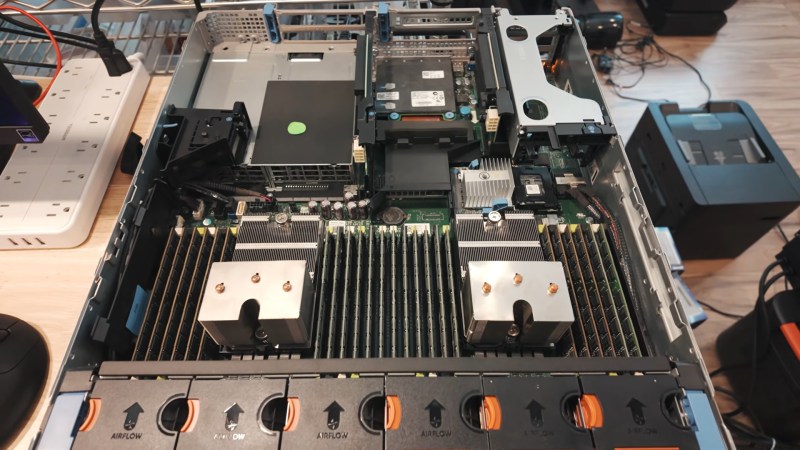
The guts of the server, with lots of sticks of DDR3, and not a single GPU in sight.

No GPU, No Problem: Flagship LLMs On A GPU-less Teenaged Server

There are lots of reasons to run LLMs locally, from privacy concerns to just wanting to futz about with the technology, but if you want to run the big models, the standard logic is that you need big money for lots and lots of VRAM. [MattMo] is calling that into question with his recent video — embedded below, naturally — in which he gets GLM 5.3 Flash, Qwen 3.8 Flash and Qwen 3.8 27B all running on a 14-year-old server without a single GPU.

The secret, if you can call it that, is that they aren’t running very fast: four tokens per second was about the max. Those four tokens are excreted from the twin Xeon processors of the vintage Dell PowerEdge R720 server, with the models living in its 348 GB of DDR3 system memory. That’s enough even for the largest flagship models, but as you can see by the speed, things are a bit bottlenecked by having only 20 threads available between the two processors. Said processors are also old enough to lack certain instructions that might have helped speed things up. Still, [MattMo] argues in the video that this is more than just a dancing bear: there are workloads where batch-processing at 4tps might make sense, and there are people who already have servers of this class laying around in their homelabs. The intersection of that Venn diagram is probably pretty lonely, but if that’s you — hey! [MattMo] says it’ll work, so give it a shot.

If you had to buy the hardware, well, it’s also quite reasonable on the second-hand market, with [MattMo] estimating about $600 given prevailing prices. He also points out that the newer models may still get some optimization to improve speeds, but don’t expect real-time conversations with Hal 9000.  Still, in terms of local LLMs, it certainly beats the pants off toy models running via Llama on the PSP or the C64.

Continue reading “No GPU, No Problem: Flagship LLMs On A GPU-less Teenaged Server” →

Fly Brain Connectome Used To Trade Stocks And Play Games

Recently researchers finished mapping the central nervous system (CNS) connectome of not just the female Drosophila melanogaster (i.e. fruit fly) brain, but also that of the male D. melanogaster for a comparative analysis. Here the sexually dimorphic changes turned out to induce specific mating behavior that ensures that there will only be smooching between genetically fit D. melanogaster males and females, while the rest of the connectome remained effectively the same.

Of course, with this connectome in hand it led some people to ask themselves what else one can do with this connectome graph of about 160,000 neurons other than make a fruit fly into a fruit fly. So far we have seen [Nftechie] turn this connectome into a crypto stock trader with the Stonkfly project that uses the connectome’s reward circuits to potentially make profitable trades, though [Nftechie] says that they haven’t verified yet how good a fruit fly is at trading stocks, only that it does said stonks.

Over at [PC Gamer] they summarized a number of things that people have also done, including trying to make the connectome control a game of DOOM and Beat Saber. Each game frame stimulates sensory neurons, with the generated outputs then mapped to game controls, with dopamine-producing reward circuits wired in for reinforcement learning.

Although the D. melanogaster brain is only the merest fraction of the size of the human brain, it does provide us with a glimpse of what actual artificial intelligence research may lead to, as we unravel how even a 160,000 neuron connectome is enough to make these terrors of rotting plant matter do their wonderful things.

Local LLMs Can Work Better Than Claude, At Least For Some

This is going to be a very personal question, because when you’re talking cloud vs local anything, it comes down to this: how much are you willing to pay for independence? The local option might save you long term, or it might never pay off the capital investment. It will almost certainly cost you your time to set up and maintain your own system — but what you get back is independence. With LLMs, traditionally you lose quite a bit of performance, but as [Anurag Singh] points out on XDA Developers, a lesser model might actually let you get more done, depending on your workflow.

[Anurag] had been on the 20$/month plan with Anthropic when he decided that the scratch just wasn’t worth the sniff– he was hitting usage limits he couldn’t stand at that level, but couldn’t justify a higher tier of access. So he decided to try a local LLM, even though all he had was a 16 GB MacBook Air M5, not a beefy workstation. Since his workflow isn’t so much ‘vibe code the whole thing for me’ as ‘help me find where I went wrong here, electronic rubber duck’, Qwen2.5 Coder 14B proved more than adequate for his use case.

It can’t understand all the moving parts of a large project as well as Claude can — not surprising given how old it is and how much memory it has to work with — but that’s [Anurag]’s job. He’s the programmer, it’s just the assistant. For his use case, he can make use of his existing hardware and having the the LLM right in VS Code is allows for a speedy workflow.

Your millage may vary, but if you want to get into locally running LLMs, we can point you at the easy ways to get started. Depending on your hardware, you might want to grab another GPU.