
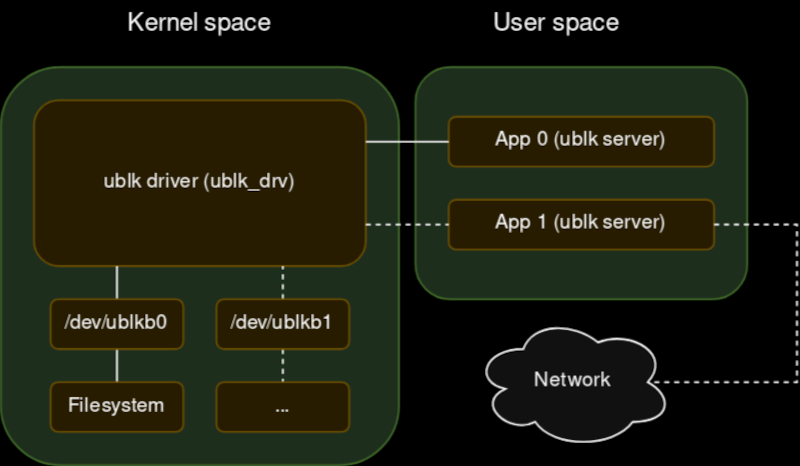
Your new project really could use a block device for Linux. File systems are easy to do with FUSE, but that’s sometimes too high-level. But a block driver can be tough to write and debug, especially since bugs in the kernel’s space can be catastrophic. [Jiri Pospisil] suggests Ublk, a framework for writing block devices in user space. This works using the io_uring facility in recent kernels.
This opens the block device field up. You can use any language you want (we’ve seen FUSE used with some very strange languages). You can use libraries that would not work in the kernel. Debugging is simple, and crashing is a minor inconvenience.
Another advantage? Your driver won’t depend on the kernel code. There is a kernel driver, of course, named ublk_drv, but that’s not your code. That’s what your code talks to.
The driver maintains the block devices and relays I/O and ioctl requests to your code for servicing. There are several possible use cases for this. For example, you could dream up some exotic RAID scheme and expose it as a block device that multiplexes many devices. The example in the post, for example, exposes a block device that is made up of many discrete files on a different file system.
Do you need this? Probably not. But if you do, it is a great way to push out a block driver in a hurry. Is it high-performance? Probably not, just like FUSE isn’t as performant as a “real” file system. But for many cases, that’s not a problem.
If you want to try FUSE, why not make your favorite website part of your file system?












What is a block device and why should I be interested in it?
In the conventional sense? A hard drive or SSD. Linux and other unix devices present these devices as if they were a file, say 500GB in size, which you can read and write to. Filesystems like FAT32 are an abstraction on top of this, which write to the block device to create various bookkeeping datastructures and store files.
As for the why this lets people prototype new and interesting block devices because the barrier to entry is much lower. you could implement iSCSI in userspace, sure, but I’m sure you could do lots of other fun things like the raid thing mentioned in the article or even weirder things.
The existence of FUSE (which allows emulation of the higher-level filesystem interface for opening files, reading/writing them, moving them, renaming them, etc) has enabled some really interesting stuff. You can mount zip files as if they were folders. You can get monitoring interfaces exposed as filesystems like in /sys or /proc. (useful due to the flexibility of “everything is a file”) And then there’s been wacky stuff like filesystem games, like a text adventure but files and folders.
The performance likely isn’t actually going to be too bad. The speed of FUSE has improved significantly as various improvements have been made to the interface between FUSE programs and the kernel, like delegating copies of data to the kernel and using IOuring to process commands more quickly, to the point where the most modern FUSE drivers approach normal speed.
This is clearly built to take advantage of such techniques from the start, including use of IOuring. The biggest bottleneck is probably the question of what the actual backing for the block device will be. If it’s ram then it’s likely to be very fast indeed. If it’s some network socket, then you’re going to be limited to the speed of your ethernet interface and the kernel’s network stack.
Block is the way to go for performance – I improved a production program by a factor of 100 a few months ago by looking at blocks, not files… If you have a lot of small files, look where the blocks are in deciding the order to read them (for a first cut) and where they are in the mft (ntfs) (for the next step) etc..
In reality the world is going the other way. I’ve seen relatively small projects that have (literally) half a million tiny files.. Not something that is fun to copy around including backing up..
If you access a block device directly, you forego the page cache. For many applications may end up with slower I/O access.
That’s backwards. This isn’t for accessing devices through block device files (bypassing filesystem code). It’s for creating custom block devices, in userspace.
Thanks both/all for hipping me up!
Dear author, I am too lazy to read the linked blog. What is the benefit of ublk over nbd (which has been used for many years in tools like qemu-nbd)? Performance? Security?
nbd is available in older kenels. ublk is only on newer kernels and uses io_uring. Much faster and more scalable. In fact nbdublk is a nbd client written using ublk that performs better than the old nbd driver. Read: https://docs.kernel.org/block/ublk.html
You can also do character devices in user space too. I used one to emulate a normal keyboard from a set of switches connected to the IO pins of a Raspberry Pi. That way, normal applications just see a normal keyboard when I press the buttons.
What advantages does this framework have over the existing NBD?
https://letmegooglethat.com/?q=compare+nbd+to+ublk
May I suggest following the instructions here: https://letmegooglethat.com/?q=compare+nbd+to+ublk
i once did a uinput driver for a custom raspberry pi controller interface over i2c. i used it to talk to an attiny84 that i used to read all my analog values from a few joystick axes and slider pots and presented them as a i2c slave device. idk if this is the same thing but i didnt have to touch the kernel at all, just run the driver as a background task. i could have also used a dedicated adc module but the tiny was just sitting there in the parts bin.