
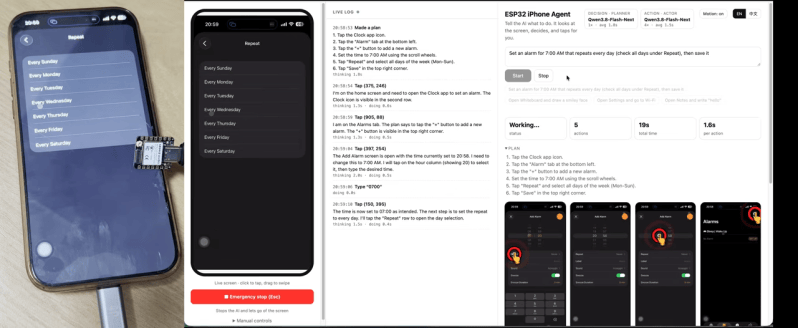
Do you want to get an AI agent to do something to an iPhone? You could try and jailbreak the device and do some heavy software hacking, or… you could grab a microcontroller off the shelf and have it do the hard work. [Henry Yuan] explains how to achieve this with an ESP32.
The first step is getting an AI agent access to the current state of the phone screen—which [Henry] achieves with AirPlay screen mirroring and UxPlay. A Gstreamer pipeline is then used to feed the screen as a JPEG stream to the AI agent of your choice. Then comes control, which is achieved by an ESP32-S3 acting as a USB-HID device, emulating both USB mouse and keyboard. With iOS AssistiveTouch enabled, this gives the agent control over inputs to the device. From there, it’s up to the AI agent to figure out the actions to make to achieve the desired behavior, which is obviously very use-case specific.
It might sound a little convoluted, but this approach has benefits. There’s no requirement to have an Apple Developer Account, or XCode, or a Macintosh at all. You can just get your agent tinkering away on the phone without any of that fussy overhead. We’ve featured some other great iPhone hacks of late, as well. Video after the break.












having to use a jpg stream as a way to computationally determine what a phone is doing is exactly why I hate phones as computational devices. they’re the anthesis of a real computer that I can own and make do what I want it to. I only use mine for TWO FACTOR AUTHENTICATION — which I also hate, but I don’t get to choose when I need to sign in to get my unemployment check (as a laid off software developer)
I agree with you in spirit. There is no reason why a powerful computing device should be accessible, or automate-able over jpg stream + USB-HID keyboard/mouse. Something like ADB should be available, which should in fact provide more functionality.
These days there are computers and then there are dumputers, the latter being devices that are intentionally hobbled to prevent meddling and make them more friendly for the mass-market lowest common denominator. It’s a bit disappointing but it does make sense. Hopefully you will be able to easily jailbreak all hardware and software soon.
Been here, Feeling for you.
I think this is awesome, with minimal cost to get started.
Wonder how well it would work with a USB-C hub, passing HDMI out to one of the cheap UVC HDMI-In dongles, in parallel with the ESP32-S3 as keyboard and mouse? That would eliminate the dependency on uxplay, and initial setup of airplay mirroring.
I’d add that a downside would be the limitation to more modern i-devices with a USB-C port instead of lightning, but I think it might still be possible with lightning and the HDMI-out dongle. Just not sure if any allow simultaneous USB HID input and HDMI output.
I could totally see a mashup of this (https://www.aliexpress.com/item/1005012060834258.html) with a Macrosilicon MS2131 and WCH9329 UART-HID chip. Plug the lightning port into the phone, USB-C to the controlling computer with the Macrosilicon and a USB-UART connected to the WCH9329. Done!
Other advantage is that it frees up all of the phone’s network interfaces, no limitation that you have to use cellular data because WiFi is dedicated to airplay, etc.
And of course, with a different set of adapters, the same approach could work equally well for a USB-C-powered iPhone, as well as Android devices.
Keeping the phone on its normal Wi-Fi was one of our goals too. We built iPhone Agent Harness, inspired by Henry’s project: https://github.com/cccat6/iphone-agent-harness
Our route uses Safari screen capture and the agent on the phone, local WebRTC for commands, and ESP32 Bluetooth HID for mouse/keyboard input. The separately powered board sits nearby, so there is no USB cable to the phone or dedicated AirPlay hotspot. The tradeoff is iOS/iPadOS 27+ and Safari screen sharing; the phone and bridge must share the same Wi-Fi.
The repo includes firmware and setup instructions, and https://igent.cc has a real alarm-setting demo. I am one of the builders; feedback on the Wi-Fi/BLE coexistence and connection setup would be useful.
I just can’t wait for the AI bubble to burst!
Like the Web bubble “bursted” look where we are now …
Haha good one
Bluetooth would seem like a good way to go for automating a mobile phone, once paired a Bluetooth device would have access to the phonebook, messages, call logs, screen cursor, keyboard, files, pretty much everything.
“I only use mine for TWO FACTOR AUTHENTICATION”
If the 2FA is via SMS then a dumb-phone can do it just as well, if the 2fa is via anything which is actually TOTP underneath (many things are really just TOTP despite absurd demands to “use OUR app”) then KeePassXC (runs on Linux, Windows, any other system) can handle them when you give it the initial secret string and ensure the PC has it’s time kept relatively in-sync with internet servers.
I’ve started building something like this. I already have the Android app and the code for the ESP32-S3. Now, I need to develop the code to interpret the output from the HDMI-to-USB capture card. https://github.com/moises-dev-git