
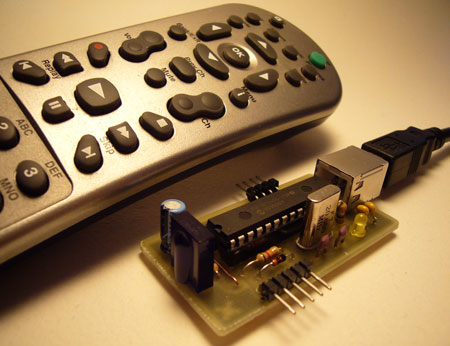
Now that we listen to MP3s, and watch XVIDs or x264s, a computer is the entertainment center in at least one room of most homes. Unless you have a special HTPC, though, you’re probably stuck using the keyboard to pause, change the volume, and fast-forward through annoying Mythbusters recaps. PC remote control receivers range from ancient serial port designs (who has one?) to USB devices not supported by popular software. In this how-to we design a USB infrared receiver that imitates a common protocol supported by software for Windows, Linux, and Mac. We’ve got a full guide to the protocol plus schematics and a parts list.
Design overview

Remote controls transmit data on an modulated infrared beam. An infrared receiver IC separates the modulated beam into a clean stream of 0s and 1s. The data stream is decoded by a microcontroller and sent to a computer over a USB connection. Software processes the codes and triggers actions on the computer.
Background
Computer infrared receivers
The oldest PC infrared receiver design uses a receiver IC to toggle a serial port pin, usually DCD. This design probably originated on Usenet, and it’s still the most popular on the web: Engadget, Instructables, etc. These aren’t true serial devices because they don’t send data to the PC. Instead, a computer program times pulses on the serial port and demodulates the signal. This is a super simple design, but it depends on direct interrupt access and timing precision that’s no longer available in Windows. Linux or Mac users can try this receiver, if you still have a serial port. We couldn’t get this type of receiver to work with the serial port on a modern Windows XP PC, and don’t expect the precise timing to transfer through a USB->serial converter.
Some more advanced infrared receivers are true serial port devices that measure or decoding infrared signals before sending data to the computer. The UIR/IRMan and UIR2 incorporate a classic PIC 16F84, but don’t provide firmware and/or source code. These devices should work on a modern computer, through a USB->serial converter if necessary. The USBTINY and USBIRBOY are native USB devices, but lack wide support.
Receiver software
Regardless of receiver type, the computer needs a program to listen for incoming remote commands and convert them to actions on the computer. Linux and Mac users have LIRC, which supports a bunch of different receiver types. Windows users are a bit less fortunate. WinLIRC is an abandoned Windows port of LIRC for simple interrupt-based serial port receivers; WinLIRC was last developed in 2003. Girder was originally a freeware PC automation utility, but has become expensive bloatware with a 30 day trial. Fortunately, the last freeware version of Girder (3.2.9b) is still available for download.
Working with IR remote protocols
Decoding IR signals
Remote controls encode commands in the spacing or timing of a 38KHz carrier pulse, [San Bergmans] has an explanation of the principals involved. An infrared receiver IC separates the data stream from the carrier. Our job is to decode the data stream with a microcontroller. There are dozens of remote control protocols, but Phillips’ RC5 is widespread and commonly used by hobbyists.
RC5 is stream of 14 equal length bits of exactly 1.778ms per bit time. A pulse during the first half of the bit time represents 0, a pulse in the second half represents 1. This scheme is called Manchester coding.

We used a logic analyzer to examine the output of a Happauge WinTV remote control, a known RC5 remote. The diagram shows two presses of the 1 button, and two presses of the 2 button; note that the output is inversed and the Manchester coding is backwards from the above description.
The first two bit times are start bits, followed by a toggle bit. The toggle bit inverses each time a button is pressed so the receiver can tell the difference between a hold and a repeated press. The next 5 bits are the address (0b11110=0x1E), followed by the command (0b000001=0x01, 0b000010=0x02). A backwards compatible extension to RC5 uses the second start bit as command bit 7.
Representing remote codes to the computer
Looking at previous designs, we saw three general methods of communicating remote commands to a computer:
- Protocol specific receivers decode one protocol, and send actual decoded commands to the PC
- A more general type of receiver measures the timing and spacing of each pulse and sends the full waveform to the PC for analysis.
- Some receivers create a unique hash for a signal, but don’t actually include enough data to fully recreate the waveform.
While our preference is towards the general hash method, our only remote uses RC5 and it was more interesting to build an RC5 specific decoder. We describe modifications for a more general version in the firmware section.
Computer interface protocol
We didn’t want to write our own receiver software or driver, so we looked for an existing, well established communication protocol to imitate. The UIR/IRMAN/IRA/CTInfra/Hollywood+ type receiver is supported by Girder and LIRC, and uses a simple serial protocol with handshake:
- The device is initialized by the DTS and DTR pins of the serial port. We don’t have these and don’t care.
- The computer sends “IR”, with an optional delay. The device replies “OK”. We’ll just send “OK” on every “R”
- Remote control codes are sent as a unique six byte hash. We’ll decode an RC5 signal and send the actual values, but a generic hash could be used instead.
This protocol is for a serial port device, but our USB receiver will appear as a virtual serial port and the program won’t know the difference.
Hardware

Click here for a full size schematic (png). Our receiver is based on a USB enabled PIC 18F2455 microcontroller, the smaller, cheaper version of the 18F2550. The 18F family is programmable with the hobbyist favorite JDM-style programmers if a diode is used to drop VPP to a safe level. The PIC gets one decoupling capacitor (C1), and a diode (D1) and resistor(R1) on the ICSP programming header. We exposed the serial port on a pin header for debugging or a mixed USB/serial port version using a MAX RS232 transceiver IC.
The USB peripheral requires a 20MHz external clock (Q1, C5,6), and a .220uF capacitor. We faked the capacitor using 2 x .1uF decoupling capacitors (C2,3). A 3mm LED (LED1) and a 330ohm current limiting resistor (R2) show USB connection status.
We used a TSOP-1738 infrared receiver IC which calls for a 4.7uF decoupling capacitor (C4). If you can’t find this particular IC, any receiver listed here should work. The TSOP-1738 output is the inverse of the received signal, it pulls to ground when a pulse is detected, so a pull-up resistor (R3) holds the pin high when no signal is present. Check if you use a different receiver, you may need to use a pull-down resistor and reverse the Manchester decoding routine in the firmware.
The circuit draws power from the USB bus, so we don’t need an additional power supply.
Parts list

Click here for a full size placement diagram (png). The PCB design is 100% through-hole and single sided. The schematic and PCB were made with Cadsoft Eagle, freeware versions are available for most platforms. All the files are included in the project archive (zip).
|
Part
|
Description
|
|
IC1
|
|
|
—
|
|
|
C1,2,3
|
|
|
C4
|
|
|
C5,6
|
27pF capacitor (15pF might be better)
|
|
D1
|
|
|
Q1
|
|
|
R1,3
|
|
|
R2
|
|
|
TSOP
|
TSOP1738 (obsolete, try TSOP1138)
|
|
USB
|
|
|
SER
|
|
|
ICSP
|

Firmware
The firmware is written in C using Microchip’s free demonstration C18 compiler. Firmware and source are included in the project archive (zip).
We used version 2.3 of Microchip’s USB stack to create a USB serial port using the default drivers already available on most systems. The USB stack has simple functions to enumerate the USB device and transfer data between device and host. It only took a few pin changes to get the CDC demonstration working on our custom hardware.
Our implementation of the UIR/IRMAN/IRA/CTInfra/Hollywood+ protocol simply responds to the letter ‘R’ with ‘OK’. This should satisfy the handshake requirements of any implementation of this protocol.
We chose to specifically decode RC5 (and RC5x) because it’s a widely used protocol, and the only type of remote we have to work with. Most of the decoding is done in the interrupt handler:
- The first signal change triggers an interrupt that starts a 889us (one-half bit period) timer.
- On each timer interrupt, one-half of a Manchester coded bit is sampled.
- Every other interrupt the measurements are compared, and the bit value is calculated to be 0, 1, or an error. Errors reset the decoding routing.
- At the end of each transmission the address and command bytes are decoded, and sent to the host with 4 buffer bytes(0). We discard the toggle bit because it would confuse the PC software into thinking every other press was a unique code. We append the second start bit to the command bit for RC5x compliance; this just adds 0x40 to non RC5x remote codes.
A more general version can be made by removing the Manchester coding step (3), and sending 48 sample bits (all 6 bytes) to the computer.
Installing the USB infrared receiver
Most operating systems already have drivers that support a virtual serial port device like the receiver. Windows XP has the required drivers, but needs help from an .inf file to properly associate them with our device.
Windows will show the new hardware dialog the first time you plug in the receiver. Choose to use a custom driver and point it to the .inf file included in the project archive (zip). This links the device to a driver already included in Windows, and adds the receiver as a COM port. You can check the COM port number in the control panel.
Mac and Linux users can use the receiver with LIRC, but Windows users will be faced with the choice of the old, freeware Girder, or the new, 30-day trial shareware version. We used the freeware version of Girder, but hope you guys can suggest a great, open source alternative that we overlooked.

Regardless of the computer-side control software you use, configure it for a UIR/IRMAN/IRA/CTInfra/Hollywood+ style receiver, and enter the COM port or serial address assigned to it. Our receiver is also compatible with any protocol options like ‘Fast UIR Init’ and ‘Skip UIR Init Check’, which shorten or eliminate the “IR”->”OK” handshake. Now test the receiver and add a remote according to the documentation for your software.
Manual terminal interface and debugging
If you have a problem with the receiver, or you’re just curious, try to interface it from a serial terminal. We really like the serial terminal on Hercules. Set the correct COM port, but the speed and configuration settings are ignored by the USB serial port driver.

A capital ‘R’ will prompt the receiver to reply ‘OK’. RC5 codes are returned as raw bytes, so be sure to set your terminal to show HEX values rather than interpret it as ASCII text. The first byte is the RC5 address byte (0x1E), followed by the command byte (0x41), and then four buffer 0s to comply with the UIR/IRman protocol. The image shows the handshake, and the output of a short press on the 1,2, and 3 buttons.

A free utility called Portmon logs COM port activity for review. This is helpful for spying on existing receiver protocols, and debugging the interaction of our custom hardware and closed/proprietary software. The image shows Girder sending the initialization string ‘IR’ (0x49,0x52), and the receiver reply ‘OK’ (0x4F,0x4B).
Taking it further
Our RC5x compliant receiver follows a widely used interface protocol. There’s a ton of possibilities for additional features in an open source infrared receiver:
- Support all remotes through a generic hash generator, like the original UIR/IRman hardware.
- Add additional remote protocol decoders, like RC6.
- Support multiple, configurable interface protocols.
- Implement the serial port I/O.
- Store configuration options in EEPROM, including protocol, interface mode, timing options, serial port, etc.













I’ve wanted something like this for a long time…thank you thank you thank you…..
I built the Lirc receiver one day on a whim, and I still use it along with The Korean media player.
works fine on XP with a serial port to usb Adapter, been using it now since around 2004 no problems at all.
it is also a good way to check if a remote control is actually working as well, with Wlirc’s debug options
Well I would consider this if my computer did not include an onboard IRDA port (Its a new DFI mobo) and serial one cost under $10 if you scrounge and I highly doubt that your mobo does not have a serial port at least internal.
how I did it with the instructions below
http://www.vituperation.com/?page_id=522
http://lnx.manoweb.com/lirc/
38kHz Infrared (IR) Receiver Module
Catalog#: 276-640
(Some websites say this does not work but it works fine for me!)
+5V Fixed-Voltage Regulator 7805
Catalog#: 276-1770 (Instead of the 78L05)
1N914/4148-Type Diode
Catalog#: 276-1122
4.7µF 50V 20% Axial-Lead Non-Polarized Elect. Capacitor
Catalog#: 272-998
4.7K ohm 1/2W 5% Carbon Film Resistor pk/5
Catalog#: 271-1124
WinLIRC has been mostly abandoned because it does its job, and there hasn’t been a very strong demand for changes. If someone wanted to add support for this or other modern receiver hardware, I’m sure people would find that useful.
Nice work. I started to built mine yesterday in fact. My version is a bit simplified and all SMD. And I use a mini B connector, so cute :)
I took a different approach in the development. My purpose is to replace key stroke when using media center applications. usually they can be used with the 4 directions + OK + cancel. So the PIC receives and decode the IR signal (Nec code in my case) and when it finds one prerecorded code, it sends the equivalent keyboard action.
The PIC uses the HID firmware so there is no need of specific library or application, it is recognized as a standard keyboard.
Since the codes are written in hard in the device, I will use a USB bootloader to minimize the parts on the single side board
Jerome
@The guy above: IRDA is not IR. IRDA is a specific communication protocol using infrared – it’s used for talking between devices like PDAs, phones, laptops – all in the past now but anyway. You can’t use an IRDA port as an infrared remote system, generally, without some heavy hacking.
Does matter if used 18F2455 or 18F2550?
They are both programmed with irmanClone.hex?
I ask because I see in the firmware folder files like “18f2455.lkr” but no any 18f2550 file.
That should work for you, but note that the circuit is different. Treat this as another project.
http://dangerousprototypes.com/blog/2010/01/29/prototype-usb-infrared-remote-control-receivertransmitter/
I have a serial remote form a packard bell system, as with all of my stuff its outdated and i’m trying to give it use and if it has 2 parts i never seem to get them in the same place together. I found the reciever the other day after having the remote for months, now it’s the other way round :(.
So the old irman simple Ir reciever will not work with XP? they also dont work with USB-RS232 adapters?
I better tell the two systems I have working they dont work… Dammit I hate it when hack a day tells my stuff it’s not supposed to work.
Note: if the article writer KNEW anything about IR and RS232 he would know that the statements about it not working under windows or with a USB/Rs232 adapter are silly. IR transmits at a data rate that is FAR slower than the faster Rs232 rates so it’s easy to lazily decode it in software.
Now install Vista on a Pentium 2 400mhz machine and then you’ll have problems. But any modern machine has plenty of processing time and power to catch the incredibly slow IR signal. 40khz is the carrier NOT THE DATA, and if you use one of the IR reciever parts instead of a photo transistor you can easily decode it under vista in spare time over a usb rs232 adapter.
Most of the time the little IR recievers are easier to find than a phototransistor, and solve all your problems with filtering and signal conditioning. I can simply toggle the RX line and set the computer to 2400 baud and capture ALL The data coming in without effort.
Neat-o pic project, but don’t start the article with lots of FUD about the process.
An old IRman should work fine on XP, both through the serial port and a USB->serial converter. It’s the interrupt line bangers that we couldn’t get to work with some USB->serial converters and later versions of Windows.
@guest — it’s the same chip, but the 2550 has more memory. The .lkr file is from the C19 compiler, you can find a 18F2550.lkr there if you want to recompile the project. I’m not sure if there are differences besides the program space that preclude the 2455 hex from working.
Question: I have a semi-new mobo that says it has a header for an IR receiver… what kind of thing can I actually attach to that header? Any ideas?
good project, i was looking into an IR circuit to control an HTPC/XBMC Live (xbmc.org) installation.
after doing some research and looking up costs associated with coming up with an USB IR solution that worked in linux, i remembered i had an extra original XBOX IR dongle ($5-10 used at any game store). These use a funky usb-esque connector, but can be taken apart to expose the standard usb pins. ( http://www.redcl0ud.com/img/ir_wiring.jpg )
works wonderfully in lirc, and apparently will also funtion in osx/windows with a proper HID driver. hope this can save someone time/money!
I have a similar project (that I think I’ll never finished), the only difference being that the pic18F4550 presents itself as an HID (keyboard), then it just map RC5 codes to keystroke. This should allow compatibility with most plateform / os / software without any driver install.
The device will also be switchable to a programming mode : a software on the computer just get the last keystroke code and send it to the device, the device waits for the first RC5 code, and the new association is memorized. RS232 port emulation would be used here.
Oh. Every computer in my house, 6 total that are in use two being laptops ALL have serial. Seriously tho, there is nothing special about treating a USB jack as an rs232 just to later have windows emulate it as an rs232. Might as well leave it what it is and use serial (as most people DO have it) and if you built your PC without including one then you are just far too progressive for me. As all my MCU projects talk to me via serial. Maybe I’m just old fashioned. db9 r0x0rs
I use the Packard Bell FastMedia Infra-Red receiver on my Win XP boxes no problem. Just call it fmir for short.
PS, most motherboards at least have a Serial header if the rear panel is legacy-free, I know my P5ne-sli had one, it worked great.
I guess I don’t like PIC because I couldn’t figure a cheap way to program it, can it be programmed with 4 resistors and a parallel port like an Atmega can?
Now a real hack would be to tell us how to strip one of these reciever chips from trashed $20 DVD players and old VCR/TVs, of which many hobbyists have stacks.
And of course trigger the soft power switch both on and off.
@ Zinge, that IR header is for a IRDA module, I have had it on most of my PC’s for about 10 years.
AVR equivalent:
http://jumptuck.wordpress.com/2008/10/26/usb-ir-receiver/
I just poted this a few days ago. I’ve been using it for months and it works wonderfully.
I am with finding parts from older electronics. I have a garage full of the stuff. Even a few laptops that were not treated nicely. One was given a ride into a canal by some “bubba” that did a barrel roll in a 4×4 into a canal. wasn’t pretty, but it yeilded some nice usable “goodies. New uses for old toys syndrome. With the economy going down, I am probably like a few others out there with no disposable income. Esp when the wife asks you want to build what for what?
which reminds me, anyone have a source for cell phone components/cross references? there are a few crystals and receivers in those that should be very useful for creating new things from old parts. not to mention resistor arrays, smt caps, transistors.
cool project, another site on the topic:http://lnx.manoweb.com/lirc/
@TheKhakinator – Actually Edward Nardella is right. There happens to be an IRDA protocol that has no flow control at all, and lines up fairly well with most remote control IR protocols. Check in the LIRC docs and elsewhere for information on how to use it.
I’ve used Pocket PC PDAs as universal learning remotes via the IRDA port on them. Pretty neat trick, though too many of them had only a few feet range. I need to setup my current PDA with the software to do it, as my current TV has a setup and input select that most universal remotes won’t trigger, and it’d be nice to have as a backup.
Hi! I tried to recompile your great job to a 18f4550 by changing the linker file with 18f4550i.lkr. It seems to work, when i digit IR it response to me OK, but the tsop 1738 doesn’t receives the rc5 command from a “philips” remote. Any suggestion? Regards from italy!
hi, great work guys!!
anyone has a compiled file for 18f2550 is possible to post here!
thnx
i need some help!
my circuit is ready an im using a 18f2550 but not works. is needed a special config in winpic800?
my computer rec. cdc demo and .inf driver but no signal is detected.
any help?
thx
I also breadboarded this circuit using an 18F2550, programmed the chip fine. I get an ‘OK’ response from the circuit, but i can’t get any IR remote to give a response through the circuit. I tried 4 different types of remotes, but no success.
my IR decoder is working correctly, an oscilloscope confirms that.
is there any special trick to making this work on the 18f2550?
@neimad hey i have the same problem!!
ive tested a 3 tsop sensors and 4 remotes noting happends no sinal i thing maybe only working in rc5 remotes?
what config you use in your programmer?
@norman
Yes, we decided to only decode RC5 remote controls. You can remove the Manchester decoding code from the interrupt routine for a more generalized ‘hash’ of the remote control protocol.
If you are having problems, first make sure that interrupts are triggering by lighting the LED on the first interrupt of the tsop.
If you’re getting an interrupt from the TSOP, but no remote control codes, then it’s probably that your remote does not follow the RC5 protocol. Remove the Manchester decoding routine and just spit the raw sample out the virtual serial port into a terminal to verify. Now do a fit of fu to get a 6 byte hash and you’re done.
okey im try to remove the manchester decoding.
thx
After programming 18f2550 with irmanClone firmware I get a new com shown on device manager and after few seconds the led starts flashing than the pc goes into repetative Unkown Device thing and com disappears, please help (by the way my circuit is complete only from the IR receiver is this could be the problem? is it possible to use a bootloader on the chip?
@nemo
Did you point the new hardware wizard at the .inf file included in the project archive? It tells windows to assign the CDC class driver to the device.
Thanks very much vor this cool project! It works with my 18f2550. Here is the firmware compiled for the 2550, maybe it solves some problems the others have with the 2550:
http://www.cg.tuwien.ac.at/~markusl/irmanClone2550.hex
Man you guys are geniuses! If I was as smart or had the knowhow I’d try building a device that makes a usb hdtv tuner work on a portable dvd player to receive hdtv programming. Anyone think that’s a good idea or feasible at least? I imagine one would need to write a program that draws power from the usb port and picks up channels to be displayed.
hi again
WORKS th circuit WORKS!
im buy a universal remote control and program to a philips tv (rc5 code). is sending data to vcom terminal okey.
im still working into removing the manchester deco
thx
Thanks for following up on my question. I went through some touch ups on soldered pins and now when I insert the usb cable the led starts flashing for a second then stays on, and I could see a COM4 on the device Manager also stays there (good sign!) but when I try to update the driver to point to the inf as you suggested it keeps telling me Cannot continue with the wizard…
Tried also to use MCHPFSUSB\fw\cdc\inf but the same thing, can someone please direct me to what I can check? Thank you, I noticed the pc becomes very slow when I connect it.
@nemo
recheck your circuit
may be a lack of ground or are inverted the d+ and d- in the usb port!
Nice circuit.But nothing to beat the winlirc + IRassistant.It works fine on winXP too and is up and running in no time at a much lesser cost.If u dont have a serial port get a usb to serial converter (if u work with microcontrollers, then chances r that u already have one :P)
Howto:
http://lnx.manoweb.com/lirc/
http://www.irassistant.com/dotcom/v_current/
@norman
Apparently, it is windows issue with the driver more than the hardware. I uninstalled driver and refresh then it asked me for a driver which it did take it and was able to test it ok on HyperT, just could not explain why it makes the pc so slow.
@nemo
humm try this
http://www.obddiag.net/drivers.html
this is the new driver for cdc device for xp/vista
from microchip
Need an open source alternative for Girder?
Use EventGhost. http://www.eventghost.org/
I love it.
This is weird, I had bought TFMS 5400 which is 40KHZ receiver with same pin out as the recomended and the device does test ok when I type R on H.terminal, also installed girder and it shows normal mode but it does not respond with receiving someting on my TV remote?. Girder setup -> general page shows received increased number of messages but I do not know how to see what was received, any idea please?
Theoretically speaking, would it be possible to use a mono mini plug as the input, rather than an IR receiver? The mono mini plug cord would connect to an output on an Xantech connecting block which would have a IR receiver as it’s input.
il have someone make this 4 me
now howbout a ir transmitor 2 connect to the keybord(if its posible) .not that it would be usefull but i’m curious.
i usb ir for a cellphone is whidh rage no?
can i get a remote to work on that
Is it possible to get this code to work for the 18F2450. I have a bunch of these lying around, I laid out the PCB like the tutorial says, but I can’t seem to figure out how to modify the code to work with the 2450.
I don`t have TSOP 1738 or TSOP 1138, just have SL SM0038 ( can`t google this shit !- no information)
Plugin….Windows asked for Driver
Installed driver…OK
New COM port appeared…OK
UIR/IRman/RA/CTInfra/Hollywood+Plugin loaded in memory (Green Color means OK)
Then take a reomte and send some code…nothing happen ??? I`ve tried 5 diffrent remote…nothing worked. I have a Watson RC9206 remote. This thing can emulate many kind of remote. But i lost the user guide..shit !!!
I`ve read the irmain clone, but how to remove the manchester code interrupt ???
hey guys!
I’ve just built this cool project on a breadboard.
pic is recognised fine as USB-serial (ttyS0), but when my remote sends a code the pic does nothing.On a Windows machine in Hercules terminal I receive OK when I send ‘IR’. And I can see the code on the output of the IR module on a scope or on PICKIT2 logic analyzer. I’m using a TSOP4838 from Vishay semi. It seems equivalent to TSOP1738.
I have no idea…
Any help would be appreciated!
Nice one, I would have a go myself but it is probably much easier to buy one.
please direct me about make a board of infrared that work by usb port
not a very related question but i am realy curious
will an old serial port reciver work with a serial to USB adapter with winlirc?