
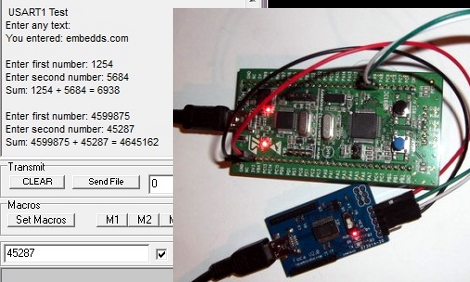
We find it interesting that PIC and AVR programming is very common in hobby electronics but ARM doesn’t have nearly the same foothold. This is partly because there’s a knowledge barrier involved with making the transition (the other part is probably the lack of DIP packaged chips). But if you’ve worked with 8-bit microcontrollers you can certainly make the jump into the 32-bit realm. Here’s a great opportunity to get your feet wet. This guide will show you how to get the USART on an STM32 Discovery Board working, which makes it easy to get feedback about what’s going on in your program.
One difference you’ll notice when moving to ARM microcontrollers is that there is almost always a library bundle available from the manufacturer which includes all of the functions you need for hardware control (USART, USB, Ethernet, ADC, etc.). That’s the case here, so simply including the USART library makes it a snap to finish the rest of the program. Once you hook up your communications hardware (an FTDI cable in this case) just use the library initialization functions, followed by the send and receive commands and you’ll be pushing messages to a computer terminal in no time.
If you’re trying to use the STM32 Discovery Board with a Linux box here’s a shove in the right direction.












I have recently started programming for an ARM Cortex-M3 (LPC1768). It is great to have the added processing power and peripherals, no more time spent wondering if it’s possible to cram that extra function in. Yesterday i finally managed to get it to send stack traces to a PC when it crashes, really helps debugging. I could buy a real debugger but that requires money, and i lack money =(.
I have an LPC Xpresso and would like to get started with it.I’m not able to find any tutorials to help me decode the wierd code examples,or using the un-documented “drivers” …Any pointers?
0x3A28213A
0x6339392C
0x7363682E
yes i am on the same track (lpcxpresso) and stuck too. I found it quite not so easy to figure out what libraries exist, what they cost, and if you can use them for GPL stuff. The Forum for me has not done the trick yet.
But, within 2h, I have managed to get the dev-environment working, and managed to flash some example on it. But I in the next hour failed to togggle a pin.
For me, this experience made it very obvious, what arduino is doing right.
But on the other hand, speed is required. And I guess its just lack of time spent in the learning curve that made stuck for now.
I saw some stuff at http://www.microbuilder.eu,but nothing other than that on the net seems to serve my purpose of learning ARM,coming from simple 8bit SoCs and MCUs.
I have been using STM32 under Linux for a year now, and everything is working great, including debugging. Btw, there is already a lot of people hanging around on ##stm32 in Freenode.
Personally, I have found that the ST peripheral library is useless crap. I tend to rather address the hardware directly, or use chibios, which provides some very cool abstraction:
http://www.chibios.org/dokuwiki/doku.php
I don’t like the CMSIS libraries also as I find them to be a lot of writing for simple things that could be done by writing into 2 or 3 registers.
On another hand, it seems useful to master CMSIS libraries as they supposed to be identical accross different chip brands
In my opinion, microcontroller code at this level is never directly portable between different brands. There are always too many variables, such as into which pin everything is connected and the different peripherals etc.
A simple UART code may be portable when CMSIS acts as an abstraction layer, but for anything more complex you need to pay attention to the low-level details.
IS CMSIS GPL compatible? Google was not my friend.
It would be a nice abstraction layer for building a reprap firmware for ARM, to be compatible for different ARM devices.
Agree with jpa. The ST peripheral library is a bloated waste of space.
I’m finding that I can shorten my learning curve by abandoning the crap they are offering and writing my own libraries.
How can this situation be helpful to a student or new developer?
I am also using different STM32 boards exclusively with Linux for a while now, and one could get things working very well.
Beside the library from STM, there is an open source alternative called libopencm3 which I like very much since it is more lightweight then the STM one. Also it is pretty simple to use the USART even without the help of a higher level API.
Sorry, messed up the frist link. Should point to: http://gpio.kaltpost.de/?page_id=447
It looks like these dev. boards are in the $10 range at Mouser and Digikey. I think its worth a try playing around to learn for that price.