
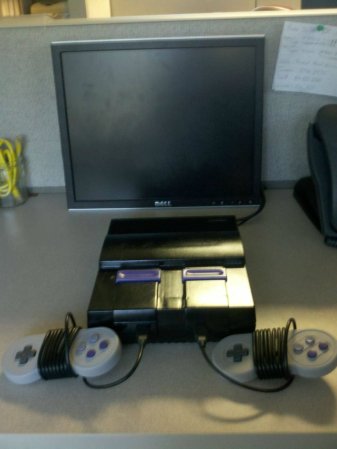
If you look closely you’ll notice there’s nowhere to put the game cartridge on this Super Nintendo system. That’s because this is a Rasberry Pi based SNES emulator that plays ROMs, not cartridges. Since the RPi board is used the only limit to what you can play is the board’s RAM and which ROMs you have on the SD card.
The case has basically been gutted and the unused cartridge slot was sealed with some Bondo before painting. In addition to the Rasberry Pi you’ll find a 7-port powered USB hub and a Teensy microcontroller board. The hub allows for the controllers to be connected via USB. The Teensy is recognized as a USB HID device and is used to connect the reset button to a functions on the emulator program. The power switch still works too. To make this happen [MIDItheKID] spliced a USB connector and a microB USB connector to the power switch. We think this draws power from the hub but we’re not 100% sure.
[MIDItheKID] mentions in the Reddit comments that he’s thinking of grabbing that new RPi that has more memory and doing some similar work on his dead PSX.










Grammar nazi sez it’s “its” not “it’s”
I have to say – a whole teensy for a reset button? Might I suggest a $1 ATtiny45/85 with v-usb instead? Heck, even a controller PCB from a worn out usb joystick could be salvaged for nothing.
I did something similar with a NES, but used the original controller ports and wired the reset button to the GPIO to simulate an ESC key press. Here is a video of it in action
Also, since the Pi has USB, why in heaven would you not just plunk a Retrode or similar in there so that it could play original carts?
I was thinking the same thing when I first saw it.
Then I saw that it costs twice as much as the computer you’d be plugging it into.
So does the mouse, if it’s a halfway decent one :-)
Because I can’t download plastic.
LOL.
a whole teensy for a reset button? Why not use one of the several GPIOs on the RasPi itself? Is it really that hard?
That would probably have taken some extensive modification to the emulator. The Teensy is easy, since it’s pretending to be an input device.
When i did it i just modified an existing driver for the controllers to simulate the Esc key as that is already used to escape the emulators. Then wired it to the GPIO, also it wouldn’t be difficult to create a basic program in C that’s started on boot to do this.
No modification to the emulator. Just a little c program and a script to start on boot. Have the program emulate a keypress based on the GPIO.
Yeah. I tried getting it working with the GPIO pins, but I was limited by my technical knowledge. The teensy provides exactly what I need it for and it was very very simple to program. I have also been considering using more pins on the teensy for save/load state buttons, which I may mount on the back of the system.
Yea, couldn’t he have just wired the switch the the Pi’s system reset bus?
Those cables wrapped around the controller, I can hear them screaming.
but not for long
Hey Jim,
It’s 10 years later and I’ve beaten the shit out of those cables… They are still working just fine.
Cheers, mate.
Since the RPi board is used the only limit to what you can play is the board’s RAM and which ROMs you have on the SD card… which is pretty much all of them.
Lesson to be learned here. Put some effort into your bondo. you can make it look perfect if you put more effort into it. Instead of rushing things. That needed a second skim coat over it then sanded again to make it 100% perfect.
Point taken. This is the first project I’ve ever done like this and the paint job did not come out as well as I wanted. I have recently gotten advice on re-painting that I may take. Use something like “red filler”, some kind of car body filler (it fills up micro-gaps) and then sand with 1000 grit, then re-paint and then use clear lacquer as a coat on top of that followed by a 2000 grit wet sanding. The entire build has been a learning experience, and I look forward to starting more projects and learning more each time.
I have no experience with Bondo. How do you replicate the texture on the plastic?
“I have no experience with Bondo. How do you replicate the texture on the plastic?”
Find some sandpaper that is about the same negative grain that the texture of the existing plastic exhibits, and then lightly press the grain into the Bondo with an appropriate sized flat surface just before it is completely dry. Depending on your Bondo mixture, it might require first being coated with a release agent…
It would be cool to have a little sd card slot where the cartridges would normally plug into.
Ah reckon ‘s some interestin work, though given the new AMD c60 netbooks fer cheap, Ah reckon that’d be a better option fer a psx version a’ this.
(take apart psx, gut it, put in netbook mb, install win 7 starter, set epsxe to auto-launch, use a wireless mouse for selecting roms, an’ fill the 320gb hdd with iso’s, leaving about 15-20gb fer saves, an’ so win7 don’t show ‘low disk space’ incorperate a usb hub, an’ via some internal wirin, replace the guts of the psx cd drive with those of a slim usb dvdwriter, connect t’ internal hub, an’ now ya kin read original psx discs as well as roms. ‘d be more complicated then this RPI snes build, but ya really need the horsepower of at least a c60 APU fer psx emulation. An’ as a bonus ya kin prolly even re-use the netbook battery t’ serve as a sort a’ UPS fer the console so storms an’ power ‘blinks’ don’ leave ya frustrated cause ya was halfway through the last level a’ some game, an’ a random power failure reset ya’ t’ yer last savepoint. Ah’d write up detailed build instructions, but that’d take the fun outta it, plus Ah’m a little busy turnin this new AMD superlaptop ( http://www.newegg.com/Product/Product.aspx?Item=N82E16834257167 ) in t’ a portable wii/gc/ps2,
Fer now, Ah’ve gutted it, an’ a 20″ 12v LCD tv with HDMI, an’ Ah’m workin on installin ever’thing in a custom case built around the 20″ screen. gonna feed the +12v from the tv in with the batt, s’ the batt kin power the machine an’ tv, er both kin recieve power from the tv power adapter, while simultaneously chargin the thing. s’ usin a xbox360 wireless controller, an’ gonna have a bluetooth keyboard/mouse. basically a monster size tablet pc, that doubles ‘s a portable game console, gonna have wifi thorough a usb 1000mw adapter, (gutted an’ installed internally) an’ 9dbi antenna (layin’ along the top a’ the screen inside the case, an’ still in its rubber t’ prevent shorts) Ah’ll post with pics ’bout it, soon’s ah get t’ the point ‘s ready t’ boot up an’ start installin win7 (x86 w +4gb rampatch. (Pcsx2 hates win7x64)
an’ a custom battery mate a’ 26650 cells (11.1v) w’ charge controller fer 12v input, (11.5-14.1v range) multiple stacks a’ three cells (in series) connected in parallell fer a total a’ 11.1v @ 20100mah capacity.