
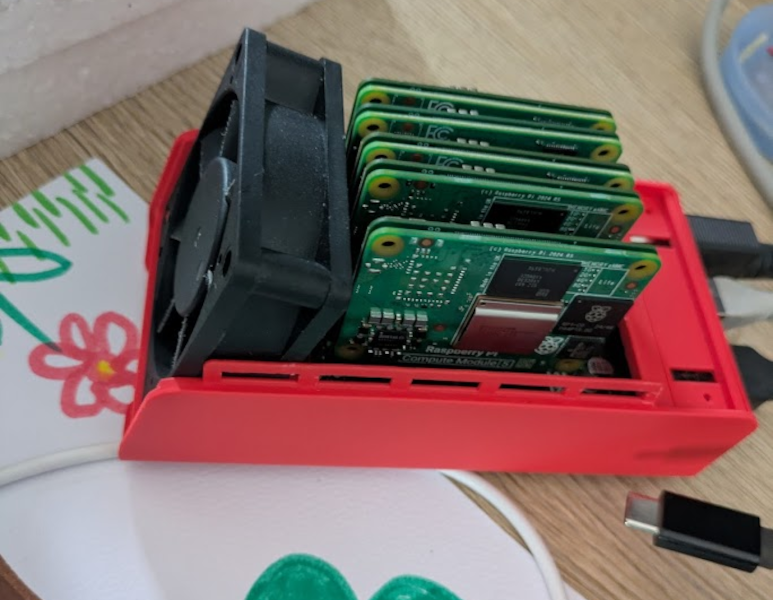
Raspberry Pi clusters have been a favorite project of homelabbers and distributed computing enthusiasts since the platform first launched over a decade ago, and for good reason. For an extremely low price this hardware makes it possible to experiment with parallel computing — something that otherwise isn’t easily accessible without lots of time, money, and hardware. This is even more true with the compute modules, as their size and cost makes some staggering builds possible like this cluster sporting 112 GB of RAM.
The project is based on the NanoCluster, a board that can hold seven compute modules in a form factor which, as [Christian] describes it, is about the size of a coffee mug. That means not only does it have a fairly staggering amount of RAM but also 28 processor cores to work with. Putting the hardware together is the easy part, though; [Christian] wanted to find the absolute easiest way of managing a system like this and decided on gitops, which is a method of maintaining a server where the desired system state is stored in Git, and automation continuously ensures the running environment on the hardware matches what’s in the repository.
For this cluster, it means that the nodes themselves can be swapped in and out, with new nodes automatically receiving instructions and then configuring themselves automatically. Updates and changes made on Git are pushed to the nodes automatically as well and there’s not much that needs to be done manually at all. In much the same way that immutable Linux distributions move all of the hassle of administering a system to something like a config file, tools like gitops do the same for servers and clusters like this, and it’s worth checking out [Christian]’s project to get an idea of just how straightforward it can be now.












The problem with such motherboards is that they are a bad idea.
Each node should be able to connect to the motherboard, but also to other nodes. The same applies to the disk.
So we need a decent disk array that could be supported by multiple cores as well as connectivity between motherboards.
Intel once demonstrated a token ring with 80 processors precisely to make communication faster. There is nothing here. You might as well connect this equipment through an old router.
If I’m reading you correctly, your whinge is that NanoCluster and similar hardware connection architectures is suboptimal, performance-wise. Other comments touch on oft-heard performance critiques (eg. just use an i7!). I think these miss the point that [rue56ue5tr] makes, that this is a platform for learning on/developing for a cluster, where the inability to – say – run a nuclear physics problem in day in production is moot.
At the very tiniest scale it might be possible to do what I think you are describing – to an extent you could consider every modern ‘high end’ server/workstation system is exactly that with the big/little and chiplet CPU architecture and the dual CPU workstations etc. It really is lots of rather separate bits connected together reasonably directly to all the other bits.
Though those two CPU system it really is not that direct, anything accessing memory across the the other CPU etc will notice the bottleneck much like any cluster, its just a quicker interconnect than the network would be. But trying to do that level of many CPU on one board everything interconnected just doesn’t scale up well, where your ‘old router’ or network switch does – that scales well beyond any even remotely plausible to build clusters quite easily, and at those larger scales for the right tasks at least is a really good performer you just can’t match any other way.
Could this ‘cluster’ be programmed to run a ‘bit miner’?
Just because it has 112Gb memory doesent mean its fast?
Anything cool that I can do with a Pi cluster? Running LLMs or any useful distributed applications?
I’ve been eyeing one of those refurbished ThinkCentre Mini PCs for a few weeks to make a lightweight home server out of. They get tossed out after 4-5 years of light use by larger companies and they can be bought for a great price from refurbishing companies.
Or free, if you know the company IT staff personally, but that’s just what I have heard
distributed llama.cpp is Your friend
(ok, why admin blocking my comments?)
Just get an N100 mini-itx air-cooled motherboard. Mine is on 24/7 running Linux Mint. It’s a webserver, fileserver, VCR (hdhomerun), bittorrent client, media server for my kitchen and backup device for my main computer. It’s accessible remotely using the VPN built into my router, I can’t live without it.
If You write a program for big cluster You must have a small cluster for writing program. On supercomputer you dont have console only you can send a job
What?
A 12100 is faster, and a 12400,12500,12600 are in another league. I’d rather have a 1L (7x7x2″) Dell, Lenovo, or HP used from a business. BIOS and driver patches, spare parts availability.
HP Mini, Dell Micro and Lenovo Tiny are the models. Run on a 65w or 90w Laptop style power brick.
Lenovo is ‘Tiny’, HP is ‘Mini’, I assuming we are talking about the 1L PCs
“For an extremely low price”
CM5 is pretty expensive, you can get used small thin clients like Futro S740 for less and they are still pretty small and low power so stacking 10 of them is not an issue.
A trifle disingenuous to say it’s ‘112GB’ of RAM, his setup was 4 8GB nodes and a 2GB node, that is 34GB by my math. If you get the $120+ each compute module it will have 16GB of RAM and 5 nodes. For the same price you can get 3 maybe 4 used office machines ranging from 6 to 12 or even 20 cores. Each with 16-64GB of RAM.
I appreciate the hackery of making a midget cluster, but for doing work I’m not sure I get it. Especially with the Pi modules needing breakout boards. Would be impressed with a double sided board sporting flat mounted 4-6 modules.
Heck for a single system I got a $40-60 motherboard and a pair of 14-core CPUs for ~$15 each. RAM was $1-2/GB and you can get 4 or 8 32GB modules.
” 3 maybe 4 used office machines… ” How do you shrink those boards into credit card size for less space used for a ‘cool’ looking machine? That’s what I wonder. Cost isn’t a ‘factor’ (up to a point) for my projects. If I want small … I go small.
As far the above project is concerned. Cool. Wish I had a use for a cluster to justify gathering the RPIs…
According to CPU Monkey a single ($40-$50) Intel i3 12100 CPU is worth 4x the multi-core geekbench performance of an RPi 5. An i5 14400 is approximately 7.7x the multi-core compute.
I am seeing an MSI Pro AP242 (i5 12400) has almost exactly 5x the compute (AKA the maximum of this cluster), and is $350 with the whole PC integrated into the monitor. If you need to have a monitor already that is basically a 0 footprint (Obviously I understand that if you wanted to use it with a laptop as a cloud, but they are also available as a 7x7x2″ ‘1L’ form factor as well.
Cost no object there are tiny tiny LGA1700 motherboards you could load up for a mini cluster. https://www.bcmcom.com/bcm_product_ECM-ADLS.html
This allows you to /learn and practice/ quite valuable parallel computing development techniques used in high performance computing like rendering, land sciences, and meterology before you hit the big iron.
This isn’t really a project for the average home lab (running home assist, pihole, and so on) which is by-far and away better serviced with something single-boarded and likely faster+cheaper.
And don’t forget that it could be just plain fun/interesting project if nothing else. It’s what people do on hackaday right? :)
Is there some stellar feature I’m missing that a Raspberry Pi cluster offers over other options for building a cluster?
I have priced out components for a Pi cluster several times over the past half decade, and I keep coming back to some x64 solution every time. (And I’m a big fan of a DIY cluster if you need a test-bed or small production environment for HPC tasks.)
When I needed a lot of memory, used servers were the most cost efficient option (by a huge margin).
When I wanted more cores and specifically wanted them physically distributed, but had a really tight budget, used enterprise mini pcs made the most sense.
When more performance cores were needed but the budget was still a constraint, mini PCs with some of the not-quite-new Ryzen processors won out in the spreadsheet for the decision.
The power consumption looks roughly comparable between a Pi and a similarly priced N100/N97/N150 mini PC with substantially more storage.
The footprint on the project linked in this post is impressively small, but a trio of 8-core mini pcs and a small network switch seem significantly more flexible (since they’re practical to use elsewhere in the future) at a comparable price point.
So, if you don’t specifically need an ARM cluster for learning/testing a distributed ARM workflow, is there somewhere a Pi CM cluster or something similar practically beats out an x64 alternative? (That’s a sincere question. I assume I’m overlooking something.)
Yes, but the original linked article is fine, the guy runs different (x86) clusters and just wanted to try this 7xCM4/5 NanoCluster board mainly because of the size (not price or performance). So it is mostly this HaD summary with the “extremely low price” comment that is wrong. The original article clearly says “I never expected to go back to Pis because the lower power consumption was not worth the price to performance ratio.”
The Futro 740 I mentioned is somewhere between CM4 and CM5 performance wise, but it is cheaper (currently ~30-40EUR on ebay) and small and low power and even has two M2 slots each with 1x gen2 pcie lane so one could in theory put two AI accelerator cards there. Also the gemini lake can do H265 video decoding/encoding in hardware while drawing ~6W. It works with one DDR4 SODIMM up to 16GB and draws ~3-16W so stack of 8 would possibly work from single 180W laptop power supply.
There are of course even cheaper alternatives if lower performance and/or higher power draw and size is not an issue and ‘learning about clusters’ is the main goal, this was just alternative to CM4/CM5 with similar performance and power draw.
The only thing ‘special’ about a Pi cluster is low power draw and compactness that lets you play with a cluster in your small home lab without needing to rewire or extend your house to suit. Also in many cases being pretty low power draw chips its a quieter cluster than anything else – on those more mini-ITX sort of size Pi clusters you probably won’t even need a fan as the system might be 300 watts but the nodes are so far apart a little heatsink is enough.
You are not really missing anything, you just have too much space so you can’t see the appeal of a cluster, or mini discrete machines to isolate processes better than VMs (etc) that can actually fit on your desk/behind your monitor or wherever else you can find to squash it in. I certainly don’t have enough space for a shelf of mini pc to play with right now… But definitively more learning exercise than seriously practical – as it would need to be a very unusual task that the more modern AMD (etc) workstation with its likely fewer but far more performant threads isn’t going to be better at.
For size check this https://ibb.co/album/7nK6r8 I think you certaily do have space even for 10x S740 on your desk. Yes That 7xCM4/5 cluster board is smaller but it is not about having enough space for this. And they have no fan so it is quiet too.
Using Docker swarm pushed via cron job to a cluster is not gitops.
The term gitops was coined by weave works for the Flux controller used with Kubernetes. Push based systems with git as the source of truth existed prior to Kubernetes and Flux. Gitops with k8s and Flux was different because it used a “pull” vs “push” mechanism.
Just because git is the source of truth does not mean it is “gitops”. It would be the same as saying all JavaScript is typescript, which is simply not true.
The Pi cluster created by Christian is more accurately a nano cluster managed with Docker Swarm.