
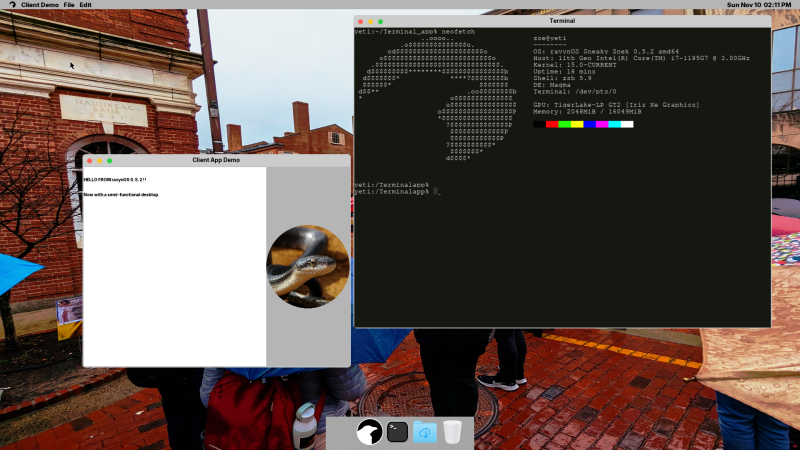
That macOS (formerly OS X) has BSD roots is a well-known fact, with its predecessor NeXTSTEP and its XNU kernel derived from 4.3BSD. Subsequent releases of OS X/macOS then proceeded to happily copy more bits from 4.4BSD, FreeBSD and other BSDs.
In that respect the thing that makes macOS unique compared to other BSDs is its user interface, which is what the open source ravynOS seeks to address. By taking FreeBSD as its core, and crafting a macOS-like UI on top, it intends to provide the Mac UI experience without locking the user into the Apple ecosystem.
Although FreeBSD already has the ability to use the same desktop environments as Linux, there are quite a few people who prefer the Apple UX. As noted in the project FAQ, one of the goals is also to become compatible with macOS applications, while retaining support for FreeBSD applications and Linux via the FreeBSD binary compatibility layer.
If this sounds good to you, then it should be noted that ravynOS is still in pre-release, with the recently released “Hyperpop Hyena” 0.6.1 available for download and your perusal. System requirements include UEFI boot, 4+ GB of RAM, x86_x64 CPU and either Intel or AMD graphics. Hardware driver support for the most part is that of current FreeBSD 14.x, which is generally pretty decent on x86 platforms, but your mileage may vary. For testing systems and VMs have a look at the supported device list, and developers are welcome to check out the GitHub page for the source.
Considering our own recent coverage of using FreeBSD as a desktop system, ravynOS provides an interesting counterpoint to simply copying over the desktop experience of Linux, and instead cozying up to its cousin macOS. If this also means being able to run all macOS games and applications, it could really propel FreeBSD into the desktop space from an unexpected corner.












Wait, are we talking about the Mac UI, or its UX?
The window chrome / menus / buttons etc. are basically an aesthetic preference, but the overall Mac user experience is a matter of how the filesystem is (and isn’t) exposed, the common idiom for changing settings, the idea that you install and uninstall apps by just moving the executable file, etc. (though that last one has been considerably eroded).
The distinction between the two is sort of the defining thing that Mac-likers care about…
If it’s got MacOS’s column browsing, I’m in…
I view this with cautious anticipation and I want one!
As a MacBook pro 11,1 (from 2013) owner with Linux installed on it, this project is appealing. I would like to test it on my next experimentation momentum
I’ve the last of the Intel macbook pro… what distro would you recommend. One thing I’ve been struggling is the mac keyboard compatibility…
Try Kubuntu and do a search for how to make KDE plasma look like Mac OS if you really want that Mac OS desktop paradigm. The regular Ubuntu uses GNOME desktop, which people say is more similar to Mac OS and that’s somewhat true (out of the box), but I think you can get KDE plasma to be a lot more like Mac with some tweaking.
But they’re all free to try. So try them both. Get a USB stick that’s big enough and you can try both on one single USB stick with Ventoy. You have to first download Ventoy and run the little program to make the USB stick bootable from multiple .iso files, it takes about 1 second to do it.
What are the UXes of all these OSes?
What is UX in computing?
AI Overview
In computing, UX stands for User Experience
and refers to the overall experience a person
has when interacting with a product, system, or
service. It encompasses the user’s feelings,
perceptions, and emotions, considering every
aspect from usability and design to the user’s
overall satisfaction. The goal is to create a
holistic and positive interaction by
coordinating elements like layout, visual
design, and functionality to make a
product useful, valuable, and easy
to use.
…
It’s the foundation of a good product:
A good user experience is crucial for
customer retention and is a key
aspect of product development,
ensuring that users find the
product valuable and effective.
Fire OS is currently winning UX? :)
The user experience of me and most computing environments occasionally includes me imagining myself taking a sledgehammer to the equipment.
And that, my dear HaD friends, is why I don’t have a sledgehammer within reach of any of my computing devices.
…and it is why I, with poorer anger-management, have a keyboard whose wrist-rest is now attached only by the power of suggestion, having suffered more than one high-speed clenched fist impact in the past.
A sledgehammer in my home office would be a very very bad idea in every regard (except for possibly, the stock price of Logitech).
AI overview of a subject you don’t understand, then you claim (or ask, it’s hard to tell) that FireOS is “winning” with user-experience? False. FireOS is a dumpster-fire of waiting for the device to respond to commands, flagship apps (hulu, peacock, etc) randomly crashing to the home screen, the home button taking 10 seconds to load a home screen, rewind simply not working in many apps (hulu, peacock, xfinity, at least: they allow rewinding, but then immediately skip back forward to where you started). (I’ll admit, I do enjoy the global search, though there are many apps from which the search will not pull results, even if they’re there). User-experience is obviously subjective, but I’m pretty sure you’re trolling (you can’t possibly believe Amazon makes devices with a positive user experience- if they did they could charge enough to make a profit).
If Apple decides they don’t want this to happen, they will find a way to make sure it doesn’t happen, at least not with applications that take advantage of future hardware. So, yeah, that 2025 version of your favorite app might eventually run under ravynOS, but the 2026 version might never be able to run thanks to Apple-enforced checking* that it’s running under a genuine Apple OS running on genuine Apple hardware.
Including the “Apple Genuine Platform[TM] checker” being a condition of having your code notorized by Apple
That is certainly a concern. For a while there was Hackintosh, which allowed macOS to run on non-Apple x86 computers, but I don’t think that was kept current once macOS became fully 64-bit. And of course, Apple will almost certainly stop supporting x86 CPUs entirely in the near future. So the path to running Apple software on non-Apple hardware is likely to dry up soon anyway.
Before the Hackintosh there were generic PowerPC computers that had custom MacOS versions running (OEM releases or system extensions to make them run).
So it’s not like MacOS (or “System” as it was called before) never ran on alternate hardware.
In principle, it’s possible to make modern macOS run on other ARM computers, those that can run Windows 11.
The unsupported Apple Silicon instructions of the M-Series chips can be emulated in software, maybe.
The similar way it had been done in late 2000s on Intel platform before.
Back then, instruction emulators for SSE had been included in Hackintosh releases of OS X.
Users of AMD computers needed that, I think, because OS X 10.4 Tiger was meant to run on an Intel Pentium 4 or Core Solo, originally.
That being said, who needs macOS 26 and beyond in near future?
Current macOS applications usually support many previous OS X versions, often way down to 10.12 or 10.6.
So it makes sense that support for macOS 15 will continue for a while (5 years or so).
It’s the last macOS with a consistent GUI, after all.
It doesn’t have the huge window corners of VisionOS yet, for example.
Not just Apple. x86 architecture is dying, it seems.
And ARM is the future, but PC gamers don’t wanna see the truth or so it seems.
Because, since the days of MS Surface tablets it was possible to run Win32 (x86) applications on ARM ports of Windows.
Originally that was Windows 8.x ARM with optional x86 emulator, then Windows 10 ARM port (shortlived) and Windows 11 ARM, of course.
It’s surprising how little experience the average Windows users have with ARM platform, really.
Despite the fact that ARM architecture is everywhere; powering about every tablet and smartphone these days.
And also despite the fact that Windows 11 ARM can execute Win32 applications (x86, ARM) and Win64 applications (x64, ARM).
By using OTVDM, it can even run Win16 applications (x86-16, x86).
From that point if view, it’s perhaps the most compatible Windows so far.
Alas, all they know is the old Wintel platform, left alone the old RISC platforms (MIPS, Alpha, Power PC) from the 90s.
Thinking about this makes me sad.
The majority of PC users seems to have been living under a rock the past 30 years or something.
Last time I talked to a PC user he had no idea about what the x86/x84 instructions set even is or how it differed from ARM.
That’s different to the 90s, when about every user knew that a Z80 or 68000 can’t execute intel (x86) code. So sad.
What happened to all the basic knowledge? Sigh.
Please tell us where windows users have hurt you…
Hi, “they” haven’t. Thanks for your worrying, though.
Personally, I’ve used to be a DOS/Windows user for a long time, too.
After Windows 7 it became clear though where the travel goes to.
Still, most users around me seem unable to change their mind.
They’re hard-coded into old patterns of the Windows world, sadly.
I understand this concern, but Apple is more of a hardware company than a software company.
It’s the Gucci of the entertainment electronics, so to speak.
Computers are nolonger as important to Apple.
The change from Apple Computer to just Apple in 2007 proved that.
Also, Apple itself had no issues allowing Windows to run on Macs for ages.
The Bootcamp software was even bundled with Mac OS X Snow Leopard, for example.
So I really think that macOS at heart nolonger is so important to the company.
I mean, let’s just have a look at macOS 26. It’s a hearthless mix of macOS, watchOS, VisionOS and iOS.
macOS has become a platform for Apple products, rather than a traditional computer operating system.
To Apple, software compatibility with macOS applications isn’t the leading factor anymore, maybe.
macOS rather is a foundation for an ecosystem of Apple products, for Apple services such as the App Store, A.I. and cloud storage.
It’s become a tool, rather than being the star of the show it used to be.
I mean, Windows 10/11 aren’t that different, either.
Windows nolonger is there to run applications (programs) but to provide a service.
Software as a service, that’s what it’s all about.
The last real standalone Windows was Windows 7, maybe Windows 8.x too.
After that, it nolonger was about incorporating new features, new APIs into Windows.
PCs itself nolonger were the target audience, but mobile computing and the (somewhat fictional) cloud.
Windows stopped evolving, compared to the times of Windows Longhorn when technologies such as WinFS had been developed.
Agreed that Apple might see MacOS app compatibility as a threat, if it were a realistic possibility. However, it’s unlikely that Apple would ever need to take any action to counter it, since a useful level of binary compatibility with MacOS/X apps is unlikely to happen anyway. For reference, look at how long it took WINE to get anywhere near usefulness as a substitute for Windows, how much impact WINE has had on sales of Microsoft Windows, and how much of an effort Microsoft has felt necessary to expend on sabotaging it (“decades”, “little to none”, and “none”, respectively).
Exactly, fortunately I haven’t used macos since 2009, but I remember even point upgrades would break apps
Dammit, the * got lost. The * refers to “* Including the …”. Hackaday needs a preview button.
Very interesting, I’ll have to check this out.
I always preferred the NeXTStep / OSX method of containing an entire desktop application in a single .app directory.
It is more simple than being spread across the filesystem like a modern Linux application.
While snap and flatpak attempt to solve the same problem, they are far more complicated and bloated than a simple directory.
Windows 3.1x had same concept once.
Applications weren’t bundled into an .APP package, maybe, but were portable in a similar way.
You had an EXE file with *.INI file and some DLLs in same directory.
Alternatively, the INI also could been in WINDOWS directory.
Beginning with Windows 95, Windows programs used Windows Registry more often and programs usually nolonger were portable.
Except for small Freeware/Shareware programs that kept up with the tradition.
That’s why using Mac OS X (and partially Mac OS 8/9) was such as a surprise.
Unlike Linux or modern Windows, it kept things clean and tidy.
Tell us more about how your choices are so amazing, while anyone choosing linux or windows just isn’t as smart as you! (And “ARM is the future”? Maybe, maybe not, but if it is the future, that’s not because it’s any better. And Window on ARM is a shi* experience, unless you’re using official Microsoft hardware.
I’m not sure that’s true. Choosing an OS is a highly personal decision, I think.
Unless the workplace requires it to use something specific.
As for me, I’m trying to be open minded as much as I can.
Which, I may like to add, is no small feat. It’s a challenge, considering the options available today.
Linux users tend to vocally agree on not agreeing on same thing.
Windows users keep suffering and tell themselves “there’s surely a way to disable the new feature MS enforces upon us”.
While macOS users.. don’t know. macOS just seems to be the smallest pain at the moment. That may change, though.
(macOS is a relief when being at home when you simply don’t want to be bothered by computer problems anymore.)
Hi, I don’t know exactly what to respond.
The MS Surface was from about 10 years ago when Windows didn’t have the best x86/x64 emulator yet.
With Windows 11 24H2 it got the new Prism emulator that claims to have improved performance and compatibility for x86/x64.
But if you’re on a Mac, VM software such as Parallels Desktop might be able to use Rosetta 2 for assistance, too.
That being said, not exactly sure about the actual implementation.
All I can say is that Windows 11 ARM can run things like the Unigine Heaven benchmark just fine (it’s Win32/x86).
So it’s capable of running actual games, for sure.
Once there will be native ARM ports of games or mixed ARM/x64 binaries, the performance wouldn’t be something to worry about anymore. IMHO.
Not sure if I can or if words alone do suffice.
I recommend everyone to try out macOS at least once, though.
Be it through emulation, buying an (used) Mac or by building a Hackintosh.
Not because of it being an OS of a designer computer,
but because it’s nearly as old as personal computing itself.
The GUI concepts used do date back to the beginnings.
When both MS Windows and GEM tried to match its level of user-friendliness and intuivity.
Because of this, it would be good if more Linux/Windows users would give it a try, in order to learn how to “think different”.
It doesn’t have to be the latest macOS, either.
What a strange reply considering the message you were replying to. Maybe you should seek some help. They literally weren’t saying that at all and you seem to have imagined some slight against your choices.
For a short time i used to use PC-BSD which had single self contained packages
As the owner of not one, but two MacBooks no-longer-supported-by-Apple, an open-source work-alike to macOS sounds interesting. I find the macOS user interface to be more sensible than any of the Linux variants, so that is also a plus. It also sounds like this can run on non-Apple hardware, which could make it possible to develop macOS and iOS apps on a generic laptop. It’s pre-alpha now, but I will be watching this. But I wonder where they will draw the line – whether it will run only applications that were written for 64-bit, or also earlier applications. It has been a major headache trying to get things to run on macOS ever since Big Sur, and THEN there’s the x86 vs Apple Silicon issue.
64-Bit applications? Snow Leopard (10.6) already had the ability to run fully 64-Bit – if the hardware had an 64-Bit UEFI and x64 processor (Core2 Duo and up).
I mean, sure, 32-Bit applications (PPC/Intel) still were the norm in the days of Tiger, Leopard and Snow Leopard.
But beginning with Snowy, weren’t many Mac OS X applications being provided as “universal binaries”?
Not just PowerPC/32-Bit intel but also 32-Bit intel/64-Bit intel?
If not, the older applications can still be run just fine on an emulated Snowy?!
Either the normal version or the server version, I mean.
“Snowy”??? I know, I know, typing is hard.
To my knowledge it’s the nickname for Snow Leopard, an Mac OS X from the late 2000s.
Similar to how Windows 7 was nicknamed “Seven” sometimes.
Snow Leopard was notable for being the last to have the Rosetta emulation layer for PowerPC applications.
Because of that it could still use Cocoa/Carbon applications written for PowerPC architecture.
It was very popular for many years to come because of this.
And because Carbon library also was available to Mac OS 8/9,
it was even compatible with those late applications that users had used on Mac OS 8/9.
I’m so glad that I haven’t had to listen to Apple users be superior and condescending more than a couple times in the last few years here on hackaday. It used to be much worse, like once a week. This is Hackaday. It’s like going to a diy auto repair forum to brag about your Ferrari never needing repairs…
I’m sorry about that to happen (or also glad to hear about that you’re glad).
Personally, I think, I’m just an ex-Windows user that has progressed further and found a tiny bit of enlightment.
Though I’m still a tinkerer and SWL (I enjoy to build stuff on a veroboard and use a Weller soldering station).
On Mac, I noticed there’s a handful of amateur radio software too.
That being said I’m still having fun playing with good old DOS, too. Be it real or emulated hardware.
If needed, Windows applications can still be run safely inside of a digital cage also (vmware, virtualbox, parallels etc).
“one of the goals is also to become compatible with MacOS applications”
“System requirements include… x86_x64 CPU”
Admirable ambition from the devs, but sounds like a pipe dream.
FreeBSD works on ARMv8 platforms as a first-tier support target, so adding the bits that would make it work on Apple Silicon doesn’t seem entirely inconceivable. There’s even a certain Linux port that may serve as inspiration.
Apple has also demonstrated efficiently running Intel & AS applications side-by-side in MacOS, so I’d call it ‘ambitious’ more than anything.
I think “bish” actually already called it ‘ambitious’ more than anything.
go Maya!
Apple has dropped Firewire support in latest macOS Tahoe. It is not an hardware reason, since it is possible to use USB-C -> Thunderbolt 2 + Thunderbolt 2 -> Firewire converters, and it was still working with previous OS.
Since it is an software only problem, I wonder if it would be possible to bring it back with open source drivers?
Sure not a lot of people would still need Firewire, but since i’m working in the video tape preservation industry, being able to connect Digital8, DV, DVCam or DVCPro VTRs to read back all tapes from professionnal and home users still is needed, and will be for quite some years to come (i still have to read 40 years old tapes today!).
I know also a lot of users were forced to throw their perfectly working firewire audio interfaces when Apple dropped the needed driver in a previous OS update. That is a perfect shame when the reason is nothing else than a little piece of sofware.
Indeed, the drop of Firewire/i.Link/IEEE 1394 wasn’t nice.
In fact, I think it’s the only real downside of macOS 26, besides the ugly round corners borrowed from VisionOS.
When I heard about this, I checked for SCSI support just to find out that it’s effectively gone for 2 decades already.
I’m saying that because internally, Darwin/BSD do still operate in SCSI-friendly manner as far as mass storage is considered.
It’s just that there’s no physical SCSI support anymore (no drivers/APIs).
Which makes me remind that i also have a Firewire to SCSI adapter!
Call me up when it runs iOS simulator on Nvidia gpu, I know I’m probably never gonna get a call lol
Apple will stomp on this as soon as it becomes a usable system. Which is exactly why we need to have an open source OS’s with everything fully independent from Apple, Microsoft, and the rest of the for profit world.
Great effort, though.
Starting with early Apple machines years ago, then moving to Windows PCs once Photoshop and Illustrator ran on them, I’ve spent the last two decades using open-source distros exclusively to avoid dealing with today’s Apple/MS cartels and their total lack of concern for ‘work a day’ PC user’s actual needs, no matter their field of endeavor.
I couldn’t agree more that: “Apple will stomp on this as soon as it becomes a usable system. Which is exactly why we need to have an open source OS’s with everything fully independent from Apple, Microsoft, and the rest of the for profit world.”
I love the ambition that’s evident in the RayvnOS project, and I applaud those involved. But, without Apple adopting a ‘hands off’ attitude and allowing it to naturally evolve, it’s up against a mountain in that road that could, and most likely will, see it relegated to ‘footnote’ obscurity.
I think there’s a 50/50 chance for that.
If it’s niche, like the Hackintoshs, then Apple might simply ignore its existence and keep quiet,
being it solely to prevent fueling further public relations for the “other” macOS.
I mean, parts of OS X, such as Darwin, are already open for a long time,
so it’s not as if Apple never considered the possibility of an OS X clone to happen..
Will it stall like all other (gnustep, darling…) ?
I don’t mean to be negative and do wish them the best but…
Apple is so famously protective of it’s iron grip on it’s customer’s PCs.
To run current software it will be a constant game of catch-up just like in the Windows-clone world. Anything like this will be more for running versions of things that are a little older.
But, if any number of people actually start doing that.. Apple will probably just finally lock their desktops to their app store like an iPhone and they won’t offer old versions on the store.
Just for anyone curious, they are already deciding to switch from their FreeBSD base to Darwin: https://github.com/ravynsoft/ravynos/discussions/529
As an “old school” Unix guy, that is quite capable under (antique)Unix/SunOS/HpUX/AIX/Irix/BSD/Linux/MSDOS/Windows/MacOS, this seems like an overly simplified explanation of history, and development goals…