
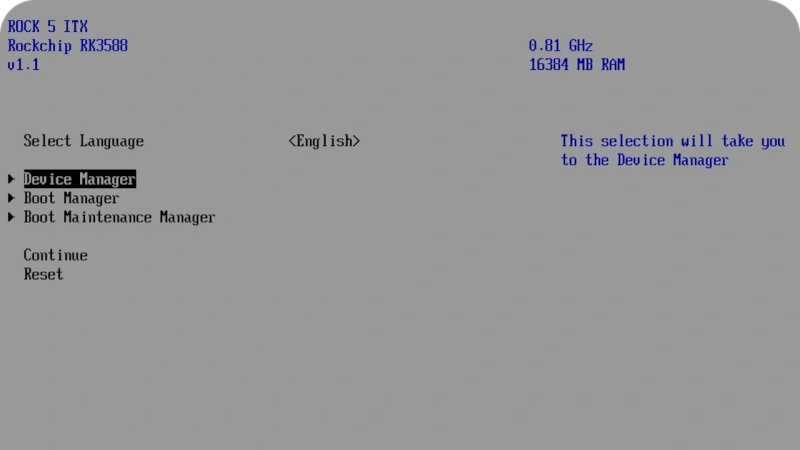
Now, Rock 5 ITX+ is no x86 board, sporting an ARM Rockchip RK3588 on its ITX form-factor PCB, but reading this blog post’s headline might as well give you the impression. [Venn] from the [interfacinglinux.com] blog tells us about their journey bringing up UEFI on this board, thanks to the [EDK2-RK3588] project. Why? UEFI is genuinely nice for things like OS switching or system reconfiguration on the fly, and in many aspects, having a system management/configuration interface for your SBC sure beats the “flash microSD card and pray” traditional approach.
In theory, a UEFI binary runs like any other firmware. In theory. For [Venn], the journey wasn’t as smooth, which made it very well worth documenting. There’s maybe not a mountain, but at least a small hill of caveats: having to use a specific HDMI port to see the configuration output, somehow having to flash it onto SPI flash chip specifically (and managing to do that through Gnome file manager of all things), requiring a new enough kernel for GPU hardware acceleration… Yet, it works, it really does.
Worth it? From the looks of it, absolutely. One thing [Venn] points out is, the RK3588 is getting a lot of its features upstreamed, so it’s aiming to become a healthy chip for many a Linux goal. From the blog post comments, we’ve also learned that there’s a RPi UEFI port, even if for a specific CPU revision of the Model 5B, it’s still a nifty thing to know. Want to learn more about UEFI? You can start here or here, and if you want a fun hands-on example, you could very well start by running DOOM.












Maybe make the ARM chip decide on a standard boot process before sinking many man hours into maintaining a moving, under documented target?
(I am yet to read the post, I am just upset ARM software is so fragmented)
It’s not going to happen.
Never thought i’d see a hackaday author write what i have been saying about UEFI all along :)
It’s a big step forward, and specifically way better than the bootloader situation on ARM phones and SBCs.
Bloat. Hardware dependencies. Encourages using parts of the boot loader after OS boot. Do not want.
Everything has hardware dependencies, especially on boot up. The only way to mitigate hardware dependencies is to use the boot loader after OS boot. I’m not convinced you have an objection.
You forgot about device drivers in the host OS. Otherwise, OSes would be constrained to use UEFI for all of its device management, which is very clearly not desirable at all.
The point is that you don’t need to include device drivers for N+1 hardware variants or modify the OS image to fit before you can boot it. You can use UEFI to bootstrap the system from a standard base and replace it with custom solutions if necessary.
\begin{rant}
I see it as a huge step backwards, especially with computers running windows. We have tons of specialized equipment and with Linux UEFI works sort of fine but with Windows it’s a disaster. A Windows update comes along and your computer is e-waste because the update destroyed the UEFI system. A year or two ago my employer had to scrap hundreds of Lenovo ThinkPad laptops as a result. And my employer deals with contracts that makes it very costly to resell them or give them away, which means drilling through the SSD and smashing the screen is a cheaper solution. Problems with UEFI remembering things that aren’t there is also an annoyance. Yesterday I grabbed a laptop and according to UEFI, there were at least 200 USB sticks inserted into the two USB ports. Not the one I actually put in there, it didn’t know that one because why would it. Right now, when I do a Linux install one a bunch of these computers of different brands, after a reboot I have to modify the UEFI system and change the boot drive to a different SSD (it only has 1) because it thinks that Linux (deb) and an NVME are two different physical drives. It doesn’t know that Linux is ON the NVME. And those stupid annoying hard to read graphical interfaces manufacturers use. Why? Why make it so much more complicated than it needs to be? No one needed to change the looks, it was perfect, why change something that is perfect?. Doesn’t matter if it’s Lenovo, Dell, Gigabyte etc, it’s all using terribly designed hard to read and annoying to use interfaces. The moment I have to use a mouse, your design is a failure. Some of these custom manufacturers go even wilder were you don’t even know what function you select. The keyboard works, but you don’t see what option you are selecting. It’s so stupid.
UEFI makes everything more complicated. Dual boot, bootloaders in general, using drives, graphical interfaces, reliability, it’s slow, everything is down the drain.
UEFI is the worst tech invention in decades. I hate UEFI with a passion.
\end{rant}
sounds like you hate microsoft and perhaps one specific buggy bios
It’s not uefi not knowing that Linux is on the disk, it’s the OS installer deciding that it knows better than the uefi by creating its own entry.
The only upside to the user is that you can see which OS it is in the option name.
The obvious upside to the OS (looking at you Microsoft) is that it puts itself on top of the boot order while not caring about anything else.
It’s kinda wild to see opinions changing on it.
I recall various hype back in the 2010s about how ARM would displace x86 and PCs. I took a new job in that time to try and learn more about mobile platforms. I switched back to the PC world for a while after that, watch he microserver thing emerge then fade.
I’m currently with another company with a custom ARM solution and it’s often more of the same issues that have helped maintain the status quo.
I hope the SBC world continues to explore this path because it would be nice to be able to pick a Linux distro for an SBC other than what the SBC maker provides permission to use.
U-Boot provides an UEFI implementation, and it is used by several distributions (e.g. Fedora and openSUSE) to provide a unified boot setup across architectures and boards.
Many RISC-V boards come with U-Boot on (SPI) flash, and can boot any UEFI compliant OS. On ARM this would be viable as well, unfortunately most vendors save the 10¢ for the boot flash and require the firmware to be stored on disk (i.e. SD card, eMMC, USB, …).
eMMC should be fine, the other two might have durability issues.
They’re literally all based on the same technology. The only difference between eMMC and SD is that the latter has built-in DRM support; they’re otherwise protocol compatible. They all have the same durability concerns otherwise.
BIOS and by extension UEFI are, unfortunately, a historical accident. IBM made their BIOS and then everybody copied it, and if they had the legal measures to stop the copying they would have. Instead, BIOS became the compatibility layer, and the PC market got its fairly open standards that let end users do whatever they wanted hardware wise. When UEFI came along it had to keep that same openness. ARM though never had any similar compatibiltiy layer. Each vendor wrote its own firmware and each driver had to work with that firmware. Raspberry Pis have such an annoying support situation because you have to write a lot of supporting interfaces between the OS and the firmware. There’s an effort for UEFI on ARM, although I can’t remember what it’s called right now, but I see it as a token effort to say they’re open. Really vendors don’t care about anybody running anything they want on their hardware, they only care about the OEM running its OS on there. They don’t sell to consumers and they don’t really want to, so they don’t need to keep it open.
The BIOS (Latin, meaning “life”) had its origin in the days of CP/M.
Here it was the lowest layer of the operating system, providing a basic level of hardware abstraction.
On IBM PC platform, -which was made with ROM BASIC and DOS in mind-, the BIOS part moved into the ROM.
Probably to lower RAM requirements for DOS and save costs.
It also had the advantage that DOS would run on newer IBM PCs without any changes, even if the hardware design has changed.
So it became the PC’s firmware, which would do self-test, init of the components and run the bootloader of an OS.
Btw, what many miss: The BIOS and the CMOS Setup Utility (aka Setup or SETUP) are two separate things!
You can’t “go into the BIOS”, what you’re working with is the Setup, the front-end.
(In the days of the PC AT Model 5170 the Setup program for AT BIOS was still on diskette, even!)
On UEFI systems, it’s similar. The “GUI” is a configuration program, not the UEFI itself.
greek word bios means life, not latin
You’re right, my bad. It’s from old greek language.
It’s an acronym – Basic Input/Output System. The term is not related to the Greek word.
It’s from English: “Basic Input/Output System”.
The GUI is literally called UiApp, but everyone knows what someone means when they say “go into the BIOS” (or UEFI, or UEFI BIOS, it’s all ambiguous at this point).
the name of the app will depend on who is providing it. For example,AMI had (has?) 2 utilities. One text based called AMITSE and one graphical called AMIGSE.
Sighs.
I’m so sick and tired of the world always, ALWAYS, copying the worst mistakes of the PC industry, when there is a literal rich treasure trove of VASTLY better ideas in the Amiga/Atari/Mac/Archimedes communities.
FFS.
To be fair, the 8-Bit IBM PC platform was successful because it was the spiritual successor to Z80 CP/M platform and because it was using an open architecture.
Likewise, Apple II and ZX81/ZX Spectrum had been cloned world wide.
They also were made using off the shelf parts (the ZX ULA was built using discreet parts).
The Commodores or Atari computers had no “free” implementations (clones), sadly.
The original 68000 Macs were cloned a few times, though.
And being emulated on Atari ST/Amiga in the 1980s.
That being said, MS-DOS wasn’t even the problem.
There had been fine MS-DOS Compatibles that weren’t IBM PC knockoffs.
Such as DEC Rainbow 100, which had a smooth scrolling text-mode.
Or the Sanyo MBC 55x, which had no ROM. The BIOS was part of the MS-DOS boot-up disk, making it very flexible.
Or let’s take the Tandy 2000. A fast 80186 PC with 640×400 graphics in 8c.
The Sirius 1/Victor 9000 had 800×400 pixels resolution and a DAC for sound effects.
They all were better than IBM PC in terms of specs, but they weren’t as open as the IBM PC was.
The IBM PC was comparable to an IMSAI 8080 or Altair 8800 in terms of design and status.
Everything was standardized and well built. No wonder it served as s blue print for clone makers.
OpenFirmware was more professional, I think.
It was in use in the 90s during the rise of the RISC platforms, when computing still was a serious matter.
Not new. Ii ts how Windows on ARM runs. Windows requires UEFI.
“You’re watching television. Suddenly you realize there’s a UEFI crawling on your arm.”
“I’d kill it.”
You can’t study for the Voight Kampff test
It is not the first ARM UEFI board. The Orion 6 ARM board from the same Radxa supports UEFI out of the box..
I actually love that this added layer of (usually) unnecessary complexity is gone form the ARM world. Stick OS on sd card and plug it in is a feature IMHO.
I imagine there are going to be cases where this is useful, but I can’t immediately think of them and I doubt it would be a better default.
I’ve used it. It’s quite annoying that the device tree gets compiled into UEFI so that you can’t change it or load overlays easily.
Rockchip, not Rockship.
Thank you, fixing!