
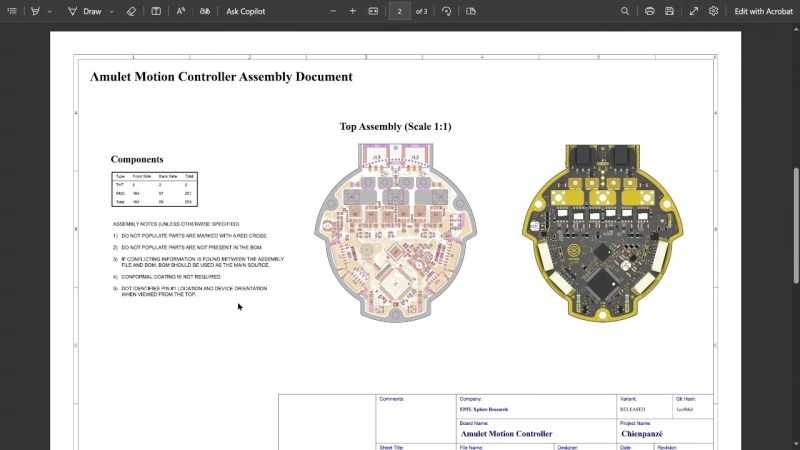
Ever think about all the moving parts involving a big KiCad project going into production? You need to provide manufacturer documentation, assembly instructions and renders for them to reference, every output file they could want, and all of it has to always stay up to date. [Vincent Nguyen] has a software pipeline to create all the files and documentation you could ever want upon release – with an extensive installation and usage guide, helping you turn your KiCad projects truly production-grade.
This KiBot-based project template has no shortage of features. It generates assembly documents with custom processing for a number of production scenarios like DNPs, stackup and drill tables, fab notes, it adds features like table of contents and 3D renders into KiCad-produced documents as compared to KiCad’s spartan defaults, and it autogenerates all the outputs you could want – from Gerbers, .step and BOM files, to ERC/DRC reports and visual diffs.
This pipeline is Github-tailored, but it can also be run locally, and it works wonderfully for those moments when you need to release a PCB into the wild, while making sure that the least amount of things possible can go wrong during production. With all the features, it might take a bit to get used to. Don’t need fully-featured, just some GitHub page images? Use this simple plugin to auto-add render images in your KiCad repositories, then.
We thank [Jaac] for sharing this with us!











This. Very very welcome extension to KiCAD. This software is picking up steam and will eat the cake of Altium.
I dropped the service plan for my altium perpetual licence when kicad 7 came out. I still whip it out a few times a year if i need to do something with older designs. But all new designs have been in Kicad since then and i don’t miss it one bit. It would probably be a bit different if i did huge high speed layouts, but i mostly do wireless sensors so a bit RF, sensor integration and mcu’s, and I do like Kicad a lot better for those fast iteration designs, especially for prototype work.
KiCAD is also largely superior from a CI/CD point of view. I´m impatiently waiting to the finalization of the new API, that will permit manipulate all features of KiCAD through a simple network socket, thus allowing excellent integration with any other piece of code, and automatized schematics and PCB editions, library manipulations and so on.
Oh that’s hype. The feature I’m looking forward to is the extension of schematic design blocks to the PCB layout tool. I read somewhere that that might be coming in v10. There have always been ways to do this with plugins, but it’s always been a bit clunky and, in some versions, very flaky. It’s been a hot second since I’ve done a PCB, but I’m looking to do one with a highly replicated layout sometime soon.
I recently tried kicad and found it to be an anthill. Routinely lust disappears (crashes I assume :-)) and if it last long enough to actually save some work, next time around what was saved isn’t there. Disappointing to say the least…
Interesting. Have you tried importing your old Altium designs into KiCAD? I’m curious how that went.
Been using KiBot for years, it’s really cool. I have a gitlab-ci setup I use for all my PCB projects. Each time I make a tag, it automatically generates all the artifacts and uploads them to the Package Registry. The result is all the fabrication artifacts tagged by version, ready to download and traced to the design files from where they were generated: https://gitlab.com/doragasu/sms-sl2map/-/packages