
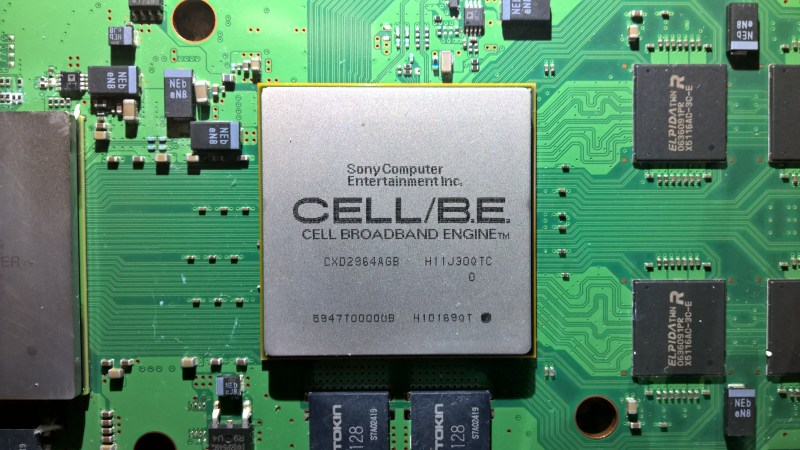
Key to efficient hardware emulation is an efficient mapping to the underlying CPU’s opcodes. Here one is free to target opcodes that may or may not have been imagined for that particular use. For emulators like the RPCS3 PlayStation 3 emulator this has led to some interesting mappings, as detailed in a video by [Whatcookie].
It’s important to remember here that the Cell processor in the PlayStation 3 is a bit of an odd duck, using a single regular PowerPC core (PPE) along with multiple much more simple co-processors called synergistic processing elements (SPEs) all connected with a high-speed bus. A lot of the focus with Cell was on floating point vector – i.e. SIMD – processing, which is part of why for a while the PlayStation 3 was not going to have a dedicated GPU.
As a result, it makes perfect sense to do creative mapping between the Cell’s SIMD instructions and those of e.g. SSE and AVX, even if Intel removing AVX-512 for a while caused major headaches. Fortunately some of those reappeared in AVX2.
The video goes through a whole range of Cell-specific instructions, how they work, and what x86 SIMD instructions they were mapped to and why. The SUBD instruction for example is mapped to VPDPBUSD as well as VDBPSADBW in AVX-512, the latter of which mostly targets things like video encoding. In the end it’s the result that matters, even if it also shows why the Cell processor was so interesting for high-performance compute clusters back in the day.












For people wondering what SIMD stands for (like i did), it’s “Single Instruction, Multiple Data”. That clarifies a lot of the article.
It’s an MMX, in short.
Every time I remember the Cell architecture it feels like the future.
I mean every time the assymetric cores one high end and multiple fast, and perhaps a separate hypervisor for security seems like a good idea.
But for different reasons, if I predicted what a 2030 high end PC would be like it’s basically a Cell CPU modernized and a GPU made more generic.
My 12 core/24 thread Ryzen 9 just isn’t particularly good bang for my buck in my day to day life. If I could offload more to my GPU, and keep my CPU cores snappy and simple I think I’d be better off (that and having everything on NVNe with their own multiple lanes).
Will it eventually happen? Perhaps as an APU with on package RAM?
I’m sure there’s loads of settings that a 12c/24t fast CPU would be better. It’s just never seemed that way to me
Ironically Intel pioneered a low latency storage in the form of Optane, even making hybrid storage M.2 with an Optane on x2 lanes and an SSD on x2.
This lag is percebtible, and still an unsolved problem. Also in many situations a dual chiplet Ryzen 9 6c+6c will fall behind a single chiplet 8c Ryzen 7. Especially if there is V-Cache.
There are also x4 Optane drives.
I have some 112GB m.2 drives that are used for pool metadata on my NAS and are blazingly low latency. Like, 1 microsecond compared to modern drives that gt 15 microseconds under perfect conditions. PCIe 3.0 x4.
I have a few p900 U.2 drives kicking around that I got for dirt cheap because they were 80% used up. Oh no! Only 1.5 PETABYTES of writes left before they used up… Also PCIe 3.0 x4.
I also have a single p5800 PCIe 4.0 x4 U.2 drive as my system drive on my main machine.
I got that one from a local system recycler for a reasonable price and 90% life remaining.
That thing will sustain 6GB/second writes until the sun dies out. PCIe 5.0 consumer drives might have higher burst speeds… With 0% drive usage, fresh from the box NAND, and the planets aligning, but after normal usage they get “slow” compared to 6 year old Optane tech.
I hate that we don’t get cool stuff because NAND marketing gets to lie by omission or twist the truth.
We could ALL be rocking 3d Xpoint drives that last forever if we had economy of scale on our side.
Note: I have never had an Optane drive wear out. The 3 failures I have had were due to electrical components, not the storage cells or controllers. I have even run the crappy x2 lane consumer drives into >250% of their lifetime and they kept chugging.
(It was not intentional. I did not realize that workload was doing 100GB/day of caching on a 16GB drive… It ran for many months. I should really set up S.M.A.R.T. monitoring on systems other than my NAS too.)
X86 “ffuff” instructions, we read.