
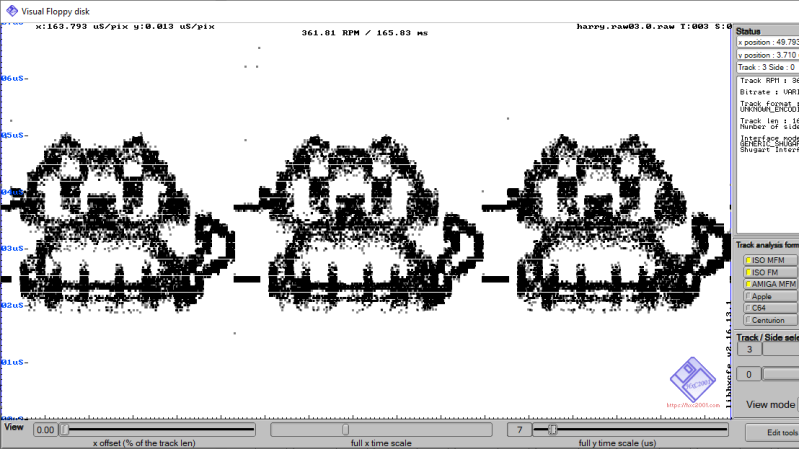
Here at Hackaday we love floppy disks. While they are by no means a practical or useful means of storing data in the age of solid state storage, there is something special about the little floppy disc of magnetic film inside that iconic plastic case. That’s why we were so excited to see the tool [dbalsom] developed for printing pixel art in a floppy’s track timing diagrams!
Floppy timing diagrams are usually used to analyze the quality of an individual disk. It represents flux transitions within a single floppy tack as a 2D graph. But it’s also perfectly possible to “paint” images on a floppy this way. Granted, you can’t see these images without printing out a timing diagram, but if you’re painting images onto a floppy, that’s probably the point.
This is where pbm2track comes in handy! It takes bitmap images and encodes them onto floppy emulators, or actual floppies. The results are quite excellent, with near-perfect recreation in floppy graphical views. The results on real floppies are also recognizable as the original image. The concept is similar to a previous tool [dbalsom] created, PNG2disk
If you, too, love the nearly forgotten physical likeness of the save button, make sure to check out this modern Linux on a floppy hack next!
Thanks [gloriouscow] for the tip!












Oh, neat. Try to quote a single line, and HaD’s markup goes absolutely haywire. I love this site.
Just use the edit button and correct it !
I just had a quick thought- how about brushing on some magnetic developer powder onto the floppy disc? It’s easily available in the form of developer powder from an old laser printer or photopier. A yellow developer powder would contrast nicely with the black surface of the floppy disc. If we took the whole developer roller assembly out of the laser printer it already has a magnetic “brush” that applies either a North or South magnetic polarization to the magnetic developer powder; usually in alternating stripes a few millimeters apart. I’m guessing that by sliding the disc past one of these stripes then the magnetized disc pixels could be used to either attract or repel the North or South polarized developer powder.
Similar to the process used in the laser printer, a static electric charge could also be used to attract even more of the yellow toner that is embedded in the magnetic developer mixture. (a typical developer mixture contains about 5% to 11% coloured plastic toner powder and the rest is a magnetic ferrite powder). This could make the image even more vivid.
This static electric charge would be pretty easy to generate by simply rubbing the floppy disc (outside of its sleeve) on some fabric. You could try wool or silk for the first couple of trials.
Probably an hour or two of work- and old laser printers and photocopiers are readily available for free ( I work with them on a daily basis).