
We are all familiar enough by now with the succession of boards that have come from Raspberry Pi in Cambridge over the years, and when a new one comes out we’ve got a pretty good idea what to expect. The “classic” Pi model B+ form factor has been copied widely by other manufacturers as has their current Compute Module. If you buy the real Raspberry Pi you know you’ll get a solid board with exceptionally good software support.
Every now and then though, they surprise us, with a board that follows a completely different path, which brings us to the one on our bench today. The Compute Module Zero packs the same quad-core RP3 system-on-chip (SoC) and Wi-Fi module as the Pi Zero 2 W with 512 MB of SDRAM onto a tiny 39 mm by 33 mm postage-stamp module. It’s a Pi, but not as you know it, so what is it useful for?
A Pi Zero 2 As You Haven’t Seen It Before

The first clue as to where this module sits in the Pi range comes from how it came to me. I have a bare module and the dev kit on loan from a friend who’s evaluating them with the idea of incorporating into a product. Instead of buying it from a store here in Europe he had to have it shipped from LCSC in China. It’s Chinese-made and distributed, and it’s not a consumer part in the way your Pi 5 is. Instead it’s an OEM part, and one which appears from where we’re sitting to be tailored specifically to the needs of OEMs manufacturing in China. Would you like a Linux computer with useful software updates and support built into your product? Look no further.
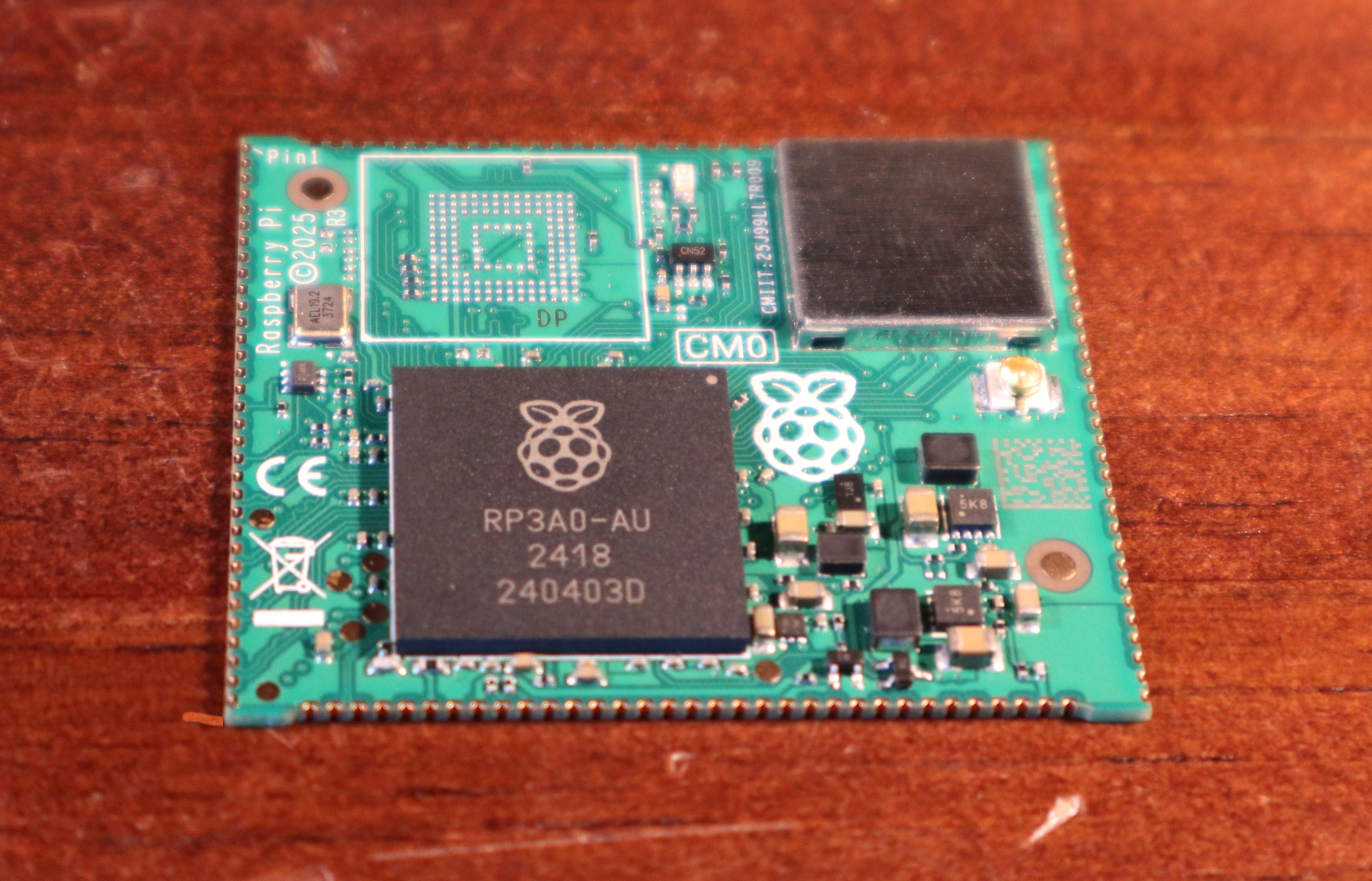
I put up a quick video showing it in detail which you can see at the bottom of the page. Physically it appears to carry the same parts we’re used to from the Zero 2, with the addition of an eMMC storage chip and with an antenna socket in place of the PCB antenna on the Zero. All the available interfaces are brought out to the edge of the board including some not seen on the Zero. The module is available with a variety of different storage options, including the version with no eMMC which my friend has. He’s also bought one with the storage on the dev board, so you can see both types.
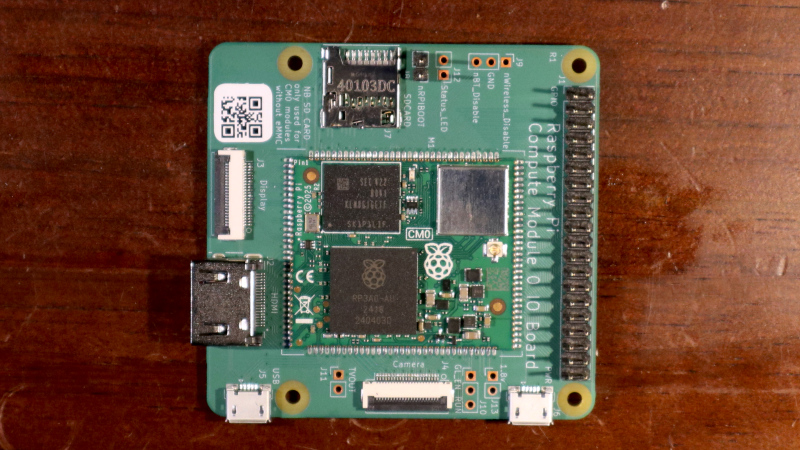
The dev board is similar to a Pi model A+ in size, with a bit of extra PCB at the bottom for the USB and HDMI connectors. Like the Zero it has Micro-USB connectors for power and USB, but it carries a full-size HDMI socket. There are connectors for an LCD display, a camera, a micro SD card if you’re using the version without eMMC, and 40-pin GPIO header.
In addition, there’s an extrnal stick-on antenna in the box. Electrically it’s nothing you won’t have seen before, after all it’s little more than a Pi Zero 2 on a different board, and with less memory. This one is fresh from the box and doesn’t have an OS installed, but since we all already know how well a Pi Zero 2 runs and the likely implications of 512 MB of memory I’ve left it that way for my friend.
What Can This Board Do For Us?
The idea of a bottom-end Raspberry Pi as a component module for your Chinese assembly house is a good one. It has to be the RP3 on board, because as we’ve noted, the earlier Pi architecture is heading into the sunset and that is now their lowest-power 64-bit silicon. It could use more memory, but 512 MB is enough for many undemanding Linux applications and more than appears on many SoCs.
For tiny little computer applications, it’s an attractive component, but it’s a little bit expensive. Depending on the version, and whether it comes with the dev board, it ranges from about $25 to $38, and we can imagine that even with a quantity price break that may be too much for many manufacturers. A Chinese SoC, albeit with worse long-term Linux support, can be had for much less. If this SBC form factor catches on, we’d expect to see knockoff boards appear for a more reasonable price in due course.
Perhaps as the price of memory eventually comes down they will increase the spec a little, but we’d hazard a guess that a lower price would mean more success. A low power, plug-innable computer for $20 would be interesting for a number of projects where size really matters. Only time will tell, but meanwhile if you’re designing a product you have a new Linux option for it, and for the rest of us it’s time to look out for these modules appearing in things we buy.
Would you use one of these, and for what?












There’s a letter missing in *External: “extrnal stick-on antenna”
We don’t know that; it might be an eternal stick-on antenna
VHB on steroids hehe
Ghostbusters?
I sort of like the ‘extrnal’ version of the word.
It’s interesting that it appears to indicate List doesn’t use a spellchecker.
Or maybe it’s a Welsh or Scottish word :)
No x in Gaelic languages
We might do an “eochs”
Lots of very long loan words like “teacnoailte” — technological, my spelling is highly suspect, don’t trust it. Not so long but obviously loaned
Yeah secure boot is SOOOOOOO important isn’t it, soooooo freaking important, it’s like making a device without DRM and forced subscriptions, and without forced online activation with official ID and age verification, what are people thinking eh freedomunit
What on Earth are you ranting about? Are you okay?
It’s a bot/ai comment.
Guess to whom that reply was? It’s the eternal HaD game, the masters of software and hardware hacking.
You are probably blocking some JS element that the WordPress backend needs to associate comments with their parents.
You are the only commenter (AFAIK) to whom this is happening at the moment, so if you want to post up browser/blocking details, maybe we can troubleshoot.
But yeah. We’re horrible at PHP. :) Stuff breaks when we make even minimal changes. Of course, it’s all on the dev server, so you never see it, but still. Horrible at this “web” stuff.
You did choose wordpress…
What language is that backend written in?
Running JS on the server isn’t a sign of competence.
What’s the backend database?
How often are the routine reindexes running?
35$ for a pcb that has the same pizero 2 w HW without the conectors and cost 20$.
Why?
There is emmc added so not same hw and the target audience of CM is different, it is harder to use Zero 2 as part of your product. There is also external antenna connector – not part of typical end consumer Pi but typical for CM modules.
smaller and easier to integrate into commercial products?
but yeah…
It’s likely many fewer CM0s will be manufactured than Zero 2Ws, due to how niche it is. Lower volume = higher cost, since fixed manufacturing costs have to be amortized over a certain quantity of units based on projected production/sales.
It also has onboard eMMC and fans out MIPI DSI, both of which the Zero 2W lacks, as well as a wider operating temperature spec.
With that context, the higher cost makes sense!
Can you secure boot it? Does it have any kind of security module? I wouldn’t build in volume anything that doesn’t secure boot. IMO.
No. This is actually why the original effort to develop an open source boot firmware for the PI’s VPU units (the GPU processors boot first and start up the main CPUs) came to a screeching halt. It turns out that bcom did some very stupid things like hard-tying important security signals in the SoC to logic-high, rendering any meaningful trustzone implementation impossible.
That is the sentiment of an engineer that cares about the quality of their product and its security implications for customers. I have not seen evidence that Chinese manufacturers of cheap, semi-disposable electronics care about that at all (to be fair, their customers apparently don’t either)
Raspberry Pi is based in the UK, not China.
Blame the British.
Yeah but they also have a factory in chine where this board is built.
Secure boot really is there to prevent any tinkerer from hacking the hardware and repurposing it when inevitably all the online services the product depend on get shut down. Way to make a lot of e-waste in a few years just so a very theoretical supply chain attack doesn’t happen.
Well true yes, and many evil corporations use security to ensure hardware finds a speedy end (in the trash) but on the flip side of the argument is that this is a module you’re supposed to solder to your product. If the product does something like gather data about its owner or where its owner lives or has been there should be a secure channel to send that information home secureenclaves trustzone etc make it so keys used to send data can’t be stolen or used nefariously. More famously lack of security has been used to send changes to a device to join it to a zombie hoard DDoS or to watch you sleep at night if attached to a camera. This module is great for proof of concept stuff but I shudder to think about yet another product in the wild where security wasn’t even considered.
Also they publish a lot of code under GPL, but because the hardware is locked down, you can never sign it to run your own copy. This is entirely disingenuous.
One significant CM0 upside when compared to a Zero 2, is that the CM0 has DSI available – great for building portable devices where you want a higher-res higher-refresh-rate display unburdened by low throughput of SPI or the many-GPIO requirement of DPI aka parallel RGB! Hopefully the CM0 will be just as easy to run from a LiIon cell as the Pi Zero is, too.
The pi zero 2 w also only has 512 MB of RAM. It would be good if they had made a 1 GB version just so more things work without the board freezing up or having to increase swap file sizes just to get things to compile.
I have run into issues even just using one for a pimoroni inky impression display. Multiple times it froze even trying to compile the libraries needed even without a desktop. It also doesn’t work all that well with vscode remote access, it keeps freezing and disconnecting and then can’t connect again. This has happened to me on multiple pi zero 2 w, with multiple SD cards and with different versions of the OS.
Overall it was a good idea, small dev boards are definitely a good thing and easier to put in projects but it just didn’t work all that well for me.
I have here a 486 laptop (bought 2000), which runs Linux and used it to run gnome, gcc etc. It has 16 MB of RAM, this was enough 2005, when I retired it.
heh i’m with Thorsten, i think 512MB is an awful lot of memory. I would definitely run the compiler locally on a machine with 512MB of RAM. But hahaha i’m gonna say it sounds like you’re building bloatware, if the compile can’t complete in 512MB. :)
But even so, you can just treat 512MB as if it was the new frontier of “embedded, too small for local development.” If you don’t want the hassle of cross-compiling, just run debian-arm under qemu. Couldn’t be easier. There are so many easy answers to these problems these days.
Excellently said, Greg, and not at all elitist OR condescending, except that, and I know this is an absurd concept, maybe Conor and others want to do things with modern display resolutions and real-time graphical UIs?
Maybe Thorsten should get out that old 486 and see how it does running one of the 800×480 color displays Conor mentioned. Also, every program is ‘bloatware’ (not at all the right use of the term, by the way) if you compile it in modern C++ use existing libraries which were written for extended functionality and not minimal size, and, really, aren’t hand-crafting every program to be as lightweight and efficient as possible in C or assembly.
Sometimes, you really do need a little more than what a W 2’s specs can provide, but the alternatives are larger or more expensive. I could abide spending a little more, but I’m already having trouble fitting the Pi, battery, display, and other bits in my repurposed Zune case, not to mention the performance issues using it to run Kodi and drive a 1080p HDMI display.
Now that’d be a hack!
Nobody talks about its temp range. So many suckers are going to put this outside only to find out it wont boot or wigs out in the heat. This is a indoor only thing, which IMHO is useless.
Yeah right, let’s use micro-USB like its 2009, so sad.
Where do you see USB anything on this module?!?
Raspberry Pi has given up on Risc-V. Try to buy a 2350 RPi.
Number two point…… smaller in not always the best we need two models one for embedded and one for desktop. As an older Geek the small RPI zero 2 is impossible to work with. Please bigger models for us older folks.
Although the CM0 cannot be purchased outside of China, an SBC based on the CM0 is now available: https://edatec.cn/cm0nano
Both DigiKey and Mouser have it in stock.