
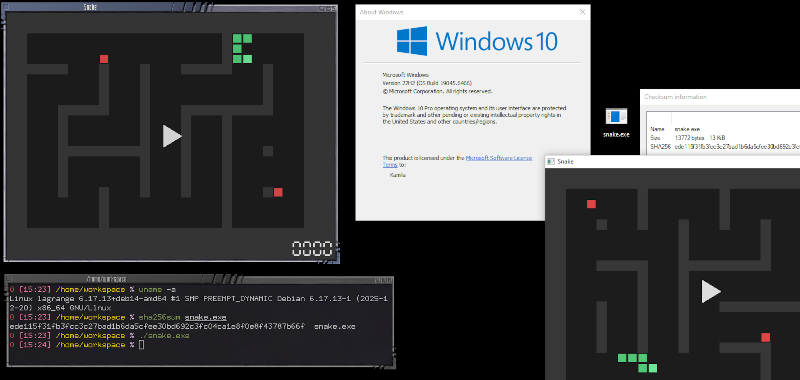
We’ve been aware of projects like Cosmopolitan that allow you to crank out a single executable that will run on different operating systems. [Kamila] noticed that the idea was sound, but that the executables were large and there were some limitations. So she produced a 13K file that will run under Windows, Linux, or even in a Web browser. The program itself is a simple snake game.
There seems to be little sharing between the three versions. Instead, each version is compressed and stitched together so that each platform sees what it wants to see. To accommodate Windows, the file has to start with a PE header. However, there is enough flexibility in the header that part of the stub forms a valid shell script that skips over the Windows code when running under Linux.
So, essentially, Windows skips the “garbage” in the header, which is the part that makes Linux skip the “garbage” in the front of the file.
That leaves the browser. Browsers will throw away everything before an <HTML> tag, so that’s the easy part.
Should you do this? Probably not. But if you needed to make this happen, this is a clear template for how to do it. If you want to go back to [Kamila’s] inspiration, we’ve covered Cosmopolitan and its APE format before.












I like llamacpp (llamafile from mozilla) and whisper
ideal for carring AI in pendrive
Given the size of llamm files, It would take fewer resources to simply bundle a dozen different binaries together. You may like the idea but it’s not good in any practical sense.
I use gemma3n working perfectly ideal for offline workstation
I cant use a whisper+cosmpopolitan but meybe in future
This sound as a good way to distribute multiplatform malware as mail attachment :-(
Well Vivaldi blocks its download as a virus, probably because of the malformed headers.
If you are still being infected by opening malicious attachments from emails in 2026 then it’s pretty clear where the blame lies.
Nice work. That’s using your head(ers) 😁
Now let’s use the MZ header part on top of of any Windows PE file and add some DOS code, too! 😁
Can you elabotate more on this? it sounds to me like bypassing shell and using dos-era instructions that no loger run in win enviroment?
Hi, sure! Normally, Windows executables have an MZ stub which displays “This program requires MS Windows!” on DOS, so it wouldn’t crash the PC if accidently run on plain DOS.
Both Win16 (NE) and Win32 (PE) applications had that MZ stub.
On 16-Bit Windows there also were hybrid applications, such as setup.exe (Windows Setup) inside Windows directory.
Instead of a short message these programs contained both full Windows 3.x and MS-DOS applications.
On 16-Bit OS/2, there also were MZ/NE hybrid applications. The socalled “Family API” applications.
Here, the MZ part contained an OS/2 runtime for DOS that would run the OS/2 application in the NE part of same EXE file.
That way, same application ran on an 8088 based PC/XT in Real-Mode and on an 80286/80386 based PC/AT in 16-Bit Protected-Mode, including the advantage of multitasking, virtual memory and memory protection.
The draw-back was that those hybrid applications were fatter and more memory hungry.
And the OS/2 runtime was more limited than real OS/2, of course.
Thank you very much for the insight! Of course, the imagination runs wild haha!!
You’re welcome. :)
Why don’t people see the usefulness in this immediately?
This is a no-brainer.
The HTML trick is really amusing. It could be used for the program or even documentation (regardless if you can execute)
1980s are calling and they want their invention back : – ]
I personally knew people who worked on universal/uniform file format that would work with MacOS (back then it was McIntosh that was the highest popular ride, so it was something like System 2 or System 3 on McIntosh) and IBM clones (and probably Xerox OS, too, but that part I don’t know at all). The year was 1986 and it was really in the middle of nowhere, so as far as I could tell the project mostly went back to the middle of nowhere – though I suspect all programmers found better-paying jobs in the middle of somewhere (as opposed to the original nowhere).
In the hindsight, programming OSs back then was quite simpler, so potentially this wasn’t insurmountable obstacle that couldn’t be tackled by few dozens dedicated experts. Id also speculate that with some mental grease same files could (probably) run on CP/M or Atari, given they are not too esoteric for those machines.
I am still unclear what went wrong with compiled Java that promised binaries for any OS/platform. It kinda sorta did happen (JVM), though certainly not on the scale initially promised – and odd coincidence has it, browser solutions are now struggling to reinvent this exact concept – though, in quite awkward and unproductive way.
The Java application logic was quite portable (though we still called it “Write Once, Debug Everywhere”), but the Swing user interface didn’t look native on desktops. This was discouraging. JavaFX tried to fix this but got little traction and was eventually jettisoned from SE.
Then came Oracle buying Java, the “Java Trap”, web app security issues, and HTML5, and Java faded from the desktop and browser. It did great business on phones and servers, though!
From my humble experience (5+ years ago right before COVID) Java became “compile for the target JVM” binary, ie, as good as not. Why? Because there is no guarantee compiled binary will simply run on the target JVM.
I’ve tried, and it wasn’t GUI app – it was a standalone data-massaging app. The one that doesn’t need math libraries or anything esoteric, hashmaps and btrees with mostly strings. “Mostly” because some tasks run faster/better with integers, so those were hybrid hashmaps four-levels deep, and some included auto-sorted btrees. Same thing shelled out as a standalone jar wouldn’t run inside Oracle JVM, which apparently was in need of those exact libraries I was using elsewhere.
Point being, this just doesn’t work. Ideally all the stuffs just compiles/fuses into one blob, and not calling up the compatible libraries maelstrom. This is a relatively simple (and mostly straightforward) task, so if it couldn’t do that without recompiling for the target JVM, then it is not compatible.
Having said that, in the past we had to downgrade code because it wouldn’t run on servers that were two or three upgrades behind The Absolutest Latest And Greatest. We simply couldn’t wait for the slow-mo “budget approved, license renewed, contract renegotiated, product ordered” molasses to waft down to our bottom of the food chain, so we just rolled back the code few versions, compiled and quietly deployed. This probably explains why some places are an easy targets for hackattack – because they simply didn’t react in time, the legacy apps is what keeps them in the past.
If stuffs would have some kind of absolute bare minimum core libraries that don’t sway with the latest fad, it would be the first concrete step towards universal binaries. Like some kind of standard for the Things That Don’t Change Like Crazy Every Five Year. GUI, prime example, buttons, textboxes, etc – they don’t change much and have been about the same (functionality-wise) for the last what, 30+ years? No need to reinvent the same GUI with the same set of controls with each and every OS (and browser), just have core libraries that compiled about the same way on every OS.
This reminds me of LauryWeird when she was reverse engineering some IOCCC entries and one of the entries had an embedded virtual machine that ran the actual program.
This is kinda like https://justine.lol/ape.html but supporting html instead of osx?
Oh, Cosmopolitan was already mentioned. Oops. Ignore me :)
I could see this being useful for a cross-platform app launcher. Have it fork to the platform-specific executable without having to tell users that they’ve got to run foobar.exe on Windows and foobar.bin on Linux – they just run foobar-launcher.exe (whether that be interpreted as PE or shell script).
cross compiling is a great idea but only if all your dependencies are also cross platform. it always annoyed me how game companies target a single platform, going all in on its proprietary components, and then let others make a translation layer, when you could just use cross platform libraries, cross compile once and done. you dont even need a vm.
This reminds me of the “jumpstart convention” I proposed early in the days of the IBM PC, in which every executable’s first instruction would be “jmp START”, immediately followed by a block of plain text identifying and briefly describing the program, with the START: address immediately following that. The advantage would be that simply dumping the start of the program file to the screen would give you that essential information.