
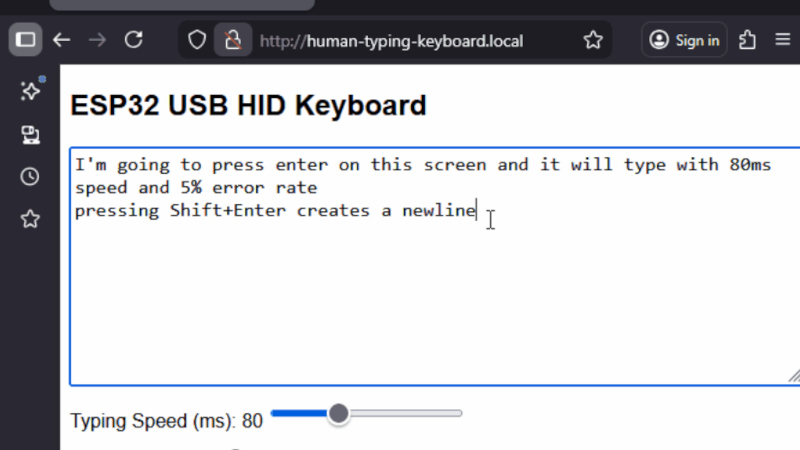
There are many solutions for remote control keyboards, be they Bluetooth, infrared, or whatever else. Often they leave much to be desired, and come with distinctly underwhelming physical buttons. [konkop] has a solution to these woes we’ve not seen before, turning an ESP32-S3 into a USB HID keyboard with a web interface for typing and some physical keyboard macro buttons. Instead of typing on the thing, you connect to it via WiFi using your phone, tablet, or computer, and type into a web browser. Your typing is then relayed to the USB HID interface.
The full hardware and software for the design is in the GitHub repository. The macro buttons use Cherry MX keys, and are mapped by default to the common control sequences that most of us would find useful. The software uses Visual Studio Code, and PlatformIO.
We like this project, because it solves something we’ve all encountered at one time or another, and it does so in a novel way. Yes, typing on a smartphone screen can be just as annoying as doing so with a fiddly rubber keyboard, but at least many of us already have our smartphones to hand. Previous plug-in keyboard dongles haven’t reached this ease of use.












Nice idea. Moving the input to your smartphone has the added benefit of speech recognition as an option, or pasting from other apps.
Brilliant idea. Twice this past week I could have used a device like this.
Now looking to see if I can shrink it to EDC size.
Not bad, but . . .
I’ve been using InputStick (iOS or Android device into wireless USB keyboard & mouse) for years: easy bluetooth from smartphone to usb.
https://www.inputstick.com/
So then you’re dependent on that app to drive it, and have that app installed on a compatible device, and have that device handy too. And also dependent on the app still working on your new OS a year later.
Different animal.
This one is agnostic: anything with wifi and a web browser can talk to it.
True, but for now its awesome! The app is foss and the hw is reliable. Perfekt for keepass2android.
Mostly true, but I don’t need wifi to use it AND it has been working without problems for over 10 years. The InputStick it self is about the size of thumb drive.
Give the browser developers a moment, they will find a way to make this not work. And the use of the word “anything” when speaking of devices with WiFi and a browser involves a lot of stuff that will not work. Please don’t use the word anything like that.
Why did there word anything make you tweak out broo
android tv has had this feature for years. but recently, as part of their “break everything for no reason” initiative, google has broken the android app that drives it
so if you connect it to the pc with the web interface, you have a complex autorepeat. neat!
yes, workssssssssssssssssssssssssssssssssssssssssssssssssssssssssssssssssssssssssssssssssssssssssssssssssssssssssssssssssssssssssssssssssssssssssss
Oh, I didn’t know how much I needed this. I use a software KVM for a bunch of hosts, but some of them have physical monitors but no HIDs. Something like this will solve a real problem for me.
I should build or buy a few USB-stick form factor ESP32s for this.
Waveshare has some good options in this form factor, the “ESP32-S3-GEEK”, or the “ESP32-S3 1.47inch”. There’s also the LILYGO T-Dongle-S3. Lots of good options for not much money!
I feel the typing on the smartphone is going away. I have noticed, lately, like after pandemic, people hardly response to my texts. They read, but do not reply, unless this is emergency.
The mobile communication today is going toward essentials only. There a lot of garbage online now. And after the AI, everything looks garbage. Even hard to read, used to be trusted, news sites. Now any news site looks like a hacked web site with a lot of banners like Rapidshare back on 2010. People now get news on Tiktok today… What next? AI news? AI streaming radio?
Tiktok news?
And there is the whole problem with the world. But to be honest, no matter what side of the political spectrum you land on, the main media has performed a self inflected wound by hyping up minor news and using political pundits as news casters.
As for the keyboard USB hid over web. I can see some use. It would be nice to add an HDMI capture/web replay and USB mouse. But very straight forward project as a good start.
Seems like the ESP32 project from last week, except it doesn’t require a custom iOS app.
If you want a tiny neat controller for this: M5Stack NanoC6 is perfect!
Noone seeing any security issues with this remote rubber ducky? Or the hillarious coworker pranking potential?
Remember the first rule of Fight Club?
I literally made my own version of something like this 2 months ago just so I can plug it in and type from another system
ESP32 HID is really easy, just use the example included in ESP-IDF, and modify it to do what you need.
I have a laptop that can’t be woken over WiFi, but it can be woken via keyboard keypress. So I got the smallest ESP32-S3, I used the ESP-IDF HID example, slapped on the WiFi example, and figured out how to wait for a “Magic Packet” wake-on-lan packet. When the WoL packet comes in, it sends a space-bar keypress and the computer wakes up. Fortunately the laptop has an always-powered USB port to keep the ESP32 powered on, listening to WiFi. It works great, it will wake up computers that can’t otherwise be woken except by a keypress.
This is really cool! Since you’re already hosting a web interface on the ESP8266, have you thought about adding a small on-screen keyboard in the web UI? That way users could just click keys like a virtual keyboard instead of typing text manually. Might make it feel more like a real wireless keyboard
I was just looking into this yesterday – my idea was to get a RPI 500+ and kit it out with BBC Micro keycaps and then use it as a keyboard for my desktop or laptop