
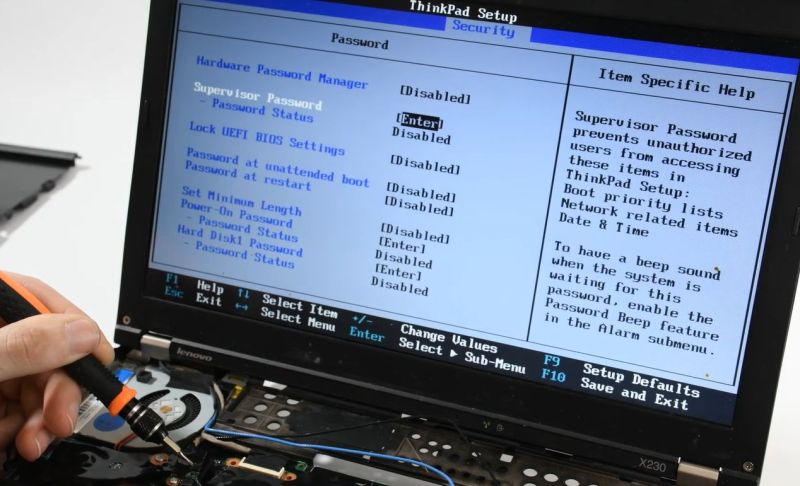
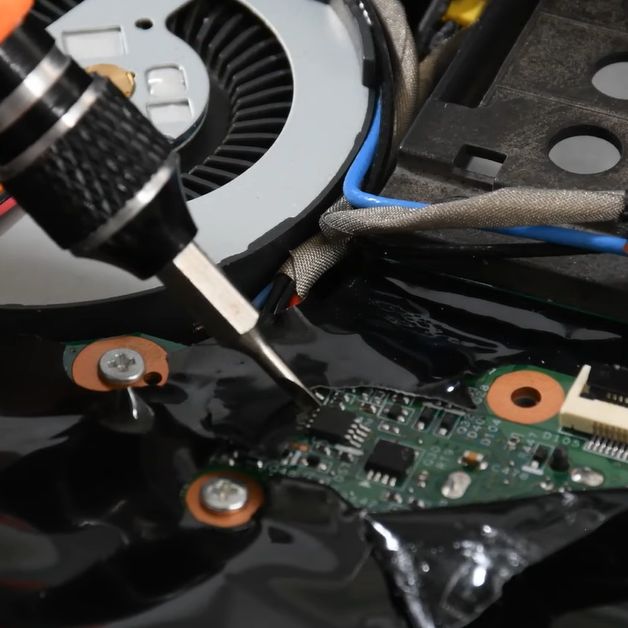
In the olden days, an administrator password on a BIOS was a mere annoyance, one quickly remedied by powering off the system and pulling its CMOS battery or moving a jumper around. These days, you’re more likely to find a separate EEPROM on the mainboard that preserves the password. This, too, is mostly just another annoyance, as [onionboots] knew. All it takes is shorting out this EEPROM at the right time to knock it offline, with the ‘right time’ turning out to be rather crucial.
While refurbishing this laptop for a customer, he thought it’d be easy: the guide he found said he just had to disassemble the laptop to gain access to this chip, then short out its reset pin at the right time to make it drop offline and keep it shorted. Important here is that you do not short it when you are still booting the system, or it won’t boot. This makes for some interesting prodding of tiny pins with a metal tool.
What baffled him was that although this method worked, and he could now disable the password, on the next boot, it would be enabled again. As it turns out, to actually save the new supervisor password status to the EEPROM, you should stop shorting its pin, else you cannot write to it. Although the guide said to keep shorting it, this was, in hindsight, a clear case of relying too much on instructions and less on an obvious deduction. Not like any of us are ever guilty of such an embarrassing glitch, natch.
At any rate, it was still infinitely faster than trying to crack such a password with a brute-force method, even if helped by an LLM.












You can buy an SOIC test clip for a few dollars. Then you can just connect a switch to the reset pin instead of having to poke it with a screwdriver. A couple of test leads with micro grabbers would work too.
Yeah, he made the task a bit more complicated than necessary. On another note: I wonder why the password can be written back to the EEPROM by letting go of the “short”. I would think a not initialized EEPROM (that stores a password!) at startup would be flagged as such by the BIOS and a mere “here, the EEPROM is available again” should not work.
All commands for read and write are self contained. The cpu can’t tell, if the software is poorly written, that the rom answered FF’s, or maybe ignores that case as a new board.
The article says:”to actually save the new supervisor password status”.
So shorting the pins deos not erase the password, but disable it.
I wonder if the flag would be stored on the same chip? I don’t expect a BIOS to have too many kinds of writeable persistent memory available.
Huh… But you could allso just sniff the password at boot couldnt you?
Assuming its not encrypted, which is possible but dumb. Laptops can contain data worth thousands and even millions of dollars in the wrong hands.
Yes, but not data secured entirely by the BIOS password. That’s would be possible, but dumb.
Considering they dont even check that the eprom actually sends data it wouldnt surprise me if its not encrypted.
Okay, assuming its encrypted, where the key is stored?
It’s the DVD all over again
I’m sure this is a well known method by now but I did document my method on my website a decade or so ago.
People might find the comments useful:-
https://kinggeek.co.uk/tech-notes/item/46-clearing-the-supervisor-password-on-a-lenovo-thinkpad-r61i-at-your-own-risk
thanks for this. I have a plain R61 and I’m trying to find the eeprom chip. I’ve removed the palm rest and keyboard, can you recall if I need to remove the heatsink as well?
Sorry, I don’t recall. It might be under some black plastic sheet?
It appears that at least some Panasonic Toughbooks (like the one I have) store the password in the main Flash chip (despite having superficially the same BIOS setup screens).
If nothing else, that would appear to reinforce the conclusion that the password read and write operations are highly modularised and distinct from the rest of the setup.