
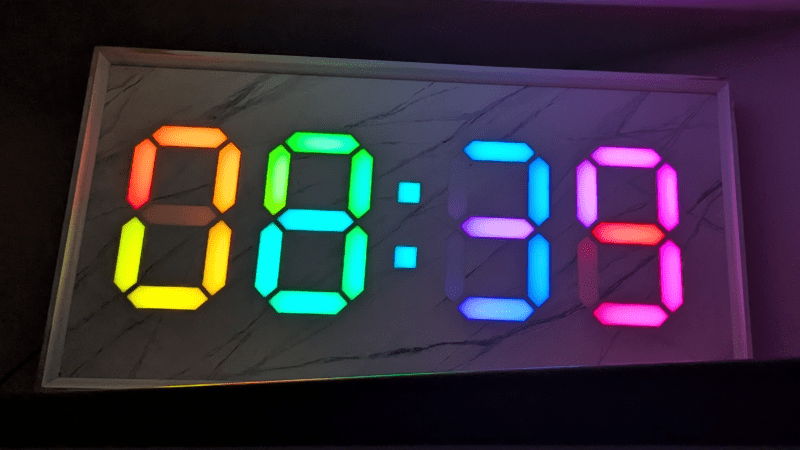
At first glance, it may look like [Rybitski]’s 7-segment RGB LED clock is something that’s been done before, but look past the beautiful mounting. It’s not just stylishly framed; the back end is just as attentively executed. It’s got a built-in web UI, MQTT automation, so Home Assistant integration is a snap, and allows remote OTA updates, so software changes don’t require taking the thing down and plugging in a cable.
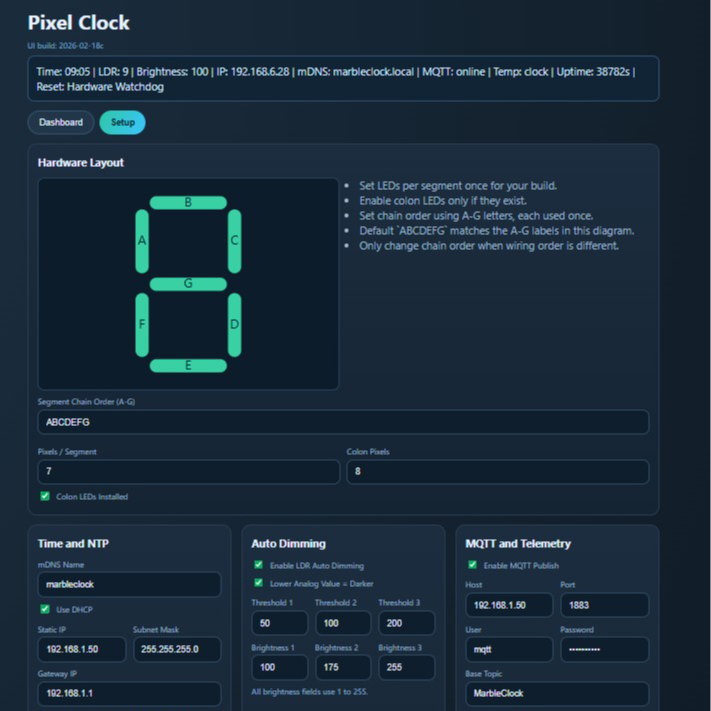
Pixel Clock is code for the Wemos D1 Mini microcontroller board and WS2812/WS2812B RGB LED strips, but it’s made to be flexible enough to support different implementations. For example, altering which LEDs in the strip belong to which segments on which digits can be configured entirely from the web interface. Naturally, one could build an LED strip clock using the same layout [Rybitski] did and require no changes at all — but it’s very nice to see that different wiring layouts are supported without needing to edit any code. There’s even automatic brightness adjustment if one adds an LDR (light-dependent resistor), which is a nice touch.
[Rybitski]’s enclosure is CNC-routed MDF, framed and given a marble finish. The number segments are capped with laser-cut frosted white acrylic, which serve as both diffuser for the LEDs and an attractive fit with the marble finish at the front. MDF is dense and opaque enough that no additional baffles or louvers are needed between segments.
With this code and an RGB LED strip, you can implement your own 7-segment clock any way you like, focusing on an artful presentation instead of re-inventing the wheel in software. Of course, there’s nothing that says one must use 7-segment numerals; some say your LED clock need not display numbers at all.












Entire OS, JavaScript interpreter, browser, network stack, TCP/IP implementation and other thingamabobs burning consuming at least 150-200W (what a bottom-end x86 PC needs) just to run an 8-segment display. No wonder we’re living in an era of microchip crisis when something that could be done on a PIC with 128 bytes of RAM now needs a server-like stuff with literal gigabytes.
I remember the joke that when old engineers retire and new ones will be put in charge then a single woodpecker will collapse an entire civilisation. It seems to be happening now.
Bah; give him a break. This is a one-off project; if it were deployed at hundreds of sites, you’d have a case for complaining about bloat and power consumption. IMHO, the net benefit of having another person with skills in hardware, UI, and software design outweigh the additional power draw from this one project. They have time to learn power analysis and design-for-manufacturing skills later.
It’s running on and ESP8266. Not that much juice at all, and cheaper than a softdrink.
Perhaps you didn’t check out the project links?
Looks nice 👍 I wanted to purchase your two display led clock, but can’t find the kit, but then I am in the UK, I watch your YouTube channel, if you can supply a kit for your alarm clock, I would purchase one, it looked nice with 2 red led displays and a smokey front panel and alarms, thanks Bob in the UK.
What are you talking about? It runs on an ESP8266. It’s going to be consuming well under 100mA on average. It’s trivial compared to the LEDs themselves.
Where did you get the 150-200W number from? This is running on a modern micro controller, not a PC. The LEDs use more power than the controller – at least on full brightness.
Also, a bottom-end x86 consumes a lot less than 150W, these days.
Wonderful LED-hack! :-)
Where did you get 200W from or think it’s running on an x86 PC and requiring gigabytes of RAM?
Did you actually read the article? It runs on a microcontroller which uses minimal power. I suspect the LEDs will use a lot more than the controller.
And sure, it could all be written in hand crafted assembler, let us know when you’ve done that.
Did you read the project docs before coming to that conclusion?
The cpu used here draws a quarter watt running flat out. Maybe a whole watt during the rare times it powers up the wifi radio to transmit. I have not looked through the code, but if the author uses the usual sleep modes it could average maybe a milliwatt.
HaD comment system is in whackomode again…
Previous comment clearly in response to the first one from purported EE.
At least 150-200 watts?!
Not even close; maybe it’s time to retire that degree as it seems you aren’t using it anyway.
Dude you ragebaiting or what?
This is ESP8266 project.
I have had exact same thing built in kitchen for years. It draws 3 – 5 watts.
Grrr… Looking into it.
(Edit: It solved itself as the backend service re-attached. Sorry to the folks whose comments got orphaned! We have the WP support folks looking into it, but it’s an intermittent glitch. At least we have a symptom that we can track down now… Freaking software.)