
Many different types of printers have entered the market over the years. Most of us are intimately familiar with the common inkjet and laser, both of which can be found in homes and offices all over the world. Then there are those old dot matrix printers that were so noisy in use, thermal printers, and even solid ink printers that occupied a weird niche for a time.
However, very little attention is ever paid to the LED printer. They’re not actually that uncommon, and they work in a very familiar way. It’s just that because these printers are so similar to an existing technology, they largely escaped any real notability in the marketplace. Let’s explore the inner workings of the printer tech that the world forgot.
Blinding Lights
To understand the LED printer, it helps to first understand the laser printer, and before that, the photocopier. Indeed, it was the latter technology that spawned the xerographic process that underpins all three machines.
Xerography is a compound word, from the Greek words xeros (dry) and graphia (writing). It’s where the Xerox company earned its name, and the process is at the heart of the photocopier. In the modern form we’re all familiar with, a photocopier relies on the use of a cylindrical drum, coated in a photoconductive material. This drum can be given an electrostatic charge, which remains on the surface when in darkness, but is conducted away when exposed to light. In a photocopier, the drum is exposed to light from a scanning lamp passing over a document. Where the document has light sections, the charges on the drum are conducted away, and where there are dark sections, the charge remains. The drum is then exposed to tiny particles of toner, which are attracted to the charged areas on the drum. A corona wire is then used to generate an opposite charge to that of the toner, pulling it off the drum and onto a piece of paper to replicate the original document. It’s then merely a matter of heating the paper to fuse the toner in place by melting it, and then the completed document is fed out of the photocopier. It’s this final step that gives fresh photocopies their characteristic warm feel and mild plasticky smell.
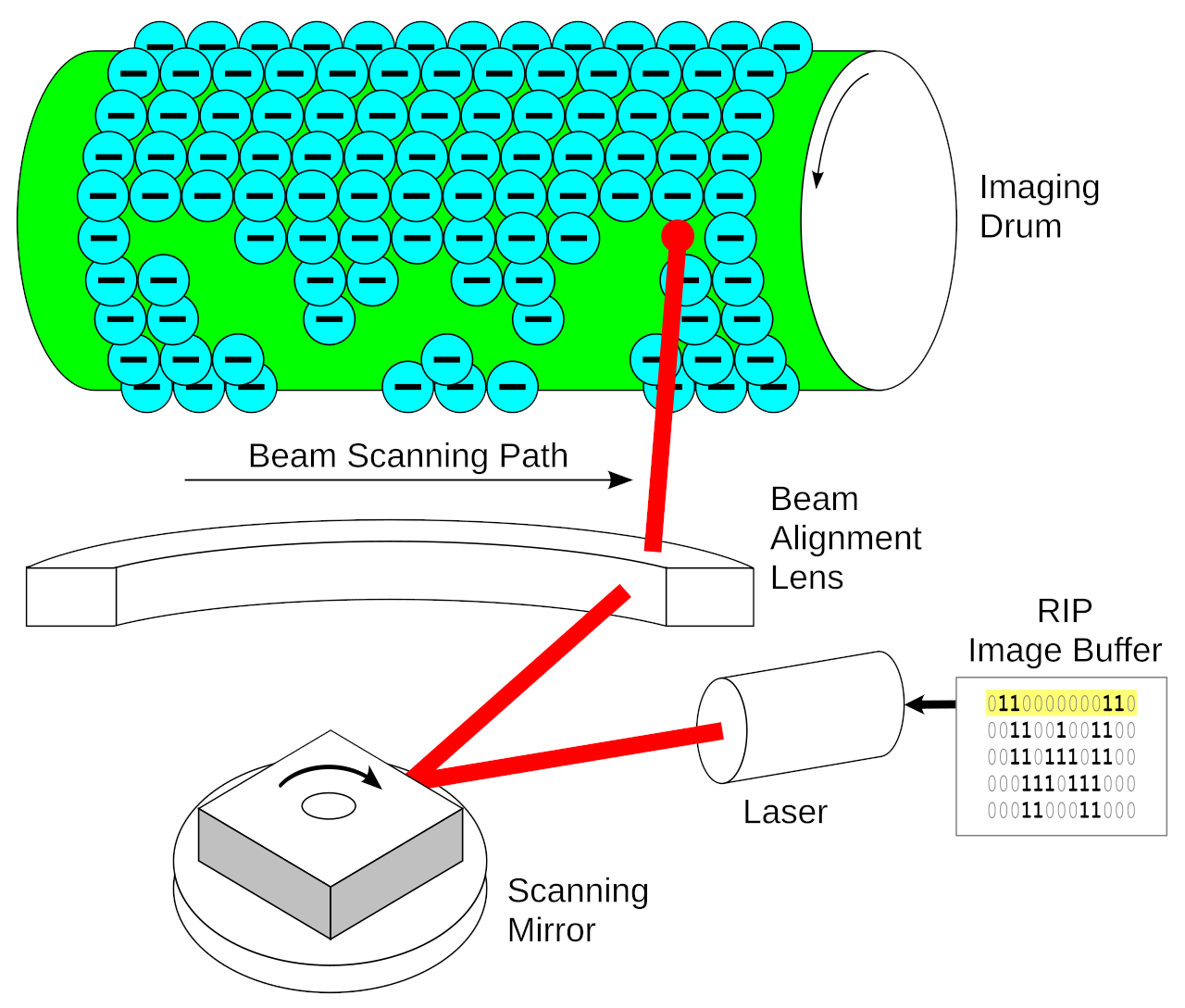
It wasn’t long before the xerography process was applied beyond mere photocopies. Xerox engineer Gary Starkweather realized in 1969 that a scanning laser beam could be used to draw directly on to the drum in place of the scanning lamp of a photocopier. A few years later, this led to the development of a prototype which proved the concept, and by 1976, the first commercial laser printer was on the market.
These printers were prized for their high speed and initially used in data center roles, before smaller desktop-sized units reached the market in the 1980s. Laser printers vary in construction, but most use a single laser diode with a rotating mirror that scans the beam over the drum. The beam is modulated as the mirror scans and the drum rotates to only remove charges from the drum in light areas that are not to have toner deposited. For color printing, some laser printers implement multiple drums, one for each color of toner—cyan, magenta, yellow, and key (black)—with four scanning lasers required in turn. The paper is passed over each, picking up one layer of toner at a time before it’s fused into the paper to create the final image. Some printers have also added a “transfer belt” to ease registration issues in color printers, wherein the drums deliver each color of toner to a belt, and the belt then delivers the toner to the paper in one fell swoop.
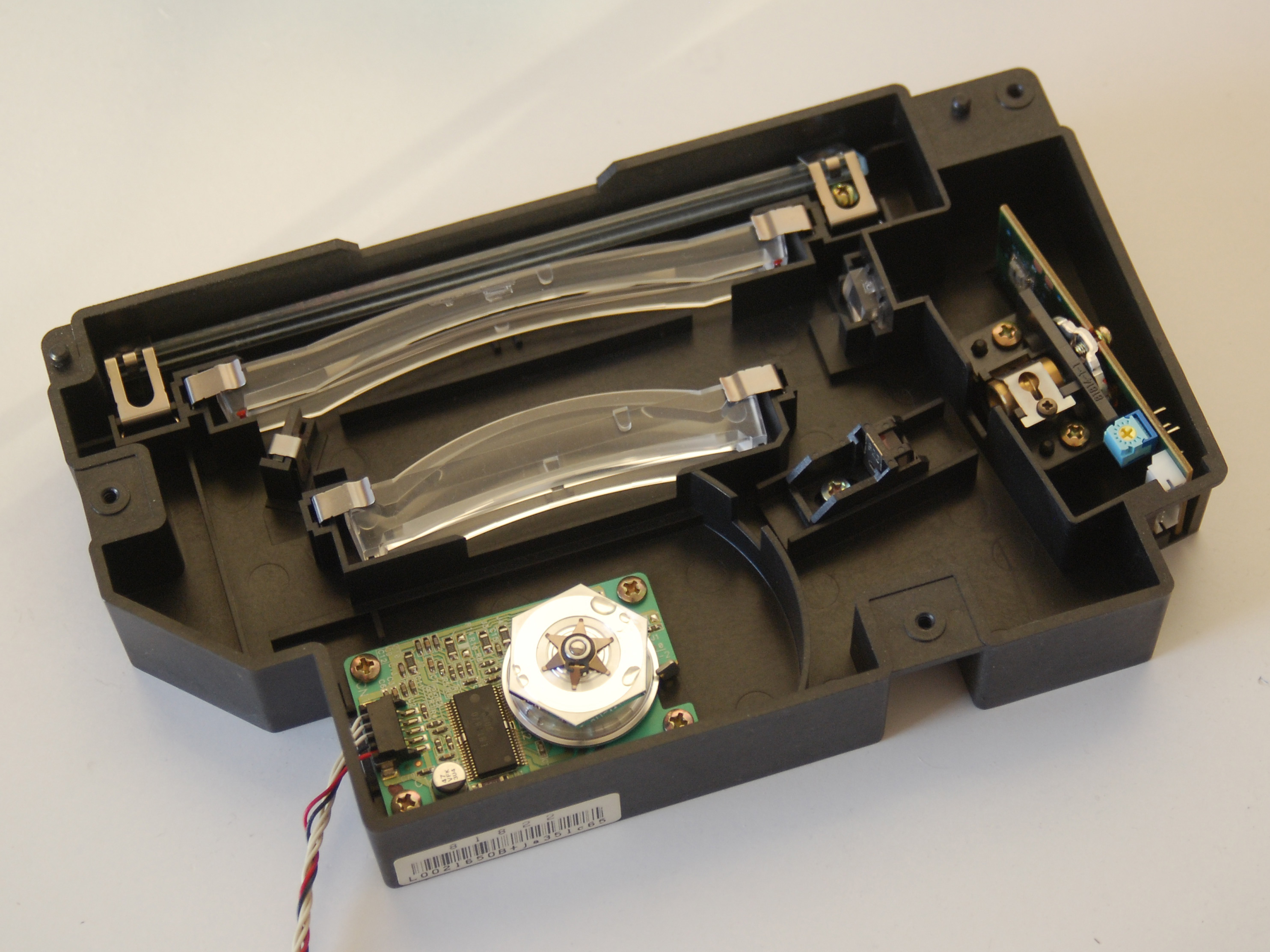
Laser printers are capable, high-speed printing machines, but they are expensive and do have a lot of moving parts. Engineers at Oki eventually realized it was possible to replace the combined laser diode and spinning mirror assembly with something simpler and more solid-state. Thus was born the LED printer, first developed in 1981 and commercialized in 1986. Rather than scanning a laser beam across a cylindrical drum, the LED printer has a line array of tiny individual LEDs that remove charges from the drum instead. The printer otherwise works in pretty much exactly the same way—only the method of discharging the drum was changed.
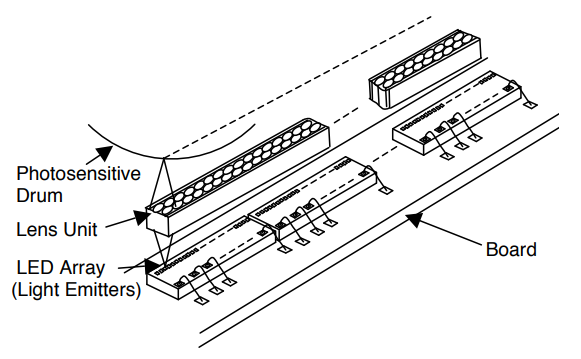
LED printers are generally a bit cheaper to manufacture, and can sometimes print faster than comparable laser printers. In part, this is because the line array can flash a segment of the drum all at once versus a laser beam which must be scanned across it. Where laser printers routinely offer 1200 x 2400 DPI resolution, it took LED printers some time to reach the same heights, as fitting 1200 LEDs into a single inch is no mean feat. However, Oki was able to achieve this milestone by 1997, while some cheaper models sit at the 600 DPI level instead. Meanwhile, in 2024, Canon did produce a LED-type printer using OLED technology, which enabled resolutions up to 4800 x 2400 DPI. The higher light emitter density possible with OLED technology allowed this leap forward.
Notably, most color LED printers tend to use a transfer belt setup, in which each LED/drum unit delivers toner to the belt which is then deposited on the paper in one pass. This is why LED printers tend to have similar print speeds for color and black-an-white use. This was an advantage over older color laser printers that didn’t use transfer belts, but instead had a color page make four separate passes over a drum, slowing printing down significantly.
Canon leveraged OLED technology to produce an LED-type printer with far superior resolution to traditional designs.
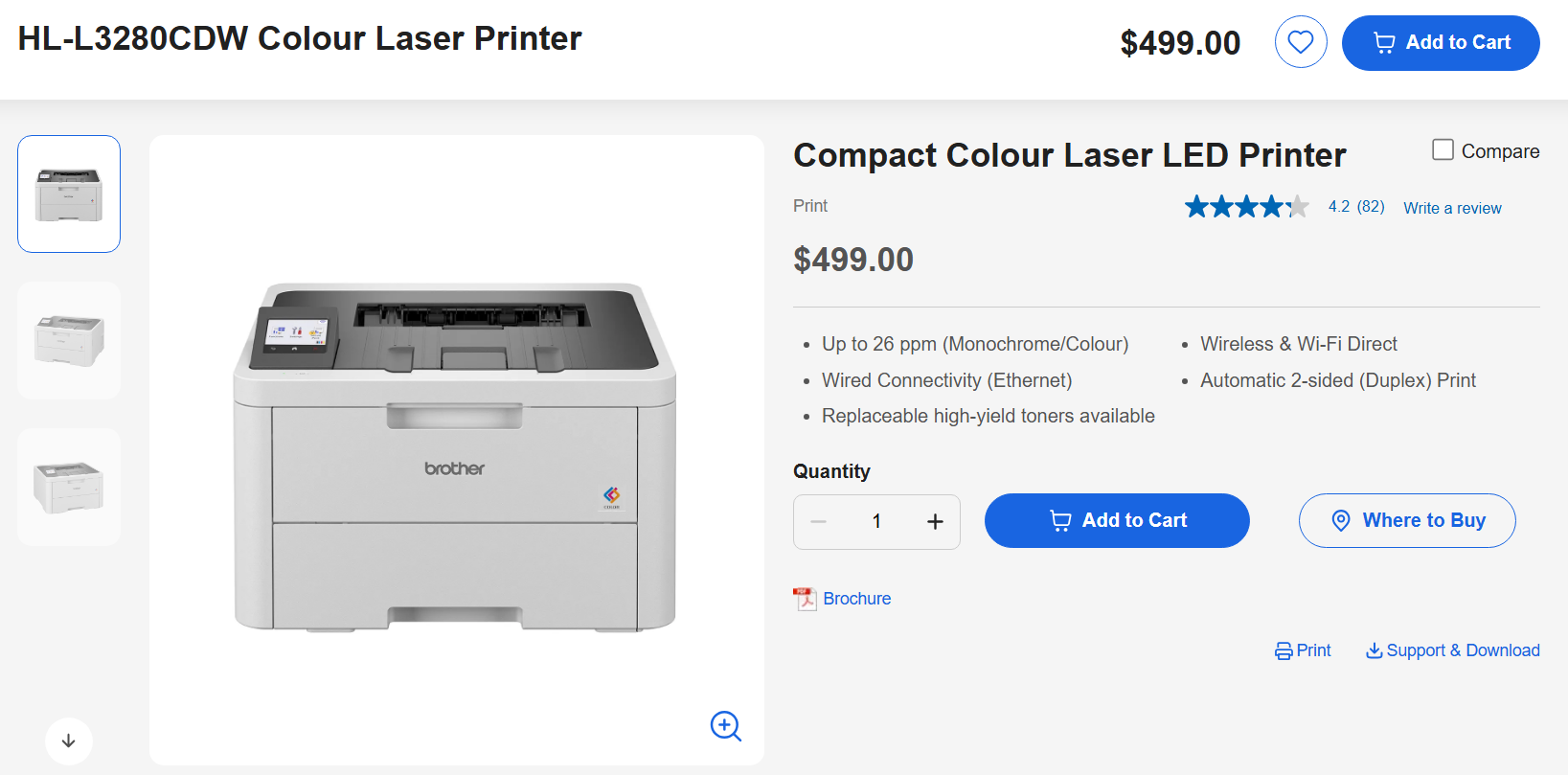
Funnily enough, some LED printers fly under the radar and are sold as “laser printers” despite not containing a laser. This is because, to the end user, the technology is not particularly different—the printers still use a charged drum for printing and still use toner to make an image. LED printers never differentiated themselves enough to make a big splash with disinterested consumers and commercial buyers who just want well-printed documents at the end of the day. LED printers mostly just look like laser printers and work similarly enough that few ever noticed the difference. Often, an LED printer will show up on e-commerce sites with “laser” scattered around the marketing copy because many understand them to be essentially the same thing from a user perspective.
LED printers are unlikely to become a household name any time soon, even if you have one in your household—if only because their close association with laser printing technology means most people never noticed they existed in the first place. In any case, next time you’re sitting at a table at your friend’s wedding with a bunch of people you’ve never met before, you now have an incredibly tedious technical lecture you can deliver to impress everybody at dinner. Spread the word about LED printers, because they’ve failed to do it themselves!












Great article, thanks.
I used 4 Oki page printers for 5+ years in a production order packing line.
They printed great.
They were cheap (too cheap to repair).
Toner was cheap.
They were very reliable and handled production environment handily, once we figured out how to turn off the energy saver to bring the time to first page down to a few seconds.
If I were building that line today, I’d make the same choice.
On my second Oki.
As you say.
Also note, if you buy them a generation old, new in box, they are price competitive with inkjets, and don’t go dry if you don’t use them for six months.
My first one was still on 3 of the original starter toners when it stopped moving paper completely.
You could hear that a nylon gear had stripped, insides were filthy from the cat, who likely did half the wear on it by waking it up for noise, heat and fun.
As you say, too cheap to repair.
Also they don’t mark the edges of your paper with narc dots, at least in the standard way.
People have looked.
Same here, Oki 600 dpi on individual workstations for lot summaries and the like. Quiet, easy to maintain and relatively inexpensive. Supplanted queuing the simple jobs to the noisey
, always in use by the test engineers, Printronix behemoths. So impressed with them I bought a couple for myself.
I’ve got a 20 years old Brother laser printer that refuses to die (HL2030 for those curious to know which one) and I’d be curious to know which OKI models you are referring too (and also the posters belows) since maybe one day my Brother printer would eventually die.
And 4 rows with 300 LEDs?
It also took some time to get LEDs efficient. 40 years ago, you needed 20 mA to get not even 1 mcd (90° field). Now, you can get LEDs at up to about 1200 mcd at the same current (60° field, so not directly comparable, but still around 3 orders of magnitude difference). Even more if you use LEDs with narrower light field (as you need for a printer) or with optics.
Optical matching circuits also took some time to develop which is why old LEDs were either a single tiny shiny spot or a dim opaque 3mm LED.
RIP Image Buffer
Technology connections did a pretty in-depth video on the subject a while back: https://www.youtube.com/watch?v=_saDCwsB9Ww
It’s really fascinating to observe that printing is nearly technologically plateaued. I am happy to be corrected, but outside the area of ink and toner monetization (ie. ensh**ification, which is actually anti-innovation), there really hasn’t been a major technological innovation in printing for at least a decade. Hearing about this Canon OLED printer could be one, but it’s really a modification of an existing approach rather than a major change. Still cool.
And no, “ecotanks” and all of the other code names for rejecting the razors and blades model which infected printers for years aren’t innovation. They’re deciding not to do something toxic, not innovating. Don’t get me started on printer DRM.
But here’s the weird thing: friends often ask me what printer they should buy. A couple of years ago I always pushed them to a midrange printer which had the ecotank (or other vendor) approach. Brother laser printers are also good – reasonable price, last years and no toner DRM. But lately I’ve realized it’s bad advice, as lots of people only print a few hundred pages for the entire life of their printer. Some people don’t even get past the half-empty starter cartridge! Printing has become a very rare thing, so telling them not to buy a printer and just use a print shop, or buy a cheap one actually makes economic sense.
It’s not a good time to be a printer manufacturer.
What I would recommend is: Unless that person is gonna be printing really often, i would recommend them a simple black-and-white toner all-in-one. Idk about Canon’s newer models, but their older ones (e.g. MF212) are really great! The toner can last you 3 years or so if you don’t print that often, and is widely available (Canon 707). As for photo prints, use a print shop.
I think that’s the best approach: no printer can be a hassle; having to go to a print shop every time you want to print or scan something can be tedious.
Though again, I do not know about modern Canon models. They may have implemented DRM in toners.
It seems i print a few dozen pages a year, and i use the public library for that. Sheet music is kind of upsetting that happy balance, because i haven’t yet found a tolerable way to read it off of like a tablet, so i have been printing it out lately. Really, the library is still fine, but it has made me want a printer. And i just can’t imagine spending a lot of money on it, or dedicating a lot of space to it, which points me to inkjets. But an inkjet will have always run dry in my life. And i’m surveying the available technologies and none of them appeals to me at all. The closest is the tiny thermal printers you can get cheap these days from china, but i’m not crazy about BPA paper.
Anyways, the innovation i want, which i think the time might have come for, is a thermal-laser printer that works on regular paper. A laser that is so hot that it can instantly char the surface of a piece of paper, without burning it through to compromise its integrity. Sounds like scifi but i think we might finally be to that point. Hoping i can just wish for it and wait :)
It’s a great idea, but unfortunately probably not gonna happen, at least commercially.
No toner/ink/subscription/bs to keep you coming back to spend more. I don’t know of any one-and-done companies who’d bother. Unless the laser head has integrated planned obsolescence—the new “toner.”
But hey, maybe we’ll see an article pop up here of someone showing us how to build one!
Are you ChatGPT?
Something saying ‘It’s a great idea’ to dumbass shit is usually ChatGPT, or some other LLM.
Print technology has plateued in as much as printers are now “good enough” for the average joe to not care about minor spec differences any more, and all that remains is cost-engineering (for the good ones) and enshittification for the bad ones.
I have a cheap Brother colour laser that does everything I need and will likely keep doing it for the next decade or more, the only thing that would improve it would be making it a bit smaller or cheaper to buy.
A simple B/W laser printer is worth having for one reason: DIY wheatpaste stickers.
Many print shops would outright refuse to print something grossly uncivilized and offensive. With your own printer you can print your own stickers on regular A4 paper. Then all you need is a paintbrush and a bit of starch solution. Unlike ink, toner prints are not affected by water. You just spread some of the paste on a wall, then put on sticker and push it with the same brush.
Once dried it’s weather resistant and almost impossible to remove – which makes it perfect for posting offensive stuff (like pro-abortion slogans in heavily catholic neighborhood 😂)
Or goatse QR codes to put on top of other QR codes. URL obfuscation is bad. People need to learn.
Doesn’t sound like the line frequency will allow us to build an 8K VirtualBoy from these when the printers get scrapped.
Also, what’s the spectrum of these?
Brother sells the HLL5000D, which has a USB connection but also a parallel port! Just in case you want to occasionally print from your SparcStation 5 or some old Compaq Luggable. Not that those sorts of things EVER happen to me. :-)
I just thought I’d mention it if you run into some industrial application. There’s some jurassic stuff still out there.
Hell I’m fairly sure you can still buy dot matrix for industrial / commercial applications, I still see the odd invoice churned out on a dot matrix and they must be buying them from somewhere…
Yes Epson (with the LQ series) and Oki (with Microline and MX series) still make some of those in 2026. I mostly see them at airports. They’re the most economical printers to own by few orders of magnitude (a ribbon is cheap and last a very long time) so don’t expect them to disappear any soon (and if they do it would be some thermal printer that replace it but thermal paper is still more expensive than regular one).
I have three Brother printers. A color L3280 pictured above, and a B/W L2740 . The third is being tossed as it is an ink jet (tank printer). Got tired of wasting paper to clean nozzles… When you want to print, the Laser printers just work. Love it. I’ve had the L2740 for a looong time now… Just works.
Thanks for the article!
After watching the video I have to wonder if the resolution is really 4800 dpi or is that just the dot density.
I wonder if the same technology could be applied to SLS 3D printing, maybe achieving faster and higher detail prints?